





logics-manager is a local workflow runtime for projects that keep their delivery memory in Markdown.
The core product is the CLI. It creates, promotes, validates, audits, and closes the logics/* documents that describe work:
request -> backlog item -> task -> implementation
Everything else in this repository is a client around that runtime:
- the VS Code extension gives humans a board, details panel, previews, search, and insights;
- the MCP server gives assistants a bounded tool API over the same CLI;
- the npm package and Python package are distribution paths for the same runtime.
The source of truth stays in your repository. Logics documents are plain Markdown, versioned with git, readable in reviews, and reusable by humans or AI assistants across sessions.
AI-heavy projects often lose context between chats, agents, and implementation passes. Logics turns that context into durable project artifacts:
request: the problem, need, and acceptance criteria;backlog item: a scoped delivery slice;task: executable implementation work;product brief: product framing and intent;ADR: architectural decisions;spec: behavioral contract.
The result is a repo-local memory layer that reduces re-explaining, keeps implementation grounded, and gives every assistant or human the same inspectable workflow state.
logics-manager has one core and several integrations:
| Layer | Purpose |
|---|---|
| CLI runtime | Canonical workflow engine for creating, promoting, auditing, repairing, and closing Logics docs. |
| VS Code extension | Human-facing cockpit for navigating and managing the Markdown corpus. |
| MCP server | Assistant-facing adapter that exposes bounded Logics tools without giving agents a shell. |
| npm / Python packaging | Installation paths for the same CLI/runtime. |
The CLI owns the behavior. The extension and MCP server call into it instead of reimplementing workflow logic.
Install the CLI from this repository:
python3.11 -m pip install .
logics-manager --help
On Debian, Ubuntu, or WSL environments where Python is externally managed, use pipx instead of installing into the system Python:
sudo apt update
sudo apt install pipx python3-venv
pipx ensurepath
pipx install logics-manager
Or install the npm package:
npm install -g @grifhinz/logics-manager
logics-manager --help
Initialize or check a repository:
logics-manager bootstrap --checkCreate the first workflow document:
logics-manager flow new request --title "Improve onboarding"Validate the workflow corpus:
logics-manager lint --require-status
logics-manager auditThe CLI is the stable contract for Logics. It supports:
- bootstrapping the
logics/tree; - creating requests, backlog items, tasks, product briefs, and ADRs;
- promoting request -> backlog and backlog -> task;
- splitting large requests or backlog items;
- closing tasks, backlog items, and requests with consistency checks;
- linting and auditing workflow traceability;
- exporting indexes, context packs, and graph data;
- serving a read-only local browser viewer for the Logics corpus;
- serving the bounded MCP tool surface.
Useful commands:
logics-manager flow list
logics-manager flow promote request-to-backlog req_001_example
logics-manager flow promote backlog-to-task item_001_example
logics-manager flow finish task task_001_example
logics-manager sync context-pack req_001_example --format json
logics-manager view --open
logics-manager view --focus req_001_example --read --openUse the CLI viewer when you want to inspect the Logics corpus outside VS Code:
logics-manager view --openThe viewer starts a localhost-only, read-only browser UI on 127.0.0.1:8765 by default. It shows the same workflow board/list experience as the extension, with search, filters, document previews, corpus insights, lint/audit health, Mermaid rendering, auto-refresh, and an edit shortcut that opens the selected Markdown file in the system editor.
Useful options:
logics-manager view --port 0 --open
logics-manager view --host 127.0.0.1 --port 9876
logics-manager view --focus req_001_example --open
logics-manager view --focus logics/tasks/task_001_example.md --read --open
logics-manager view --no-open
Use --port 0 when the default port is already taken. The viewer is intentionally read-only; use the canonical CLI commands such as flow promote, flow finish, lint, and audit for workflow mutations.
Focused viewer links can point directly at a corpus item:
http://127.0.0.1:8765/?focus=logics/request/req_001_example.md
http://127.0.0.1:8765/?focus=logics/request/req_001_example.md&read=1
If the viewer server is not already running, start it with the equivalent fallback command:
logics-manager view --focus logics/request/req_001_example.md --open
logics-manager view --focus req_001_example --read --open
This is the recommended assistant handoff pattern: provide the local viewer link for an already-running viewer and the CLI fallback command for a stopped server. Focus targets accept workflow refs such as req_001_example, item_001_example, or task_001_example, plus repo-relative Logics Markdown paths. Traversal and non-Logics paths are rejected.
Workflow target arguments accept these forms:
- a workflow ref, such as
req_001_example,item_001_example, ortask_001_example; - a repo-relative Markdown path under the matching Logics directory, such as
logics/request/req_001_example.md; - an absolute path only when it resolves inside the current repository.
Mutation commands reject .. traversal and files outside the repository before writing. Output paths passed with --out must also be repo-relative and remain inside the repository after resolution. Configured log/cache paths in logics.yaml may be repo-relative or absolute, but absolute paths must still resolve inside the current repository.
When a command supports --format json, stdout is a machine-readable JSON payload. Human-oriented status, diagnostics, and progress text should not be mixed into stdout for JSON mode. This makes JSON-mode commands safe to pipe into tools such as jq or consume from scripts.
--json is a shorthand for --format json on commands that support JSON output.
JSON-capable operator commands:
| Command | Purpose | JSON output |
|---|---|---|
logics-manager status |
Summarize open workflow docs and next actions. | --format json or --json |
logics-manager health |
Show workflow health counts and issue signals. | --format json or --json |
logics-manager followups |
List follow-up areas with request creation commands. | --format json or --json |
logics-manager product-consistency |
Check product brief lineage links. | --format json or --json |
logics-manager search <query> |
Search workflow docs directly. | --format json or --json |
logics-manager index |
Regenerate logics/INDEX.md. |
--format json or --json |
logics-manager lint |
Validate doc shape and changed-doc hygiene. | --format json or --json |
logics-manager audit |
Validate workflow traceability and governance. | --format json or --json |
logics-manager sync ... |
Read, list, search, repair, and export workflow state. | --format json or --json on supported subcommands |
logics-manager assist ... |
Build review, validation, context, and runtime summaries. | --format json or --json on supported subcommands |
logics-manager flow ... |
Create, promote, split, close, finish, and list docs. | --format json or --json on supported subcommands |
Operator triage flow:
logics-manager status --json
logics-manager health --json
logics-manager product-consistency --json
logics-manager followups --source-kind product --json
Use status first when you need the next work signal. Use health for corpus-level anomalies. Use product-consistency --strict in release checks when active product briefs must have valid lineage. Use followups for open actionable follow-up areas; add --include-closed only when auditing historical docs.
Multi-file workflow mutations such as flow promote, flow split, and flow finish validate their direct inputs before writing. New workflow docs are created with exclusive filesystem writes, so an ID collision fails instead of overwriting an existing file; rerun the command to allocate a fresh ID after reviewing git status/git diff. They still operate on Markdown files in the working tree rather than through a database or transaction service; if the filesystem fails mid-write, recover with git status/diff and rerun after cleanup.
To update the installed CLI later:
logics-manager self-updateIf self-update reports an externally managed Python environment, migrate the Python install through pipx:
sudo apt update
sudo apt install pipx python3-venv
pipx ensurepath
pipx install --force logics-manager
If logics-manager is already installed through pipx, update that managed environment directly:
pipx upgrade logics-managerFor npm installs, update with:
npm install -g @grifhinz/logics-manager@latestIf npm reports a successful update but logics-manager --version still shows an older version, another installation is earlier on PATH. Diagnose it with:
command -v -a logics-manager
npm prefix -g
npm list -g @grifhinz/logics-manager --depth=0
"$(npm prefix -g)/bin/logics-manager" --version
If the direct npm binary shows the expected version, remove the older Python install or move the npm global bin directory earlier on PATH.
The VS Code extension is the human cockpit around the same runtime. It helps you:
- browse workflow docs as a board or list;
- preview Logics Markdown with clickable references and Mermaid rendering;
- create and promote workflow items without leaving the editor;
- inspect recent activity, status, theme, confidence, stale work, and backlog coverage;
- run validation-oriented actions from the UI.
Install from the Marketplace:
https://marketplace.visualstudio.com/items?itemName=cdx-logics.cdx-logics-vscode
For local development or manual VSIX testing:
npm install
npm run package
npm run install:vsixThe MCP server is an assistant-facing adapter over the CLI. It is useful when a chat assistant should work with Logics documents without getting arbitrary filesystem or shell access.
The MCP surface can:
- create and promote workflow docs;
- read, list, search, and build context packs from approved Logics docs;
- update controlled indicators and append bounded notes;
- finish or close workflow docs through canonical commands;
- run lint, audit, deterministic repairs, split operations, and Logics-scoped diffs.
Inspect the exposed tools:
python3 -m logics_manager mcp toolsRun the local stdio server:
python3 -m logics_manager mcp serve --repo-root .Run the local HTTP server for an HTTPS tunnel:
LOGICS_MCP_BEARER_TOKEN="$(openssl rand -hex 32)" python3 -m logics_manager mcp serve-http --repo-root . --host 127.0.0.1 --port 8765POST /mcp accepts Authorization: Bearer <token> when LOGICS_MCP_BEARER_TOKEN or --bearer-token is set. Keep /health unauthenticated for smoke checks, but do not expose /mcp publicly without a bearer token.
Start the local server and a temporary localtunnel session in one command:
python3 -m logics_manager mcp tunnel --repo-root . --port 8765For short-lived live debugging only, run without bearer auth:
python3 -m logics_manager mcp tunnel --repo-root . --port 8765 --no-bearerDuring project development, the same commands can be run through the repository binary:
node scripts/npm/logics-manager.mjs mcp tunnel --repo-root . --port 8765
node scripts/npm/logics-manager.mjs mcp tunnel --repo-root . --port 8765 --no-bearer
Generate a local connector plan:
python3 -m logics_manager mcp connect --repo-root . --port 8765With an HTTPS tunnel URL:
python3 -m logics_manager mcp connect --repo-root . --public-url https://example-tunnel.example --checkFor a no-bearer plan:
python3 -m logics_manager mcp connect --repo-root . --public-url https://example-tunnel.example --no-bearer --checkThe connector plan prints the bearer token when used, server command, tunnel target, assistant connector URL, auth mode, auth header, smoke checks, warnings, and cleanup steps.
The project is local-first:
- each operator runs the CLI and MCP server against their own repository;
- remote chat assistants connect through a short-lived HTTPS tunnel when needed;
- coding agents consume prepared tasks and run validations in the repo;
- shared GPTs or assistant configs can carry instructions, but each user keeps their own local connector URL and token.
This avoids a hosted multi-tenant Logics service while still allowing ChatGPT, Claude, Codex, or another MCP-capable assistant to work against the same workflow contract.
Use these as quick starting points when you want the plugin or the shared Logics flow to help frame work before execution.
Start a new request for this problem:
<describe the need or pain point>Ask me any clarifying questions that would make the request stronger. Suggest helpful options if I need guidance.
Generate backlog items for the new requests and split them into separate delivery slices.
Ask me any questions that would increase your confidence or improve your understanding before you finalize the backlog.
Create the orchestration tasks needed to execute the backlog slices, one bounded task per coherent delivery wave.
If the slice is still broad, propose a split before you draft the tasks and ask any questions that would reduce ambiguity.
Execute task
<task id or title>. Commit after each wave, keep going until the work is done, and do not stop early.If you need to make assumptions, state them briefly and keep the task moving.
- If you think "here is the problem and context..." -> request
- If you think "this needs a scoped delivery slice..." -> item
- If you think "we want..." -> product brief
- If you think "we decided..." -> ADR
- If you think "the system should..." -> spec
- If you think "let's do..." -> task
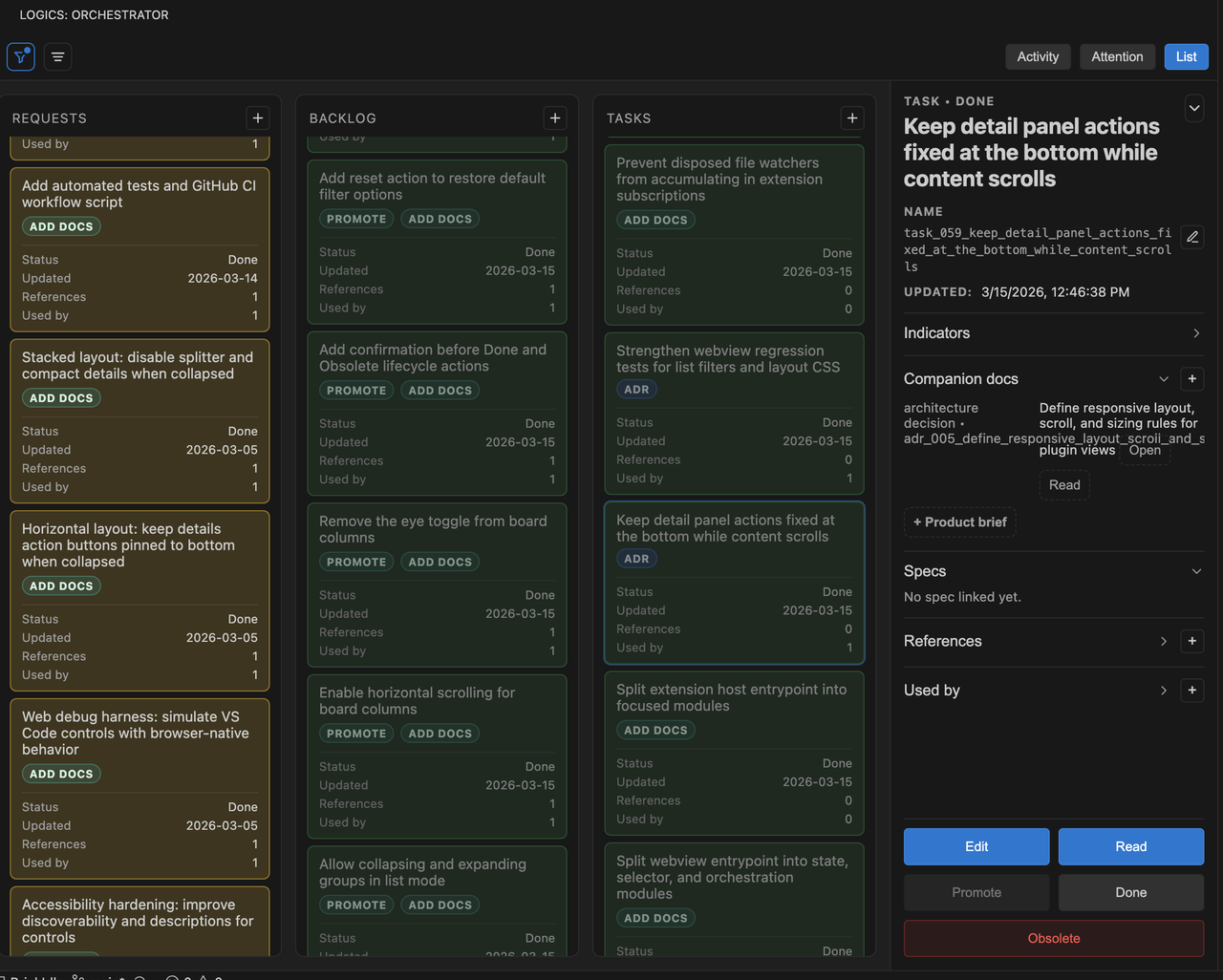
Board panel |
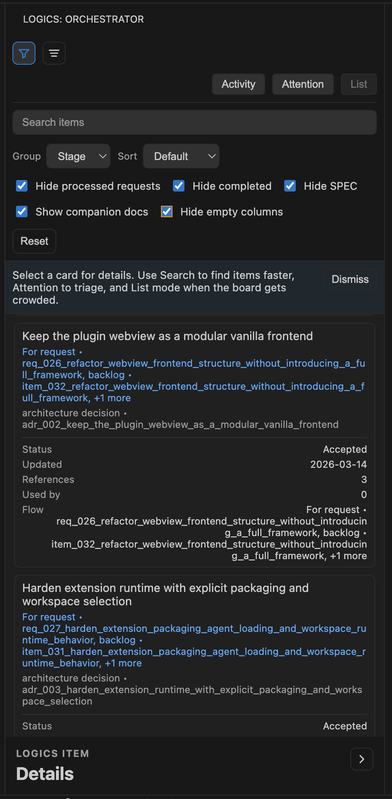
Filter panel |
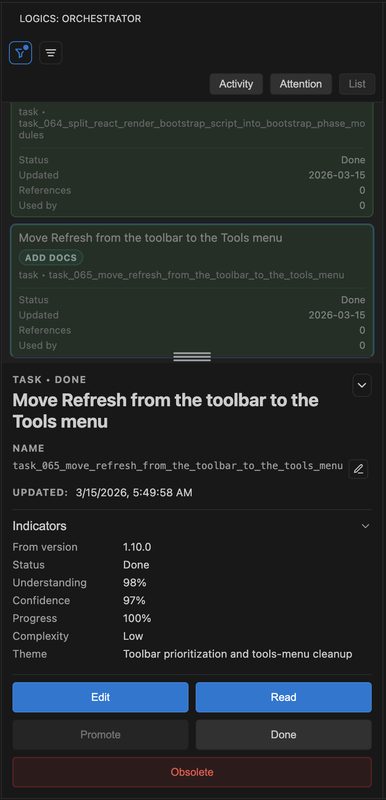
List panel |
- To use the extension:
- A workspace folder open in VS Code.
- Git on PATH for workspace and repository repair flows.
logics/is bootstrapped automatically when needed.- The normal path uses the bundled runtime and
logics-manager. - Python 3 on PATH for script-backed workflow actions. The extension accepts
python3,python,py -3, orpy.
- To build, package, or test the extension locally:
- Node.js + npm.
- Optional CLI tooling:
- VS Code CLI
codeon PATH for terminal-based VSIX install ornpm run dev.
- VS Code CLI
Windows notes:
- You do not need the
codeCLI for normal extension usage inside VS Code. - If Python is installed through the Windows launcher,
py -3is supported by the extension. - Repository-managed text files are normalized through
.gitattributes; let Git handleCRLF/LFconversion instead of rewriting line endings manually.
- Canonical CLI and runtime contract:
logics-manager - The bundled runtime is the supported steady-state path for the extension.
- If the bundled runtime is missing or incompatible, create/promote actions fail with explicit error messaging in the extension.
- Create a request from UI (
New Request) and confirm markdown is generated. - Create a fixture request with
logics-manager flow new request --title "Smoke test"and confirm the compact synthetic request shape is generated. - Create a backlog item and a task from the UI and confirm markdown is generated.
- Open
Readon a Mermaid-bearing doc and confirm the graph is rendered. - Run
logics-manager view --port 0 --open, confirm the browser viewer loads repository docs, then stop it withCtrl+C. - Promote request -> backlog and confirm links are updated.
- Confirm request/backlog/task generation fails fast if a Mermaid signature or traceability block is stale instead of waiting for audit to find it later.
- Promote backlog -> task and confirm task document is generated.
- Refresh board/details and confirm data remains consistent.
This section is only for installing the VS Code extension. For the core CLI, use the Quick Start section above.
https://marketplace.visualstudio.com/items?itemName=cdx-logics.cdx-logics-vscode
code --install-extension logics-manager-<version>.vsix --forceIf you don't have the code CLI on PATH:
- Windows: either use the VS Code installer option that adds
codeto PATH, or install the.vsixfrom the VS Code UI via Extensions -> ... -> Install from VSIX.... - macOS/Linux: you can enable it from Command Palette -> Shell Command: Install 'code' command in PATH.
npm install
npm run compile
npm run test
Run the extension:
- In VS Code: Run -> Start Debugging (F5)
- The Extension Development Host opens.
- Open the Logics panel at the bottom -> Orchestrator.
If you prefer the terminal helper:
npm run devnpm run dev requires the code CLI on PATH, so the F5 path above remains the safest cross-platform dev entrypoint.
Use the real local viewer for repository data:
logics-manager view --openUse the mock webview harness only when developing the shared browser/webview UI without VS Code:
npm run debug:webviewThe harness runs at http://localhost:4173/ and supports mock scenarios such as /?scenario=empty and /?scenario=error. It does not execute real VS Code commands or workflow writes.
- Bump the version in
package.json,pyproject.toml, and rootVERSIONwhen preparing a release manually. - Curate the matching changelog entry in
changelogs/CHANGELOGS_X_Y_Z.md. - Validate that the changelog matches the current package version:
npm run release:changelog:validate- Build and package:
npm run packageThis creates logics-manager-<version>.vsix in the repo root.
- Smoke-test the package locally:
npm run install:vsix- Distribute the
.vsixand use the matching release notes when publishing.
If the current plugin version is already published, logics-manager assist next-step can now propose the next release step instead of stalling on an already-live tag.
Logics: RefreshLogics: Refresh AgentsLogics: Select AgentLogics: Open ItemLogics: Promote ItemLogics: New RequestLogics: Create Companion DocLogics: Check EnvironmentLogics: Open Hybrid InsightsLogics: Open Logics InsightsLogics: Triage ItemLogics: Assess Diff RiskLogics: Build Validation ChecklistLogics: Review Doc Consistency
- Compile:
npm run compile - Lint TS:
npm run lint - Unit tests:
npm run test - Plugin coverage:
npm run test:coverage - VSIX package validation:
npm run package:ci - Logics docs lint:
npm run lint:logics - Logics workflow audit + docs lint:
npm run audit:logics - Strict Logics governance audit:
npm run audit:logics:strict - Local browser viewer smoke:
logics-manager view --port 0 --open - Fast extension-focused local check:
npm run ci:fast - Full CI-equivalent local check:
npm run ci:check - Security audit policy gate:
npm run audit:ci
npm run audit:logics uses the default active-work profile. It blocks correctness and traceability failures, but reports early companion-doc polish such as missing overview Mermaid diagrams as warnings so drafting and agent handoffs can continue.
npm run audit:logics:strict uses the strict governance profile. Use it before release or governance review when companion docs must be complete and warning-class findings should be resolved.
logics-manager audit --format json and logics-manager lint --format json expose issue_count, warning_count, strict_count, finding_count, can_continue, and release_ready. Agents should treat issue_count > 0 as blocking active work, and release_ready: false as a signal that cleanup remains before release-grade validation.
npm run ci:check mirrors the blocking repository CI contract, including Logics strict-status lint, request auto-close sync verification, workflow audit, Python tests, CLI smoke checks, TypeScript validation, extension tests, and VSIX packaging.
npm run audit:ci enforces the repository audit policy locally. It blocks new actionable vulnerabilities and only allows the explicitly documented temporary exceptions tracked in the backlog.
CI runs compile, lint, tests, Logics docs lint, and VSIX packaging validation on every push and pull_request via .github/workflows/ci.yml.
Use a two-layer strategy:
- CI is the fast default. The repository now validates supported Windows flows in GitHub Actions on
windows-latest. - A real Windows VM is still required for targeted debugging and release confidence on shell, PATH, launcher, filesystem, and VS Code host behavior.
Recommended local VM path from macOS:
- Apple Silicon: UTM with Windows 11 ARM is the pragmatic low-cost option.
- Intel Mac: UTM or another Windows-capable VM is fine.
Suggested VM checklist:
- Install VS Code, Git, Python 3, and Node.js inside the VM.
- Confirm launchers from the Windows shell you actually care about (
git --version,py -3 --versionorpython --version,node --version,npm --version). - Clone the repo and run
npm ci. - Run the automated baseline first:
npm run ci:checkandpython -m logics_manager lint. - Smoke the real Windows-only paths:
- install the
.vsixfrom VS Code or withcode --install-extension ... - trigger
Bootstrap Logics - run
Logics: Check Environment - run
logics-manager assist runtime-status --format jsonand confirmwindows_safe_entrypointstill points topython -m logics_manager flow assist ... - run
logics-manager assist diff-risk --backend auto --format jsonandlogics-manager assist validation-checklist --format json - confirm those shared-runtime commands still work without relying on any repo-local Codex overlay path
- create a request, backlog item, and task
- promote request -> backlog and backlog -> task
- confirm
py -3orpythonlauncher resolution works as expected
- install the
- Use the VM for release preparation and any bug that smells like shell quoting, PATH resolution, case-insensitive paths, symlink restrictions, or extension-host behavior. Do not treat macOS-only local simulation as a full Windows substitute.
Do not mark a Logics task as Done by editing markdown indicators manually.
Use the canonical logics-manager guarded finish command so closure propagates correctly from task -> backlog -> request and the linked chain is verified.
npm run logics:finish:task -- logics/tasks/task_020_orchestration_delivery_for_req_019_req_020_and_req_021.mdThis uses the runtime-native command:
logics-manager flow finish task ...
If you want a full repository-wide check afterward, run:
npm run audit:logics
If you edit statuses by hand, the docs can look valid while the request/backlog chain is left out of sync.
For multi-wave delivery work, prefer coherent checkpoints:
- update the linked Logics docs during the wave that changes the behavior;
- leave the repo in a commit-ready state at the end of the wave;
- then create the reviewed commit checkpoint instead of batching several undocumented partial states.
For new UI controls in this project:
- Every interactive control must expose an accessible name (
aria-labelor visible text). - Icon-only controls must include a
titletooltip for discoverability. - Dynamic toggles must keep ARIA state in sync (
aria-expanded,aria-disabled,aria-pressed). - Custom interactive elements must be keyboard reachable (
tabindex) and activatable (Enter/Space). - Keep hover/focus descriptions consistent across toolbar, board, menus, and details panel.
- Promotion is only allowed for request/backlog items that are not already used.
- Items with
Progress: 100%are treated as completed. - The UI reads and writes the existing Markdown files; it does not manage a separate database.
- For stable references in the board/details panel, use canonical markdown links:
Derived from \logics//.md`orPromoted from `...``# Backlogsection in requests# Referencesand# Used bysections with backticked relative paths
- For companion docs (
prod_*,adr_*),Related request/backlog/task/architectureindicators are also indexed as managed-doc links. - Companion docs should still mirror those links under
# Referenceswith canonical relative paths so the runtime and plugin stay aligned. - Legacy nested list blocks (
- References:/- Used by:) are also parsed for backward compatibility.