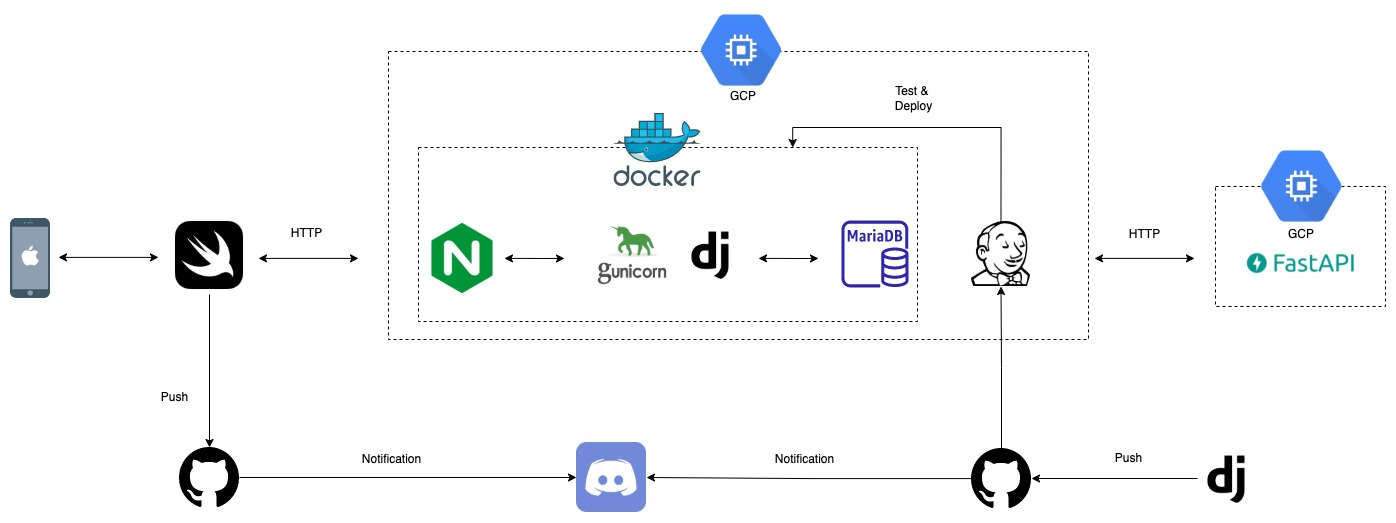
- GCP setting
- region : 오사카
- 삭제 보호 : 설정됨
- 부팅디스크
- 운영체제 : ubuntu
- 방화벽 : HTTP 트래픽
- 고정 IP
- port opened
- 22, 80, 443, 8000, 8080, 8888, 9000
- https 인증
- 도커 version 3.7
- django-gunicorn 컨테이너 (custom image 기반)
- nginx 1.19.5 컨테이너
- mariadb 10.5 컨테이너
from rest_framework.test import APITestCase를 이용.- 아래와 같이 test GET 통신하여, 성공적인 response를 받고자 한다.
url = reverse(viewname="dailypathapp:weekly_request")
header = {
            "user": "TESTBOY",
            "date": "2022-02-18"
}
response = self.client.get(path=url, **header)
[기댓값]
- 성공적인 response 기대
[실젯값]
- response 실패
- header 파라미터로
user를 찾을 수 없다고 한다.
[Error Log]
KeyError: 'user'

----------------------------------------------------------------------
Ran 1 test in 0.594s

FAILED (errors=1)
Destroying test database for alias 'default'...
- client의 get 함수에서 파라미터를 전달하는 방식이 잘못 되지 않았을까..?
- 놀랍게도, 장고는 self 정의된 header가 있다.
- 모든 HTTP header의 key들은 META key로 바뀐다.
- META key는 모든 character가 대문자
- META key는 모든 hyphen이 underscore로 바뀜
- META key는 모든 parameter에
HTTP_라는 prefix를 붙임
- META key로 바뀌어 통신할 수 있도록,
HTTP_라는 prefix를 붙여야한다.
url = reverse(viewname="dailypathapp:weekly_request")
header = {
            "HTTP_user": "HTTP_TESTBOY",
            "HTTP_date": "2022-02-18"
}
response = self.client.get(path=url, **header)
=> 결과 : 성공
- 해결 완료
- 해결 중