





DataLab is an open-source platform for scientific and technical data processing and visualization with unique features designed to meet industrial requirements.
Try DataLab online, without installing anything, using Binder:
See DataLab website for more details.
Note: This project (DataLab Platform) should not be confused with the datalab-org project, which is a separate and unrelated initiative focused on materials science databases and computational tools.
ℹ️ Created by CODRA/Pierre Raybaut in 2023, developed and maintained by DataLab Platform Developers.
🧮 DataLab's processing power comes from the advanced algorithms of the object-oriented signal and image processing library Sigima 🚀 which is part of the DataLab Platform.

ℹ️ DataLab is powered by PlotPyStack 🚀 for curve plotting and fast image visualization.

ℹ️ DataLab is built on Python and scientific libraries.





- Signal processing (1D): FFT, filtering, fitting, peak detection, stability analysis, and more
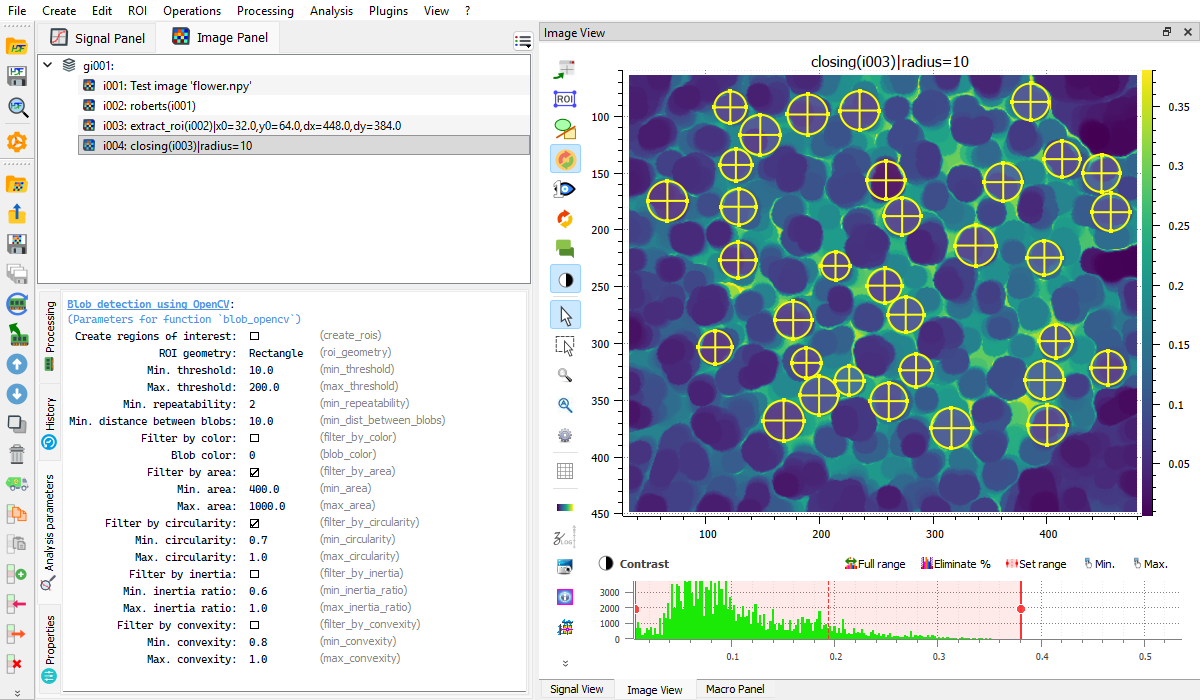
- Image processing (2D): filtering, morphology, edge detection, blob detection, and more
- Extensible plugin system with hot-reload support
- Macro system for Python-based automation
- Remote control via XML-RPC for integration with Jupyter, Spyder, or any IDE
- Web API (HTTP/JSON) for notebook integration and remote control from any HTTP client
- HDF5 support for data import/export
- Batch processing with ROI (Region of Interest) support
✨ Add features to DataLab by writing your own plugin (see plugin examples) or macro (see macro examples)
✨ DataLab may be remotely controlled from a third-party application (such as Jupyter, Spyder or any IDE):
-
Using the integrated remote control feature (this requires to install DataLab as a Python package)
-
Using the Web API (HTTP/JSON server for notebook integration and WASM/Pyodide environments)
-
Using the lightweight client integrated in Sigima (
pip install sigima)
DataLab requires Python 3.9+.
From PyPI:
pip install datalab-platformFrom conda-forge:
conda install -c conda-forge datalab-platformSee the installation guide for more options (standalone installer, WinPython, offline installation, etc.).
Contributions are welcome! See the contributing guide or the CONTRIBUTING.md file for details.