


I no longer have a Kia or Hyundai so don't maintain this like I used to. Others who are interested in jumping in are welcome to join the project! Even just pull requests are appreciated!
I have baked a custom integration for Kia Uvo / Hyundai Bluelink, this will be working for new account types. Thanks for your hard work @wcomartin. This project was mostly inspired by his home assistant integration. This now uses our underlying python package: https://github.com/Hyundai-Kia-Connect/hyundai_kia_connect_api.
Install the software by using HACS or manually copying files into the custom_components subdirectory. Next, go to Settings, then Devices & services and in the Integrations section search for Kia uvo and configure your vehicle using your username and password(or token if Europe!) (I know, translations are missing, a PR for this would be great!).
**EU KIA and Hyundai require special steps. This is outlined here: https://github.com/Hyundai-Kia-Connect/hyundai_kia_connect_api/wiki/Kia-Europe-Login-Flow **
- AU, EU, CA, IN, AUS, NZ, BR and US is supported by this. USA, India, China and Brazil support is limited.
- Genesis Support hasn't been tested and has just been added for Canada only. Feedback would be appreciated!
- Multiple cars and accounts are supported. To add additional accounts just go through setup a second time.
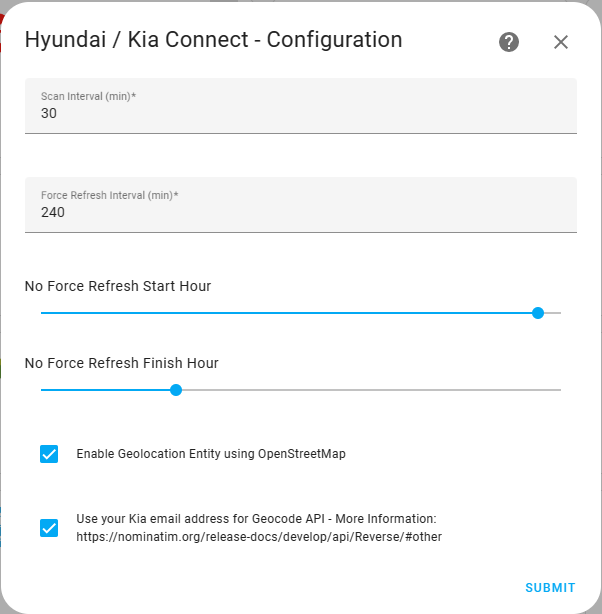
- update - It will fetch the cached information every 30 minutes from Kia Uvo / Hyundai Bluelink Servers. Now Configurable
- force update - It will ask your car for the latest data every 4 hours. Now Configurable
- It will not force update between 10PM to 6AM. I am trying to be cautios here. Now Configurable
- By default, distance unit is based on HA metric/imperial preference, you need to configure each entity if you would like other units.
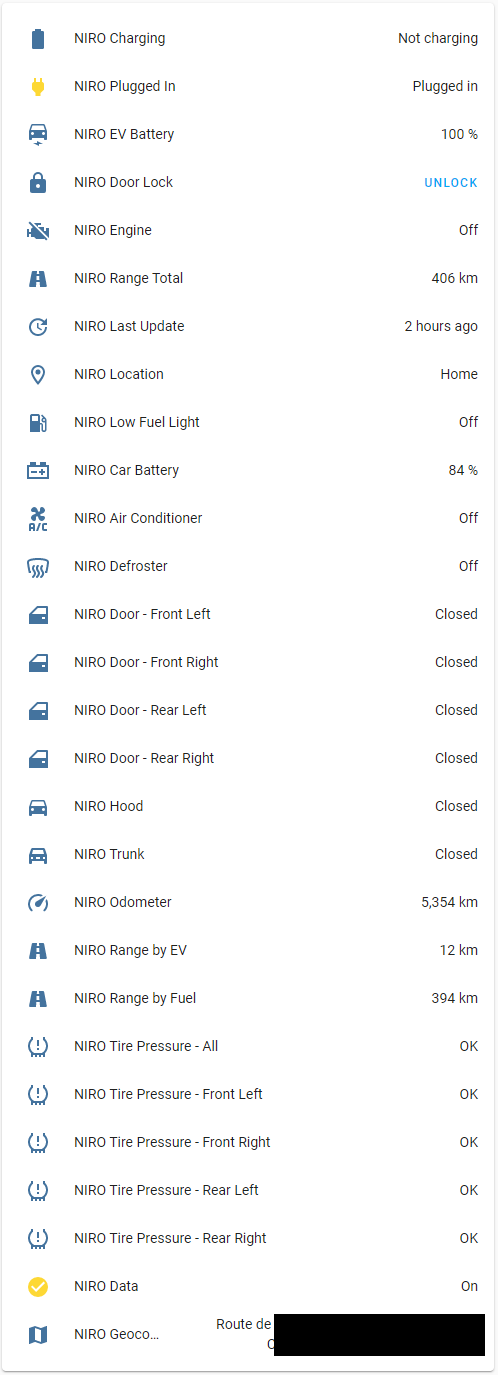
- Air Conditioner Status, Defroster Status, Set Temperature
- Heated Rear Window, Heated Steering Wheel
- Car Battery Level (12v), EV Battery Level, Remaining Time to Full Charge
- Tire Pressure Warnings (individual and all)
- Charge Status and Plugged In Status
- Low Fuel Light Status (for PHEV and IC)
- Doors, Trunk, Window and Hood Open/Close Status
- Locking and Unlocking
- Engine Status
- Location/Coordinates (over GPS) and Geocoded Location using OpenStreetMap (optional, disabled by default)
- Last Service and Next Service in Canada
- Odometer, EV Range (for PHEV and EV), Fuel Range (for PHEV and IC), Total Range (for PHEV and EV)
- Latest Update
- cache update interval, force update interval, blackout start and finish hours
- Ignition, Accessory status
- Lights status
These can be access by going to the developer tools followed by actions. These can also be called via automation.
- update: get latest cached vehicle data
- force_update: this will make a call to your vehicle to get its latest data, do not overuse this!
- start_climate / stop_climate: Starts the ICE engine in some regions or starts EV climate.
- start_charge / stop_charge: You can control your charging using these services
- set_charge_limits: You can control your charging capacity limits using this services
- set_charging_current: You can control the charging current level (100%, 90% or 60%)
- open_charge_port / close_charge_port: Open or close the charge port.
- set_windows: opens and closes the windows for select cars and regions
- start_hazard_lights_and_horn / stop: Panic!
- start_hazard_lights / stop: Hazard lights only
- schedule_charging_and_climate: planned depature
- start_valet_mode / stop: valet mode
| Service | EU | EU(>2023), NZ, AU | CA | USA Kia | USA Hyundai | USA Genesis | China | India | Brazil |
|---|---|---|---|---|---|---|---|---|---|
| Update | ✔ | ✔ | ✔ | ✔ | ✔ | ✔ | ✔ | ✔ | ✔ |
| Force Update | ✔ | not tested | ✔ | ✔ | ✔ | ✔ | ✔ | ||
| Lock Unlock | ✔ | ✔ | ✔ | ✔ | ✔ | ✔ | ✔ | ✔ | ✖ |
| start stop climate | ✔ | ✔ | ✔ | ✔ | ✔ | ✔ | ✔ | ✖ | |
| start stop charge | ✔ | ✔ | ✔ | ✔ | ✔ | ✖ | |||
| set charge limits | ✔ | ✔ | ✔ | ✔ | ✔ | ✖ | |||
| open and close charge port | ✖ | ✔ | ✖ | ✖ | ✖ | ✖ | ✖ | ✖ | |
| set windows | ✖ | ✔ | ✖ | ✖ | ✖ | ✖ | ✖ | ✖ | |
| start stop hazard lights | ✖ | ✔ | ✖ | ✖ | ✖ | ✖ | ✖ | ✖ | |
| start stop hazard lights and horn | ✖ | ✔ | ✖ | ✖ | ✖ | ✖ | ✖ | ✔ | ✖ |
| schedule charging and climate | ✖ | ✔ | ✖ | ✖ | ✖ | ✖ | ✖ | ✖ | |
| start stop valet_mode | ✖ | ✔ | ✖ | ✖ | ✖ | ✖ | ✖ | ✖ |
I have posted an example screenshot from my own car.
If you receive an error while trying to login, please go through these steps;
- As of now, integration only supports USA, EU, China, IN, Aus, NZ, CAD and BR region, so if you are outside, you are more than welcome to create an issue and become a test user for changes to expand coverage. USA and Brazil coverage isn't complete.
- EU Kia users recently (August 2025) faced an issue, while solution was implemented, some users require to login their account on https://www.kia.com/de and consent to data processing by Kia to overcome the issue.
- As a last resort, please double check your account credentials or you can create a new account and share your car from main account to new account.
- You can enable logging for this integration specifically and share your logs, so I can have a deep dive investigation. To enable logging click "Enable debug logging" on the integration. It can be access via "Settings -> System -> Logs"