#network [[Hypertext]] Transfer Protocol: an asymmetric **request-response client-server** protocol
Whenever you enter a [[URL]] in the address box of the browser, the browser translates the URL into a request message according to the specified protocol; and sends the request message to the server.
For example, the browser translated the URL http://www.test101.com/doc/test.html into the following request message:
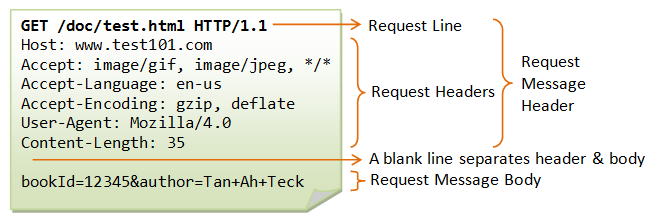
The request line has the following syntax: request-method-name request-URI HTTP-version
See also [[web server]].
In its idling state, an HTTP server does nothing but listening to the IP address(es) and port(s) specified in the configuration for incoming request.
Although [[TCP]] [[port]] 80 is pre-assigned to [[HTTP]], as the default HTTP port number, this does not prohibit you from running an HTTP server at other user-assigned port number (1024-65535) such as 8000, 8080, especially for test server. You could also run multiple HTTP servers in the same machine on different port numbers.
When a request arrives, the server analyzes the message header, applies rules specified in the configuration, and takes the appropriate action. When this request message reaches the server, the server can take either one of these actions:
- The server interprets the request received, maps the request into a file under the server's document directory, and returns the file requested to the client.
- The server interprets the request received, maps the request into a program kept in the server, executes the program, and returns the output of the program to the client.
- The request cannot be satisfied, the server returns an error message.
Apache HTTP Server Apache Tomcat Server
An example of the HTTP response message is as shown:
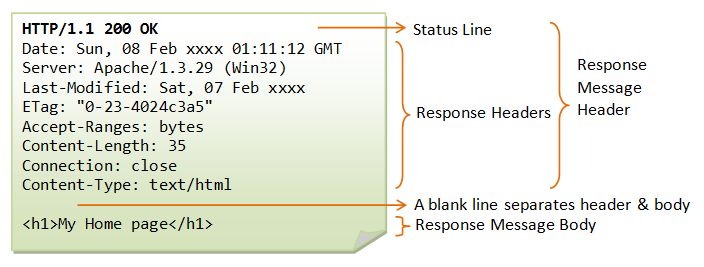
The status line has the following syntax: HTTP-version status-code reason-phrase
The browser receives the response message, interprets the message and displays the contents of the message on the browser's window according to the media type of the response (as in the Content-Type response header). Common media type include "text/plain", "text/html", "image/gif", "image/jpeg", "audio/mpeg", "video/mpeg", "application/msword", and "application/pdf".