Mousehole communicates with MyAnonamouse's Dynamic Seedbox IP API endpoint. If you see an error in Mousehole, it's just a relay of an error response from MAM. This page will help you understand what the error means and how to fix it.
- 429 Last Change Too Recent
- 403 Invalid Session
- 403 Invalid Session - IP Mismatch
- 403 Invalid Session - ASN Mismatch
- 403 Invalid Session - Invalid Cookie
- 403 Incorrect Session Type - Not Allowed This Function
- 403 Incorrect Session Type - Non-API Session
❓ What's wrong?: MAM was updated within the last hour — either because your IP changed or because you set a new cookie — and MAM enforces a minimum one-hour interval between updates.
🔧 How to fix: You just have to wait it out, at most one hour. This is a policy of MAM. Mousehole will retry automatically. You do not need a new cookie or to restart Mousehole.
❓ What's wrong?: MAM could not validate the session. This is a general error, usually returned when a more specific error could not be identified.
🔧 How to fix: Get a new cookie value following the steps in Getting Your Cookie Value.
❓ What's wrong?: The session cookie is locked to a single IP address, and Mousehole is not running from that IP. This happens when the session was created with "IP locked".
🔧 How to fix: Create a new session with ASN selected for "IP vs ASN locked session".
❓ What's wrong?: Mousehole is running on a network that MAM does not expect. The ASN (Autonomous System Number, which groups sets of IP addresses) of Mousehole's IP is not in the list of allowed ASNs for the session.
🔧 How to fix: Add Mousehole's IP address to the session's allowed ASNs:
-
Copy the IP address shown on Mousehole's main page.
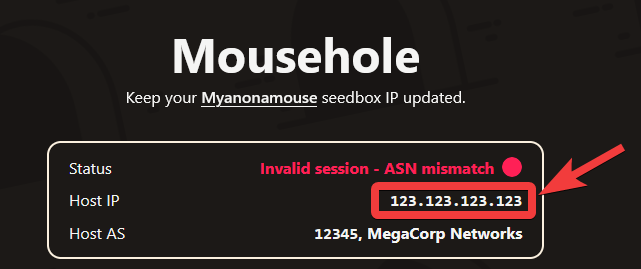
-
Go to the MAM Security Settings page.
-
Find your existing Mousehole session in the table and click the "Manage Session" button.
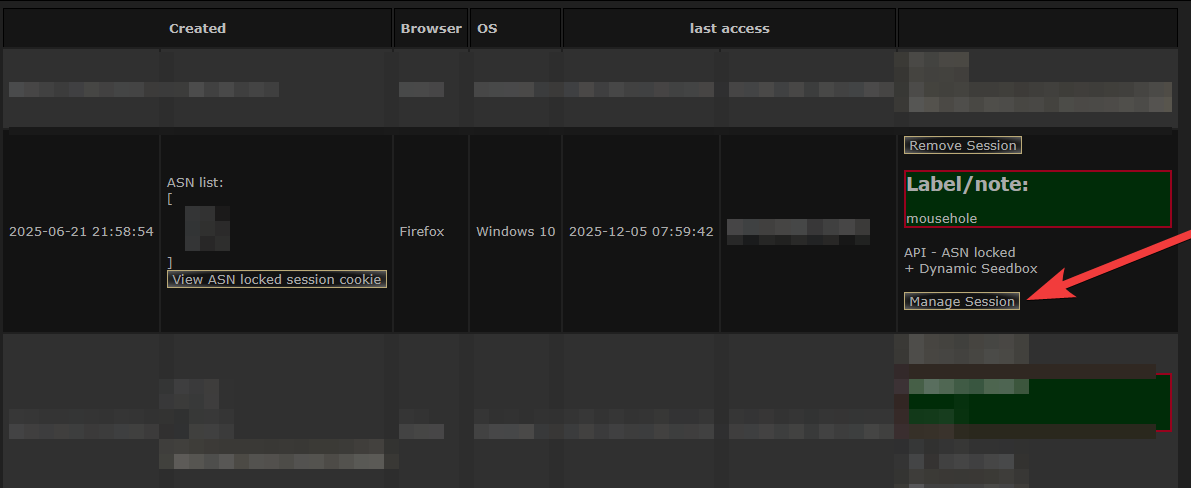
-
In the popup, add the Mousehole IP address to the "Add additional ASN via IP address" text box.
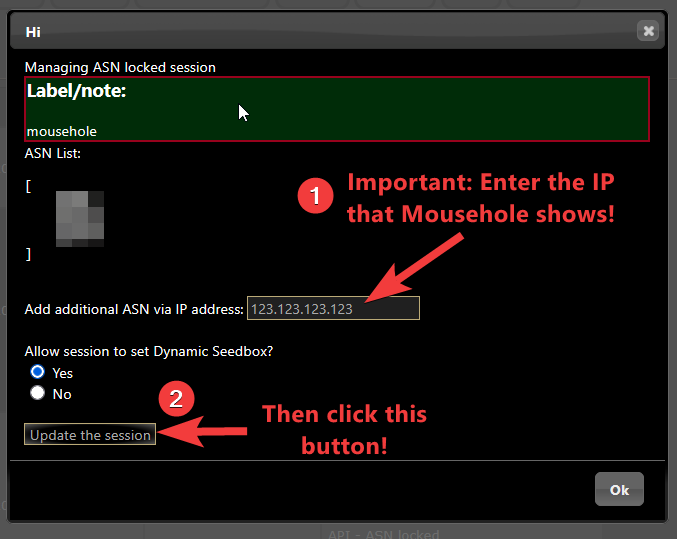
(Ensure "Yes" is selected for "Allow Session to set Dynamic Seedbox".)
Then press the "Update the session" button.
-
Back in Mousehole, press the "Check Now" button.

-
You should now see an OK status.
❓ What's wrong?: The cookie value stored in Mousehole is incorrect — possibly a typo or a copy of the wrong value.
🔧 How to fix: Get a new cookie value following the steps in Getting Your Cookie Value. When pasting the cookie value into Mousehole, ensure there are no extra spaces at the beginning or end of the value.
❓ What's wrong?: The session cookie belongs to a session that was not created with permission to set the Dynamic Seedbox IP. This means "Allow Session to set Dynamic Seedbox" was set to "No" when the session was created.
🔧 How to fix: Get a new cookie value following the steps in Getting Your Cookie Value, ensuring to select "Yes" for "Allow Session to set Dynamic Seedbox" when creating the session.
❓ What's wrong?: The cookie belongs to a regular MAM web browser session, not an API session. (Did you copy the cookie from your browser's developer tools? 🤨)
🔧 How to fix: Create a new session the right way by following the steps in Getting Your Cookie Value.