Different people have reached out to us asking for help finding scholarships specifically for their situation. We can use the browser extension to make it easy to quickly create scholarships for specific users.
See: (Scholarships for Naomi or Atila’s scholarship TikToks.
The browser extension should make it easy to save scholarships on the internet and add it to a collection. This feature is similar to the Add to Collection Feature in Atila's Atlas Extension (code, chrome store).
Related Pull Requests
Diagram
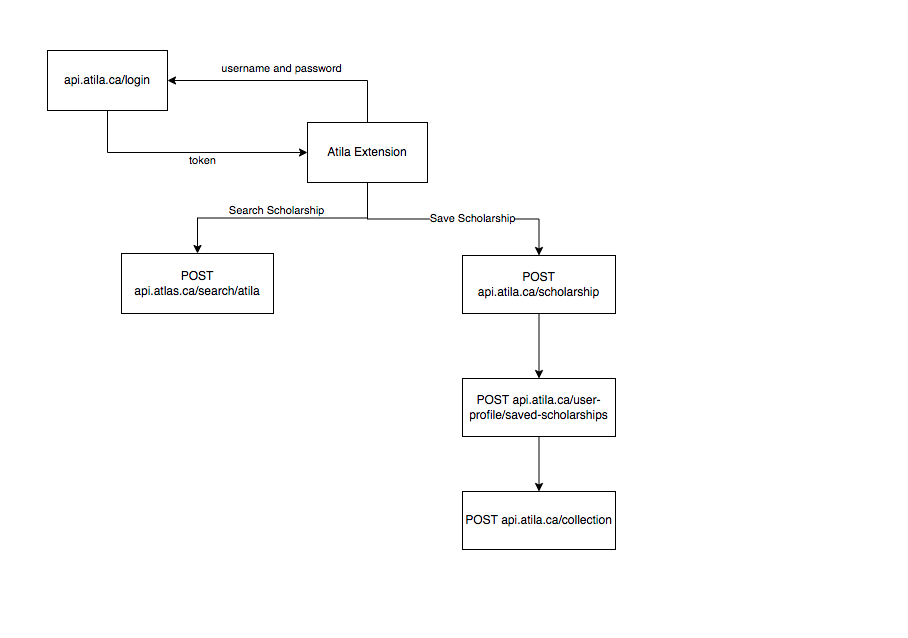
- Create multiple tabs: Add Save, Search, Settings tab
- Login through settings tab
- Save token to local storage
- Authenticate each subsequent request with
JWT
- Save Scholarships found on the Internet
- Search for existing scholarships
- Add scholarships in previous two steps to collection
This will use a lot of the code in Atila Atlas. The goal is to eventually combine these two extensions into one.
[ show demo of how it works on Atlas]
Grace: Saving and searching scholarships -> Adding to Collection
Tomiwa: Multiple tabs
Hadi: Logging in -> Authenticating requests -> Making backend able to accept requests from Chrome
Logging In
- The login page will be publicly accessible and must remove CORS restrictions for the login endpoint.
- User sends
username and password a token is returned, just like in atila-client-web-app
- Each subsequent request is authenticated by the
JTW ${token}
Saving Scholarship
- When a user finds a scholarship on the internet, they can simply click on
save and all the metadata of that scholarship will be auto-filled, user can add missing details and it will be added to Atila
- The user then has the option of adding it to a specific collection (similar to how Pocket works [show demo])
Searching Scholarship
- The user can search existing scholarships on Atila.
- Add a
/search endpoint to atila-django
- Use the same logic used in atlas search
Saving to Collection
- Collection Model should be updated so that a
CollectionItem can either beContent or Scholarship
Instructions
- Clone, build and unpack the two extensions: https://github.com/ademidun/atila-scholarship-helper-extension and https://github.com/atilatech/browser-extension (make sure not to confuse them!)
- Create a new branch and create 3 separate tabs
- Any requests to
atila-django API must have certain headers set:
https://github.com/atilatech/browser-extension/blob/498257100535919f6b731efb0dcf30b08cc39c5b/src/services/AtlasAPI.ts#L18
- Add
Authorization to list of allowed headers: https://github.com/ademidun/atila-django/pull/410/commits/1b9a7cc0081afa1c61ea6652ecbb835124e49999#diff-d8def684c9a77cfaaa19b4c1762a220d5978a030144169de2a502eedd110651bR189
- If you get issues with sending requests to atila api from the broswer extension see these commits in PR: https://github.com/ademidun/atila-django/pull/410
- https://github.com/ademidun/atila-django/pull/410/commits/48006b563e3d3411d5e3c94b9debb74d6a035a72
- All these requests are from a browser extension to Atila's API so you can use it as an example: https://github.com/atilatech/browser-extension/blob/master/src/services/AtlasAPI.ts#L24
Endpoints
The following endpoints on atila-django would need to be supported without CORS restrictions
- Login
- Save Scholarships (already done)
- Save Scholarship to User Profile
- Create a new Collection
- Save Scholarship to a collection
Different people have reached out to us asking for help finding scholarships specifically for their situation. We can use the browser extension to make it easy to quickly create scholarships for specific users.
See: (Scholarships for Naomi or Atila’s scholarship TikToks.
The browser extension should make it easy to save scholarships on the internet and add it to a collection. This feature is similar to the Add to Collection Feature in Atila's Atlas Extension (code, chrome store).
Related Pull Requests
Diagram

JWTThis will use a lot of the code in Atila Atlas. The goal is to eventually combine these two extensions into one.
[ show demo of how it works on Atlas]
Grace: Saving and searching scholarships -> Adding to Collection
Tomiwa: Multiple tabs
Hadi: Logging in -> Authenticating requests -> Making backend able to accept requests from Chrome
Logging In
usernameandpasswordatokenis returned, just like in atila-client-web-appJTW ${token}Saving Scholarship
saveand all the metadata of that scholarship will be auto-filled, user can add missing details and it will be added to AtilaSearching Scholarship
/searchendpoint to atila-djangoSaving to Collection
CollectionItemcan either beContentorScholarshipInstructions
atila-djangoAPI must have certain headers set:https://github.com/atilatech/browser-extension/blob/498257100535919f6b731efb0dcf30b08cc39c5b/src/services/AtlasAPI.ts#L18
Authorizationto list of allowed headers: https://github.com/ademidun/atila-django/pull/410/commits/1b9a7cc0081afa1c61ea6652ecbb835124e49999#diff-d8def684c9a77cfaaa19b4c1762a220d5978a030144169de2a502eedd110651bR189Endpoints
The following endpoints on atila-django would need to be supported without CORS restrictions