How to copy file from one table to another? #4


-
|
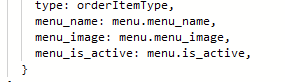
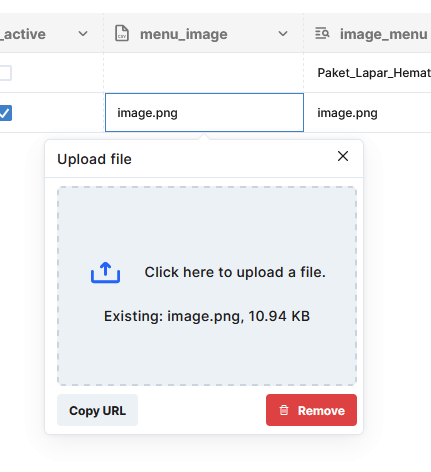
On project, Baso Aci Akang, 454, I have three separate tables, To resolve performance issue, we decide to just include these lookup items to insert row for Then on GCF, I simply select menu by its id and insert it on order_item, Data inserted and looks fine, But, once I check on editor, this error shows up, |

Beta Was this translation helpful? Give feedback.
Replies: 3 comments 10 replies

-
|
@miftahulmuhaemen mas bisa confirm function yg dibuat di GCF itu pake admin secret role apa ? dan pas editor display error ini {"statusCode":500,"code":"NoSuchKey","error":"Internal Server Error","message":"The specified key does not exist."} ini rolenya apa? |
Beta Was this translation helpful? Give feedback.

-
|
Tapi ini udah bukan nested atau lookup biasa lagi mas. Kolom File biasa yang informasinya saya salin dari tabel master Apakah metadata tidak bisa disalin gitu aja jadinya, misal harus download dulu file-nya, minta token storage, download, terus token write buat kolom 'menu_image' di tabel tujuan |
Beta Was this translation helpful? Give feedback.

-
|
ini yg di salin apa aja mas? |
Beta Was this translation helpful? Give feedback.
-
|
|
Beta Was this translation helpful? Give feedback.
-
|
ohh iya itu pasti ga bisa mas karna file di storage nya ga di pindahin, solusinya paling upload ulang soalnya di sistem sekarang belum ada fitur buat copy file di storage nya |
Beta Was this translation helpful? Give feedback.
-
|
Yah lumanyun ya mas kalau file-nya gede. Untungnya sih ini enggak. Nanti aku coba kerjain deh mas, kalau ada trouble atau sudah bisa, nanti aku post dibawah, minta tolong belum di check ijo dulu hhe. |
Beta Was this translation helpful? Give feedback.
-
|
mas @miftahulmuhaemen mintol coba yg di GCF admin secretnya disesuain sm role yg di editor qore apps mas. |
Beta Was this translation helpful? Give feedback.
-
|
admin secret yang di editor ini liatnya dimana ya mba? |
Beta Was this translation helpful? Give feedback.

-
|
berarti yg ini false alarm mas @miftahulmuhaemen bukan karena role |
Beta Was this translation helpful? Give feedback.
-
|
False alarm gimana mba? Case ini harusnya belum close kan ya? |
Beta Was this translation helpful? Give feedback.
-
|
Ini aku udah buat solusi sementara, selama Qore mungkin akan develop fungsi copy file dari satu tabel ke tabel lain. //Code written in Typescript.
import fetch, {Headers} from 'cross-fetch';
import * as Constant from '../utils/const';
import * as FormData from 'form-data';
export const storageToken = async (env: string) => {
const res = await fetch(
`${
env === Constant.PRODUCTION
? process.env.QOREBASE_PROD_URL
: process.env.QOREBASE_URL
}/v1/storage/token`,
{
method: 'POST',
headers: new Headers([
['x-qore-engine-admin-secret', `${process.env.QOREBASE_ADMIN_SECRET}`],
]),
}
);
const response = await res.json();
if (response.statusCode >= 400) {
throw response.message;
}
return response.token;
};
export const fileTokenTable = async (
table: string,
column: string,
row: string,
access: string,
env: string
) => {
const res = await fetch(
`${
env === Constant.PRODUCTION
? process.env.QOREBASE_PROD_URL
: process.env.QOREBASE_URL
}/v1/files/token/table/${table}/id/${row}/column/${column}?access=${access}`,
{
method: 'GET',
headers: new Headers([
['x-qore-engine-admin-secret', `${process.env.QOREBASE_ADMIN_SECRET}`],
]),
}
);
const response = await res.json();
if (response.statusCode >= 400) {
throw response.message;
}
return response.token;
};
export const copyFile = async (
filename: string,
imageURL: string,
token: string,
env: string
) => {
const arrayBuffer = await fetch(imageURL).then(res => {
return res.arrayBuffer();
});
const buffer = Buffer.from(arrayBuffer);
const formData = new FormData();
formData.append('file', buffer, {filename: filename});
return await new Promise(resolve => {
formData.submit(
{
host: `${
env === Constant.PRODUCTION
? process.env.QOREBASE_PROD_URL
: process.env.QOREBASE_URL
}`.replace('https://', ''),
path: `/v1/files/upload?token=${token}`,
headers: {
'x-qore-engine-admin-secret': `${process.env.QOREBASE_ADMIN_SECRET}`,
},
},
(err, res) => {
if (err) throw err;
if (Number(`${res.statusCode}`) >= 400)
throw new Error('Upload file failed');
resolve(res);
}
);
});
}; const readToken = await storageToken(env);
const writeToken = await fileTokenTable(
'order_items',
'menu_image',
`${rowID}`,
'write',
env
);
await copyFile(
`${menu.menu_image.filename}`,
`${menu.menu_image.url}?token=${readToken}`,
writeToken,
env
); |
Beta Was this translation helpful? Give feedback.


Ini aku udah buat solusi sementara, selama Qore mungkin akan develop fungsi copy file dari satu tabel ke tabel lain.
Boleh dikasih checkmark mba, mas hhe.
cc @Dewiif @hilmanfjrsy