


Pure Java, self-contained implementation of OpenCC for Traditional ↔ Simplified Chinese text conversion, with full Office/EPUB document support and a lightweight CLI.
-
✅ High performance – implements advanced optimization techniques for near-native speed:
- Static dictionaries preloaded into memory for zero-overhead lookups.
- Starter index tables accelerate segmentation by jumping directly to valid first characters.
- Starter masks and union masks (bitwise-optimized) for constant-time gating of valid phrase starts.
- Starter unions merge multiple dictionary sources efficiently, eliminating redundant scans.
- Length-aware segmentation using per-starter
minLen/maxLenlimits to reduce iteration overhead. - Zero-copy scanning and surrogate-safe UTF-16 iteration to handle all BMP and non-BMP characters accurately.
- Pre-allocated buffers and minimal
String/char[]allocations to avoid GC overhead during large conversions. - Fully parallelized dictionary initialization, ensuring instant startup after first load.
Result: performance on par with native OpenCC implementations (C++/Rust), verified with multi-million-character benchmarks.
-
✅ Accurate with non-BMP CJK – correctly handles astral Chinese characters (CJK Ext. B–G, U+20000+), using surrogate-safe scanning and max-match across code points.
-
✅ Pure Java, no JNI – easy to use on any JVM (JDK 1.8+), no native libraries required.
-
✅ Thread-safe convenience conversion – use
OpenCC.convert(...)for one-off conversions with shared, lazy-loaded dictionaries that are loaded only once per JVM. -
✅ Wide format support – convert plain text and Office documents:
.docx,.xlsx,.pptx,.odt,.epub, etc. -
✅ Optional font name preservation – keep original fonts when processing Office documents.
-
✅ CLI tool included (
OpenccJavaCli.bat) – convert files or stdin with flexible encoding options. -
✅ Cross-platform – runs on Windows, Linux, and macOS without extra dependencies.
-
✅ Self-contained – no third-party dependencies, just the JDK.
-
✅ Drop-in replacement for OpenCC configs – supports the same dictionary structure and configs.
- Available on Maven Central and JitPack.
- Works with build tools like Maven and Gradle.
- CLI binaries included in GitHub releases.
Reusable Java library for programmatic conversion.
Option 1: Use from Maven Central
Gradle (Kotlin DSL):
dependencies {
    implementation("io.github.laisuk:openccjava:1.3.0")
}
Gradle (Groovy):
dependencies {
    implementation 'io.github.laisuk:openccjava:1.3.0'
}
Maven:
<dependency>
    <groupId>io.github.laisuk</groupId>
    <artifactId>openccjava</artifactId>
    <version>1.3.0</version>
</dependency>
Option 2: Use with JitPack
(Alternative if you want to build directly from GitHub tags)
Gradle:
repositories {
    mavenCentral()
    maven { url = uri("https://jitpack.io") }
}
dependencies {
    implementation 'com.github.laisuk:OpenccJava:v1.3.0' // replace with latest tag
}
Maven:
<repositories>
    <repository>
        <id>jitpack.io</id>
        <url>https://jitpack.io</url>
    </repository>
</repositories>

<dependency>
<groupId>com.github.laisuk</groupId>
<artifactId>OpenccJava</artifactId>
<version>v1.3.0</version>
</dependency>git clone https://github.com/laisuk/OpenccJava.git
cd OpenccJava
./gradlew build- Built
.jarwill be inopenccjava/build/libs/. - CLI tools are built in
openccjavacli/build/libs/.
If you don’t want to rely on mavenCentral or JitPack:
- Copy the
openccjava/folder into your own project. - Edit settings.gradle:
include("openccjava")- Add to your dependencies:
implementation project(":openccjava")That’s it! No Internet required, no JARs to manage.
openccjava(the core library) has no external runtime dependencies.openccjavacli(the command-line tool) bundles picocli automatically when built with./gradlew distZip.
👉 If you only use the library in your project (io.github.laisuk:openccjava), you don’t need to add anything else to
your classpath.
OpenCC provides conversion between Simplified and Traditional Chinese (and variants) using configurable dictionaries.
OpenCC cc = OpenCC.fromConfig("s2t");              // Static helper, autoloads shared dictionaries
OpenCC cc = OpenCC.fromConfig(OpenccConfig.TW2SP);  // Typed config helper
OpenCC cc = new OpenCC();                           // Default config "s2t"
OpenCC cc = new OpenCC("tw2sp");                  // String config
OpenCC cc = new OpenCC(OpenccConfig.S2HK);         // Typed config
OpenCC cc = new OpenCC("s2t", customSpecs);      // String config + custom dictionary specs
OpenCC cc = new OpenCC(OpenccConfig.S2T, customSpecs); // Typed config + custom dictionary specs
// @deprecated
OpenCC cc = new OpenCC("s2t", java.nio.file.Paths.get("dicts")); // Custom plain-text dicts (@deprecated)import openccjava.OpenCC;
public class Example {
static void main(String[] args) {
OpenCC converter = new OpenCC("s2t");
String result = converter.convert("汉字转换");
System.out.println(result); // → 漢字轉換
String withPunctuation = converter.convert("“春眠不觉晓”", true);
System.out.println(withPunctuation); // → 「春眠不覺曉」
}
}For thread-safe, one-off conversions, use either static convenience API:
OpenCC.convert(String text, OpenccConfig config)OpenCC.convert(String text, String config)
String result = OpenCC.convert(
        "欢迎使用OpenCC",
        OpenccConfig.S2T);
String result = OpenCC.convert(
"软件工程",
"s2t");These methods use the shared lazy-loaded dictionary cache, so dictionaries are still loaded only once per JVM. For
repeated conversions, custom dictionaries, or advanced usage, create and reuse an OpenCC instance as shown above.
import openccjava.OpenCC;
import openccjava.OpenccConfig;

public class Example {
    static void main(String[] args) {
        OpenCC cc = new OpenCC();

        cc.setConfig("t2s");
        String cfg = cc.getConfig();           // → "t2s"
        OpenccConfig cfgId = cc.getConfigId(); // → OpenccConfig.T2S

        cc.setConfig("invalid_config");
        String fallback = cc.getConfig();      // → "s2t" (default fallback)
        String err = cc.getLastError();        // → explains the fallback
        boolean hasErr = cc.hasLastError();    // → true
        cc.clearLastError();
    }
}import openccjava.OpenCC;
public class Example {
static void main(String[] args) {
int code = OpenCC.zhoCheck("漢字"); // 1 = Traditional, 2 = Simplified, 0 = Unknown/Mixed
// Deprecated compatibility instance method still exists:
OpenCC cc = new OpenCC("s2t");
int legacyCode = cc.zhoCheckInstance("汉字");
}
}import openccjava.OpenCC;
public class Example {
static void main(String[] args) {
OpenCC cc = new OpenCC();
cc.s2t("汉字", false); // 漢字 - Simplified → Traditional
cc.t2s("漢字", false); // 汉字 - Traditional → Simplified
cc.s2tw("汉字", false); // 漢字 - Simplified → Taiwan Traditional
cc.tw2sp("臺灣計程車", false); // 台湾出租车 - Taiwan Traditional → Simplified with idioms
cc.s2hkp("香港鼠标", false); // 香港滑鼠 - Simplified → Hong Kong Traditional with phrases
cc.hk2sp("香港滑鼠", false); // 香港鼠标 - Hong Kong Traditional with phrases → Simplified
cc.t2jp("傳統"); // 伝統 - Traditional → Japanese Kanji
}
}Most directional conversion methods support a boolean punctuation flag as a second parameter.
Methods such as t2tw, t2twp, tw2t, tw2tp, t2hk, hk2t, t2jp, and jp2t are single-argument methods.
Use s2hkp / hk2sp when Hong Kong phrase-level mappings from HKPhrases.txt / HKPhrasesRev.txt
should be applied in addition to HK variant normalization.
CompatIdeographs is an optional Unicode compatibility pre-processing helper. It maps CJK Compatibility Ideographs to
their Unicode decomposition targets before OpenCC segmentation and dictionary conversion. This is useful when input text
contains compatibility forms such as 金 but you want conversion to behave as if the canonical ideograph 金 had been
provided.
Compatibility ideograph normalization is not part of OpenCC dictionary conversion logic. It does not affect phrase matching, regional variants, punctuation conversion, script detection, or dictionary data. For converted text, the recommended order is:
- Normalize compatibility ideographs with
CompatIdeographs.normalize(...)orOpenCC.normalizeCompat(...). - Run normal OpenCC conversion with
convert(...). - Optionally run DeTofu on the converted result for display fallback.
import openccjava.OpenCC;
import openccjava.CompatIdeographs;

public class CompatIdeographsExample {
    static void main(String[] args) {
        System.out.println(CompatIdeographs.normalize("天龍八部書裡的喬峰是契丹人"));
        // 天龍八部書裡的喬峰是契丹人

        System.out.println(CompatIdeographs.normalize("abc天龍八部書裡的喬峰是契丹人123"));
        // abc天龍八部書裡的喬峰是契丹人123

        System.out.println(CompatIdeographs.normalize("鼖鼻𪘀"));
        // 鼖鼻𪘀

        OpenCC cc = new OpenCC();
        System.out.println(cc.normalizeCompat("天龍八部書裡的喬峰是契丹人"));
        // 天龍八部書裡的喬峰是契丹人
    }
}
Normalize before conversion:
import openccjava.OpenCC;
import openccjava.OpenccConfig;

public class CompatBeforeConvertExample {
    static void main(String[] args) {
        OpenCC cc = new OpenCC(OpenccConfig.T2S);

        String normalized = cc.normalizeCompat("天龍八部書裡的喬峰是契丹人");
        String converted = cc.convert(normalized);

        System.out.println(converted);
        // 天龙八部书里的乔峰是契丹人
    }
}CompatIdeographs.normalize(...)OpenCC.normalizeCompat(...)
Built-in mappings are embedded under dicts/CJK_Compatibility_Ideographs.txt. Characters outside the CJK Compatibility
Ideograph ranges, and compatibility ideographs without a decomposition mapping, are preserved unchanged.
DeTofu is an optional post-conversion display compatibility pass. It replaces only mapped tofu-risk rare CJK extension
characters with display-compatible fallback characters. It is useful after conversions such as t2s, where some rare
Traditional characters may convert to non-BMP Simplified extension characters that render as boxes on some systems,
browsers, document viewers, e-book readers, or mobile platforms.
For example, 驂騑 converted by t2s may become 骖𬴂. Applying DeTofu can turn it into 骖騑 for safer display.
Unknown or unmapped characters are preserved unchanged.
If input may contain CJK Compatibility Ideographs, normalize them before conversion. DeTofu remains the opposite side of the pipeline and runs after conversion.
DeTofu is not part of OpenCC dictionary conversion logic. It does not affect phrase matching, regional variants, punctuation conversion, script detection, or dictionary data. Apply it after normal OpenCC conversion when display compatibility is more important than preserving every converted rare extension character.
Built-in mappings are embedded under dicts/TSCharactersTofu.txt. Users do not need to manage this file for normal
usage.
import openccjava.OpenCC;
import openccjava.OpenccConfig;
import openccjava.DeTofu;

public class DeTofuApiExample {
    static void main(String[] args) {
        OpenCC cc = new OpenCC(OpenccConfig.T2S);

        String converted = cc.convert("儼驂騑於上路,訪風景於崇阿,𱁬");
        String safe = cc.deTofu(converted, DeTofu.Level.ExtB);

        System.out.println(safe);
        // 俨骖騑于上路,访风景于崇阿,𱁬
    }
}
You can also use the DeTofu utility directly:
import openccjava.DeTofu;

public class DeTofuDirectExample {
    static void main(String[] args) {
        String safe = DeTofu.convert("骖𬴂", DeTofu.Level.ExtB);
        System.out.println(safe);
        // 骖騑
    }
}DeTofu.convert(...)OpenCC.deTofu(...)OpenCC.deTofuWithCustomFile(...)OpenCC.deTofuWithCustomPairs(...)DeTofu.builtinMap(...)DeTofu.Map.withCustomFile(...)DeTofu.Map.withCustomPairs(...)
OpenccJava supports both file-based and in-memory custom DeTofu mappings. File-based mappings are convenient for CLI and external configuration. In-memory mappings are useful for applications that generate or manage fallback mappings programmatically.
deTofuWithCustomFile(...)deTofuWithCustomPairs(...)
import openccjava.OpenCC;
import openccjava.DeTofu;

public class DeTofuCustomFileExample {
    static void main(String[] args) throws Exception {
        OpenCC cc = new OpenCC();

        String safe = cc.deTofuWithCustomFile(
                "𣭲毛",
                DeTofu.Level.ExtB,
                "custom-tofu.txt"
        );

        System.out.println(safe);
        // 氂毛
    }
}
Custom DeTofu fallback files use UTF-8 text with one mapping per line:
# Format: tofu_char<TAB>fallback_char<TAB>extension
𣭲	氂	B
𬴂	騑	ExtC
Blank lines and lines beginning with # are ignored. The extension column accepts compact B-I or legacy
ExtB-ExtI. Custom mappings are applied after built-in mappings and override built-in mappings for the same
tofu-risk character.
public String deTofuWithCustomPairs(
        String text,
        DeTofu.Level level,
        Map<String, String> pairs
);
Use deTofuWithCustomPairs(...) when fallback mappings are generated dynamically or loaded from a database,
configuration file, network source, or GUI settings:
import openccjava.OpenCC;
import openccjava.DeTofu;

import java.util.HashMap;
import java.util.Map;

public class DeTofuCustomPairsExample {
    static void main(String[] args) {
        OpenCC cc = new OpenCC();

        Map<String, String> pairs = new HashMap<>();
        pairs.put("𣭲", "氂");
        pairs.put("𬴂", "騑");

        String safe = cc.deTofuWithCustomPairs(
                "𣭲毛 骖𬴂",
                DeTofu.Level.ExtB,
                pairs
        );

        System.out.println(safe);
        // 氂毛 骖騑
    }
}
Keys are tofu-risk characters. Values are display-compatible fallback characters. Custom mappings are applied after built-in mappings and override built-in mappings for the same tofu-risk character.
DeTofu levels are threshold-based:
ExtBmeans ExtB and above.ExtCmeans ExtC and above.ExtDmeans ExtD and above.ExtEmeans ExtE and above.ExtFmeans ExtF and above.ExtGmeans ExtG and above.ExtHmeans ExtH and above.ExtImeans ExtI only.
CLI aliases may use all, ext-b, ext-c, ext-d, ext-e, ext-f, ext-g, ext-h, or ext-i.
Custom dictionaries patch specific OpenCC dictionary slots. The base official dictionaries are loaded first, then custom dictionary files and/or in-memory pairs are applied to the selected slots.
TWVariantsPhrases and HKVariantsPhrases are forward regional variant phrase slots. They are applied before
TWVariants / HKVariants, so phrase-level regional variants win over conflicting character-level variants. The
built-in TWVariantsPhrases.txt and HKVariantsPhrases.txt files are required official dictionaries; missing files are
load errors, the same as other official dictionary files.
Normal OpenCC usage still uses the lazy default DictionaryHolder singleton. Custom dictionary usage does not touch
DictionaryHolder: file-level custom dictionaries build a caller-owned DictionaryMaxlength, and post-load
customization returns a customized copy without mutating the original DictionaryMaxlength. After an OpenCC instance
is
constructed, runtime conversion remains immutable and fast.
Only users who intentionally use both the default singleton path and custom dictionary paths may hold two dictionary copies in memory. This is intentional and avoids global mutable state.
CustomDictMode.Appendmerges custom entries into the existing slot. Custom entries win if keys already exist. This is the recommended/default mode for most users.CustomDictMode.Overridereplaces the selected slot before applying custom entries. This is advanced mode. Other slots in the same conversion chain may still run afterward; for example,STCharactersmay still apply afterSTPhrases.
Custom dictionary files use the same parser as OpenCC text dictionaries:
- UTF-8 text
- One entry per line
source<TAB>target- Blank/comment lines follow existing parser behavior
- Only the first target token is used, matching OpenCC dictionary behavior
- File-based custom dictionaries use
CustomDictSpec.fromFile(...)orCustomDictSpec.fromFiles(...)and load UTF-8 OpenCC text dictionary files. - In-memory custom dictionaries use
CustomDictSpec.fromPairs(...)and apply aMap<String, String>directly, which is useful for runtime terms or application-provided user dictionaries. - When custom specs for the same slot include both file paths and pairs, apply file specs first and pair specs
afterward.
Pair entries override file entries when the same source key exists; internally,
pairsare applied afterpaths. - Insertion order is preserved for in-memory pairs. Use
LinkedHashMapwhen order matters.
Forward Taiwan/Hong Kong regional variant phrase slots can also be patched with append or override specs:
import openccjava.*;

import java.util.Collections;
import java.util.HashMap;
import java.util.Map;

public class RegionalVariantPhraseExample {
    static void main(String[] args) {
        Map<String, String> pairs = new HashMap<>();
        pairs.put("喫茶小舖", "喫茶小舖");

        CustomDictSpec spec = CustomDictSpec.fromPairs(
                DictSlot.TWVariantsPhrases,
                pairs,
                CustomDictMode.Append
        );

        DictionaryMaxlength dict = DictionaryMaxlength
                .fromDicts()
                .withCustomDicts(Collections.singletonList(spec));

        OpenCC opencc = new OpenCC(OpenccConfig.S2TW, dict);
        System.out.println(opencc.convert("喫茶小舖", false));
    }
}Use the OpenCC custom dictionary constructors when you want a concise construction-time override for one converter.
These constructors copy the shared dictionary first, apply the specs to that copy, and leave the shared
DictionaryHolder singleton unchanged.
import openccjava.*;

import java.nio.file.Paths;
import java.util.Collections;

public class OpenCCCustomDictConstructorExample {
    static void main(String[] args) {
        OpenCC cc = new OpenCC(
                OpenccConfig.S2T,
                Collections.singletonList(
                        CustomDictSpec.fromFile(
                                DictSlot.STPhrases,
                                Paths.get("custom_st_phrases.txt"),
                                CustomDictMode.Override
                        )
                )
        );

        System.out.println(cc.convert("测试词"));
    }
}
Use the string-config overload when your config comes from CLI options, config files, or other user input:
OpenCC cc = new OpenCC("s2t", customSpecs);Use OpenCC.fromDicts(...) or DictionaryMaxlength.fromDicts(..., specs) when you want to load official dictionary
text files and apply custom entries before constructing the converter.
import openccjava.*;

import java.nio.file.Paths;
import java.util.Collections;

public class CustomDictFileExample {
    static void main(String[] args) {
        OpenCC cc = OpenCC.fromDicts(
                OpenccConfig.S2T,
                Collections.singletonList(
                        CustomDictSpec.fromFile(
                                DictSlot.STPhrases,
                                Paths.get("custom_st_phrases.txt"),
                                CustomDictMode.Append
                        )
                )
        );

        System.out.println(cc.convert("测试词"));
    }
}
You can also build a caller-owned DictionaryMaxlength at construction time, then pass it to OpenCC:
import openccjava.*;

import java.util.Collections;
import java.util.LinkedHashMap;
import java.util.Map;

public class CustomDictPairsAtLoadExample {
    static void main(String[] args) {
        Map<String, String> pairs = new LinkedHashMap<>();
        pairs.put("测试词", "專用詞");
        pairs.put("鼠标", "滑鼠");

        DictionaryMaxlength dict = DictionaryMaxlength.fromDicts(
                Collections.singletonList(
                        CustomDictSpec.fromPairs(
                                DictSlot.STPhrases,
                                pairs,
                                CustomDictMode.Append
                        )
                )
        );

        OpenCC cc = new OpenCC(OpenccConfig.S2T, dict);

        System.out.println(cc.convert("测试词和鼠标"));
    }
}
For direct converter construction, OpenCC.fromDicts(...) accepts the same specs:
import openccjava.*;

import java.util.Collections;
import java.util.LinkedHashMap;
import java.util.Map;

public class OpenCCFromPairsExample {
    static void main(String[] args) {
        Map<String, String> pairs = new LinkedHashMap<>();
        pairs.put("测试词", "專用詞");
        pairs.put("鼠标", "滑鼠");

        OpenCC cc = OpenCC.fromDicts(
                OpenccConfig.S2T,
                Collections.singletonList(
                        CustomDictSpec.fromPairs(
                                DictSlot.STPhrases,
                                pairs,
                                CustomDictMode.Append
                        )
                )
        );

        System.out.println(cc.convert("测试词和鼠标"));
    }
}Use DictionaryMaxlength.withCustomDicts(...) or DictionaryMaxlength.withCustomDictFiles(...) when you already have a
loaded dictionary, such as one loaded from a serialized dictionary_maxlength.json. Both methods return a customized
copy
and do not mutate the original dictionary.
withCustomDicts(...) accepts specs created from files, pairs, or both sources:
import openccjava.*;

import java.util.Collections;
import java.util.LinkedHashMap;
import java.util.Map;

public class PostLoadCustomPairsExample {
    static void main(String[] args) {
        Map<String, String> pairs = new LinkedHashMap<>();
        pairs.put("测试词", "專用詞");
        pairs.put("鼠标", "滑鼠");

        DictionaryMaxlength dict = DictionaryMaxlength
                .fromDicts()
                .withCustomDicts(
                        Collections.singletonList(
                                CustomDictSpec.fromPairs(
                                        DictSlot.STPhrases,
                                        pairs,
                                        CustomDictMode.Append
                                )
                        )
                );

        OpenCC cc = new OpenCC(dict);

        System.out.println(cc.convert("测试词和鼠标"));
    }
}
withCustomDictFiles(...) is a convenience method for file-based specs:
import openccjava.*;

import java.nio.file.Paths;
import java.util.Collections;

public class PostLoadCustomDictExample {
    static void main(String[] args) throws Exception {
        DictionaryMaxlength dict = DictionaryMaxlength
                .fromJsonFileNoDeps("dicts/dictionary_maxlength.json")
                .withCustomDictFiles(
                        Collections.singletonList(
                                CustomDictSpec.fromFile(
                                        DictSlot.STPhrases,
                                        Paths.get("custom_st_phrases.txt"),
                                        CustomDictMode.Append
                                )
                        )
                );

        OpenCC cc = new OpenCC(OpenccConfig.S2T, dict);

        System.out.println(cc.convert("测试词"));
    }
}Use CustomDictSpec.fromFiles(...) to apply multiple files to one slot. Files are applied in list order; later entries
with the same source key win.
import openccjava.*;

import java.nio.file.Paths;
import java.util.Arrays;

public class MultipleCustomDictFilesExample {
    static void main(String[] args) {
        OpenCC cc = OpenCC.fromDicts(
                OpenccConfig.S2T,
                Arrays.asList(
                        CustomDictSpec.fromFiles(
                                DictSlot.STPhrases,
                                Arrays.asList(
                                        Paths.get("custom_st_phrases.txt"),
                                        Paths.get("project_terms.txt")
                                ),
                                CustomDictMode.Append
                        )
                )
        );

        System.out.println(cc.convert("测试词"));
    }
}
File specs and pair specs can be combined. File paths are applied first, then in-memory pairs:
import openccjava.*;

import java.nio.file.Paths;
import java.util.Arrays;
import java.util.LinkedHashMap;
import java.util.Map;

public class CustomDictFilesAndPairsExample {
    static void main(String[] args) {
        Map<String, String> pairs = new LinkedHashMap<>();
        pairs.put("测试词", "專用詞");
        pairs.put("鼠标", "滑鼠");

        OpenCC cc = OpenCC.fromDicts(
                OpenccConfig.S2T,
                Arrays.asList(
                        CustomDictSpec.fromFiles(
                                DictSlot.STPhrases,
                                Arrays.asList(
                                        Paths.get("custom_st_phrases.txt"),
                                        Paths.get("project_terms.txt")
                                ),
                                CustomDictMode.Append
                        ),
                        CustomDictSpec.fromPairs(
                                DictSlot.STPhrases,
                                pairs,
                                CustomDictMode.Append
                        )
                )
        );

        System.out.println(cc.convert("测试词和鼠标"));
    }
}DictSlotselects the OpenCC dictionary slot to patch.CustomDictModeselects append or override behavior.CustomDictSpec.fromFile(...)creates a spec for one custom dictionary file.CustomDictSpec.fromFiles(...)creates a spec for multiple custom dictionary files.CustomDictSpec.fromPairs(...)creates a spec for in-memory custom dictionary pairs.DictionaryMaxlength.fromDicts(List<CustomDictSpec>)loads default text dictionaries and applies custom specs.DictionaryMaxlength.fromDicts(String, List<CustomDictSpec>)loads text dictionaries from a base path and applies custom specs.DictionaryMaxlength.withCustomDicts(...)returns a customized copy using specs with files, pairs, or both.DictionaryMaxlength.withCustomDictFiles(...)returns a customized copy of an already loaded dictionary.OpenCC.fromDicts(...)creates a converter from a caller-owned custom dictionary.OpenCC(String config, List<CustomDictSpec>)creates a converter with custom specs and a string config key.OpenCC(OpenccConfig config, List<CustomDictSpec>)creates a converter with custom specs and a typed config.OpenCC(OpenccConfig config, DictionaryMaxlength dictionary)creates a converter from a caller-supplied dictionary.OpenCC(DictionaryMaxlength dictionary)uses the defaults2tconfig with a caller-supplied dictionary.
| DictSlot | Dictionary file | Serialized field |
|---|---|---|
| STCharacters | STCharacters.txt | st_characters |
| STPhrases | STPhrases.txt | st_phrases |
| STPunctuations | STPunctuations.txt | st_punctuations |
| TSCharacters | TSCharacters.txt | ts_characters |
| TSPhrases | TSPhrases.txt | ts_phrases |
| TSPunctuations | TSPunctuations.txt | ts_punctuations |
| TWPhrases | TWPhrases.txt | tw_phrases |
| TWPhrasesRev | TWPhrasesRev.txt | tw_phrases_rev |
| TWVariants | TWVariants.txt | tw_variants |
| TWVariantsPhrases | TWVariantsPhrases.txt | tw_variants_phrases |
| TWVariantsRev | TWVariantsRev.txt | tw_variants_rev |
| TWVariantsRevPhrases | TWVariantsRevPhrases.txt | tw_variants_rev_phrases |
| HKPhrases | HKPhrases.txt | hk_phrases |
| HKPhrasesRev | HKPhrasesRev.txt | hk_phrases_rev |
| HKVariants | HKVariants.txt | hk_variants |
| HKVariantsPhrases | HKVariantsPhrases.txt | hk_variants_phrases |
| HKVariantsRev | HKVariantsRev.txt | hk_variants_rev |
| HKVariantsRevPhrases | HKVariantsRevPhrases.txt | hk_variants_rev_phrases |
| JPSCharacters | JPShinjitaiCharacters.txt | jps_characters |
| JPSCharactersRev | JPShinjitaiCharactersRev.txt | jps_characters_rev |
| JPSPhrases | JPShinjitaiPhrases.txt | jps_phrases |
- Custom dictionaries are applied before
OpenCCconstruction. - No runtime hot reload is provided.
- To update custom dictionaries, build a new
DictionaryMaxlengthand then create a newOpenCCinstance. Overridereplaces only the selected slot, not the whole conversion pipeline.Appendis recommended for most user dictionaries.- If file and pair entries define the same source key, the pair entry wins.
- Wrong slot choice may produce no effect or unexpected fallback behavior.
DictionaryHolder/ default singleton is not modified.- The custom path may load its own dictionary copy; this is intentional and avoids global mutable state.
List<String> configs = OpenCC.getSupportedConfigs();The following configuration keys correspond to OpenCC conversion modes:
| Config Key | Direction | Description |
|---|---|---|
| s2t | Simplified → Traditional | General conversion from Simplified Chinese to Traditional Chinese. |
| t2s | Traditional → Simplified | Converts Traditional Chinese text to Simplified Chinese. |
| s2tw | Simplified → Traditional (Taiwan) | Uses Taiwan-specific vocabulary and character preferences. |
| tw2s | Traditional (Taiwan) → Simplified | Converts Taiwan Traditional Chinese to Simplified Chinese. |
| s2twp | Simplified → Traditional (Taiwan + phrases) | Applies Taiwan-specific character and phrase mappings. |
| tw2sp | Traditional (Taiwan + phrases) → Simplified | Converts Taiwan-phrased Traditional Chinese to Simplified Chinese. |
| s2hk | Simplified → Traditional (Hong Kong) | Uses Hong Kong variant characters and word choices. |
| hk2s | Traditional (Hong Kong) → Simplified | Converts Hong Kong Traditional Chinese to Simplified Chinese. |
| s2hkp | Simplified → Traditional (Hong Kong + phrases) | Applies HK phrase mappings, HK phrase variants, and HK character variants. |
| hk2sp | Traditional (Hong Kong + phrases) → Simplified | Applies HK phrase/variant reverse normalization before Simplified conversion. |
| t2tw | Traditional → Traditional (Taiwan) | Normalizes Traditional Chinese to Taiwan variant. |
| t2twp | Traditional → Traditional (Taiwan + phrases) | Includes Taiwan-specific phrase-level normalization. |
| t2hk | Traditional → Traditional (Hong Kong) | Normalizes Traditional Chinese to Hong Kong variant. |
| tw2t | Traditional (Taiwan) → Traditional | Converts Taiwan variant back to general Traditional Chinese. |
| tw2tp | Traditional (Taiwan + phrases) → Traditional | Converts Taiwan phrased Traditional Chinese to general Traditional. |
| hk2t | Traditional (Hong Kong) → Traditional | Converts Hong Kong variant back to general Traditional Chinese. |
| t2jp | Traditional → Japanese Shinjitai | Converts Traditional Japanese Kyujitai to Japanese Shinjitai (simplified kanji). |
| jp2t | Japanese Shinjitai → Traditional | Converts Japanese Shinjitai characters back to Traditional Japanese Kyujitai. |
import openccjava.OpenCC;

public class Example {
    static void main(String[] args) {
        OpenCC.setVerboseLogging(true);
    }
}
Logs will print dictionary load source and fallback behavior. Useful for CLI or testing. Disabled by default to keep GUI silent.
import openccjava.OpenCC;
import openccjava.OfficeHelper;
import openccjava.OfficeHelper.FileResult;

import java.io.File;

public class Example {
    static void main(String[] args) {
        // Input and output files
        File input = new File("example_simplified.docx");
        File output = new File("example_traditional.docx");

        // Create an OpenCC converter (Simplified → Traditional)
        OpenCC converter = new OpenCC("s2t");

        // Convert the document (output must not be null)
        FileResult result = OfficeHelper.convert(
                input,
                output,
                "docx",      // Supported: docx, xlsx, pptx, odt, epub
                converter,
                true,        // Convert punctuation
                true         // Preserve font names
        );

        // Show result
        if (result.success) {
            System.out.println("✅ Conversion successful: " + output.getAbsolutePath());
        } else {
            System.err.println("❌ Conversion failed: " + result.message);
        }
    }
}import openccjava.OpenCC;
import openccjava.OfficeHelper;
import openccjava.OfficeHelper.MemoryResult;
import java.nio.file.Files;
import java.nio.file.Paths;
public class ExampleBytes {
static void main(String[] args) throws Exception {
// Load the document entirely into memory
byte[] inputBytes = Files.readAllBytes(Paths.get("example_simplified.docx"));
// Create an OpenCC converter
OpenCC converter = new OpenCC("s2t"); // Simplified → Traditional
// Perform in-memory conversion
MemoryResult result = OfficeHelper.convert(
inputBytes,
"docx", // Supported: docx, xlsx, pptx, odt, epub
converter,
true, // Convert punctuation
true // Keep font names
);
if (result.success) {
// Save the converted bytes (optional)
Files.write(Paths.get("example_traditional.docx"), result.data);
System.out.println("✅ In-memory conversion successful.");
} else {
System.err.println("❌ Conversion failed: " + result.message);
}
}
}MemoryResultis returned when you call the in-memory overload:
  OfficeHelper.convert(
      byte[] inputBytes,
      String format,
      OpenCC converter,
      boolean punctuation,
      boolean keepFont
  )
FileResultis returned when you call the file-to-file overload:
OfficeHelper.convert(
    File inputFile,
    File outputFile,
    String format,
    OpenCC converter,
    boolean punctuation,
    boolean keepFont
)
- You may still use
Result(the abstract base class) as the return type in legacy code.
it remains fully valid since bothMemoryResultandFileResultextend it.
Perfect for platforms where file system access is limited or optional:
- Blazor WebAssembly (browser sandbox → byte[] only)
- Android / iOS (ContentResolver/InputStream → byte[])
- REST APIs (receive byte[], return byte[])
- CLI pipes (stdin → stdout)
- Unit tests (no temp files, fast in-memory testing)
Perfect for traditional file system environments:
- Desktop apps (JavaFX, Swing, AWT)
- Servers and microservices
- Batch
.docx/.xlsx/.pptxconversions - Large-scale scheduled jobs
Command-line tool based on openccjava.
./gradlew distZipZip file will be created in: openccjavacli/build/distributions/openccjavacli-<version>.zip
bin/OpenccJavaCli.bat convert -c s2t -i input.txt -o output.txtbin/OpenccJavaCli convert --help
Usage: openccjavacli convert [-hpV] -c=<conversion> [--con-enc=<encoding>]
[--detofu=<level>] [--detofu-file=<file>]
[-i=<file>] [--in-enc=<encoding>] [-o=<file>]
[--out-enc=<encoding>] [--custom-dict=<slot:mode:
path>[,<slot:mode:path>...]]...
Convert plain text using OpenccJava
-c, --config=<conversion> Conversion configuration. Supported: s2t, t2s,
s2tw, tw2s, s2twp, tw2sp, s2hkp, hk2sp, s2hk,
hk2s, t2tw, t2twp, tw2t, tw2tp, t2hk, hk2t,
t2jp, jp2t
--con-enc=<encoding> Console encoding for interactive mode. Ignored if
not attached to a terminal. Common <encoding>:
UTF-8, GBK, Big5
--custom-dict=<slot:mode:path>[,<slot:mode:path>...]
Apply custom dictionary file. Format: slot:
append|override:path. Can be repeated or
comma-separated.
--detofu=<level> Apply tofu-safe fallback after conversion: all,
ext-b, ext-c, ext-d, ext-e, ext-f, ext-g, ext-h,
ext-i
--detofu-file=<file> Load additional DeTofu fallback mappings from a
UTF-8 text file. Custom mappings override
built-in mappings (requires --detofu)
-h, --help Show this help message and exit.
-i, --input=<file> Input file
--in-enc=<encoding> Input encoding
-o, --output=<file> Output file
--out-enc=<encoding> Output encoding
-p, --punct Punctuation conversion (default: false)
-V, --version Print version information and exit.echo "儼驂騑於上路,訪風景於崇阿,𱁬" | openccjavacli convert -c t2s --detofu allExpected output:
俨骖騑于上路,访风景于崇阿,𱁬
With a custom fallback file:
openccjavacli convert -c t2s --detofu all --detofu-file custom-tofu.txtExample: append a custom Hong Kong phrase dictionary for hk2sp.
data/my_hk_dict.txt:
# Custom Dictionary

細路哥	小男孩
echo "這個細路哥很靈活" | ./openccjavacli convert -c hk2sp --custom-dict hkphrasesrev:append:data/my_hk_dict.txt
这个小男孩很灵活bin/OpenccJavaCli.bat office -c s2t -i book.docx -o book_converted.docxbin/OpenccJavaCli office --help
Usage: openccjavacli office [-hkpV] -c=<conversion> [-f=<format>] -i=<file>
[-o=<file>] [--custom-dict=<slot:mode:path>[,<slot:
mode:path>...]]...
Convert Office documents using OpenccJava
-c, --config=<conversion>
Conversion configuration
--custom-dict=<slot:mode:path>[,<slot:mode:path>...]
Apply custom dictionary file. Format: slot:
append|override:path. Can be repeated or
comma-separated.
-f, --format=<format> Target Office format (e.g., docx, xlsx, pptx, odt,
epub)
-h, --help Show this help message and exit.
-i, --input=<file> Input Office file
-k, --[no-]keep-font Preserve font-family info (default: false)
-o, --output=<file> Output Office file
-p, --punct Punctuation conversion (default: false)
-V, --version Print version information and exit.--punct: Enable punctuation conversion.--auto-ext: Auto-append extension like_converted.--keep-font/--no-keep-font: Preserve original fonts (Office only).--in-enc/--out-enc: Specify encoding (e.g.GBK,BIG5,UTF-8).--format: Force document format (e.g.,docx,epub).--list-configs: Show supported OpenCC configs.
bin/OpenccJavaCli.bat pdf -c s2t -p -i sample.pdf -o converted.txt --reflowUsage: openccjavacli pdf [-ehHprV] [--compact] [-c=<conversion>] -i=<file>
[-o=<file>] [--custom-dict=<slot:mode:path>[,<slot:
mode:path>...]]...
Extract PDF text, optionally reflow CJK paragraphs, then convert with
OpenccJava
-c, --config=<conversion>
OpenCC conversion configuration (e.g. s2t, t2s, s2tw,
t2hk, t2jp, ...)
--compact Compact / tighten paragraph gaps after reflow (default:
false)
--custom-dict=<slot:mode:path>[,<slot:mode:path>...]
Apply custom dictionary file. Format: slot:
append|override:path. Can be repeated or
comma-separated.
-e, --extract Extract text from PDF document only (default: false)
-h, --help Show this help message and exit.
-H, --header Insert per-page header markers into extracted text
-i, --input=<file> Input PDF file
-o, --output=<file> Output text file (UTF-8). If omitted, '<name>_converted.
txt' is used next to input.
-p, --punct Enable punctuation conversion (default: false)
-r, --reflow Reflow CJK paragraphs after extraction (default: false)
-V, --version Print version information and exit.
openccjavacli pdf uses a text-based PDF extraction engine (PdfBox) and is intended for **digitally generated PDFs
** (
e-books, research papers, reports).
- ✅ Works best with selectable text
- ❌ Does not perform OCR on scanned/image-only PDFs
- ❌ Visual layout (columns, tables, figures) is not preserved
The --reflow option applies a CJK-aware paragraph reconstruction pipeline, designed for Chinese novels, essays,
and academic text.
Reflow attempts to:
- Join artificially wrapped lines
- Repair cross-line splits (e.g.
面+容→面容) - Preserve headings, short titles, dialog markers, and metadata-like lines
- Reflow is heuristic-based
- It is not suitable for:
- Poetry
- Comics / scripts
- Highly informal or experimental layouts
- Web novels often use inconsistent formatting and may require tuning
DictionaryMaxlength can write dictionary JSON without any external JSON dependency. File output is UTF-8.
Use pretty=true for indentation and newlines, or pretty=false for compact output with no indentation/newlines.
Use sortKeys=true for deterministic lexical key ordering when you want reproducible output, stable diffs, or easier
debugging. Sorting is for output reproducibility and readability, not deserialization speed.
import openccjava.DictionaryMaxlength;

import java.nio.file.Paths;

public class DictionaryJsonExample {
    static void main(String[] args) throws Exception {
        DictionaryMaxlength dict = DictionaryMaxlength.fromDicts();

        // Pretty, sorted JSON file.
        dict.serializeToJson(Paths.get("dictionary_maxlength.json"), true, true);

        // Compact JSON file.
        dict.serializeToJson("dictionary_maxlength.compact.json", false, false);

        // Compact, sorted JSON file.
        dict.serializeToJson(Paths.get("dictionary_maxlength.compact.sorted.json"), false, true);

        // JSON string serialization.
        String json = dict.serializeToJsonString(false, false);
        System.out.println(json.length());
    }
}
The older no-dependency methods such as serializeToJsonNoDeps(...),
serializeToJsonStringNoDeps(), serializeToJsonStringNoDepsCompact(), and
serializeToJsonFileNoDepsCompact(...) remain available for source compatibility.
Generate a JSON dictionary from raw dicts/*.txt:
openccjavacli dictgen
openccjavacli dictgen --sort
openccjavacli dictgen --compact
openccjavacli dictgen --compact --sort
Plain dictgen keeps the previous pretty, sorted output behavior. --compact writes compact JSON; add --sort
when compact output should also have deterministic lexical key ordering.
OpenccJavaCli dictgen --help
sage: openccjavacli dictgen [-chsV] [-f=<format>] [-o=<filename>] [-D=<slot:
                             mode:path>[,<slot:mode:path>...]]...
Generate base dictionary for OpenccJava
  -c, --compact             Enable non-indented JSON output (default: false)
  -D, --custom-dict=<slot:mode:path>[,<slot:mode:path>...]
                            Apply custom dictionary file. Format: slot:
                              append|override:path. Can be repeated or
                              comma-separated.
  -f, --format=<format>     Dictionary output format: [json]
  -h, --help                Show this help message and exit.
  -o, --output=<filename>   Output filename
  -s, --sort                Sort JSON dictionary keys for deterministic output
-V, --version Print version information and exit.- Linux/macOS: Terminals are UTF-8 by default. You usually don’t need to set anything.
- Windows: The console isn’t always UTF-8. If you’re piping or using non-UTF-8 files, set encodings explicitly using the CLI flags below.
💡 Tip for Windows users:
If you have enabled “Beta: Use Unicode UTF-8 for worldwide language support” in Control Panel → Region → Administrative → Language for non-Unicode programs → Change system locale, your console already uses UTF-8 — no need to specify--con-enc UTF-8. You can safely display emoji, Chinese, and other Unicode characters without needing to runchcp 65001or modify code pages manually.
--in-enc <name>: Charset for reading input files (default: UTF-8)--out-enc <name>: Charset for writing output files (default: UTF-8)--con-enc <name>: Charset for console stdin/stdout on Windows (default: UTF-8)
The charset
<name>is any value accepted by Java’sCharset.forName(...).
Names are case-insensitive and aliases are supported.
C:\> openccjava --text "你好,世界 🌏✨"
Output: 你好,世界 ?? ← (emoji not displayed correctly)C:\> openccjava --text "你好,世界 🌏✨"
Output: 你好,世界 🌏✨✅ Characters and emoji display properly — no need for extra --con-enc flags or chcp commands.
- Unicode:
UTF-8,UTF-16,UTF-16LE,UTF-16BE - Chinese (Traditional/Simplified):
Big5,Big5-HKSCS,GBK,GB18030,GB2312 - Japanese:
Shift_JIS,windows-31j(aka MS932),EUC-JP,ISO-2022-JP - Korean:
EUC-KR,MS949(akax-windows-949) - SE Asia:
TIS-620(Thai),windows-1258(Vietnamese) - Cyrillic:
windows-1251,KOI8-R,KOI8-U,ISO-8859-5 - Western Europe:
ISO-8859-1,windows-1252,ISO-8859-15 - Others (selected):
ISO-8859-2/3/4/7/8/9/13/16,windows-1250/1253/1254/1255/1256/1257
Tip:
GB2312is commonly an alias handled viaEUC-CN/GBKon modern JDKs. PreferGBKorGB18030.
# Linux/macOS (files)
openccjavacli convert -c t2s -i in_big5.txt --in-enc Big5 -o out_utf8.txt --out-enc UTF-8

# Windows (pipe Big5 into the tool, keep console in GBK)
Get-Content .\in_big5.txt -Encoding Big5 | openccjavacli.bat convert -c t2s -p --con-enc GBK

# Force UTF-8 console on Windows (PowerShell 7+)
$OutputEncoding = [Console]::OutputEncoding = [Text.UTF8Encoding]::new($false)
openccjavacli.bat convert -c s2t -p --con-enc UTF-8Environment: GitHub Actions Linux runner, Java 17 (Temurin 17.0.18), AMD EPYC 9V74, 4 vCPUs
Sample: bench/sample.txt
Sample size: 1,108,590 chars
Warmup: 20 rounds on 10,000 chars
Each case: 20 runs (1 conversion per run)
| Input size (chars) | Runs | Total chars processed | Time min (ms) | Time avg (ms) | Time max (ms) | Throughput min (M chars/sec) | Throughput avg (M chars/sec) | Throughput max (M chars/sec) |
|---|---|---|---|---|---|---|---|---|
| 100 | 20 | 2,000 | 0.0869 | 0.2123 | 0.6252 | 0.1599 | 0.5643 | 1.1510 |
| 1,000 | 20 | 20,000 | 0.3080 | 1.0492 | 1.6489 | 0.6065 | 1.3565 | 3.2472 |
| 10,000 | 20 | 200,000 | 1.1105 | 1.5012 | 2.5395 | 3.9378 | 6.8545 | 9.0053 |
| 100,000 | 20 | 2,000,000 | 8.9072 | 17.2694 | 68.8832 | 1.4517 | 8.5961 | 11.2269 |
| 1,000,000 | 20 | 20,000,000 | 95.4285 | 101.5516 | 115.1731 | 8.6826 | 9.8680 | 10.4791 |
| 1,000,000 (cache-hot) | 20 | 20,000,000 | 94.7716 | 101.6154 | 116.9032 | 8.5541 | 9.8622 | 10.5517 |
| Input size | Avg time (ms) | Avg throughput (M chars/sec) | Notes |
|---|---|---|---|
| 100 | 0.212 | 0.564 | Dominated by fixed call/JVM overhead |
| 1,000 | 1.049 | 1.357 | Strong warmup effect across runs |
| 10,000 | 1.501 | 6.854 | Approaching steady-state |
| 100,000 | 17.269 | 8.596 | Early cold runs skew the average downward |
| 1,000,000 | 101.552 | 9.868 | Stable large-input throughput |
| 1,000,000 (cache-hot) | 101.615 | 9.862 | Nearly identical to the normal 1M run |
- The benchmark measures single-pass conversion latency across different input sizes using 20 runs per case.
- Small inputs (≤1k chars) are dominated by JVM and call overhead, so they are not representative of bulk conversion throughput.
- From 100k chars onward, throughput stabilizes around 9-10 M chars/sec on this GitHub Actions runner.
- At 1 million characters, average throughput is about 9.9 M chars/sec for
s2t. - Explicit cache priming has little effect on the average 1M result, suggesting normal execution already benefits from warm caches.
This project supports parallel processing for high-performance batch conversion.
👉 Read more: 🚀 Parallel Data Processing Notes
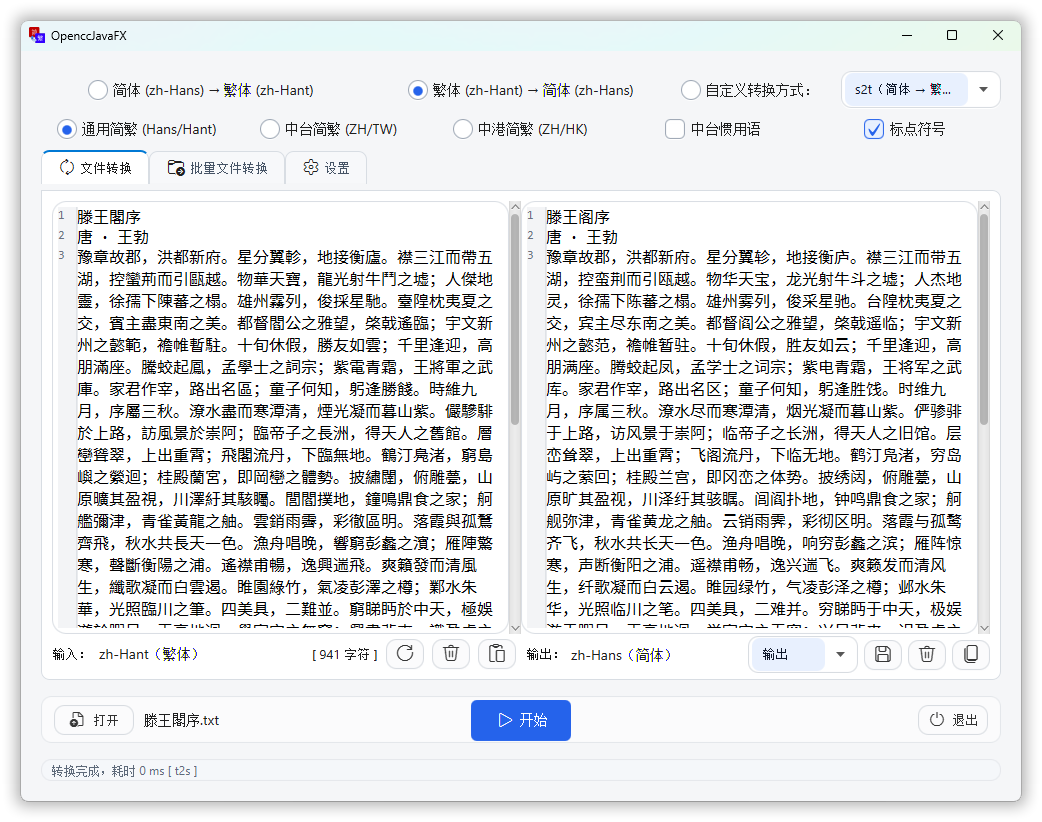
OpenccJavaFX - A Chinese text conversion application built with JavaFX,
leverages the OpenccJava library to provide simplified and traditional Chinese conversion.
- MIT License.
- © Laisuk.
- See LICENSE for details.
- See THIRD_PARTY_NOTICES.md for bundled OpenCC lexicons (Apache License 2.0).