Welcome to Windows Edge AI Development - your comprehensive guide to building intelligent applications that harness the power of on-device AI using Microsoft's Windows AI Foundry platform. This guide is specifically designed for Windows developers who want to integrate cutting-edge Edge AI capabilities into their applications while leveraging the full spectrum of Windows hardware acceleration.
Windows AI Foundry represents a unified, reliable, and secure platform that supports the complete AI developer lifecycle - from model selection and fine-tuning to optimization and deployment across CPU, GPU, NPU, and hybrid cloud architectures. This platform democratizes AI development by providing:
- Hardware Abstraction: Seamless deployment across AMD, Intel, NVIDIA, and Qualcomm silicon
- On-Device Intelligence: Privacy-preserving AI that runs entirely on local hardware
- Optimized Performance: Models pre-optimized for Windows hardware configurations
- Enterprise-Ready: Production-grade security and compliance features
Windows Machine Learning (ML) enables C#, C++, and Python developers to run ONNX AI models locally on Windows PCs via the ONNX Runtime, with automatic execution provider management for different hardware (CPUs, GPUs, NPUs). ONNX Runtime can be used with models from PyTorch, Tensorflow/Keras, TFLite, scikit-learn, and other frameworks.
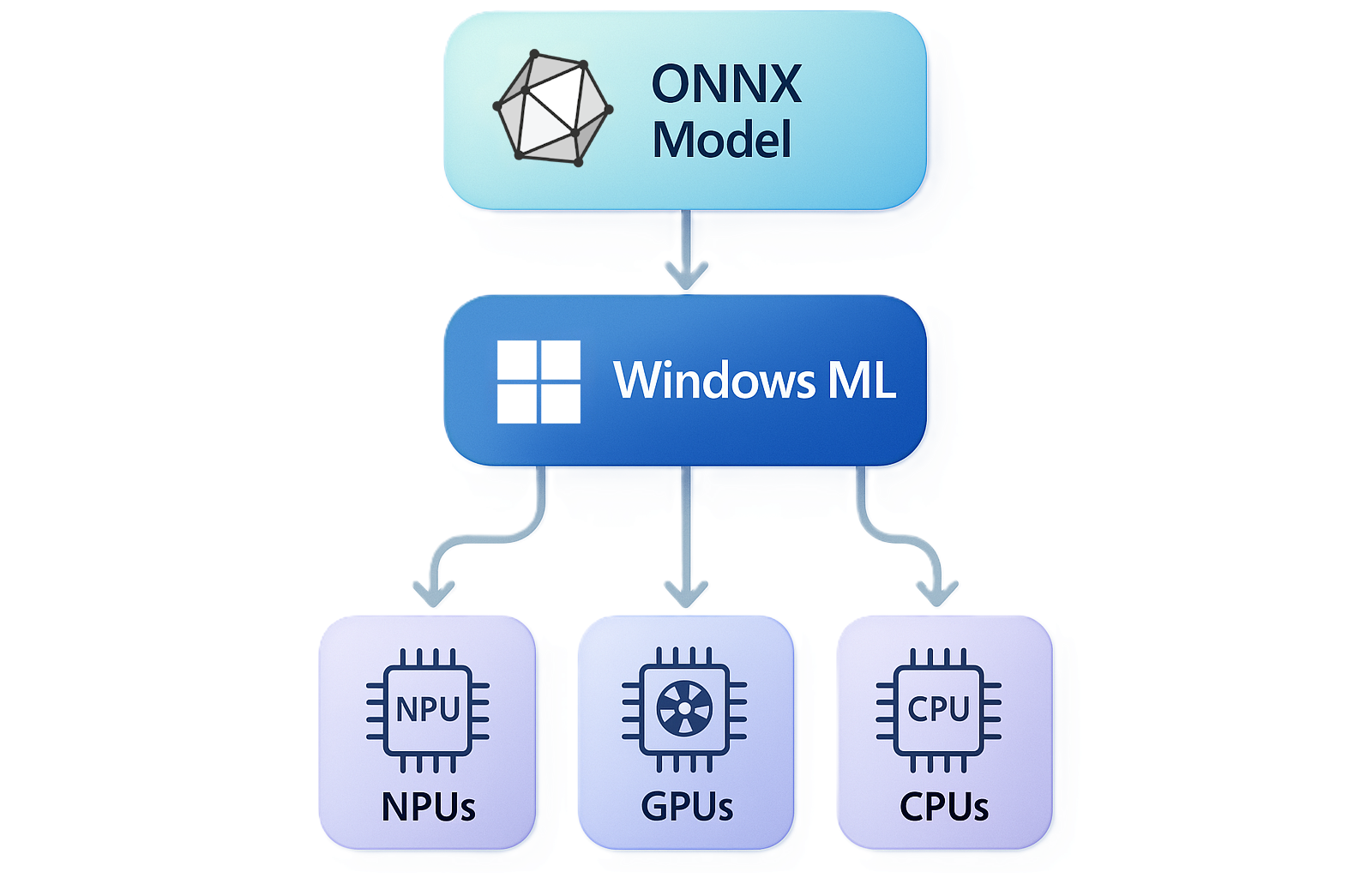
Windows ML provides a shared Windows-wide copy of the ONNX Runtime, plus the ability to dynamically download execution providers (EPs).
Universal Hardware Support Windows ML provides automatic hardware optimization across the entire Windows ecosystem, ensuring your AI applications perform optimally regardless of the underlying silicon architecture.
Integrated AI Runtime The built-in Windows ML inference engine eliminates complex setup requirements, allowing developers to focus on application logic rather than infrastructure concerns.
Copilot+ PC Optimization Purpose-built APIs designed specifically for next-generation Windows devices with dedicated Neural Processing Units (NPUs) delivering exceptional performance per watt.
Developer Ecosystem Rich tooling including Visual Studio integration, comprehensive documentation, and sample applications that accelerate development cycles.
By completing this Windows Edge AI development guide, you will master the essential skills for building production-ready AI applications on the Windows platform.
Windows AI Foundry Mastery
- Understand the architecture and components of Windows AI Foundry platform
- Navigate the complete AI development lifecycle within the Windows ecosystem
- Implement security best practices for on-device AI applications
- Optimize applications for different Windows hardware configurations
API Integration Expertise
- Master Windows AI APIs for text, vision, and multimodal applications
- Implement Phi Silica language model integration for text generation and reasoning
- Deploy computer vision capabilities using built-in image processing APIs
- Customize pre-trained models using LoRA (Low-Rank Adaptation) techniques
Foundry Local Implementation
- Browse, evaluate, and deploy open-source language models using Foundry Local CLI
- Understand model optimization and quantization for local deployment
- Implement offline AI capabilities that function without internet connectivity
- Manage model lifecycles and updates in production environments
Windows ML Deployment
- Bring custom ONNX models to Windows applications using Windows ML
- Leverage automatic hardware acceleration across CPU, GPU, and NPU architectures
- Implement real-time inference with optimal resource utilization
- Design scalable AI applications for diverse Windows device categories
Cross-Platform Windows Development
- Build AI-powered applications using .NET MAUI for universal Windows deployment
- Integrate AI capabilities into Win32, UWP, and Progressive Web Applications
- Implement responsive UI designs that adapt to AI processing states
- Handle asynchronous AI operations with proper user experience patterns
Performance Optimization
- Profile and optimize AI inference performance across different hardware configurations
- Implement efficient memory management for large language models
- Design applications that gracefully degrade based on available hardware capabilities
- Apply caching strategies for frequently used AI operations
Production Readiness
- Implement comprehensive error handling and fallback mechanisms
- Design telemetry and monitoring for AI application performance
- Apply security best practices for local AI model storage and execution
- Plan deployment strategies for enterprise and consumer applications
AI Application Architecture
- Design hybrid architectures that optimize between local and cloud AI processing
- Evaluate trade-offs between model size, accuracy, and inference speed
- Plan data flow architectures that maintain privacy while enabling intelligence
- Implement cost-effective AI solutions that scale with user demands
Market Positioning
- Understand competitive advantages of Windows-native AI applications
- Identify use cases where on-device AI provides superior user experiences
- Develop go-to-market strategies for AI-enhanced Windows applications
- Position applications to leverage Windows ecosystem benefits
The Windows App SDK provides comprehensive samples demonstrating AI integration across multiple frameworks and deployment scenarios. These samples are essential references for understanding Windows AI development patterns.
| Sample | Framework | Focus Area | Key Features |
|---|---|---|---|
| cs-winui | C# WinUI 3 | Windows AI APIs Integration | Complete WinUI app demonstrating Windows AI apis, ARM64 optimization, packaged deployment |
Key Technologies:
- Windows AI APIs
- WinUI 3 framework
- ARM64 platform optimization
- Copilot+ PC compatibility
- Packaged app deployment
Prerequisites:
- Windows 11 with Copilot+ PC recommended
- Visual Studio 2022
- ARM64 build configuration
- Windows App SDK 1.8.1+
| Sample | Type | Focus Area | Key Features |
|---|---|---|---|
| CppConsoleDesktop | Console App | Basic Windows ML | EP discovery, command-line options, model compilation |
| CppConsoleDesktop.FrameworkDependent | Console App | Framework Deployment | Shared runtime, smaller deployment footprint |
| CppConsoleDesktop.SelfContained | Console App | Self-Contained Deployment | Standalone deployment, no runtime dependencies |
| CppConsoleDll | DLL | Library Usage | WindowsML in shared library, memory management |
| CppResnetBuildDemo | Demo | ResNet Tutorial | Model conversion, EP compilation, Build 2025 tutorial |
Console Applications
| Sample | Type | Focus Area | Key Features |
|---|---|---|---|
| CSharpConsoleDesktop | Console App | Basic C# Integration | Shared helper usage, command-line interface |
| ResnetBuildDemoCS | Demo | ResNet Tutorial | Model conversion, EP compilation, Build 2025 tutorial |
GUI Applications
| Sample | Framework | Focus Area | Key Features |
|---|---|---|---|
| cs-wpf | WPF | Desktop GUI | Image classification with WPF interface |
| cs-winforms | Windows Forms | Traditional GUI | Image classification with Windows Forms |
| cs-winui | WinUI 3 | Modern GUI | Image classification with WinUI 3 interface |
| Sample | Language | Focus Area | Key Features |
|---|---|---|---|
| SqueezeNetPython | Python | Image Classification | WinML Python bindings, batch image processing |
System Requirements:
- Windows 11 PC running version 24H2 (build 26100) or greater
- Visual Studio 2022 with C++ and .NET workloads
- Windows App SDK 1.8.1 or later
- Python 3.10-3.13 for Python samples on x64 and ARM64 devices
Windows AI Foundry Specific:
- Copilot+ PC recommended for optimal performance
- ARM64 build configuration for Windows AI samples
- Package identity required (unpackaged apps no longer supported)
Most Windows ML samples follow this standard pattern:
- Initialize Environment - Create ONNX Runtime environment
- Register Execution Providers - Discover and register available hardware accelerators (CPU, GPU, NPU)
- Load Model - Load ONNX model, optionally compile for target hardware
- Preprocess Input - Convert images/data to model input format
- Run Inference - Execute model and get predictions
- Process Results - Apply softmax and display top predictions
| Model | Purpose | Included | Notes |
|---|---|---|---|
| SqueezeNet | Lightweight image classification | ✅ Included | Pre-trained, ready to use |
| ResNet-50 | High-accuracy image classification | ❌ Requires conversion | Use AI Toolkit for conversion |
All samples automatically detect and utilize available hardware:
- CPU - Universal support across all Windows devices
- GPU - Automatic detection and optimization for available graphics hardware
- NPU - Leverages Neural Processing Units on supported devices (Copilot+ PCs)
Windows AI APIs provide ready-to-use AI capabilities powered by on-device models, optimized for efficiency and performance on Copilot+ PC devices with minimal setup required.
Phi Silica Language Model
- Small yet powerful language model for text generation and reasoning
- Optimized for real-time inference with minimal power consumption
- Support for custom fine-tuning using LoRA techniques
- Integration with Windows semantic search and knowledge retrieval
Computer Vision APIs
- Text Recognition (OCR): Extract text from images with high accuracy
- Image Super Resolution: Upscale images using local AI models
- Image Segmentation: Identify and isolate specific objects in images
- Image Description: Generate detailed text descriptions for visual content
- Object Erase: Remove unwanted objects from images with AI-powered inpainting
Multimodal Capabilities
- Vision-Language Integration: Combine text and image understanding
- Semantic Search: Enable natural language queries across multimedia content
- Knowledge Retrieval: Build intelligent search experiences with local data
Foundry Local provides developers with quick access to ready-to-use open-source language models on Windows Silicon, offering the ability to browse, test, interact, and deploy models in local applications.
The Foundry Local repository provides comprehensive samples across multiple programming languages and frameworks, demonstrating various integration patterns and use cases.
| Sample | Language/Framework | Focus Area | Key Features |
|---|---|---|---|
| dotNET/rag | C# / .NET | RAG Implementation | Semantic Kernel integration, Qdrant vector store, JINA embeddings, document ingestion, streaming chat |
| electron/foundry-chat | JavaScript / Electron | Desktop Chat App | Cross-platform chat, local/cloud model switching, OpenAI SDK integration, real-time streaming |
| js/hello-foundry-local | JavaScript / Node.js | Basic Integration | Simple SDK usage, model initialization, basic chat functionality |
| python/hello-foundry-local | Python | Basic Integration | Python SDK usage, streaming responses, OpenAI-compatible API |
| rust/hello-foundry-local | Rust | Systems Integration | Low-level SDK usage, async operations, reqwest HTTP client |
RAG (Retrieval-Augmented Generation)
- dotNET/rag: Complete RAG implementation using Semantic Kernel, Qdrant vector database, and JINA embeddings
- Architecture: Document ingestion → Text chunking → Vector embeddings → Similarity search → Context-aware responses
- Technologies: Microsoft.SemanticKernel, Qdrant.Client, BERT ONNX embeddings, streaming chat completion
Desktop Applications
- electron/foundry-chat: Production-ready chat application with local/cloud model switching
- Features: Model selector, streaming responses, error handling, cross-platform deployment
- Architecture: Electron main process, IPC communication, secure preload scripts
SDK Integration Examples
- JavaScript (Node.js): Basic model interaction and streaming responses
- Python: OpenAI-compatible API usage with async streaming
- Rust: Low-level integration with reqwest and tokio for async operations
System Requirements:
- Windows 11 with Foundry Local installed
- Node.js v16+ for JavaScript/Electron samples
- .NET 8.0+ for C# samples
- Python 3.10+ for Python samples
- Rust 1.70+ for Rust samples
Installation:
# Install Foundry Local
winget install Microsoft.FoundryLocal

# Verify installation
foundry --version
foundry model listdotNET RAG Sample:
# Install required packages via NuGet
# Microsoft.SemanticKernel.Connectors.Onnx
# Microsoft.SemanticKernel.Connectors.Qdrant
# Qdrant.Client

# Start Qdrant vector database
docker run -p 6333:6333 qdrant/qdrant

# Run Jupyter notebook
jupyter notebook rag_foundrylocal_demo.ipynb
Electron Chat Sample:
# Set environment variables for cloud fallback
$env:YOUR_API_KEY="your-cloud-api-key"
$env:YOUR_ENDPOINT="your-cloud-endpoint"
$env:YOUR_MODEL_NAME="your-cloud-model"

# Install dependencies and run
npm install
npm start
JavaScript/Python/Rust Samples:
# Download model (example with phi-3.5-mini)
foundry model run phi-3.5-mini

# Run respective sample
node src/app.js          # JavaScript
python src/app.py        # Python
cargo run # RustModel Catalog
- Comprehensive collection of pre-optimized open-source models
- Models optimized across CPUs, GPUs, and NPUs for immediate deployment
- Support for popular model families including Llama, Mistral, Phi, and specialized domain models
CLI Integration
- Command-line interface for model management and deployment
- Automated optimization and quantization workflows
- Integration with popular development environments and CI/CD pipelines
Local Deployment
- Complete offline operation without cloud dependencies
- Support for custom model formats and configurations
- Efficient model serving with automatic hardware optimization
Windows ML serves as the core AI platform and integrated inferencing runtime on Windows, allowing developers to deploy custom models efficiently across the broad Windows hardware ecosystem.
Universal Hardware Support
- Automatic optimization for AMD, Intel, NVIDIA, and Qualcomm silicon
- Support for CPU, GPU, and NPU execution with transparent switching
- Hardware abstraction that eliminates platform-specific optimization work
Model Flexibility
- Support for ONNX model format with automatic conversion from popular frameworks
- Custom model deployment with production-grade performance
- Integration with existing Windows application architectures
Enterprise Integration
- Compatible with Windows security and compliance frameworks
- Support for enterprise deployment and management tools
- Integration with Windows device management and monitoring systems
Development Environment Preparation
- Install Visual Studio 2022 with C++ and .NET workloads
- Install Windows App SDK 1.8.1 or later
- Configure Windows AI Foundry CLI tools
- Set up AI Toolkit extension for Visual Studio Code
- Establish performance profiling and monitoring tools
- Ensure ARM64 build configuration for Copilot+ PC optimization
Sample Repository Setup
- Clone the Windows App SDK Samples repository
- Navigate to
Samples/WindowsAIFoundry/cs-winuifor Windows AI API examples - Navigate to
Samples/WindowsMLfor comprehensive Windows ML examples - Review the build requirements for your target platforms
AI Dev Gallery Exploration
- Explore sample applications and reference implementations
- Test Windows AI APIs with interactive demonstrations
- Review source code for best practices and patterns
- Identify relevant samples for your specific use case
Requirements Analysis
- Define functional requirements for AI capabilities
- Establish performance constraints and optimization targets
- Evaluate privacy and security requirements
- Plan deployment architecture and scaling strategies
Model Evaluation
- Use Foundry Local to test open-source models for your use case
- Benchmark Windows AI APIs against custom model requirements
- Evaluate trade-offs between model size, accuracy, and inference speed
- Prototype integration approaches with selected models
Core Integration
- Implement Windows AI API integration with proper error handling
- Design user interfaces that accommodate AI processing workflows
- Implement caching and optimization strategies for model inference
- Add telemetry and monitoring for AI operation performance
Testing and Validation
- Test applications across different Windows hardware configurations
- Validate performance metrics under various load conditions
- Implement automated testing for AI functionality reliability
- Conduct user experience testing with AI-enhanced features
Performance Optimization
- Profile application performance across target hardware configurations
- Optimize memory usage and model loading strategies
- Implement adaptive behavior based on available hardware capabilities
- Fine-tune user experience for different performance scenarios
Production Deployment
- Package applications with proper AI model dependencies
- Implement update mechanisms for models and application logic
- Configure monitoring and analytics for production environments
- Plan rollout strategies for enterprise and consumer deployments
Build a Windows application that processes documents using multiple AI capabilities:
Technologies Used:
- Phi Silica for document summarization and question answering
- OCR APIs for text extraction from scanned documents
- Image Description APIs for chart and diagram analysis
- Custom ONNX models for document classification
Implementation Approach:
- Design modular architecture with pluggable AI components
- Implement async processing for large document batches
- Add progress indicators and cancellation support for long-running operations
- Include offline capability for sensitive document processing
Create an AI-powered inventory system for retail applications:
Technologies Used:
- Image Segmentation for product identification
- Custom vision models for brand and category classification
- Foundry Local deployment of specialized retail language models
- Integration with existing POS and inventory systems
Implementation Approach:
- Build camera integration for real-time product scanning
- Implement barcode and visual product recognition
- Add natural language inventory queries using local language models
- Design scalable architecture for multi-store deployment
Develop a privacy-preserving healthcare documentation tool:
Technologies Used:
- Phi Silica for medical note generation and clinical decision support
- OCR for digitizing handwritten medical records
- Custom medical language models deployed via Windows ML
- Local vector storage for medical knowledge retrieval
Implementation Approach:
- Ensure complete offline operation for patient privacy
- Implement medical terminology validation and suggestion
- Add audit logging for regulatory compliance
- Design integration with existing Electronic Health Record systems
NPU Optimization
- Design applications to leverage NPU capabilities on Copilot+ PCs
- Implement graceful fallback to GPU/CPU on devices without NPU
- Optimize model formats for NPU-specific acceleration
- Monitor NPU utilization and thermal characteristics
Memory Management
- Implement efficient model loading and caching strategies
- Use memory mapping for large models to reduce startup time
- Design memory-conscious applications for resource-constrained devices
- Implement model quantization for memory optimization
Battery Efficiency
- Optimize AI operations for minimal power consumption
- Implement adaptive processing based on battery status
- Design efficient background processing for continuous AI operations
- Use power profiling tools to optimize energy usage
Multi-Threading
- Design thread-safe AI operations for concurrent processing
- Implement efficient work distribution across available cores
- Use async/await patterns for non-blocking AI operations
- Plan thread pool optimization for different hardware configurations
Caching Strategies
- Implement intelligent caching for frequently used AI operations
- Design cache invalidation strategies for model updates
- Use persistent caching for expensive preprocessing operations
- Implement distributed caching for multi-user scenarios
Local Processing
- Ensure sensitive data never leaves the local device
- Implement secure storage for AI models and temporary data
- Use Windows security features for application sandboxing
- Apply encryption for stored models and intermediate processing results
Model Security
- Validate model integrity before loading and execution
- Implement secure model update mechanisms
- Use signed models to prevent tampering
- Apply access controls for model files and configuration
Regulatory Alignment
- Design applications to meet GDPR, HIPAA, and other regulatory requirements
- Implement audit logging for AI decision-making processes
- Provide transparency features for AI-generated results
- Enable user control over AI data processing
Enterprise Security
- Integrate with Windows enterprise security policies
- Support managed deployment through enterprise management tools
- Implement role-based access controls for AI features
- Provide administrative controls for AI functionality
Build Configuration Issues
- Ensure ARM64 platform configuration for Windows AI API samples
- Verify Windows App SDK version compatibility (1.8.1+ required)
- Check that package identity is properly configured (required for Windows AI APIs)
- Validate that build tools support the target framework version
Model Loading Issues
- Validate ONNX model compatibility with Windows ML
- Check model file integrity and format requirements
- Verify hardware capability requirements for specific models
- Debug memory allocation issues during model loading
- Ensure execution provider registration for hardware acceleration
Deployment Mode Considerations
- Self-Contained Mode: Fully supported with larger deployment size
- Framework-Dependent Mode: Smaller footprint but requires shared runtime
- Unpackaged Applications: No longer supported for Windows AI APIs
- Use
dotnet run -p:Platform=ARM64 -p:SelfContained=truefor self-contained ARM64 deployment
Performance Problems
- Profile application performance across different hardware configurations
- Identify bottlenecks in AI processing pipelines
- Optimize data preprocessing and postprocessing operations
- Implement performance monitoring and alerting
Integration Difficulties
- Debug API integration issues with proper error handling
- Validate input data formats and preprocessing requirements
- Test edge cases and error conditions thoroughly
- Implement comprehensive logging for debugging production issues
Visual Studio Integration
- Use AI Toolkit debugger for model execution analysis
- Implement performance profiling for AI operations
- Debug async AI operations with proper exception handling
- Use memory profiling tools for optimization
Windows AI Foundry Tools
- Leverage Foundry Local CLI for model testing and validation
- Use Windows AI API testing tools for integration verification
- Implement custom logging for AI operation monitoring
- Create automated testing for AI functionality reliability
Next-Generation Hardware
- Design applications to leverage future NPU capabilities
- Plan for increased model sizes and complexity
- Implement adaptive architectures for evolving hardware
- Consider quantum-ready algorithms for future compatibility
Advanced AI Capabilities
- Prepare for multimodal AI integration across more data types
- Plan for real-time collaborative AI between multiple devices
- Design for federated learning capabilities
- Consider edge-cloud hybrid intelligence architectures
Model Updates
- Implement seamless model update mechanisms
- Design applications to adapt to improved model capabilities
- Plan for backward compatibility with existing models
- Implement A/B testing for model performance evaluation
Feature Evolution
- Design modular architectures that accommodate new AI capabilities
- Plan for integration of emerging Windows AI APIs
- Implement feature flags for gradual capability rollout
- Design user interfaces that adapt to enhanced AI features
Windows Edge AI development represents the convergence of powerful AI capabilities with the robust, secure, and scalable Windows platform. By mastering the Windows AI Foundry ecosystem, developers can create intelligent applications that provide exceptional user experiences while maintaining the highest standards of privacy, security, and performance.
The combination of Windows AI APIs, Foundry Local, and Windows ML provides an unparalleled foundation for building the next generation of intelligent Windows applications. As AI continues to evolve, the Windows platform ensures that your applications will scale with emerging technologies while maintaining compatibility and performance across the diverse Windows hardware ecosystem.
Whether you're building consumer applications, enterprise solutions, or specialized industry tools, Windows Edge AI development empowers you to create intelligent, responsive, and deeply integrated experiences that leverage the full potential of modern Windows devices.
- Windows AI Foundry Documentation
- Windows AI APIs Reference
- Get started building an app with Windows AI APIs
- Foundry Local Getting Started
- Windows ML Overview
- Windows App SDK System Requirements
- Windows App SDK Development Environment Setup
- Windows App SDK Samples - Windows AI Foundry
- Windows App SDK Samples - Windows ML
- ONNX Runtime Inference Examples
- Windows App SDK Samples Repository
- Windows ML Documentation
- ONNX Runtime Documentation
- Windows App SDK Documentation
- Report Issues - Windows App SDK Samples
This guide is designed to evolve with the rapidly advancing Windows AI ecosystem. Regular updates ensure alignment with the latest platform capabilities and development best practices.
08. Hands on With Microsoft Foundry Local - Complete Developer Toolkit