Oliver Gaskell [Cand. No]
A-Level Computer Science NEA - OCR
Ashton Sixth Form College [33507]
See top left of file for TOC
https://github.com/ogaskell/autonoPi
I will be using Git and GitHub to track my progress throughout the project, as well as managing individual features through it’s branching feature. See
Version Control for more detail.
I will be using Trello to manage features and implement the Kanban methodology. See
Development Methodology for more detail.
- CV
Computer Vision - Techniques which use analysis of image/video data to gain information about the system’s environment. - OOP
Object Oriented Programming is a Programming Paradigm which separates methods and properties into objects.
The goal of this project is to develop a robust, extensible autonomous driving system for a Raspberry Pi SBC. It should be able to navigate a simple “road” system, interpret signs, avoid collisions and be able to navigate an environment. It should provide a platform for other products/projects to be built on which add functionality to turn this into a fully-fledged solution.
Autonomous systems such as this have many applications already – according to Allied Market Research the market for autonomous vehicles is expected to grow over 1000% by 2026, from around $50 Bn to over $500 Bn. These types of systems find applications in cars - as in Tesla’s self-driving tech, which is clearly in high demand from Tesla’s market dominance, in warehouses where more tasks are being performed by autonomous robots and systems, in homes with devices like Roombas, and many other places.
I believe this project can provide a very strong foundation for developing a system such as these, by making the project modular and extensible it can easily be adapted to a range of solutions.
Autonomous vehicles have many advantages over human-operated vehicles - on the road they’re safer, in commercial applications they are cheaper to operate, can work 24/7 and are more efficient, in homes they can perform repetitive tasks quickly and easily such as vacuum cleaning, and much more.
My project is aimed at people wanting to develop a system based on my project, leveraging a ready-built autonomous system. This can be quite a complex thing to build and may be out of a person/companies scope, budget or expertise and this could expedite the development process. With significant
documentation and support, someone with little knowledge of the technology could develop my system into a final project which builds upon what I have built to create a complete product/solution.
The system should be able to connect to hardware and control itself to navigate a system of roads. This will include:
- Computer Vision techniques which can identify objects, markers etc. from the surroundings using a webcam or similar device,
- Classification of objects such as people, signs, markings etc. and extraction of useful information from these classifications,
- Lane following to navigate a rudimentary road system, using markings detected using Computer Vision and Classification,
- Basic Navigation between nodes, such as rooms and POIs using pathfinding algorithms,
- The ability to use a range of hardware, such as traditional car-style driving, differential steering, and potentially air and water vehicles,
- The ability to easily extract data from the system at any point in the process so it can be hooked into external programs, giving a strong foundation for developing other projects on top of this.
- My system, according to my design, will not be built for any specific purpose or application, rather is a platform on which a complete, specific solution can be built. This means it cannot perform a specific task without extra work to integrate this into the existing code as well as the addition of any necessary hardware.
- Also, since the system is built on a Raspberry Pi, computing power is fairly limited. This means any complex/intensive calculations will need to be offloaded via the network or other means to another system/computer.
Line following robot with OpenCV and contour-based approach
PiTanq is a robot developed in Python using OpenCV – the same software I plan to use. It uses OpenCV’s Hough Line Transform to detect a white line along the floor, which it can then follow.
This is a very similar approach to what I plan to use – an algorithm which can detect lines right in front of the vehicle, calculate their position/angle and use this to direct the vehicle accordingly. PiTanq seems to perform this task very reliably, and surprisingly performance seems to not be an issue, despite running on a relatively underpowered Raspberry Pi Zero.
The performance seems to be due to the fact that the Computer Vision isn’t actually running on the Raspberry Pi itself. It runs a REST API which allows the heavy computation for Computer Vision to be offloaded to a nearby computer. While this does have the disadvantage of making the vehicle require a network connection and another computer to make it function, it allows much more complex processing to be done on the images, since the Raspberry Pi cannot run complex AI, ML or CV algorithms.
However PiTanq has a few disadvantages which I will need to improve on greatly if I want to achieve my goals for this project. Firstly, it can only follow a single line. It has no navigational skills or decision making, which is a core component of my project as I hope it can be a completely autonomous solution for not only moving around a space, but actually navigating.
Secondly, it has no degree of user control. It simply follows a line without accepting any input, whereas I would like my project to be able to be commanded by a user, e.g. to start, stop, navigate etc.
Finally, the CV on the PiTanq is limited to detecting a single line. I would like to be able to detect multiple lines, potentially of different colours, as well as Signs and objects in the surroundings. This will maximise the data available to the navigation algorithms, allowing for more robust navigation systems, as well as providing more data for any programs developed on top of my platform.
I plan to use a Hough Line transform for my navigation, however I may modify it to work on multiple colours instead of just a white line. It also seems to have a very robust method for following these lines, and I think more research into the source code of the PiTanq could be very useful.
The approach of moving the ML/CV to another PC could also be very effective, since my vehicle will also be running a Raspberry Pi (which has integrated WiFi, making connection easy).
DeepPiCar — How to Build a Deep Learning, Self Driving Robotic Car on a Shoestring Budget
DeepPiCar uses a much more in-depth approach to navigation than the PiTanq, incorporating many more of the features I plan to add to my project. It uses lane detection algorithms combined with Object Classification for obstacles/signs for navigation.
DeepPiCar’s lane following seems to be a much better system than a simple single line follower. It allows the definition of the boundaries of where the vehicle can go, as well as making defining multiple lanes much easier. Also, from the videos of the vehicle it seems much smoother than PiTanq’s single line, while being just as robust.
Secondly, the sign detection would be a very useful feature to have. It would allow the car to make decisions about its current location, speed, and even avoid obstacles such as people and other vehicles.
While running on a Raspberry Pi, DeepPiCar makes use of a Coral USB Accelerator which allows greatly improved CV/ML performance while still using little power and being portable. However, these cost upwards of £50 so would not be viable for this project. The object detection approach in this project requires this high performance provided by the accelerator so some optimisation or alternative approaches may be required for my own project.
The lane following method used here is much more advanced than the PiTanq’s, and it seems it would be much easier to make into a more complex algorithm which includes decision making and anything else that may need to be added. The sign detection is a good system too, and is very similar to the system I had already planned to implement, so some research into the source code of this may be useful to get an idea of how OpenCV handles this.
For my success criteria, I will be splitting features into 3 categories:
- Essential Features – these are features that are essential to the function of the system. I will work on these first, and if all of these are complete the project should have met most of its goals set out in the Features section above.
- Useful Features – these are features that are not essential to the function of the system, but provide enhancements which will increase the value of the project. These aren’t as high priority as essential features, and I will work on these once the essential features are at least mostly complete.
- Extra Features – these are features that, while providing little to the value of the project, will be enjoyable to add. I will use these as stretch goals and will be added once all the essential and useful features are complete. I will still consider the project complete if none of these are added.
I will also sort them by which “area” of the program they fall into:
- Hardware Interface- code which allows other parts of the program to interface with some hardware aspect of the platform, whether this be inputs, outputs, or even other devices/networks. These should use standard functions/attributes in order to allow them to be changed for an alternative, for example to use a different type of driving system.
- Computer Vision - code which takes photo/video and extracts useful data from it about the surroundings. This will mainly be interfacing with OpenCV and writing algorithms based around the techniques it provides.
- Navigation - code which allows the system to navigate, by taking data about the vehicle’s current location and environment and outputting a path to follow.
- Management - code which manages all other areas, by linking them together and managing what data is passed to each function. This will be the main code that runs when the system powers on and will invoke other functions, subroutines and classes.
I will place these in an order which I believe would be a logical order in which to implement features, however as the project changes throughout development this order may change.
Every feature listed here will be given a separate card on my Trello board (see Development Methodology).
| No. | Category | Area | Feature Name/Description | Criteria/Justification and Testing Methods | Status |
| 1 | Essential | Hardware Interface | Basic Movement API
A basic API for movement with 4 wheels, with basic car-like steering. Other parts of the program should be able to interface with this. |
A short test program will be written which interfaces with this API, which will demonstrate basic forward, backward and turning movements. The tests should run successfully and the vehicle should complete the appropriate movements. | Not Started |
| 2 | Essential | Management | Basic Management System
This will be the code that runs when the system powers on, allowing it to invoke and manage other areas of the program. This is vital as the other areas are useless without it. |
When run, this program should be able to interface with other parts of the system and should have a self-test system to check other parts of the program at startup. This may include checking hardware, running other component’s self-tests, etc. | Not Started |
| 3 | Essential | Computer Vision | Basic Line/Lane Following
The system should be capable of following a line or lane drawn on the ground, whether this is using dedicated sensors or Computer Vision techniques. |
A small test track should be set up which tests the system’s ability to follow a line/lane. The system should combine with the movement API to navigate the vehicle around the circuit successfully. | Not Started |
| 4 | Essential | Computer Vision | Navigation Sign/Code Detection
The system should detect any codes/signs placed for the purpose of being used by the system for navigation. This may include text signs, QR Codes, or other similar signs. |
A series of signs should be created and programmed into the system for testing. When the system detects one of these testing signs, it should be logged so it can be checked that it has been detected. The system may also alert the user visually or audibly. | Not Started |
| 5 | Essential | Navigation | Simple Navigation
The system should make use of the signs mentioned in the previous Feature to navigate an environment. This will include making decisions such as which line to follow from a set of options to reach a destination. |
A test environment will be set up with a few junctions, and various start/finish points. The system should be able to navigate from one point to another after being instructed on which point to navigate to. | Not Started |
| 6 | Essential | Management | Simple Web Interface
A web interface in which the user can control the basic functions of the vehicle would be invaluable, as this would make it much easier to remotely set destination, speeds, etc as well as debug any issues remotely from any device. A basic version of this should include the ability to set destination, view current location, and update the navigation data. |
It should be possible to connect to the robot from any device on the same network and control the functions listed in the Feature Description. | Not Started |
I will be using a Raspberry Pi 4, coupled with a CamJam Edukit 3 to provide motors, a webcam and various sensors, and a battery pack to provide power. It will be built into a 3D Printed chassis which should provide mounting points for all the necessary hardware, as well as having sufficient space to add any extra hardware for developing it into a full solution, as mentioned in my introduction.
I may also build additional chassis to test any alternative movement APIs I may implement.
The system will/may make use of the following sensors:
- Camera/Webcam
A camera/webcam will be invaluable in providing data on the vehicle’s surroundings, such as navigation, signs, obstacles etc. This will be used with CV techniques to provide the system with a detailed set of information about its environment. - Ultrasonic Distance Sensors
These sensors will provide a backup to the camera for collision avoidance, since they are fairly reliable for detecting obstacles in a vehicle's path, and are relatively inexpensive. It also allows for collision detection on all sides of the vehicle, in potential camera blind spots, provided enough sensors are installed. - Line Followers
These sensors may be used in addition to or instead of CV-based line/lane detection techniques, either as a backup or as a less computationally expensive approach. However these are not as capable as a CV-based approach since they cannot detect colour, or predict upcoming turns which may result in less smooth operation or lower reliability. - Infrared Receivers
An IR receiver could be used to receive commands from a remote or other Microcontroller/SBC to allow for manual control of the vehicle. While I plan to implement a Web Interface for control, this would be useful as a backup or to aid in connection of the Web Interface. - Compass
The compass will be used to aid navigation, by ensuring the pi is travelling in the right direction. This will be used when navigating to ensure the vehicle takes the right path at a junction or node. This may be used in place of or in addition to using Computer Vision to determine the correct direction. - Onboard Buttons
Buttons on the vehicle can be used as a backup for controlling the vehicle in the event that other control surfaces fail, such as the IR receiver and Web Interface. This may include an emergency stop, debugging controls etc. - Battery Sensors
Battery Sensors will be used to check that the Vehicle has sufficient charge, and to facilitate a safe shutdown in the event that it runs out of charge. The battery level can then also be displayed on the web interface and potentially with hardware LEDs.
I plan to use Python 3 to develop the software on, making use of libraries such as OpenCV for the Computer Vision processes necessary for autonomy. I will likely develop the code using the Atom IDE, since I have experience using it and it provides all the features I plan to use (Code Completion, Version Control, etc.)
The main software should make heavy use of OOP, as this will allow me to achieve my goal of making the system modular and extensible, by making it easy to modify small parts of the code and simply enable, disable or tweak various systems. This will also make testing the system much easier and individual parts of the program can easily be isolated and tested.
I will be using Git and GitHub for Version Control on this project. This allows me to easily see what changes have been made over the course of the project, as well as rolling back any breaking changes. Also, I plan to make use of git’s branching feature to separate various features from the main codebase, so I can work on multiple changes in parallel if necessary without one affecting the other.
I plan on using the Kanban process while developing my project. The use of a Kanban board allows me to easily keep track of the various features my project will involve, as I feel without one I could easily become overwhelmed by the large amount of components the system will have. I will be using Trello, as this allows me to access the board anywhere, if I am working on my project at home, at college or elsewhere.
As well as using the Kanban Board, I will assign every feature on the board a GitHub branch. This means as the feature passes through development, at any time I can switch to a different branch and work on another feature if I feel this is necessary.
I plan to make use of an OOP Paradigm on this project. This means features can be separated out so they are easy to maintain, test, implement and extend.
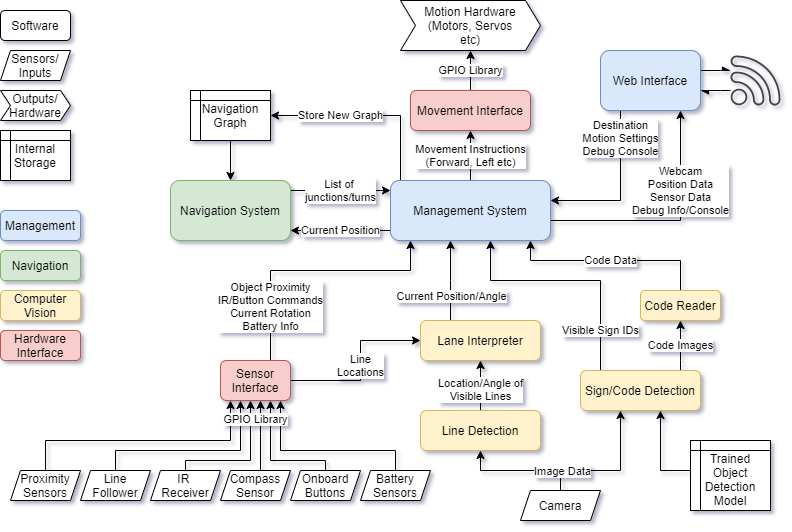 This modular approach to the system will make it easy to change, replace, debug or enable/disable any component of the whole system. This should also make development much easier as I can make one component work and test it without relying on the rest of the program, which will be particularly useful early on before I have developed many features.
Using a central management system allows each component to do exactly what it needs to and nothing more. They can output only the data they need to, and the management system will collate all the necessary inputs and compile and decode them, and make the necessary decisions to control any interfaces.
The entire system will take the form of a Python Package, with the management system as the interface to most of the system’s functionality. To use the system, an end user will write an implementation in Python by first importing the package and implementing the management systems basic functions and configuring how the system will interact.
This will allow me to achieve my goal of making the system extremely versatile and adaptable, as it can easily be configured and set up by an end user in a variety of ways. Example programs will also be provided which can also be built on top of to get up and running quickly if the use case is similar to the example cases.
The management system will start multiple threads for each part of the system, and store the results from these in a central location which the other threads can access. It should also monitor each thread, so if any thread crashes the whole program will halt. For example, this will prevent the car from just carrying on driving in a single path if the lane detection stops, and will allow a safe shutdown of the program and storing of error logs. However all of these processes will be configurable in the end user’s program, so for example the user could create a custom procedure for when the vehicle encounters an object.
The Web Interface will use a web server based on Flask. This is a lightweight framework that will allow me to easily integrate a web server into the system without large overheads that other frameworks may introduce, e.g. Django. The server will run on Port 80, so other devices on the same network can easily access it using the Pi’s Hostname.
Since Computer Vision will probably be one of the hardest things in the system to develop, I have divided this up into as many components as possible. This will allow me to ensure every component is working correctly before moving onto another, and will make developing it much more manageable. It also means it would be much easier to change out features or add more, since it is so modular, and is very logically divided up.
This block will detect lines from the webcam image which may be lane markers/indicators. It should also interpret colour. It will then extract info from these such as position in the photo, angle etc. and send this data to the Lane Interpreter block.
It will first convert the image to HSV - this means that I can easily detect areas of a single colour even if lighting changes, since the Hue will be mostly constant. For example - I can then easily detect a blue line using a hue of 240°.
Then, the image will be masked to isolate areas of the colour I want and cropped to areas that are relevant to line detection - mainly the bottom half of the image. This will produce a black+white image, with lines I need to detect in white.
A Canny edge detector will then be applied to extract the edges of the lines, and a Hough line transform will extract the position and angle of these lines from the image.
This should produce a list of lines, with their position and angle. This data can then be sent to the Lane Interpreter algorithm.
The Lane Interpreter should take a list of detected lines and their colours from the Line Detection algorithm, and extract where lanes are from this data.
This will be done by classifying lines by their gradient. Since there should only be 2 lines for the lanes, the camera perspective should mean that the left line has a positive gradient and the right line should have a negative gradient. Also, the lines should all be fairly close together. A third central line may also be detected for junctions and such, by a gradient close to vertical, and a separate colour so it can always be differentiated.
Once these have been detected, the algorithm will decide whether the vehicle needs to steer left, right or stay straight. This will be calculated by comparing the average gradient of the two lines. If it is positive, the vehicle should steer right. If it is negative, steer left. If it is within a tolerance range close to 0, it should stay straight.
This steering data will then be passed on to the management system, where it can inform decisions on steering data passed to the movement interface, where other factors such as speed will be taken into account.
This will use the YOLOv3 object detection algorithm to detect objects in a video. I will train the model with custom data so it can recognise any signs I use. This will include:
- Stop Signs
- Traffic Lights (in various states)
- Navigation Signs (which will then be passed to the code reader)
- People/Pets
- Objects Blocking the Path
Every sign that the algorithm can detect will be assigned a numeric ID, which will then be passed to the management system where it can inform other decisions.
This object detection will likely run at a very low framerate, due to the raspberry pi’s limited computational power. Also, manually limiting the framerate will conserve battery life, reduce heat output and ensure that enough CPU cycles are available to the other components of the system.
I will use OpenCV’s built in QR Code Detector to scan any codes which provide navigational data.
This will include signs which inform the vehicle of its current location as well as new navigation graphs. The QRs will store Python Pickle representations of a dictionary, so when they are read the program can easily extract their information.
The dictionary will have a “type” field which denotes which data it stores. If it stores a navigation graph, the graph will be stored in the database. If it is a location marker, the navigation system’s current location will be updated.
The navigation system will be based on the A* Pathfinding algorithm, and a map of nodes representing junctions in my “road” network. The A* algorithm will calculate the path to a given goal before the vehicle begins travelling, then once it is calculated it will provide the route data to the management engine which can then provide data to the necessary components in order to navigate the vehicle.
It will also cross check the codes present at any junctions to the expected node on the navigation map to ensure the right path is being followed. If an incorrect node is encountered, this data will be sent to the navigation system which will recalculate the path to the destination node from the current node. This should make the system very robust as any incorrect turns will not cause problems other than potentially increasing journey time.
The sensor interface will be a set of procedures, classes etc which will allow easy access to data from various sensors that can be connected to the Pi. This means that any access to the GPIO can be consolidated into a single module and everything else can use a single consistent interface, that is free of typical boilerplate code that is often required with GPIO access. This also means that a sensor can be changed out for another and the code only needs to be updated in a single place rather than everywhere that that sensor is used.
The full list of sensors used is available in the Hardware section.