



RL-Insight provides performance insight capabilities for RL training frameworks. It defines a general pipeline for performance insights. A series of capabilities will be built based on this framework. With a well-defined data protocol, these capabilities can generalize across training frameworks.
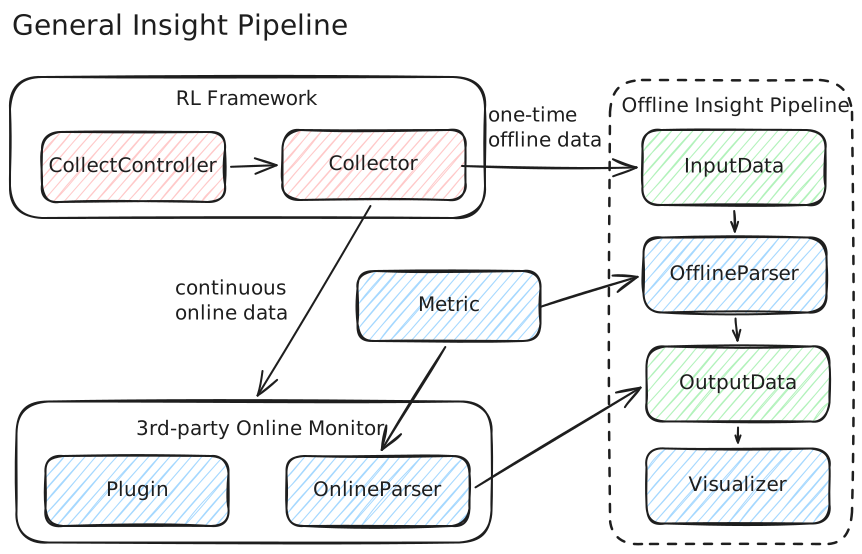
Offline Analysis
- Timeline visualization — interactive HTML Gantt charts for per-rank event timelines across RL training phases, with parallel multi-rank parsing for MSTX, Torch Profiler, and NVTX data sources. PNG export also supported.
- MoE Expert Load Heatmap — GMM-clustered heatmaps to visualize expert load distribution in Mixture-of-Experts models, helping identify load imbalance across experts and layers.
Online Monitoring (Experimental)
- Real-time observability stack based on Prometheus + Tempo + Grafana
- Training-side Python APIs: counter, gauge, histogram metrics plus distributed tracing (
trace_state,trace_op)
Python >= 3.10 required.
pip install rl-insightFor the latest unreleased features, install from source:
git clone https://github.com/verl-project/rl-insight.git
cd rl-insight
pip install -r requirements.txt
pip install -e .Parse MSTX, Torch Profiler, or NVTX data and generate an interactive HTML timeline:
# MSTX
python -m rl_insight.main \
    input.path=<profiling_data_path> \
    timeline.parser.type=mstx \
    output.path=<output_path>

# Torch Profiler
python -m rl_insight.main \
    input.path=<torch_data_path> \
    timeline.parser.type=torch \
    output.path=<output_path>

# NVTX
python -m rl_insight.main \
    input.path=<nvtx_data_path> \
    timeline.parser.type=nvtx \
    output.path=<output_path>
Switch visualizer type for PNG output:
timeline.visualizer.type=html    # interactive timeline (default)
timeline.visualizer.type=png     # static PNG export
Convenience scripts are available in examples/:
bash examples/mstx_exec.sh
bash examples/torch_profiler_exec.sh
bash examples/nvtx_exec.shVisualize expert load distribution in Mixture-of-Experts models:
bash examples/gmm_exec.shOr with full CLI control:
python -m rl_insight.main \
    input.path=<gmm_data_path> \
    output.path=<output_path> \
    heatmap.parser.type=gmm \
    heatmap.visualizer.type=gmm_heatmap \
heatmap.visualizer.gmm_per_layer=3Start the observability stack and instrument training code:
rl-insight server startimport rl_insight as insight
insight.init()
insight.metric_count("train_step_total", amount=1)
insight.metric_value("reward_mean", value=1.23)
with insight.trace_state("rollout", state_lane_id="trainer_0"):
run_rollout()See experimental/README.md for full API reference and configuration.
- Architecture & Design
- Offline Timeline Quickstart
- GMM Heatmap Quickstart
- Memory Parser Guide
- Extension Guide
See CONTRIBUTING.md.