A powerful Node.js package for generating images server-side using Tailwind CSS. Perfect for creating social media cards, thumbnails, or any dynamic images that leverage Tailwind's utility classes.
- Server-side image generation using Tailwind CSS
- Express server included for HTTP API access
- Support for custom dimensions and formats
- Built-in error handling and automatic port selection
- Uses Puppeteer for accurate rendering
- Supports all Tailwind CSS utility classes
npm install tailwind-server-image-generatorThe package includes a built-in web interface for testing and generating images. When you start the server, you can access it at http://localhost:3000 (or whatever port is assigned). The interface provides:
- Live HTML input with Tailwind CSS
- Dimension and format controls
- Instant preview
- Download functionality
- Sample templates
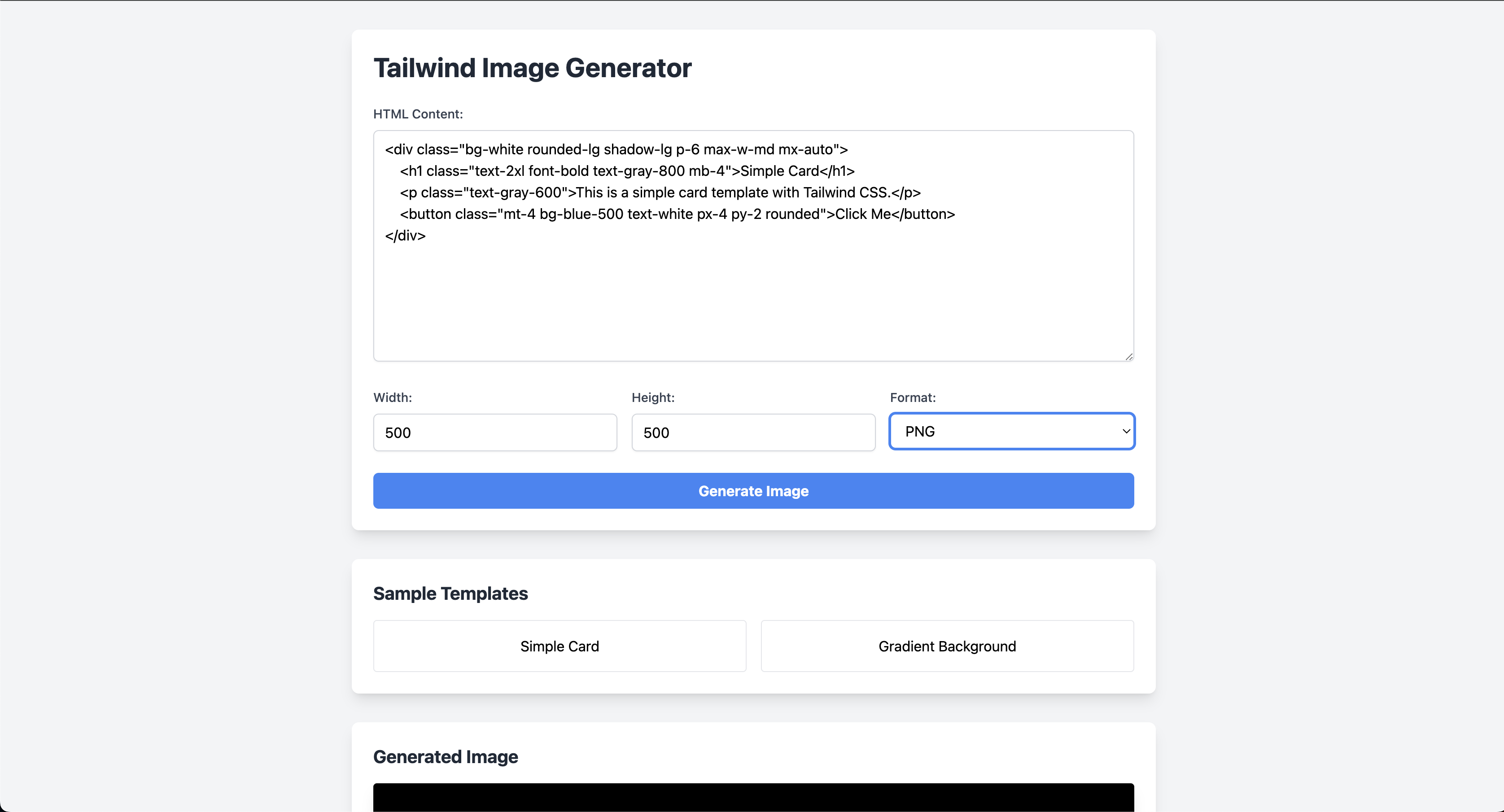
Note: Remember to replace the screenshot URL with your actual repository URL after uploading the screenshot.
const { generateImage, startServer } = require("tailwind-image-generator");

// Generate a single image
const htmlContent = `
  <div class="bg-blue-500 text-white font-bold py-4 px-6 rounded-lg">
    <h1 class="text-2xl">Hello, World!</h1>
    <p class="mt-4">Generated with Tailwind CSS</p>
  </div>
`;

generateImage(htmlContent, "output.png", {
  width: 600,
  height: 400,
  format: "png",
}).then(() => {
  console.log("Image generated successfully!");
});

// Start the HTTP server
startServer();Generates an image from HTML content with Tailwind CSS styles.
htmlContent(string): The HTML content to renderoutputPath(string): The path where the image will be savedoptions(object):width(number): Image width in pixels (default: 800)height(number): Image height in pixels (default: 600)format(string): Image format - 'png' (default)
Starts an Express server for HTTP-based image generation.
initialPort(number): Starting port number (default: 3000)maxAttempts(number): Maximum attempts to find an available port (default: 10)
Once the server is running, you can generate images via HTTP:
GET /generate?html=<encoded-html>&width=800&height=600&format=pngExample:
fetch(
  "http://localhost:3000/generate?html=" +
    encodeURIComponent('<div class="bg-blue-500">Hello</div>')
)
  .then((response) => response.blob())
  .then((blob) => {
    // Handle the generated image
});- Node.js >= 18.17.0
- Tailwind CSS ^4.0.0
- Puppeteer ^24.1.1
The package includes robust error handling:
- Port conflicts are automatically resolved
- Invalid HTML content returns appropriate error messages
- File system errors are properly caught and reported
- Always encode HTML content when using the HTTP API
- Consider image dimensions based on your use case
- Clean up generated images after use
- Use appropriate error handling in production
# Install dependencies
npm install

# Run tests
npm test

# Start server
node test.jsISC
Here's how an AI system could use this package to generate images:
async function generateSocialCard(content) {
  // 1. Generate HTML with the content
  const html = `
    <div class="bg-white p-8 rounded-lg shadow-xl max-w-2xl mx-auto">
      <h1 class="text-3xl font-bold text-gray-800">${content.title}</h1>
      <p class="mt-4 text-gray-600">${content.description}</p>
    </div>
  `;

  // 2. Make request to your image generator endpoint
  const response = await fetch(
    "http://your-server.com/generate?" +
      new URLSearchParams({
        html: encodeURIComponent(html),
        width: 1200,
        height: 630,
      })
  );

  // 3. Get the image
  const imageBuffer = await response.blob();

  // 4. Use the image for your needs (e.g., save to disk, upload to storage, etc.)
  return imageBuffer;
}
This allows AI systems to:
- Generate social media cards
- Create dynamic banners/headers
- Generate preview images
- Create custom visualizations
const { generateImage } = require("tailwind-image-generator");

async function generateTwitterCard(title, description) {
  const html = `
    <div class="bg-gradient-to-r from-blue-500 to-purple-600 w-full h-full flex items-center justify-center p-12">
      <div class="bg-white rounded-xl shadow-2xl p-8 max-w-2xl">
        <h1 class="text-4xl font-bold text-gray-800 mb-4">${title}</h1>
        <p class="text-xl text-gray-600">${description}</p>
      </div>
    </div>
  `;

  await generateImage(html, "twitter-card.png", {
    width: 1200,
    height: 630,
    format: "png",
  });
}async function generateProductThumbnail(product) {
const html = `
<div class="bg-gray-50 w-full h-full flex items-center justify-center p-8">
<div class="bg-white rounded-lg shadow-lg p-6">
<h2 class="text-2xl font-bold text-gray-800">${product.name}</h2>
<p class="text-3xl font-bold text-green-600 mt-2">${product.price}</p>
<div class="mt-4 inline-block bg-blue-500 text-white px-4 py-2 rounded">
View Details
</div>
</div>
</div>
`;
await generateImage(html, `products/${product.id}.png`, {
width: 800,
height: 800,
format: "png",
});
}async function generateQuoteImage(quote, author) {
const html = `
<div class="bg-gradient-to-br from-pink-500 to-orange-400 w-full h-full flex items-center justify-center p-16">
<div class="text-center">
<p class="text-3xl font-serif text-white italic">"${quote}"</p>
<p class="text-xl text-white mt-6">- ${author}</p>
</div>
</div>
`;
await generateImage(html, "quote.png", {
width: 1080,
height: 1080,
format: "png",
});
}-
Email Marketing
- Generate dynamic header images
- Create personalized promotional banners
- Design campaign-specific graphics
-
E-commerce
- Automated product image generation
- Sale announcement banners
- Category thumbnails
- Price comparison cards
-
Content Management
- Blog post featured images
- Article preview cards
- Category headers
- Author profile cards
-
Social Media
- Twitter/LinkedIn/Facebook post images
- Instagram story templates
- YouTube thumbnails
- Pinterest pins
-
Documentation
- API endpoint cards
- Feature highlight images
- Tutorial step graphics
- Component previews
-
Performance Optimization
- Cache frequently generated images
- Use appropriate image dimensions
- Consider implementing rate limiting
- Clean up temporary files regularly
-
Error Handling
- Implement proper logging
- Set up monitoring for the service
- Handle timeout scenarios
- Validate input thoroughly
-
Security Considerations
- Sanitize HTML input
- Implement authentication if needed
- Set up CORS properly
- Monitor resource usage
-
Scaling Tips
- Use a CDN for high-traffic scenarios
- Implement queue systems for bulk processing
- Consider containerization
- Set up load balancing
Contributions are welcome! Please feel free to submit a Pull Request.