Releases: AdguardTeam/AdGuardMiniForMac
Release list
2.3.0 beta

If filtering doesn’t work as expected or something in your setup is missing, you shouldn’t have to guess what went wrong.
In this beta, we’ve added configuration checks and improved diagnostics. The app can now warn you about settings or system conditions that may prevent it from working properly — and suggest what to do next.
Configuration checks
AdGuard Mini now checks your setup and alerts you if something may interfere with filtering or app stability.
The app will warn you about common setup issues: missing permissions, disabled system settings, or configuration conflicts.
Each alert includes a short explanation and recommendations.
Other changes
Some users reported high CPU or memory usage, especially on older Macs and Macs with Intel processors. Others ran into filtering problems after system migration or configuration changes. The new diagnostics help the app detect these cases faster and make troubleshooting easier for both users and our support team.
Changelog
Fixes
- Extreme overheating on tracker-heavy websites #1200
- The filter update notification appeared again after checking for updates #1193
- Excessive background wake-ups #1192
- Rule editor didn’t save its window position and size #1159
Sciter (UI engine)
- Updated Sciter to v6.0.3.18
How to install AdGuard Mini beta
2.2.1
After the release, we got users reporting high CPU usage. Not cool, so we’re taking care of that with this hotfix.
Changelog
Fixes
- High CPU usage by AdGuard Mini when visiting websites 1196
How to install AdGuard Mini
2.2.1 beta
After the release, we got users reporting high CPU usage. Not cool, so we’re taking care of that with this hotfix.
Changelog
Fixes
- High CPU usage by AdGuard Mini when visiting websites 1196
How to install AdGuard Mini beta
2.2.0
Most of the time, you won’t even notice that your ad blocker is working. Trackers disappear, pages load faster, and the internet feels cleaner. It all happens quietly in the background. But sometimes, it’s nice to see how much work is actually being done for you.
In AdGuard Mini for Mac v2.2, we’ve made those invisible victories a little more visible.
New statistics stories
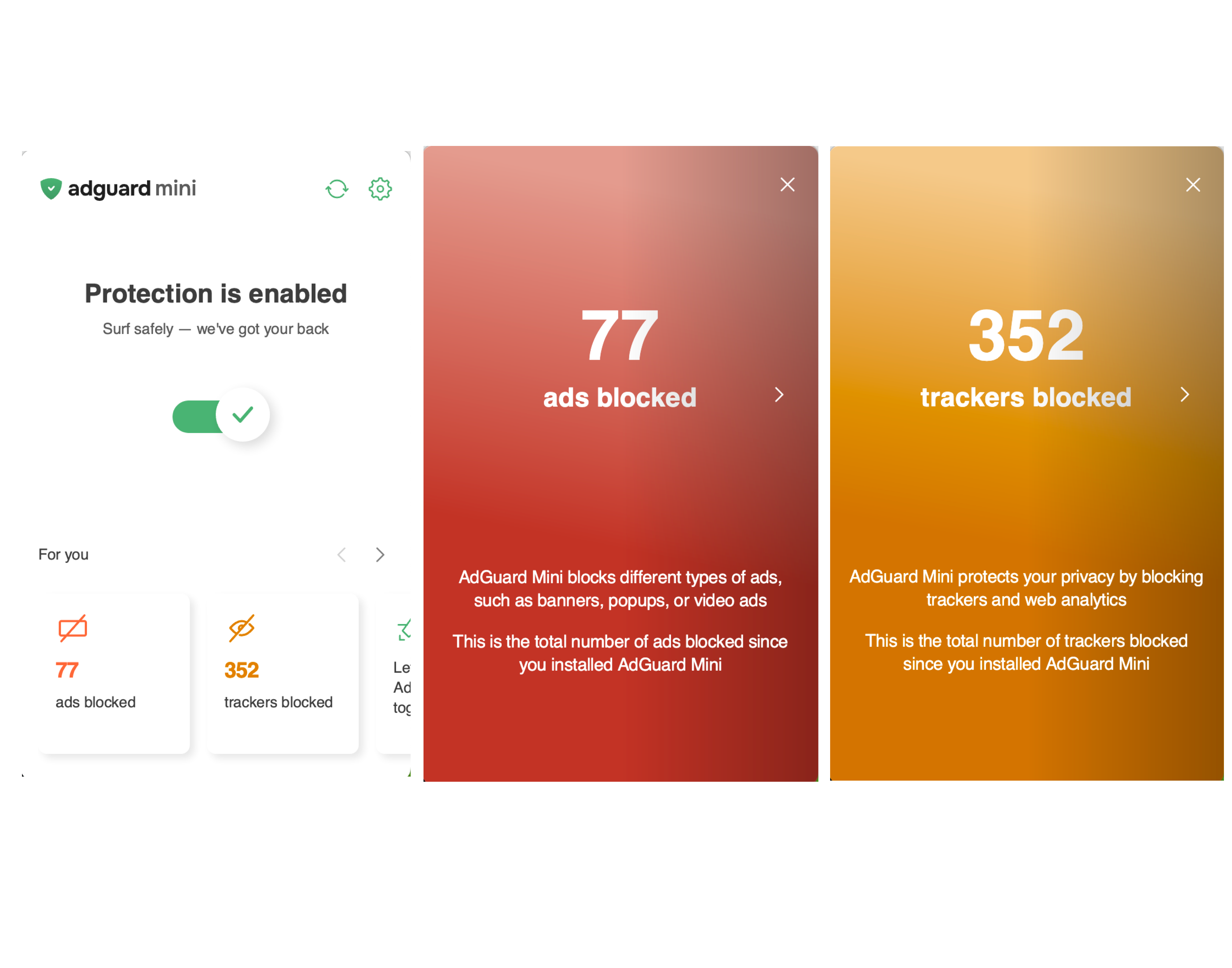
AdGuard Mini now includes two statistics stories in the menu bar popup — one for blocked ads, one for trackers. Check the exact count since you first launched the app.
AdGuard Mini now shows the number of blocked elements directly on the icon in Safari. Click the icon to see a full breakdown of blocked ads and trackers for the current page.
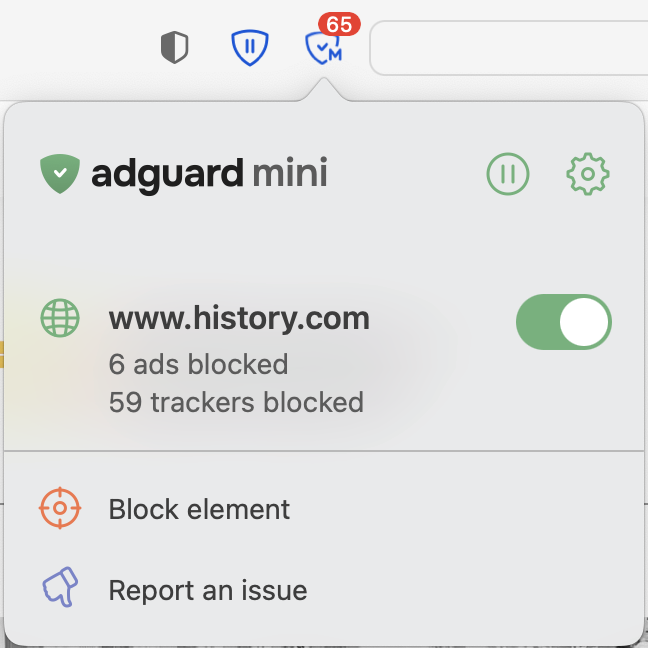
The count resets each time you open a new page. If you’d prefer to hide it, click the AdGuard Mini icon → gear icon → Settings → scroll down and toggle off Indicate the number of blocked ads on the AdGuard Mini icon in Safari.
Other changes
We've also fixed a few minor bugs to make the app more stable.
Changelog
Improvements
- Added the Statistics block to the menu #1172
- Added the ability to copy the app version from the About section
#1155
Fixes
- Separator doesn’t work in basic rules #1136
- Text hover covers the scrollbar area
#1187 - The Show AdGuard Mini in the menu bar setting works incorrectly
#1182 - When hovering over an element with a link, the cursor and the element itself respond with a delay #1144
How to install AdGuard Mini
2.2.0 beta 2
This is a technical update aimed to increase the app stability and fix minor bugs.
How to install AdGuard Mini beta
2.2.0 beta

Most of the time, you won’t even notice that your ad blocker is working. Trackers disappear, pages load faster, and the Internet feels cleaner. It all happens quietly in the background. But sometimes, it’s nice to see how much work is actually being done for you.
In this beta version of AdGuard Mini for Mac v2.2, we’ve made those invisible victories a little more visible. The new stories let you see exactly what’s happening behind the scenes.
New statistics stories in the tray menu
AdGuard Mini now includes a new statistics story in the tray menu. Click it to see the total number of blocked elements, as well as a separate count for trackers.
If no ads have been blocked yet, Agnar, our friendly mascot, will guide you to the settings where you can set up ad blocking.
Changelog
Improvements
- Added the ability to copy the app version from the About section
#1155
Fixes
- Text hover covers the scrollbar area
#1187 - Show AdGuard Mini in the menu bar setting works incorrectly
#1182
How to install AdGuard Mini beta
2.1.4
This patch polishes up the visuals and interface for a smoother experience. The Updates section now has cleaner, more scannable text formatting, and Rules editor scrollbars stay visible so long rules are easier to handle.
Changelog
Fixes
- AdGuard Mini does not warn about exceeding the rule limit when too many filters are enabled #1177
- The editor removes escaping in scriptlets
- Scroll bars in Rules editor disappear
- Text color and bold styling are displayed incorrectly on the Updates page
- The Advanced Rules (true/false) parameter is not passed when submitting an in-app report
How to install AdGuard Mini
2.1.4 beta
This patch polishes up the visuals and interface for a smoother experience. The Updates section now has cleaner, more scannable text formatting, and Rules editor scrollbars stay visible so long rules are easier to handle.
Changelog
Fixes
- AdGuard Mini does not warn about exceeding the rule limit when too many filters are enabled #1177
- The editor removes escaping in scriptlets
- Scroll bars in Rules editor disappear
- Text color and bold styling are displayed incorrectly on the Updates page
- The Advanced Rules (true/false) parameter is not passed when submitting an in-app report
How to install AdGuard Mini beta
2.1.3
Your feedback helps us keep making quick improvements on the fly. In v2.1.3, we performed a bunch of UI tweaks that make the user experience better. Here’s some of them: AdGuard Mini’s main window now opens in the current active Space, the menu bar screen keeps the dark theme after the app’s update (if the system theme is dark), and the User rules screen doesn’t scroll to the top after the changes are saved. Let us know if you encounter any similar problems — we will fix them in the closest update.
Changelog
Fixes
- Menubar UI defaults to light mode after update #1173
- Hovering above scrollbar #1164
- Layout is broken on “Contact Support” screen #1166
- Popup opens on initial Space instead of current active Space #1170
- User rules screen is scrolled to the top after “Save” button is pressed, and the cursor position is lost #1169
How to install AdGuard Mini
2.1.3 nightly
Minor fixes