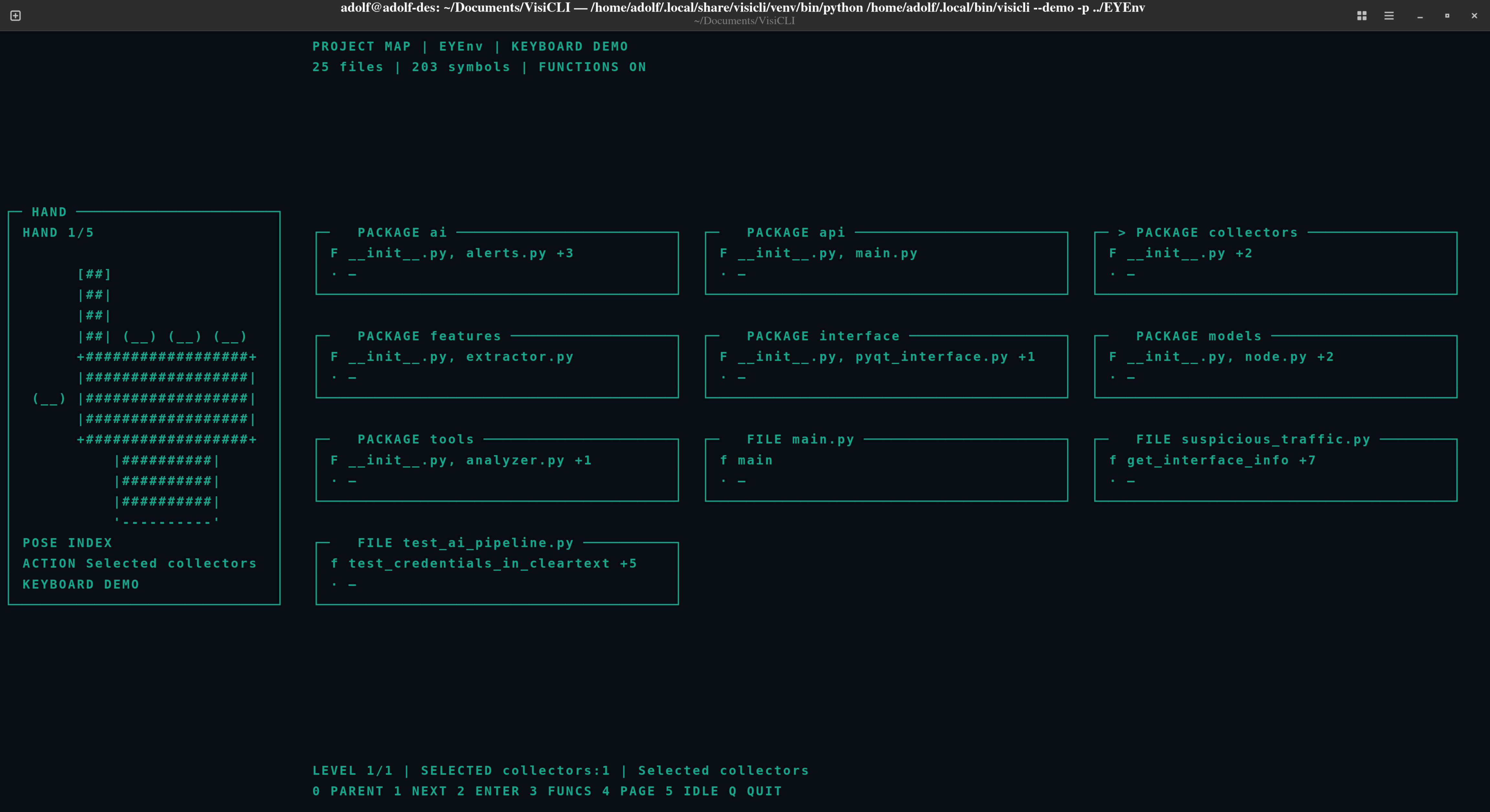
Explore a Python codebase from your terminal—with hand gestures or a keyboard.
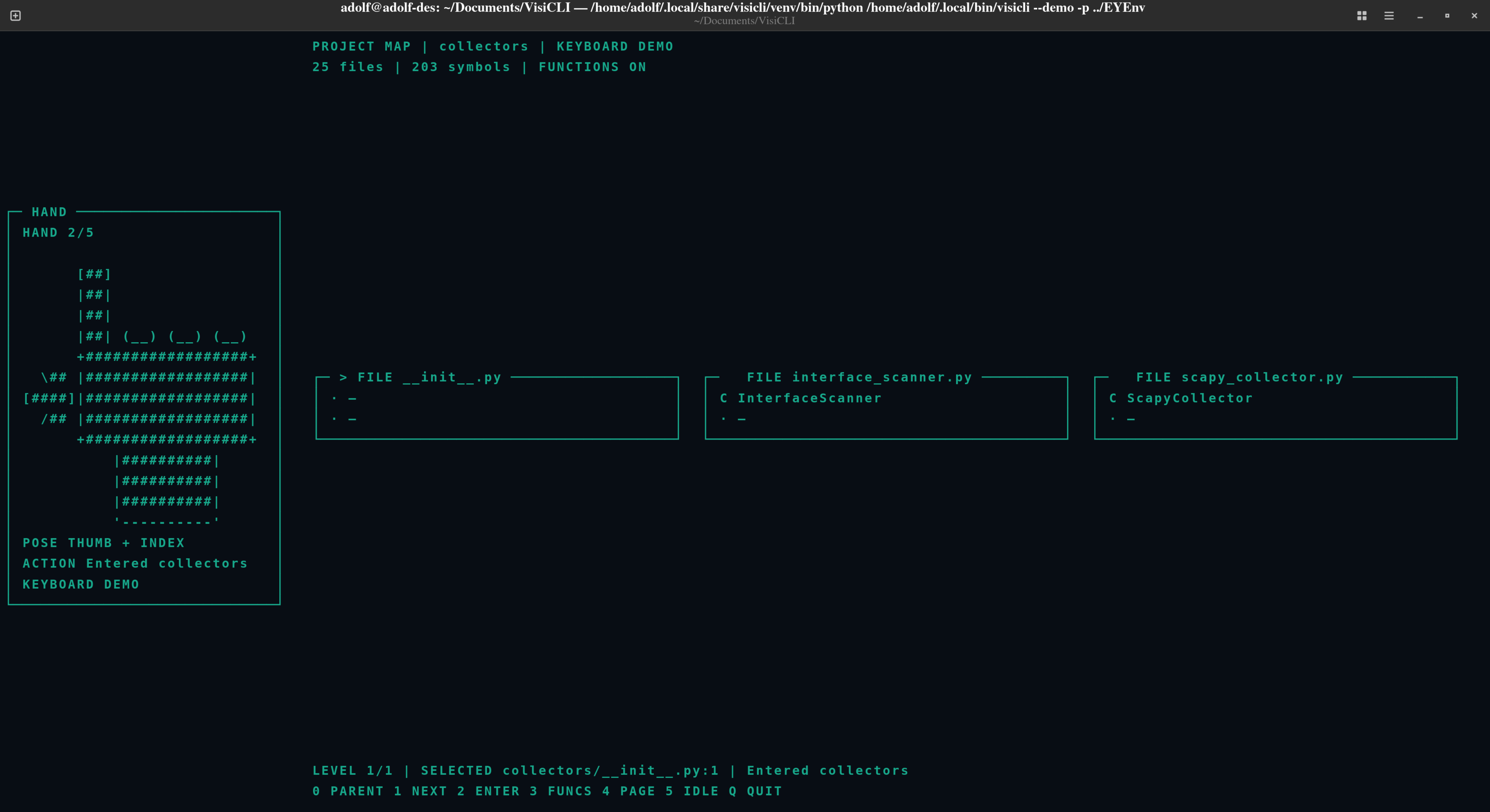
VisiCLI statically scans Python source and displays a navigable hierarchy of bordered 2D terminal cards for packages, files, classes, and functions. Each view shows one level at a time with a breadcrumb and concise child summaries. The application opens directly into the project map; there is no startup menu.
Safety by design: VisiCLI reads and parses the project source. It does not import or execute the project being inspected.
- Maps Python packages, files, classes, functions, and selected in-project import and call relationships.
- Displays a clean hierarchy of package, file, class, and function cards, with immediate children shown at each level.
- Adapts the card grid and page size to terminal dimensions; long summaries are abbreviated when necessary.
- Shows a live pose-driven ASCII hand beside the project view; when no hand is detected, it explicitly shows a waiting state.
- Opens a separate mirrored camera popup with hand landmarks and a red square tracker; the popup can be disabled for headless use.
- Starts directly in project navigation. One detected hand can drive the default actions; keyboard controls are also available.
- Keeps camera and native-library diagnostics in a log instead of printing them over the live terminal interface.
- Bounds source scanning with directory exclusions and file, byte, and definition limits.
VisiCLI is a static source-structure explorer, not a Python runtime tracer or a general-purpose semantic analyzer.
From the VisiCLI checkout, scan a Python project with the default webcam:
cd /path/to/VisiCLI
.venv/bin/visicli --camera -p /path/to/my-python-project
Run without opening the camera:
.venv/bin/visicli --demo -p /path/to/my-python-projectThe map appears immediately. Press q to quit. For a finite, non-interactive smoke run:
.venv/bin/visicli --demo --frames 1 -p /path/to/my-python-projectRequirements:
- Python 3.10 or newer
- A terminal supporting standard ANSI cursor controls for the interactive display
- For camera mode: a working webcam, camera permissions, and the MediaPipe Hand Landmarker model
On Linux, the user-level installer creates an isolated environment, installs the application and dependencies, downloads and verifies the hand model, and exposes visicli in ~/.local/bin. It does not use sudo or install into the system Python:
chmod +x install.sh
./install.sh
The installer configures common user shell startup files. Open a new terminal or reload the shell configuration to use visicli by name. Installation files are stored outside the source tree:
~/.local/share/visicli/venv/
~/.cache/visicli/hand_landmarker.task
To install without downloading the model, then download it later:
./install.sh --no-model
~/.local/share/visicli/venv/bin/python -m visicli.download_model
The model download is checked against a pinned SHA-256 checksum. The installer requires Python 3.10+, venv/ensurepip, pip access, and compatible OpenCV and MediaPipe wheels. It does not install operating-system packages automatically.
Optional installer overrides:
VISICLI_INSTALL_DIR="$HOME/apps/visicli" \
VISICLI_BIN_DIR="$HOME/.local/bin" \
PYTHON=python3.12 \
./install.sh
For development, create an editable environment:
python3 -m venv .venv
.venv/bin/python -m pip install -e ".[test]"
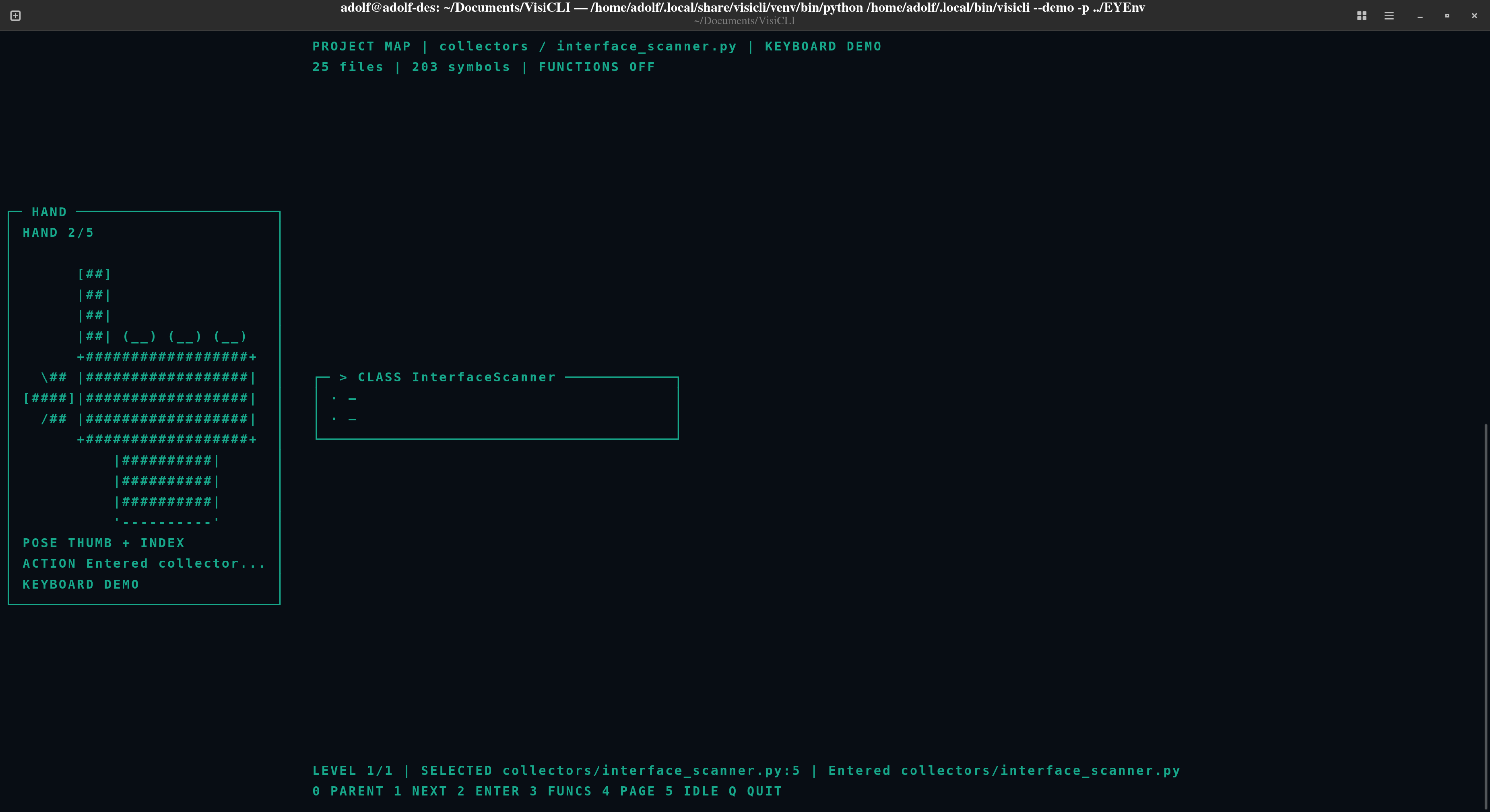
.venv/bin/python -m visicli.download_modelThe app starts at the project root. Enter a package, file, or class to inspect its children; fist returns to exactly one parent level and restores the prior selection. No selection menu, action-setup screen, or second-hand confirmation is required.
| Gesture / demo key | Action |
|---|---|
0 — fist |
Return to the parent level; at the project root, stay there. |
1 — index finger |
Select the next item at the current level. |
2 — thumb + index |
Enter the selected package, file, class, or other item with children. |
3 — index + middle + ring |
Show or hide function nodes in the current hierarchy. Functions are visible by default. |
4 — four non-thumb fingers |
Move to the next page at the current hierarchy level. |
5 — open palm |
Idle pose only; displays the open hand and triggers no project action. |
q |
Quit. |
The same digits 0–5 simulate the poses in demo mode and are keyboard fallbacks in camera mode. Digit 5 displays an open hand without binding it to an action. Enter or c has the same effect as action 2. b or m goes back one level. Navigation wraps at the beginning/end of the current item list and page list.
Navigation follows the source hierarchy: project root → package → file → class/function → nested members. Each level shows its immediate children in a bounded, terminal-sized card grid, with a breadcrumb showing the current path. Entering a leaf reports that it has no nested items; it does not display unrelated previous-level contents. Returning restores the previous selection and page. Action 3 toggles function visibility, and action 4 changes the page at the current level.
- VisiCLI walks the selected directory in deterministic path order and considers Python
*.pyfiles. - It parses eligible source with Python's
astmodule. It never imports or executes project modules. - It creates package, file, class, and function nodes, with source locations where available.
- It adds containment edges, resolvable in-project import edges, and conservative call edges when a call maps to exactly one scanned definition.
- It organizes package/file/class/function nodes into a navigable hierarchy and calculates a bounded card layout from the available terminal rows and columns.
Common generated/vendor directories—including .git, .venv, venv, __pycache__, build, and dist—are excluded. Symlinked Python files are not followed. Default limits:
| Limit | Default |
|---|---|
| Python files considered | 10,000 |
| Source size per file | 2 MiB |
| Total source size parsed | 64 MiB |
| Definitions per file | 20,000 |
| Definitions across the scan | 100,000 |
Malformed, unreadable, oversized, or over-budget files are reported. A displayed static relationship is not proof of runtime behavior.
visicli [--demo | --camera] [-p DIRECTORY]
        [--camera-index INDEX] [--model PATH] [--frames COUNT]
        [--debug] [--log-file PATH] [--no-camera-view] [--ascii-art]
| Option | Description |
|---|---|
-p DIR, --project DIR |
Existing Python project directory to scan. |
--camera |
Use the webcam (default mode). |
--demo |
Use keyboard-selected hand poses; does not open the camera. |
--camera-index N |
OpenCV camera device index; defaults to 0. |
--model PATH |
MediaPipe task model path. |
--frames N |
Render a finite number of frames, useful for smoke tests. |
--debug |
Include frame timing in the project view. |
--log-file PATH |
Camera/native diagnostics destination; defaults to ~/.cache/visicli/runtime.log. |
--no-camera-view |
Disable the separate live camera popup; useful on headless systems. |
--ascii-art |
Legacy compatibility flag; the active dashboard always shows the ASCII hand. |
-h, --help |
Print command help. |
Examples:
visicli -p ./my-python-project
visicli --camera --camera-index 1 -p ./my-python-project
visicli --demo -p ./my-python-project
visicli --demo --frames 1 -p ./my-python-project
visicli --camera -p ./my-python-project --log-file ./visicli-runtime.log
visicli --camera --no-camera-view -p ./my-python-projectPython project
-> bounded AST ProjectAnalyzer
-> ProjectGraph (package/file/class/function nodes and static edges)
-> ExplorerController (hierarchical selection stack, paging, default actions)
-> ProjectViewport (responsive 2D cards and breadcrumb at the active level)
-> TerminalDashboard (pose-driven ASCII hand at left, project map at right)
Camera -> OpenCV Camera -> MediaPipe HandDetector -> HandObservation
-> FingerAnalyzer -> GestureRecognizer -> GestureStabilizer
-> ExplorerController
-> mirrored OpenCV popup with hand skeleton and red square tracker
Keyboard demo -> simulated poses / navigation keys -> ExplorerController
| Module | Responsibility |
|---|---|
src/visicli/camera/ |
OpenCV camera capture and camera errors. |
src/visicli/vision/ |
MediaPipe 3D/world landmarks and palm-relative finger extension/joint-bend analysis; normalized-landmark fallback. |
src/visicli/vision/camera_preview.py |
Mirrored OpenCV camera popup with hand landmarks and a red square tracker. |
src/visicli/gesture/ |
Maps supported finger poses to gestures and stabilizes them over time. |
src/visicli/project/analyzer.py |
Bounded, deterministic AST scan; does not execute project code. |
src/visicli/project/model.py |
Immutable project node, edge, and graph records. |
src/visicli/project/explorer.py |
Hierarchical selection stack, parent navigation, page navigation, function visibility, and gesture-action bindings. |
src/visicli/terminal/project_view.py |
Responsive cards for packages/files/symbols, breadcrumbs, selection, and page status. |
src/visicli/terminal/dashboard.py |
Pose-driven ASCII hand, input status, layout composition, and terminal redraw lifecycle. |
src/visicli/terminal/input.py |
Raw terminal input lifecycle. |
src/visicli/terminal/log_capture.py |
Routes native stderr diagnostics to a log file. |
| The analyzer, graph model, navigation controller, terminal view, and camera/vision adapters have separate responsibilities. Project source remains data throughout analysis. Import edges are limited to scanned project modules; call edges remain unlinked when resolution is ambiguous. |
- Command not found: install or refresh the package with
.venv/bin/python -m pip install -e ".[test]", then check.venv/bin/visicli --help. - Missing hand model: run
.venv/bin/python -m visicli.download_modelor pass--model PATH. - Camera will not open: check permissions and try
--camera-index 1. Camera errors are reported; demo mode is not substituted silently. - Camera popup unavailable: install/use a graphical OpenCV environment, or pass
--no-camera-viewto run camera tracking without a preview window. PressqorEscinside the popup to close only that window. - MediaPipe/OpenCV messages: native stderr is retained in
--log-file(default~/.cache/visicli/runtime.log). A MediaPipeNORM_RECT/image-dimension warning has been observed; logging it keeps the UI readable but does not fix the upstream graph. - No hand detected: improve lighting, keep the hand fully in frame, and use
--demoto test the interface independently of camera tracking. - Hand geometry invalid: reposition the whole hand in frame; degenerate landmarks are ignored rather than interpreted as a fist/action.
.venv/bin/python -m pip install -e ".[test]"
.venv/bin/python -m pytest -q
.venv/bin/python -m compileall -q src tests
.venv/bin/python -m pip check
Tests cover analyzer safety and limits, graph relationships, card sizing, navigation, mocked image/world landmark conversion, palm/back mirroring and out-of-plane hand geometry, the camera popup tracker overlay, and terminal redraw. Synthetic landmarks do not establish real-world gesture accuracy.
-
Finger extension uses MediaPipe world landmarks when available and otherwise aspect-corrected image landmarks. Palm-relative projection, joint alignment, and thumb abduction are geometric heuristics, not a calibrated classifier; camera pose reliability still needs device-specific testing.
-
Only the documented default poses trigger actions. The open-palm pose is deliberately unbound; arbitrary combinations and orientations are not distinct actions.
-
Calls are resolved conservatively. Dynamic imports, runtime dispatch, arbitrary attribute calls, and ambiguous names are not fully represented.
-
The 2D map is a static source view, not a runtime trace. Dense cells abbreviate content; larger projects are paged.
-
Python 3.10+ is declared, but the minimum interpreter and non-Linux terminals need independent validation.
-
Camera hardware, hand ergonomics, and broad platform compatibility require separate testing; no benchmark or production-readiness claim is implied.