.
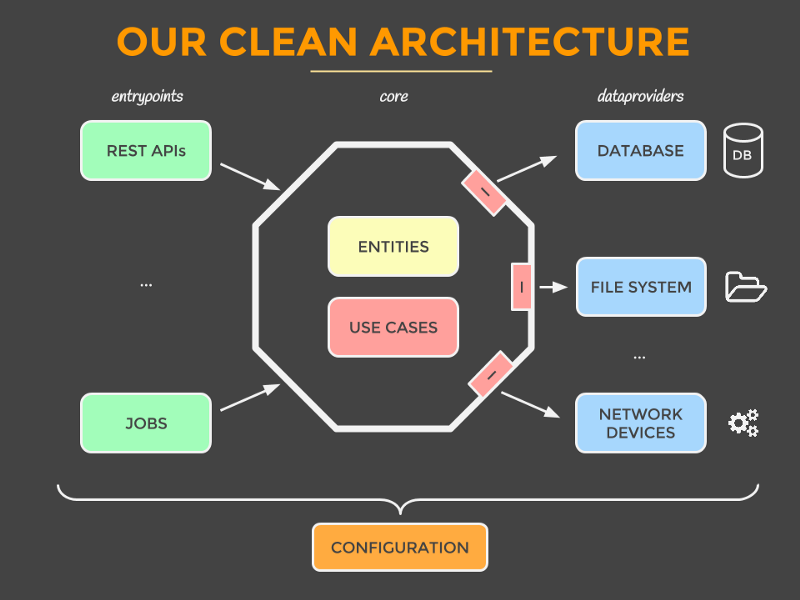
├── core                            # Project core (All the business here)
│   ├── usescase                    # The business actions/logic
│   └── entities                    # The domain objects
│
|── Adapters                        # Retrieve and store data from and to a number of sources (database,
│   │                                        network devices, file system, 3rd parties, and so on.)
│   ├── spring-jpa                  # Spring Data (ORM hibernate and PostgreSQL Databse)
│   └── spring-hibernate            # Spring hibernate (PostgreSQL Databse)
│
|── Config                          # The config folder thats put everything together
│   ├── spring-config-jpa           # Configure the Spring JPA adapter (spring-jpa)
│   └── spring-config-hibernate     # Configure the Spring JPA adapter (spring-hibernate)
│
└── application                     # The applications can be used as front (Web, Client, batch ...)
    ├── cxf-back-jpa                # Example SOAP with CXF and Spring Boot thats use the "spring-config-jpa" config
    ├── spring-back-jpa             # Example SOAP with Spring thats use the "spring-config-jpa" config
    ├── spring-back-hibernate       # Example SOAP with Spring thats use the "spring-config-hibernate" config
    └── spring-boot-back-jpa        # Example SOAP with Spring Boot thats use the "spring-config-ws" config
- JDK1.8
- Apache Maven 3.8.1
- a good IDE
- Tomcat 9
- PostgreSQL
After installing tomcat you need to follow this steps :
<tomcat-users>
  <role rolename="manager-gui"/>
  <role rolename="manager-script"/>
  <user username="admin" password="password" roles="manager-gui,manager-script" />
</tomcat-users>
<?xml version="1.0" encoding="UTF-8"?>
<settings>
    <servers>
        <server>
            <id>TomcatServer</id>
            <username>admin</username>
            <password>password</password>
        </server>
    </servers>
</settings>
If you must change the tomcat port, don't forget to change it in the POM of the 3 deployable modules
I used this config, don't forget to change every properties files in the 3 deployable modules if you want choose another one
spring.datasource.url=jdbc:postgresql://localhost:5432/postgres
spring.datasource.username=postgres
spring.datasource.password=root
mvn clean install
mvn -pl application/cxf-back-jpa tomcat7:deploy
You can find the available SOAP services list here :
mvn -pl application/spring-back-jpa tomcat7:deploy
You can find the WSDL list here :
- http://localhost:8080/spring-soap/ws/poducts.wsdl
- http://localhost:8080/spring-soap/ws/merchants.wsdl
- http://localhost:8080/spring-soap/ws/merchantProduct.wsdl
mvn -pl application/spring-back-hibernate tomcat7:deploy
You can find the WSDL list here :
- http://localhost:8080/spring-hibernate-soap/ws/poducts.wsdl
- http://localhost:8080/spring-hibernate-soap/ws/merchants.wsdl
- http://localhost:8080/spring-hibernate-soap/ws/merchantProduct.wsdl
mvn -pl application/spring-boot-back-jpa tomcat7:deploy
You can find the WSDL list here :
- http://localhost:8080/spring-boot-soap/ws/poducts.wsdl
- http://localhost:8080/spring-boot-soap/ws/merchants.wsdl
- http://localhost:8080/spring-boot-soap/ws/merchantProduct.wsdl
- Clean the POMs files
- Add Comments to the code