Releases: Aslain/modssettingsapi
Releases · Aslain/modssettingsapi
Release list
1.5.0

New in the color picker
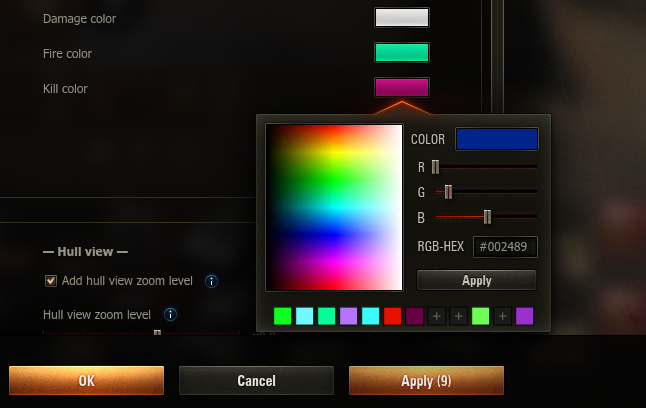
- A personal color palette: up to 48 editable preset slots (rows of 12, revealed progressively — a fresh palette starts as a single row and grows as you fill it). Left-click a slot to pick its color, left-click an empty slot (+) to start defining it, right-click a filled slot for a context menu (Edit preset / Copy hex code / Clear preset), and DEL clears the slot being edited. While editing (gold frame) the slot follows every picked color live, and Apply stores it without closing the picker, so several presets can be defined in one go. The palette is shared by all mods, ships completely empty (the API hardcodes no colors) and is saved in
aslainmenu.dat, so it survives game restarts and modpack reinstalls. The swatch matching the current color is always framed. - Live preview: while the cursor moves over the spectrum, the COLOR box previews the color under it — before any click; rolling out restores the selected color.
New in the settings window
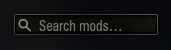
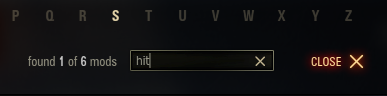
- Search upgrades: a refreshed search field (magnifier inside, modern style) and a hit counter showing
found X of Y modsas you type. - Right-click menu on color controls: right-click the color swatch next to any option to reset it to the mod's default or copy its hex code to the clipboard (bare value, e.g.
FF0000). - The Apply button counts pending changes —
Apply (3)means three options currently differ from their saved state; reverting a value drops it back out of the count. - Jump highlight: after clicking a letter on the A–Z bar (or when a search narrows to a single mod), the target mod's frame and title briefly pulse brighter, so the eye lands on it instantly.
- The window remembers its scroll position within the current game session; a fresh game start begins at the top.
New for mod authors
createColorChoice(..., presets=[...])andcreateCheckboxColor(..., presets=[...]): give the picker your mod's own palette (up to 24 hex codes, shown as one or two pick-only rows). When a mod supplies presets, only those colors are offered as presets — the user's editable palette is hidden in that picker.None(default) shows the user's palette; an empty list shows no preset rows at all.presetsOnly=True(together withpresets): reduce the picker to just your preset swatches and the Apply button — the spectrum, RGB sliders and hex input are hidden, so the user can only choose one of your colors (e.g. "pick 1 of these 8"). The popup width auto-fits the number of presets; the full picker's size is untouched.- Both are plain keyword arguments — on older API builds gate them on the version:
g_modsSettingsApi.getVersionTuple() >= (1, 5).
Fixed
- Clicking the spectrum on a color whose code starts with zero bytes (e.g. pure blue
0000FF) produced a shortened hex code (ff), which was then stored as the option's value. The spectrum now always yields a full 6-digit code. Present in every earlier version (inherited from the original picker).
1.4.1
1.4.1
Fixed
- A button attached to a
CheckBox/RadioButtonGrouprow (viacomponentConfig.button) can now be lined up by the row's configuredwidthusing an opt-inbutton.fixedPositioningflag, with an optionalbutton.align: 'right', instead of always sitting right after the label text. This lets a column of buttons align even when the labels have different lengths. The flag is opt-in, so existing mods are unchanged. Contributed by CH4MPi.
1.4.0
1.4.0
New for mod authors
templates.createCheckboxColor(text, varName, value, color, tooltip=None, tooltipIcon=None, button=None, useHTML=True): a checkbox paired with a colour picker on one row, the tick box and its label on the left and the colour swatch on the right. The stored value is a dict{'enabled': <bool>, 'color': <hex str>}, so readsettings[varName]['enabled']andsettings[varName]['color']in your callback. A long label wraps onto extra lines under the checkbox without ever running under the swatch. It works withenableWhen/visibleWhen(both as a gated control and as a master, where it gates on itsenabledflag) and insidecreateControlsGroup, supportstooltipanduseHTMLlike the other controls, and the per-mod reset button responds to its changes. Feature-detect withhasattr(templates, 'createCheckboxColor').
1.3.3
Improved
- A template change that doesn't alter the structure now keeps the user's saved values for every mod — including mods with no
settingsVersion(which previously reset on any edit) and a mod adoptingsettingsVersionfor the first time. The new template is still applied so labels and tooltips refresh; only asettingsVersionbump, a first install, or a structural change resets values. Reordering controls counts as cosmetic (values are keyed by control name), so it no longer needs a bump. - "Structural" now also covers changes that can invalidate a saved value: a dropdown / radio / step-slider's set of options, and a slider / numeric-stepper's min / max / interval. Changing those without a
settingsVersionbump is no longer mistaken for cosmetic, so a stale or out-of-range saved value is never silently kept.
Fixed
- The per-mod "reset to defaults" button now targets the current template's defaults. Previously, after a control was added on an unversioned update or a shipped default value was changed, the reset button could restore an outdated default.
1.3.2
Improved
setModTemplatenow tells cosmetic template changes apart from structural ones. A cosmetic-only change — an edited label or tooltip, or a label that embeds the live API version — refreshes in place with the user's saved values preserved, with nosettingsVersionbump and no warning. Only structural changes (controls added/removed or retyped, changed dropdown options) still need a bump.
Fixed
- Opening the settings window could bug out (
AttributeErroron_modTranslations) when a mod-label translation had been registered viaregisterModTranslationbut the active API instance had no translation table. The translation lookups are now defensive, so the window opens regardless of how the instance was resolved.
1.3.1
New for mod authors
g_modsSettingsApi.registerModTranslation(linkage, mapping)— register a display-only label translation for another mod's settings page.mappingis a dict of{original string: replacement string}; the API applies it to the copy of the template shown in the settings window, so the target mod's stored template and saved values are never touched (no settings reset) and the mod's own code is not modified. Keys may bestr(UTF-8) orunicode, and repeated calls for the samelinkagemerge. The API ships no translations of its own — it is the hook an optional, separate localization mod uses to translate a mod whose menu is only offered in one language. Feature-detect withhasattr(g_modsSettingsApi, 'registerModTranslation').
Improved
- The mod list now sorts by the shown name. When a translation is registered for a mod (see
registerModTranslation), the list orders it under its translated name instead of its original one. Mod names not written in the Latin alphabet (e.g. Cyrillic) now sort after the Latin-named mods, keeping their own order, instead of falling back to the mod's internal id.
Fixed
- Mod frames could overlap when the settings window was reopened with a saved mix of collapsed and expanded mods: the list positioned each mod by its momentary rendered height — unreliable while the window is still off-screen — instead of its laid-out height. It now uses the laid-out height, so mods stack correctly the first time the window opens. (Long-standing, present since per-mod collapse was added.)
1.3.0
New in the settings window
- Every mod in the settings window now has its own reset button — a rotate icon in the mod's header (below the on/off switch, or in its slot for mods without one; shown while the mod is expanded) that restores that mod's options and hotkeys to their defaults. It is dimmed when nothing differs from the defaults (or while the mod is switched off) and lights up once something changes. Clicking it opens a small confirmation dialog (showing the mod's name, with Reset / Cancel) drawn inside the menu so it always stays on top; on confirm the control reset is applied live like any manual change — Apply / OK keeps it, Cancel reverts it; hotkeys reset immediately (their own channel). It never changes the mod's on/off state. Both the tooltip and the dialog are localized in all 25 languages, and the confirmation can be skipped via the
resetSkipConfirmuser setting. - A search box in the settings window header filters the mod list by name as you type — magnifier icon, an "×" clear button and a "Search mods" placeholder, styled to match the menu. Press Ctrl+F to jump to it and start typing; matching mods are revealed (auto-expanded) and the list scrolls to the top, and clearing it (the ×, or emptying the field) restores the previous view. Clicking an A-Z quick-jump letter while a search is active clears the search first, then jumps to that letter.
New for mod authors
templates.visibleWhen(control, masterVarName, value, condition='==')— sibling ofenableWhenthat hides the control (and reflows the mod so the rows below close the gap) when the condition fails, instead of greying it out in place. For options that make no sense in a given mode.templates.enableWhenAll/enableWhenAny/visibleWhenAll/visibleWhenAny(control, conditions)— gate a control on more than one master at once.conditionsis a list of{'varName', 'value', 'condition'}dicts; the*Allvariants require every condition (logical AND), the*Anyvariants require at least one (OR); theenable*pair greys the control while thevisible*pair hides it. Backward-compatible — older API builds leave the control always-on.templates.createControlsGroup(master, children, indent=False)— group sub-options under a master without indenting the children, so a wide group doesn't crowd the second column (the master still greys / enables the whole group). Maps to the per-childmasterIndentkey, which you can also set by hand.templates.escape(text)— escape&,<and>in literal label text so it renders verbatim (menu labels are HTML, so a bare<would otherwise be parsed as markup and swallow the rest, e.g.master <= 5losing the<= 5). Returns a plain string; feature-detect withhasattr(templates, 'escape').useHTML=Falseon anycreate*control — render that control's whole label as plain text instead of HTML, so a literal</>/&shows verbatim (the API escapes it; the whole-label counterpart totemplates.escape). DefaultuseHTML=Truekeeps HTML labels (icons,<font>,<b>). It is a keyword argument, so gate it on the API version (getVersionTuple() >= (1, 3)) on older builds.
Improved
setModTemplatenow logs a warning topython.logwhen a mod's template changed but itssettingsVersionwas not bumped (so the stored template is kept and the change isn't applied), making the easy-to-forget bump obvious during development. No behaviour change.- Documented the
g_modsSettingsApi.onWindowOpened/onWindowClosedlifecycle hooks (for lightweight non-UI reactions) and clarified that conditional structure which must persist across reopens should be gated withvisibleWhen/createControlsGroup, not rebuilt on open — seedocs/LIVE_MENU_UPDATES.md.
Fixed
- A control gated with
enableWhen(orcreateControlsGroup) stayed active when its master control was itself greyed out or hidden but still held a matching value. Gated controls now follow the whole master chain — a child greys out whenever its master is disabled, not only when the value fails the condition.
1.2.1
g_modsSettingsApi.updateImageAtlas(linkage, varName, atlasSource, frameWidth, frameHeight, columns, count, fps, loop=True, width=None, height=None)— play a sprite sheet as a looping animation in anImagecomponent, live: one sheet loaded once and blitted frame-by-frame (copyPixels), light even at a highfps, instead of hundreds of frame files.loop=Falseplays once and holds the last frame.templates.createImage(..., atlas={source, frameWidth, frameHeight, columns, count, fps, loop})— start anImagealready animating that sheet at build time, so it plays the moment the menu opens. PaircreateImage(atlas=...)(initial) withupdateImageAtlas(...)(live switch), like staticcreateImage(source=...)pairs withupdateImage(...). Optional and backward-compatible.
1.2.0
templates.enableWhen(...)supports value comparisons (!=,>,>=,<,<=), not just equality, plusCONDITIONoperator constants.templates.createHotkey(..., float='right')wraps a long hotkey label around the keys instead of cramming it into the narrow column.registerLiveSettingsChange(..., fullsettings=True/False)selects the callback payload with a plain flag (False= only the keys that changed). The previousmode=argument andLIVE_SETTINGS_MODEclass still work but are deprecated.getVersion()/getVersionTuple()(and the importableVERSION/VERSION_TUPLE) to read the running API version for feature-gating.reloadModTemplatere-renders incrementally, so an in-menu language switch no longer flickers.- Fixed: the mods-list scrollbar thumb could drift after an in-place re-render (toggling a mod on/off, or an in-menu language switch) - the scroll range is now pinned to the laid-out list height instead of the momentary rendering bounds, so the thumb stays exactly where it was.
- Fixed: in a scrollable dropdown, the selection highlight was drawn over the scrollbar (from forked API).
- Fixed: a long hotkey key name was clipped by the fixed-width key box (from forked API).
1.1.2
- Fixed: the mods-list scrollbar could permanently stop responding to thumb dragging and arrow clicks (only the mouse wheel kept working) when the list height changed - e.g. a mod was collapsed - while a smooth wheel-scroll animation was still running
- Fixed: after Collapse All followed by Expand All on a long, deeply-scrolled list, a single wheel tick could jump the list back to its old (pre-collapse) scroll position
Requires ModsList API and net.openwg.gameface.