Go CLI for the AXME platform. Manage intent lifecycle, configure runtime contexts, inspect audit logs, and operate the platform from the terminal — single binary, no runtime dependencies.
Alpha - CLI surface is stabilizing. Install, log in, and run your first example in under 5 minutes. Quick Start · hello@axme.ai
AXME is a coordination infrastructure for durable execution of intents across services, agents, and humans. Learn more at github.com/AxmeAI/axme.
- Authenticate and onboard —
axme loginis the primary cloud alpha entry point; direct key/token input is still supported - Manage contexts — configure and switch between multiple gateway environments (local, staging, production)
- Work with intents — list, get, watch, cancel, retry, and resume intents in real time
- Operate agents and registry — register, list, and resolve agent identities
- Stream logs and traces — follow live intent event streams from the terminal
- Diagnose — run
doctorto check config, connectivity, and auth health - Quota —
axme quota showto view limits and usage;axme quota upgrade-requestto request a corporate-tier upgrade
Install or update to the latest release (Linux/macOS, no Go required):
curl -fsSL https://raw.githubusercontent.com/AxmeAI/axme-cli/main/install.sh | sh
# Open a new terminal, or run the "source" command shown by the installer
The same command installs if you don't have the CLI, and upgrades to the latest release if you do. After install the CLI periodically checks for new versions in the background and prompts you to update.
Install a specific released version:
curl -fsSL https://raw.githubusercontent.com/AxmeAI/axme-cli/main/install.sh | AXME_VERSION=v0.2.2 shUpdate explicitly from within the CLI:
axme updateManual downloads:
- GitHub Releases: https://github.com/AxmeAI/axme-cli/releases
- Linux/macOS archives are published as
tar.gz - Windows archives are published as
zip
Go-based install remains available for contributors and local development:
go install github.com/AxmeAI/axme-cli/cmd/axme@latestOr build from source:
git clone https://github.com/AxmeAI/axme-cli.git
cd axme-cli
go build -o ./bin/axme ./cmd/axme
./bin/axme versionPreferred cloud path — email-based passwordless login:
axme login
# Enter your email → receive OTP → enter code
# CLI automatically selects or prompts for workspace
axme whoami
axme quota show
axme login sends a one-time code to your email. Enter it in the CLI — no browser required, no API key to copy. On success the CLI stores credentials securely (OS keyring on desktop; ~/.config/axme/secrets.json mode 0600 on servers and SSH sessions) and selects your workspace.
The access_token (JWT) has a 15-minute TTL. The CLI automatically refreshes it using the stored refresh_token (30-day TTL) before each command — you only need to re-login after 30 days of inactivity.
Direct/manual context setup remains available:
axme context set default \
  --base-url "https://api.cloud.axme.ai" \
  --api-key "AXME_API_KEY_FROM_CLOUD_ALPHA" \
  --actor-token "OPTIONAL_USER_OR_SESSION_TOKEN" \
  --org-id "org_..." \
  --workspace-id "ws_..." \
  --owner-agent "agent://your-service" \
  --environment "production"

axme context use default
axme status
axme whoami
--api-key maps to x-api-key (service-account/workspace key from AXME Cloud alpha); --actor-token maps to Authorization: Bearer ... for actor-scoped routes.
The sequence diagram below shows what happens at the network level when you run axme run — from CLI to gateway to scheduler:
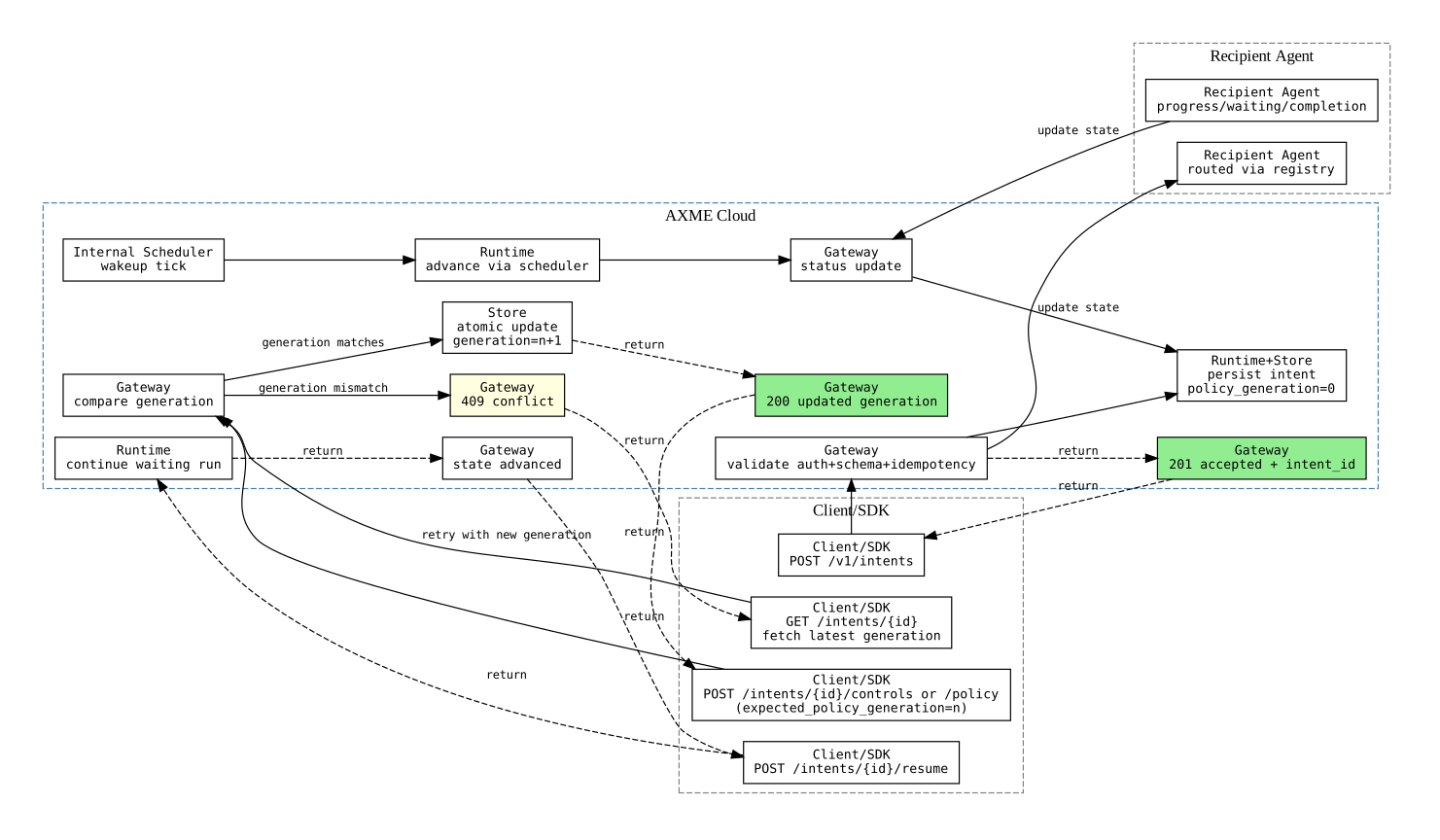
The CLI sets idempotency keys and correlation IDs on every request. The gateway authenticates, validates, and persists the intent. Status is polled and streamed back to the terminal.
All API calls from the CLI are subject to platform rate limits.
Alpha quota tiers:
| Tier | intents/day | actors | service accounts |
|---|---|---|---|
| email_verified | 500 | 20 | 10 |
| corporate | 5 000 | 200 | 50 |
email_verified tier is applied automatically on first login via email OTP.
For corporate, run axme quota upgrade-request to submit a review request.
Rate Limit and Quota Model (diagram)
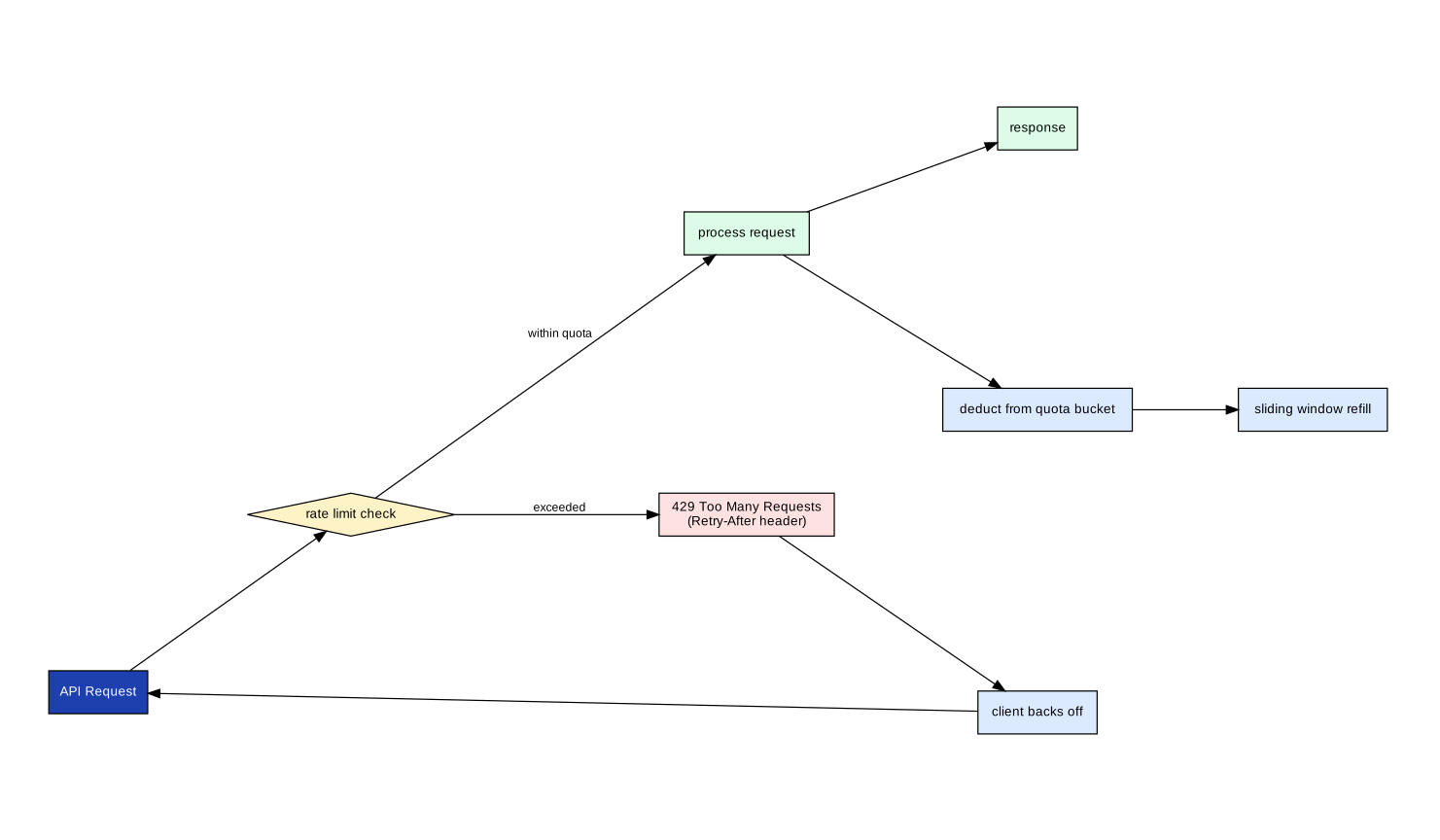
When a rate limit is hit, the CLI displays a 429 Too Many Requests error with a Retry-After value. Retry the command after the indicated wait window.
axme login                           # email OTP login (primary path — no browser, no key copy)
axme login --browser                 # browser-assisted flow (legacy, requires existing key/context)
axme login --api-key <key>           # non-interactive: store API key directly
axme login --actor-token <jwt>       # store an actor JWT for actor-scoped routes
axme whoami                          # show current identity, context, and active sessions
axme session list                    # list active sessions
axme session revoke <session_id>     # revoke a specific session
axme session revoke --current        # revoke the current session (equivalent to logout on this device)
axme logout # clear credentials for the active contextaxme context set <name> [flags] # configure a new context
axme context use <name> # switch active context
axme context list # list all configured contexts
axme context show # show active contextaxme intents list [--status <status>] [--limit <n>]
axme intents get <intent_id>
axme intents watch <intent_id> # stream live state events
axme intents cancel <intent_id>
axme intents retry <intent_id>
axme intents resume <intent_id>Resolve human-in-the-loop steps from the terminal. AXME supports 8 task types: approval, confirmation, review, assignment, form, clarification, manual_action, override.
axme tasks list                       # list pending human tasks
axme tasks get <intent_id>            # show task details and allowed outcomes
axme tasks approve <intent_id>        # approve (approval, review)
axme tasks reject <intent_id>         # reject (approval, review, override)
axme tasks confirm <intent_id>        # confirm (confirmation)
axme tasks complete <intent_id>       # complete (manual_action)
axme tasks assign <intent_id>         # assign (assignment)
axme tasks submit <intent_id> \       # generic: any outcome + data
  --outcome provided \
--comment "Here is the info you requested"axme scenarios apply scenario.json # provision agents + submit intent
axme scenarios apply scenario.json --watch # same + stream lifecycle eventsaxme agents list
axme agents register --name "<name>"
axme agents show <address>
axme agents delete <service_account_id>
axme agents keys create --agent-id <sa_id>
axme agents keys revoke --agent-id <sa_id> --key-id <sak_id>Advanced: Policies and Overrides
axme agents policy get <address>                              # show send policy (default: open)
axme agents policy set <address> <open|allowlist|denylist>    # set send policy mode
axme agents policy add <address> <sender_pattern>             # add pattern to allowlist/denylist
axme agents policy remove <address> <entry_id> # remove pattern entryControl which external organizations can send intents to your org. Default: closed (no cross-org inbound).
axme org receive-policy get                                   # show org receive policy
axme org receive-policy set <open|allowlist|closed>           # set receive policy mode
axme org receive-policy add <sender_pattern>                  # add sender to allowlist
axme org receive-policy remove <entry_id> # remove allowlist entryPer-agent exception to the org receive policy. Enables "public agents" in a closed org.
axme agents receive-override get <address>                                       # show override (default: use_org_default)
axme agents receive-override set <address> <open|allowlist|closed|use_org_default>  # set override
axme agents receive-override add <address> <sender_pattern>                      # add to agent allowlist
axme agents receive-override remove <address> <entry_id> # remove entryaxme org list # list organizations in your account
axme workspace list # list workspaces visible to your account
axme workspace use <workspace_id> # switch active workspace (persisted to context)# Org-level members (invitation, role change, removal from org)
axme member list # list org members
axme member add <actor_id> --role <role> # add actor to org + workspace
axme member remove <member_id> # remove member from org entirely
axme member update-role <member_id> --role <role> # change member role
# Workspace-scoped access (include/exclude without touching org membership)
axme workspace members list # list members in current workspace
axme workspace members include <actor_id> --role <role> # grant workspace access to an org member
axme workspace members exclude <member_id> # revoke workspace access (member stays in org)axme workspace members include/exclude operates within the workspace only — it does not add or remove the user from the organization. Use axme member add/remove for org-level changes.
axme logs <intent_id>              # fetch audit log for an intent
axme trace <intent_id>             # distributed trace view
axme status                        # gateway and service health
axme doctor                        # config, connectivity, and auth check
axme version                       # CLI version and build info
axme update                        # update CLI to the latest release
Add --json to any command for machine-readable output.
axme service-accounts create --name <name>
axme service-accounts list
axme service-accounts keys create --service-account-id <sa_id>
axme service-accounts keys revoke --service-account-id <sa_id> --key-id <sak_id>
axme service-accounts ... uses the active account session plus workspace API key. The CLI resolves the effective organization/workspace from your selected personal context unless you override it explicitly.
# View your current limits and usage
axme quota show

# Request a corporate-tier upgrade (reviewed within 1 business day)
axme quota upgrade-request \
  --company "Acme Corp" \
  --justification "Running a production pilot with ~50 agents"

# Optional: request a specific tier (default: corporate)
axme quota upgrade-request --company "..." --justification "..." --tier corporate
axme quota show output example:
DIMENSION                   USED  LIMIT  USAGE%
intents per day             48    50     96% ⚠
actors total                3     5      60%
service accounts per workspace  1     2      50%

overage_mode=block  hard_enforcement=true

To request higher limits: axme quota upgrade-request --company "..." --justification "..."
Platform-operator workflows are intentionally not part of the public axme user CLI. Internal operators should use the dedicated tooling and contract documentation in axme-security-ops.
Capacity and Latency Budget (diagram)
For teams doing performance analysis or capacity planning:
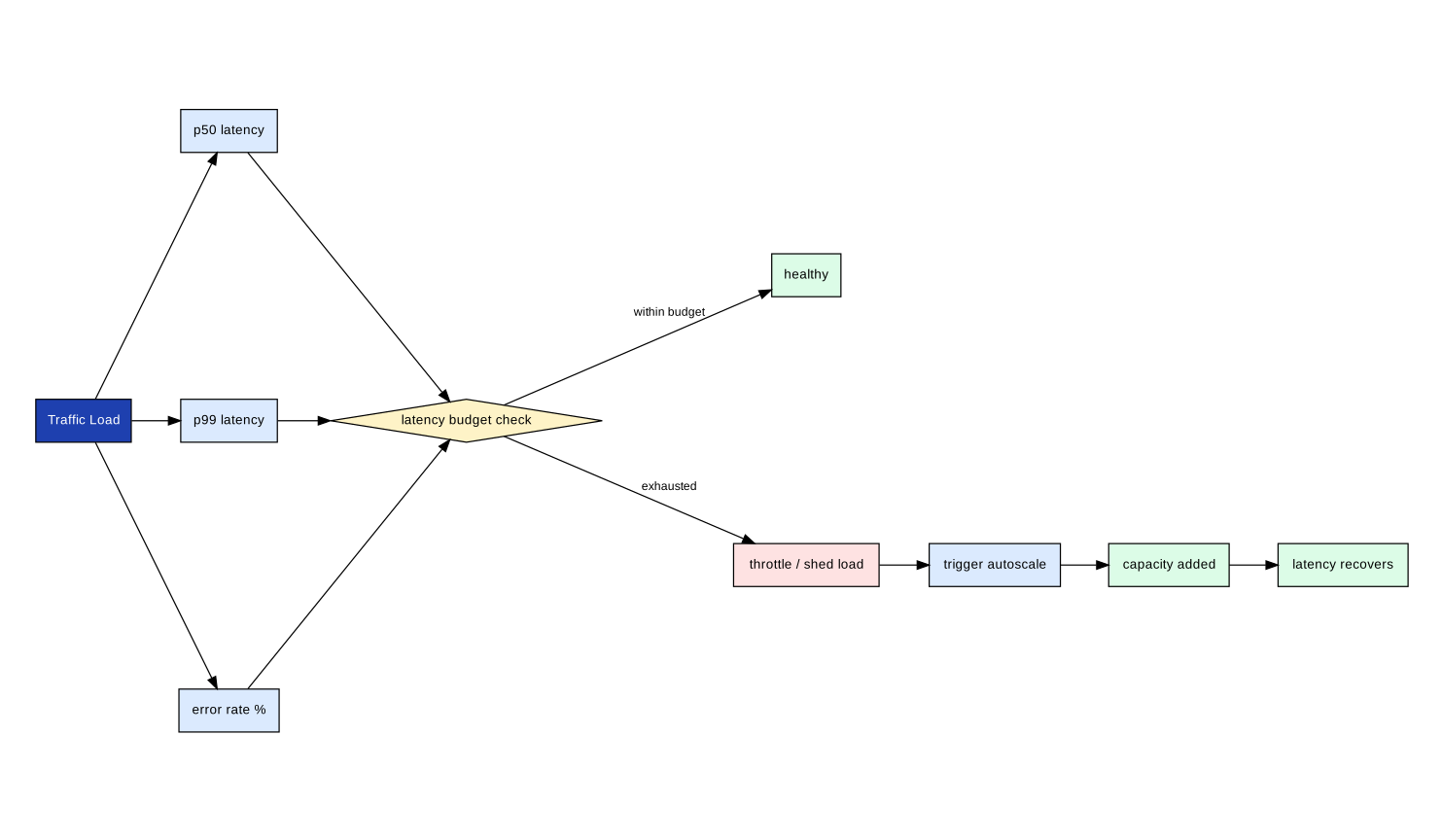
The CLI adds negligible latency overhead. Gateway p99 is the dominant term.
axme-cli/
├── cmd/
│   └── axme/                  # main entry point and command tree
├── docs/
│   └── commands/              # Per-command reference pages
└── go.mod
go test ./...| Repository | Role |
|---|---|
| axme-sdk-go | Go SDK that the CLI is built on |
| axme-examples | End-to-end examples and scenario walkthroughs |
| axme-docs | Full API reference and integration guides |
| Runtime operations (private) | Deployment and operational runbooks are maintained internally |
- Bug reports and feature requests: open an issue in this repository
- Quick Start: https://cloud.axme.ai/alpha/cli · Contact: hello@axme.ai
- Security disclosures: see SECURITY.md
- Contribution guidelines: CONTRIBUTING.md