Official TypeScript SDK for the AXME platform. Send and manage intents, observe lifecycle events, handle approvals, and access the enterprise admin surface — fully typed, Promise-based, works in Node.js and edge runtimes.
Alpha · API surface is stabilizing. Not recommended for production workloads yet.
Alpha — install CLI, log in, run your first example in under 5 minutes. Quick Start · hello@axme.ai
AXME is a coordination infrastructure for durable execution of long-running intents across distributed systems.
It provides a model for executing intents — requests that may take minutes, hours, or longer to complete — across services, agents, and human participants.
At the core of AXME is AXP (Intent Protocol) — an open protocol that defines contracts and lifecycle rules for intent processing.
AXP can be implemented independently.
The open part of the platform includes:
- the protocol specification and schemas
- SDKs and CLI for integration
- conformance tests
- implementation and integration documentation
AXME Cloud is the managed service that runs AXP in production together with The Registry (identity and routing).
It removes operational complexity by providing:
- reliable intent delivery and retries
- lifecycle management for long-running operations
- handling of timeouts, waits, reminders, and escalation
- observability of intent status and execution history
State and events can be accessed through:
- API and SDKs
- event streams and webhooks
- the cloud console
- Send intents — create typed, durable actions with delivery guarantees
- Observe lifecycle — subscribe to real-time state events via SSE
- Approve or reject — handle human-in-the-loop steps from your application
- Control workflows — pause, resume, cancel, update retry policies and reminders
- Administer — manage organizations, workspaces, service accounts, and grants
npm install @axme/axmeimport { AxmeClient } from "@axme/axme";
const client = new AxmeClient({
apiKey: "AXME_API_KEY", // sent as x-api-key
actorToken: "OPTIONAL_USER_OR_SESSION_TOKEN", // sent as Authorization: Bearer
// Optional override (defaults to https://api.cloud.axme.ai):
// baseUrl: "https://staging-api.cloud.axme.ai",
});
// Check connectivity
console.log(await client.health());
// Send an intent to a registered agent address
const intent = await client.createIntent(
{
intent_type: "order.fulfillment.v1",
to_agent: "agent://acme-corp/production/fulfillment-service",
payload: { order_id: "ord_123", priority: "high" },
},
{ correlationId: "corr-ord-123-001", idempotencyKey: "fulfill-ord-123-001" }
);
console.log(intent.intent_id, intent.status);
// List registered agent addresses in your workspace
const agents = await client.listAgents({ orgId: "acme-corp-uuid", workspaceId: "prod-ws-uuid" });
for (const agent of agents.agents as Array<Record<string, unknown>>) {
console.log(agent.address, agent.status);
}Short basic submit/get example:
Run:
export AXME_API_KEY="axme_sa_..."
npx tsx examples/basic-submit.ts
Full runnable scenario set lives in:
- Cloud: https://github.com/AxmeAI/axme-examples/tree/main/cloud
- Protocol-only: https://github.com/AxmeAI/axme-examples/tree/main/protocol
The SDK covers the full public API surface organized into families:
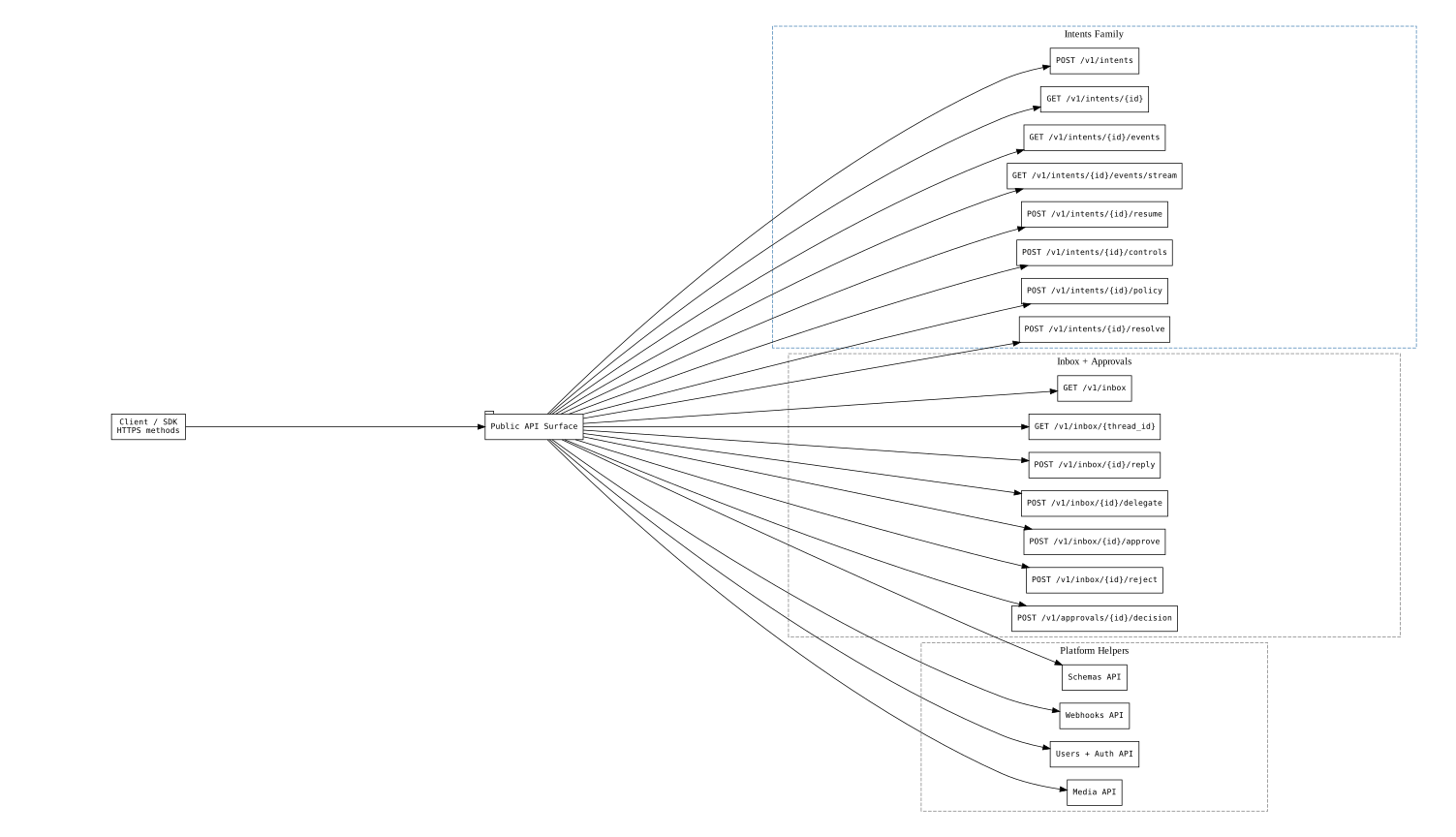
D1 families (intents, inbox, approvals) are the core integration path. D2 adds schemas, webhooks, and media. D3 covers enterprise admin. The SDK implements all three tiers.
Every request from this SDK is wrapped in the AXP protocol envelope, handled transparently:
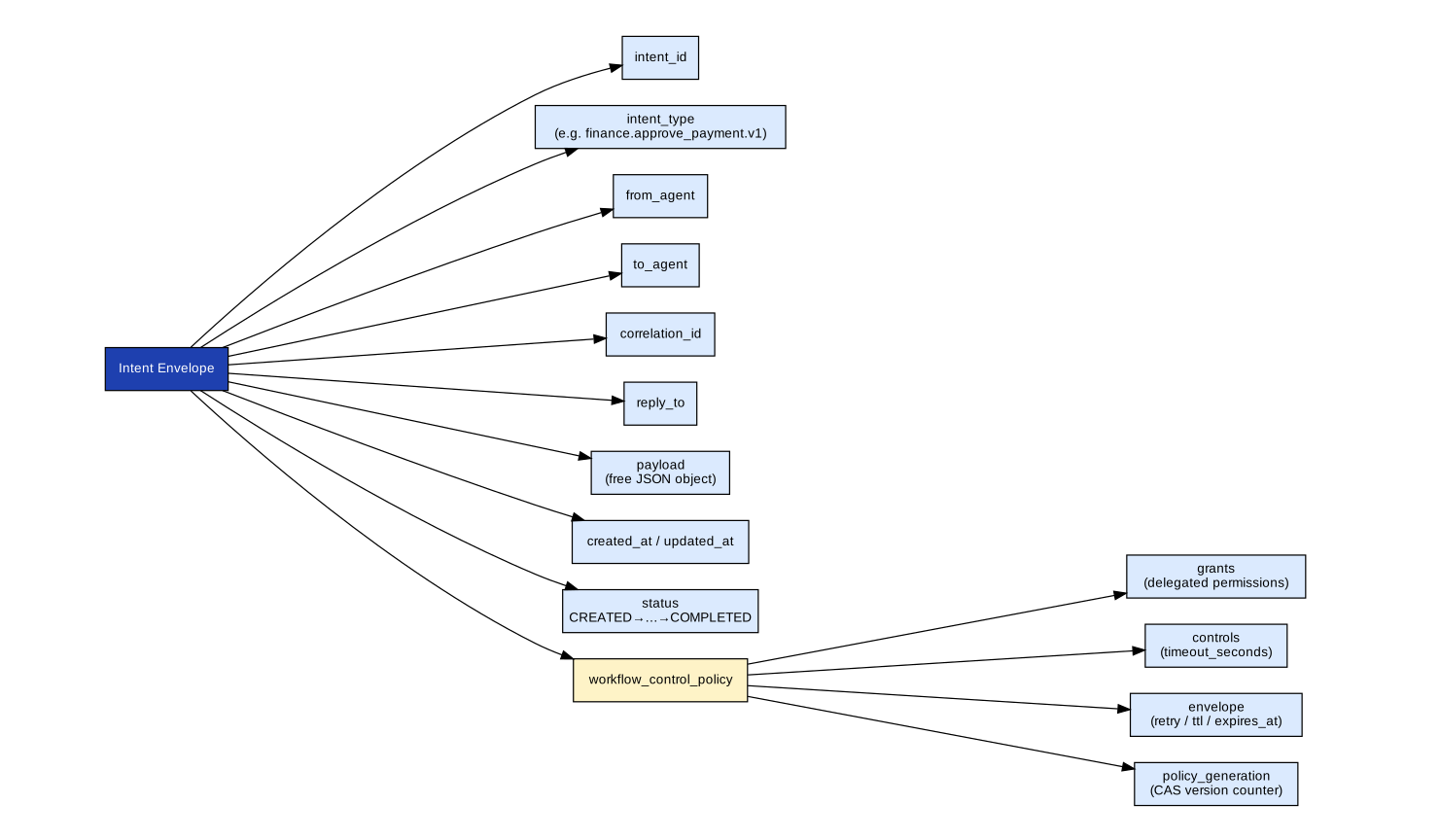
The SDK sets x-api-key on every request, and sets Authorization: Bearer <actor token> when actorToken is configured. It also handles Idempotency-Key and X-Trace-Id headers for reliability and tracing.
Every mutating method accepts an optional idempotencyKey. Pass it for any operation you might retry:
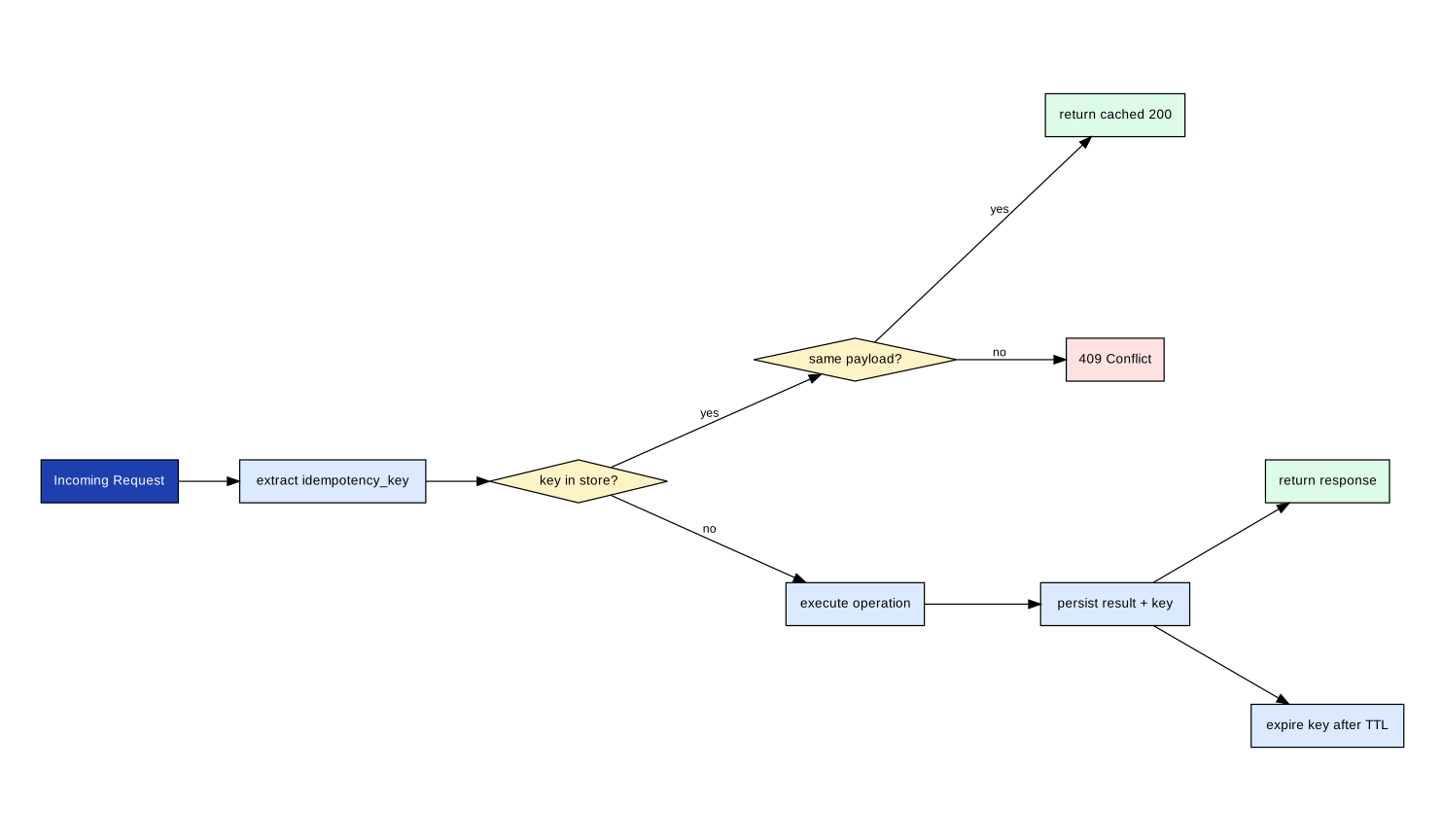
// Safe to call multiple times — only executes once
const intent = await client.createIntent(payload, {
  idempotencyKey: "my-unique-key-001",
});// Stream lifecycle events until resolution
for await (const event of client.observe(intent.intent_id)) {
console.log(event.event_type, event.status);
if (["RESOLVED", "CANCELLED", "EXPIRED"].includes(event.status)) break;
}AXME supports 8 human task types. Each pauses the workflow and notifies a human via email with a link to a web task page.
| Task type | Use case | Default outcomes |
|---|---|---|
approval |
Approve or reject a request | approved, rejected |
confirmation |
Confirm a real-world action completed | confirmed, denied |
review |
Review content with multiple outcomes | approved, changes_requested, rejected |
assignment |
Assign work to a person or team | assigned, declined |
form |
Collect structured data via form fields | submitted |
clarification |
Request clarification (comment required) | provided, declined |
manual_action |
Physical task completion (evidence required) | completed, failed |
override |
Override a policy gate (comment required) | override_approved, rejected |
// Create an intent with a human task step
const result = await client.createIntent({
  intentType: "intent.budget.approval.v1",
  toAgent: "agent://agent_core",
  payload: { amount: 32000, department: "engineering" },
  humanTask: {
    title: "Approve Q3 budget",
    description: "Review and approve the Q3 infrastructure budget.",
    taskType: "approval",
    notifyEmail: "approver@example.com",
    allowedOutcomes: ["approved", "rejected"],
  },
});
Task types with forms use form_schema to define required fields:
humanTask: {
  title: "Assign incident commander",
  taskType: "assignment",
  notifyEmail: "oncall@example.com",
  formSchema: {
    type: "object",
    required: ["assignee"],
    properties: {
      assignee: { type: "string", title: "Commander name" },
      priority: { type: "string", enum: ["P1", "P2", "P3"] },
    },
  },
},// Fetch and approve pending items
const inbox = await client.listInbox({ ownerAgent: "agent://manager" });
for (const item of (Array.isArray(inbox.items) ? inbox.items : [])) {
const threadId = typeof item?.thread_id === "string" ? item.thread_id : undefined;
if (!threadId) continue;
await client.approveInboxThread(
threadId,
{ note: "Reviewed and approved" },
{ ownerAgent: "agent://manager" }
);
}// Update retry policy and add a reminder on a live intent
await client.updateIntentControls(intentId, {
controls: {
max_retries: 5,
retry_delay_seconds: 30,
reminders: [{ offset_seconds: 3600, note: "1h reminder" }],
},
policy_generation: intent.policy_generation,
});Organizations can control which external orgs may send intents to their agents:
- Org receive policy — org-wide default (
open,allowlist,closed) - Agent receive override — per-agent exceptions to the org policy
// Get org receive policy
const policy = await client.get(`/v1/organizations/${orgId}/receive-policy`);

// Set to allowlist mode
await client.put(`/v1/organizations/${orgId}/receive-policy`, {
  mode: "allowlist",
  allowlist: ["org_id_of_trusted_partner"],
});

// Per-agent override
await client.put(`/v1/agents/${address}/receive-override`, {
  override_type: "allow",
  source_org_id: "org_id_of_partner",
});
See cross-org-receive-policy.md for the full decision flow.
axme-sdk-typescript/
├── src/
│   ├── client.ts              # AxmeClient — all API methods
│   ├── config.ts              # AxmeClientConfig type
│   └── errors.ts              # AxmeAPIError and subclasses
├── test/                      # Unit and integration tests
├── examples/
│   └── basic-submit.ts        # Minimal language-native quickstart
├── docs/
└── tsconfig.json
The TypeScript SDK includes a built-in MCP endpoint client for gateway-hosted MCP sessions:
// Initialize an MCP session
const init = await client.mcpInitialize();
console.log(init.serverInfo);

// List available tools
const tools = await client.mcpListTools();
for (const tool of (Array.isArray(tools.tools) ? tools.tools : [])) {
  console.log((tool as Record<string, unknown>).name);
}

// Call a tool
const result = await client.mcpCallTool("create_intent", {
  arguments: {
    intent_type: "order.fulfillment.v1",
    payload: { order_id: "ord_123" },
    owner_agent: "agent://fulfillment-service",
  },
});
console.log(result);
MCP calls go to /mcp by default. Override with mcpEndpointPath in the client config.
npm test| Repository | Role |
|---|---|
| axme-docs | Full API reference and integration guides |
| axme-spec | Schema contracts this SDK implements |
| axme-conformance | Conformance suite that validates this SDK |
| axme-examples | Runnable examples using this SDK |
| axme-sdk-python | Python equivalent |
| axme-sdk-go | Go equivalent |
| axme-sdk-java | Java equivalent |
| axme-sdk-dotnet | .NET equivalent |
- Bug reports and feature requests: open an issue in this repository
- Quick Start: https://cloud.axme.ai/alpha/cli · Contact: hello@axme.ai
- Security disclosures: see SECURITY.md
- Contribution guidelines: CONTRIBUTING.md