API
This api request is a graphql mutation. It requires the graduates id, company id and item that access is being requested for. Following graphql standards the data that was modified is returned, in this case a successful message is the request entity and a failed request is returned as null.
The api makes use of the ApiRequestEntity and that is what is returned.
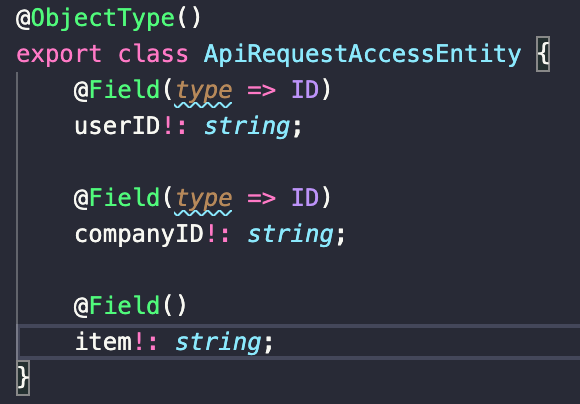
Basic error checking takes place like ensuring that no parameter is the empty string.
This api request is a graphql query. It requires the graduates id, company id. What is returned is an array of ApiAccessStatusEntities one entity for every item that a company has requested from graduate.
The api makes use of the ApiAccessStatusEntity and that is what is returned.
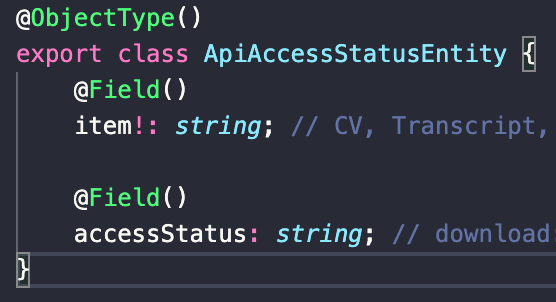
Basic error checking takes place like ensuring that no parameter is the empty string.
The api is split into two directories, request-access and access-status.
All APIs, and services need to have a status so that we know whether they are running or not an example is the twitter status API: https://api.twitterstat.us/
The hosting API should work similar to the twitter status API and ping all the various services to see if they are running or not.
The ApiHosting is made up of two string objects, a name, and a status.
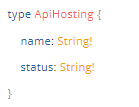
name: the name of the API/ service
status: the status of the API/service which can be either: Operational, Non-Operational, or Under Development
status Options: Operational: All APIs and Services that are up should be Operational. Non-Operational: All APIs that exists, however are not functionating for some reason, are Non-Operational. Under development: All APIs and services that are not yet implemented should been Under Development.
the status was not implemented as an enum as the requirement for the type of status is subject to change in future.
The hosting API only has one query which returns an array of ApiHosting objects.
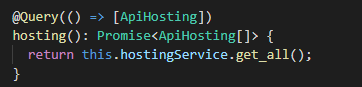
the @nestjs/terminus library was used to to ping check the various services, documentation for @nestjs/terminus to refer to:
-https://docs.nestjs.com/recipes/terminus
-https://wanago.io/2021/10/11/api-nestjs-health-checks-terminus-datadog/
to perform health checks the following needs to be present:
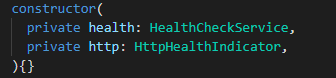
one needs a HealthCheckService and a HttpHealthIndicator because the health checks are performed using a get request, if the services is unable to respond to the get request then it is "Non-Operational" otherwise it is "Operational".
Since all the API are implemented using graphQL the get request needs to send an actual query to http://localhost:3333/graphql. instead of using the various existing queries and specializing the get request for each API a simple ping check query that simply returns a string with the text "on" was added to each API. The Query name is as follows "pingNameOfTheAPI" for the example the query inside the resolver of the Storage API is as follows:
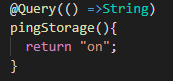
One can now ping the storage API with a get request using the following URL http://localhost:3333/graphql?query={pingStorage} this then allows us to create a generic health check function called checkApiHealth() which will not need to be updated as APIs are added and removed.

the parameters are a HealthCheckParameters array which is an array that contains all the APIs that need to be ping checked.
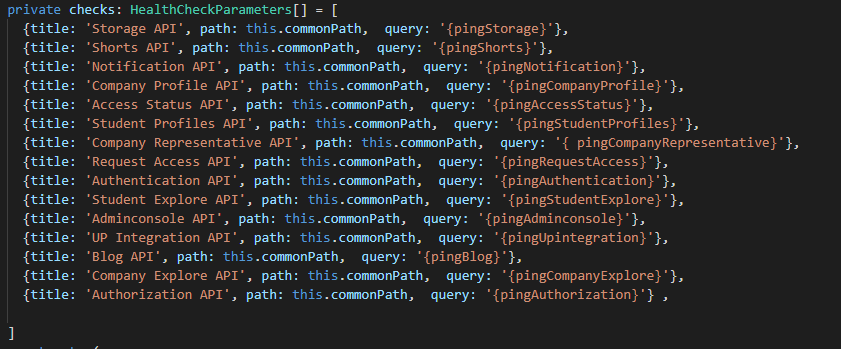
new APIs and should be added to this array, those APIs should also have a pingNameOfTheAPI query insider their resolver as specified above.
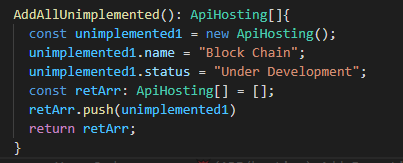
lastly we have the AddAllUnimplemented() function which simply adds all the API's and services that are Under Development. this should be updated during the development process.
- In future the API could potentially provide a way to check the up-time and down-time of APIs and services.
- consider the twitter Status API, it also provides a way to record past incidents were specific services were not available this will can be implemented as well.
- A potential refactor in future, calling this API the hosting API might not be the best choice for a name a potential refactor might be needed.
- The API can be queried either to upload , delete or download a file that was previously uploaded
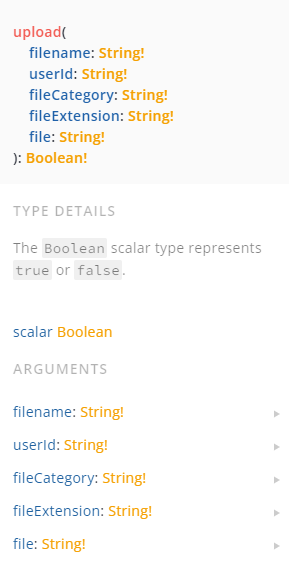
- filename: string , the file name of the file that is to be uploaded
- userId: string , the user id needed to access the files
- fileCategory: string , the category is needed for access in firebase (check the FileCategory enum in prisma)
- fileExtension: string , needed because some file types can not be stored or encoded into base64
- file: base64string
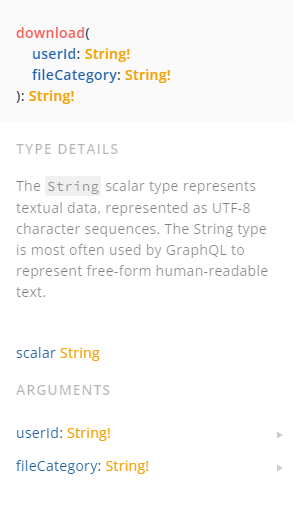
- userId: string , the user id needed to access the files
- fileCategory: string , the category is needed for access in firebase (check the FileCategory enum in prisma)
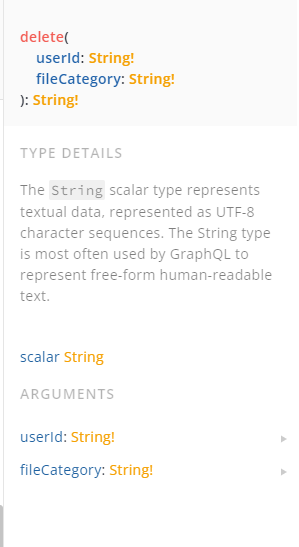
- userId: string , the user id needed to access the files
- fileCategory: string , the category is needed for access in firebase (check the FileCategory enum in prisma)
- The upload receives the the Arguments stated in Architecture and they are joined together to create a ApiStorage Entity , that is passed along the layers and stored in The database and then true or false is returned depending on the result of the upload if it failed a false is returned if it is true then the upload is successful
- The call to download returns a string which is the URL link to the file downloaded and when a GET method is used against the URL that is returned it downloads the file that is to be downloaded. The download called with two arguments which are stated under Architecture, this two items are added to a ApiStorage entity and sent through all the layers and the relevant URL is returned to the requested user
- The call to delete returns a string which is either 0 or 1 , 0 indicating that 0 items where deleted and there is nothing to delete and 1 indicating that 1 recorded was deleted and 1 file was deleted . The download called with two arguments which are stated under Architecture, this two items are added to a ApiStorage entity and sent through all the layers and the relevant URL is returned to the requested user
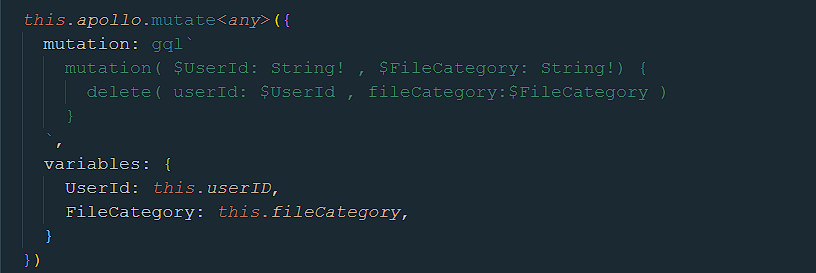
- This is an example call to the delete method using Apollo server
- Improve the API to handle Files bigger that 100kb
- Use apollo file upload implementation for file uploads
- Handle multiple downloads form a single user
- Stop the use of base64 and move to blobs
- Able to upload zip files
The Student explore feature API is used by the Student explore feature to allow companies and prospective employers to scout/find students. The Student explore feature API has multiple queries/endpoints to allow for modularity and all the queries/endpoints return the same entity so ensure that they are cross compatible. The server side implementation of the student explore feature make use of the CQRS design pattern.
ApiStudentExplore
StudentName: String
StudentBio: String
StudentEmail: [String!]
StudentNumber: String
StudentPic: String
StudentTags: [String!]
StudentID: String
StudentRel: Float
StudentLocation: String
StudentDegreeType: [String!]
StudentDegreeName: [String!]
StudentEmpStatus: Boolean
StudentEmpOffer: Boolean
Available: [String!]StudentName: will have the students name as stored in the database.
StudentBio: the students bio
StudentEmail: an array of emails.
StudentNumber: the numerical value of the students ID e.g. if the student has a student id “u19360498” then this will contain “19360498”
StudentPic: the students profile picture.
StudentTags: an array of tags the student has.
StudentID: the id of the student as in the database.
StudentRel: a value used for searching of students, the higher the number the more relevant.
StudentLocation: the location of the student.
StudentDegreeType: the array of degree types the student has each corresponding to the relative student degree in StudentDegreeName.
StudentDegreeName: the array of degree names the student has each corresponding to the relative student degree in StudentDegreeType.
The API has the following available queries: InitStudent, SearchStudentByTag, SearchStudents, FilterStudents, AllAvailable. All of these return an array of the ApiStudentExplore entity.
AllAvailable: whitch has parameter “availableQuery”, which can be on of the following: “Location”, “Degree Type”, “Degree Name”, “Emp Status”. The “Available” value will be the only non-null returned.
- “Location”: a list of unique locations in the database
- “Degree Type”: a list of unique Degree Types in the database
- “Degree Name”: a list of unique Degree Names in the database
- “Emp Status”: a list of Employment Statuses
InitStudent: has no parameters and will return an array of all students.
SearchStudentByTag: has a “searchTag” input parameter and will return all students with a specific tag.
SearchStudents: has a “searchQuery” input parameter and will return all students with names that contain matches to the searchQuery.
FilterStudents: has a “filterType” input parameter which can be “Location”, “Degree Type”, “Degree Name”, “Employment/Offers” which specify the filtering type. It also has a “filterQuery” input parameter which is used for searching.
- filterType: “Location”: will return a list of students with locations matching the filterQuery.
- filterType: “Degree Type”: will return a list of students that have a degree type matching the filterQuery.
- filterType: “Degree Name”: will return a list of students that have a degree matching the filterQuery.
- filterType: “Employment/Offers”: will return a list of students with Employment statuses matching the filterQuery.
query{
  InitStudent{
    StudentID
    StudentName
    StudentBio
    StudentEmail
    StudentNumber
    StudentTags
    StudentDegreeType
    StudentDegreeName
    StudentLocation
  }
}query{
SearchStudents(searchQuery: "Timo"){
StudentID
StudentName
StudentBio
StudentEmail
StudentNumber
StudentTags
StudentDegreeType
StudentDegreeName
StudentLocation
}
}query{
SearchStudentsByTag(searchTag: "AI"){
StudentID
StudentName
StudentBio
StudentEmail
StudentNumber
StudentTags
StudentDegreeType
StudentDegreeName
StudentLocation
}
}query{
FilterStudents(filterQuery: "Bsc", filterType: "Degree Type"){
StudentID
StudentName
StudentBio
StudentEmail
StudentNumber
StudentTags
StudentDegreeType
StudentDegreeName
StudentLocation
}
}query{
AllAvailable(availableQuery: "Location"){
Available
}
}- It should be noted that in future it might be better to have a single endpoint/query that has multiple inputs and even an array of inputs with the capability or returning different entities, but this could just as easily lead to more problems.
- It might also be a good idea to have certain tables in the database merged or even removed as they can become somewhat redundant.
- It will also be a good idea to look into more efficient Prisma queries or even SQL queries where necessary and also better searching algoridim.
- Move some of the frontend logic to Backend.
- In future it would also be a good idea to link to and make use of the student profile feature API.
An API to fetch information from the database about companies and allow company representatives to edit certain information.
The main entity is a ApiComanyProfilePage
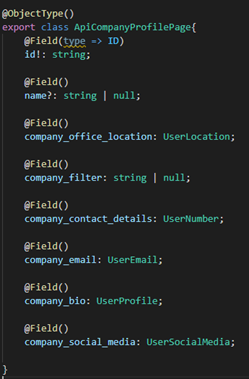
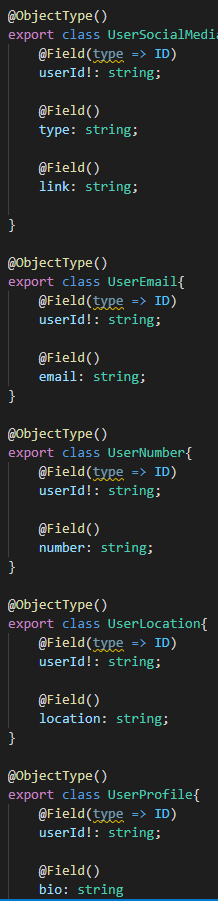
This entity is made up of many other entities such as UserLocation and UserNumber. These sub-entities are show below:
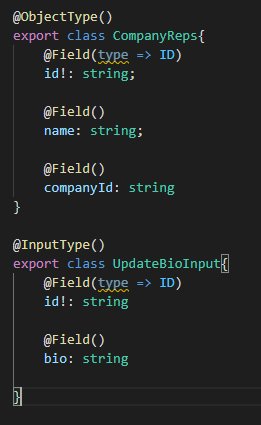
Apart from querying for data, certain information of the companies can also be updated. This includes companyBio.
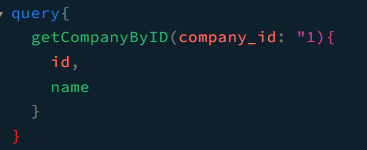
The API works by having the resolver take in the queries or mutations from the API call. The resolver then calls queries or commands in the service class which then calls functions in the repository class. An API call to fetch data and update data would look like the following:
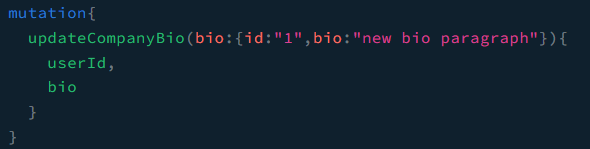
For this feature although most is complete we believe that all the companies details should be editable and that company reps can delete the company's profile page.
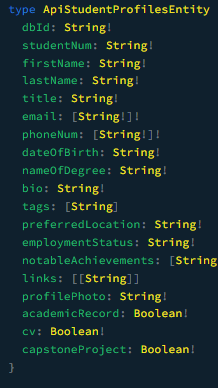
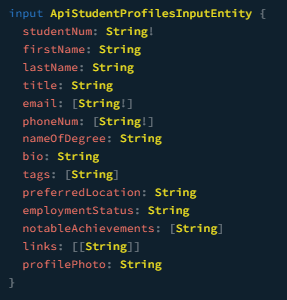
This api allows users to to edit, return or delete a student profile.
- Specifies the format in which a student profile is returned.
- Specifies the format of the input when editing a student profile.
- Contains the logic of fetching the data from the database, constructing the return object and returning the student profile object.
- See below pdf for more details on architecture and implementation of this api:
- Implement unimplemented functions as specified in the above pdf.
- Implement the deleteStudent endpoint.
- Use camelCase when naming things.
Folder structure explanation:
- What each folder is about.
- How to run and test API.
- How to query API.
- API schema.
The above mentioned team will create a system where it is possible to check if the user attempting to make API call has the correct permissions, this call should be done before an API call is made, further will be discussed in the next meeting.
- Michael du Plessis will be the head API engineer.
- The head Data engineer (Kaylee Posthumus) requested a meeting with the head API engineer (Micheal du Plessis).
- We need to communicate with the data engineers on what data they need.
- We need to discuss the schema, and how to standardize the APIs this will be done during our next meeting (Monday 21 March).
- In the meantime, we need to get familiar with graphQL code first approach https://docs.nestjs.com/graphql/quick-start#code-first.
- A separate API page on the wiki will be create that will describe how to call the different APIs.
- The APIs will need to be bundled using docker.
- ALL APIs will need a status so that we know whether they are running of not for the API status page example: https://api.twitterstat.us/.
- Mobile API is not needed, this will be communicated with Arne to figure out what needs to be done for the Mobile feature.
- Storage will need to be done using a rest API instead of graphQL however everyone else will still need to use graphQL.
- We need to contact the developer of the tuks timetable app as they can give us guidance on how to use the UP API.