

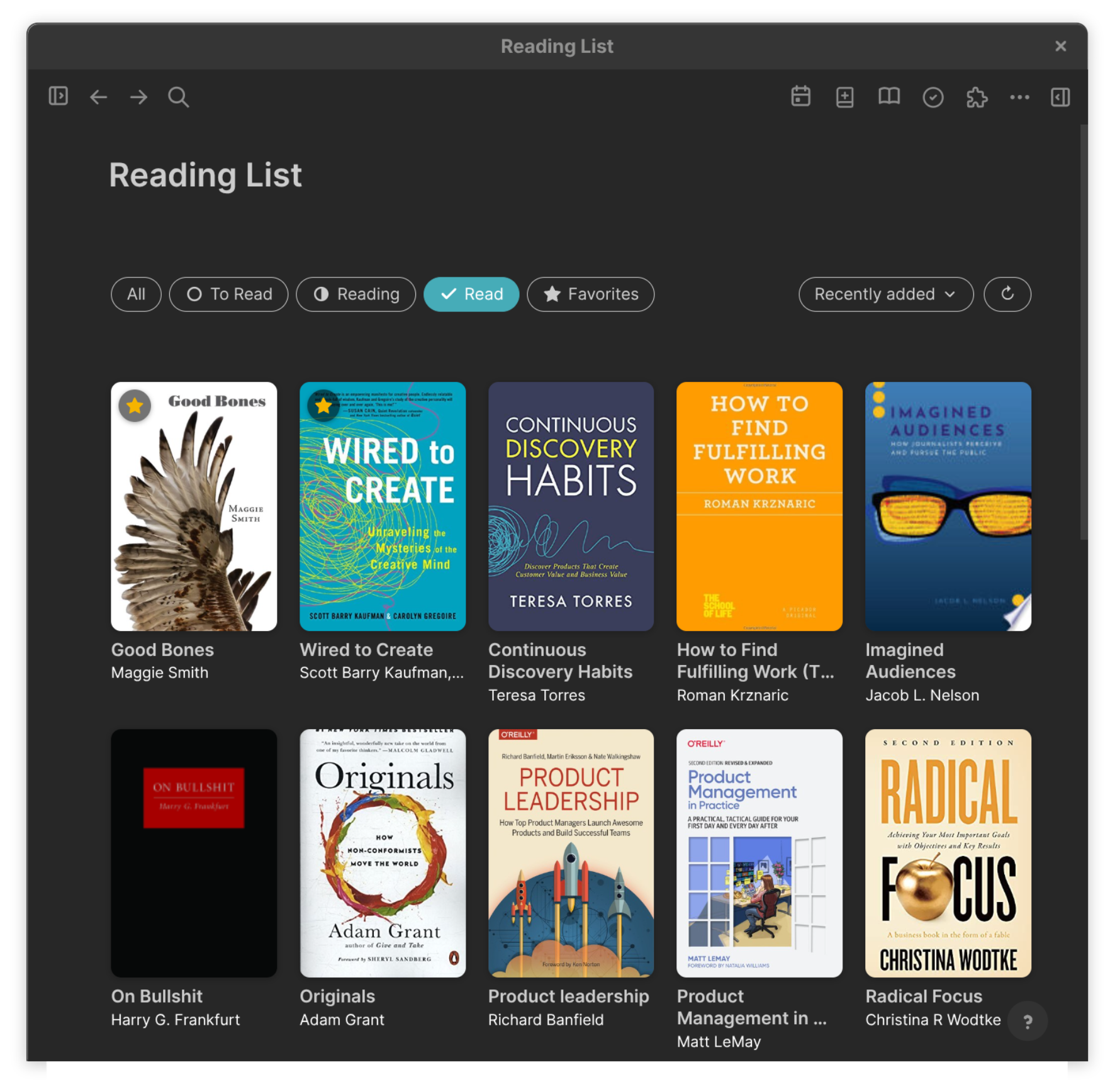
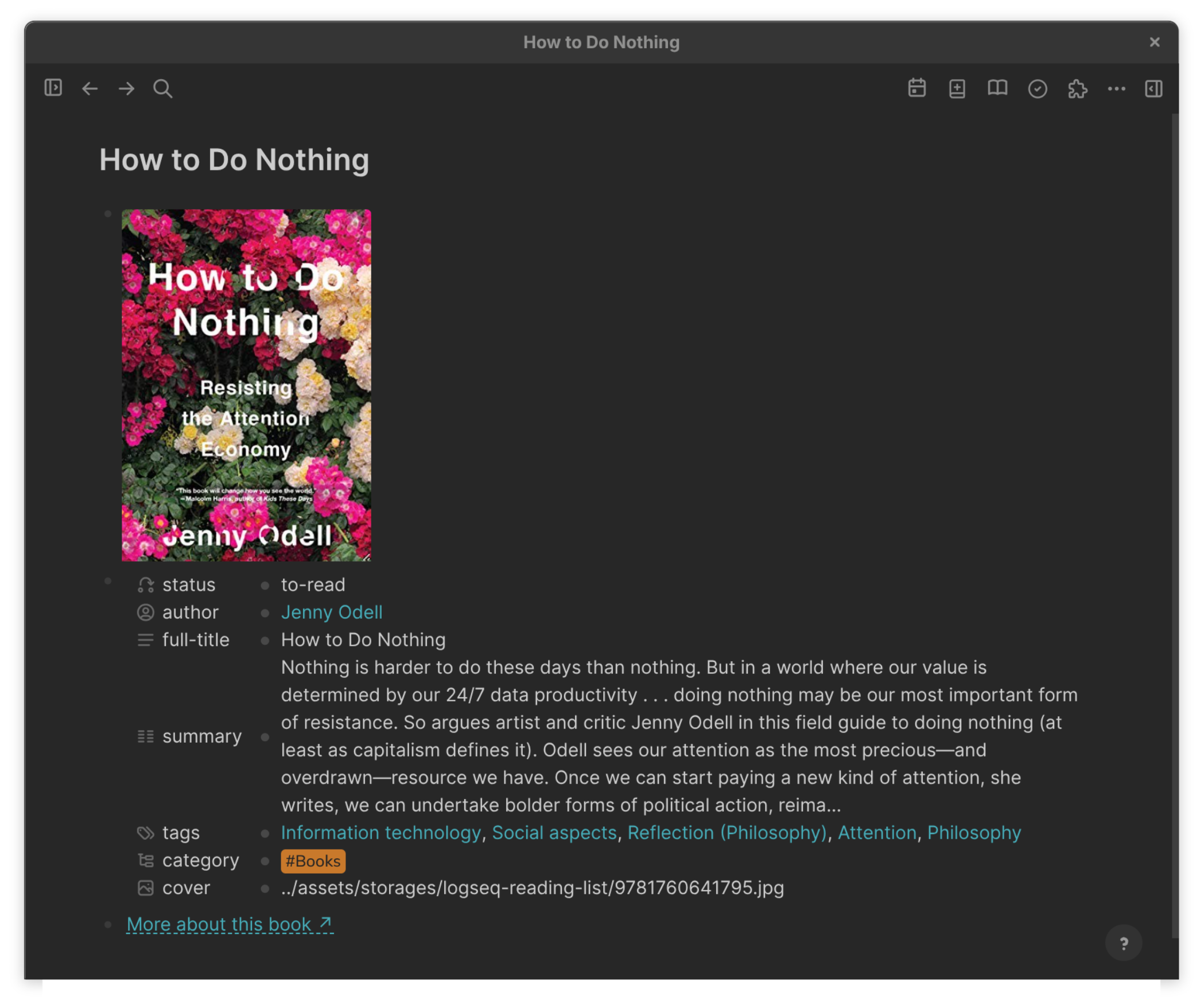
A Logseq plugin for adding books to your graph as rich, fully-populated pages — far more than just a reading list. Search Open Library or Google Books by title, author, or ISBN, pick the right edition from a themed result list, and one click creates a polished book page with the metadata filled in for you:
- a cover image saved locally to your graph,
- author, publisher, ISBN, page count, and publish date properties,
- topic tags, a summary/synopsis, and a source link.
Paste a stack of ISBNs to bulk-import a whole shelf at once. The core value is getting accurate book metadata into Logseq fast, without typing it by hand — and then, on top of that, you get an optional visual reading list: a responsive cover grid with status filters and a Favorites chip, a sort dropdown, one-click status and favorite badges on each cover, and favorited books pinned to the top of every view (plus a plugin-free table that also works on mobile).
Inspiration & credits. This plugin builds on three prior works:
YU000jp/logseq-plugin-google-books(MIT) — the direct ancestor. The Google Books search modal scaffolding, the sandbox-storage cover-download flow, and the bulk-ISBN command palette originate there. Substantial portions of the rewrite preserve that plugin's shape even where the implementation has been replaced (theme styling, Mustache templating, Open Library provider, visual grid). SeeLICENSEfor the combined MIT notice.YU000jp/logseq-plugin-multiple-assets— the working reference for binary asset writes throughlogseq.Assets.makeSandboxStorage().setItem(). Knowing that the rawArrayBufferis the right payload (not a converted binary string) is what made local cover storage reliable here.- my
sync-koreader-highlights— companion plugin and conventions sibling. The Mustache template pipeline, thebackfillTemplateDefaultspattern, the property sanitisers, and thecategory:: #Books/summary::/tags::/full-title::page-property vocabulary are shared with that plugin on purpose, so both can coexist on the same book pages without stepping on each other (see Compatibility below).Thank you to all three projects, and to the open APIs of Open Library and Google Books that make this kind of plugin possible without a backend.
AI-assisted development. This plugin was built with substantial help from Claude Code. If that matters to you, read the source before you load it into your graph.
Use at your own risk. This software is provided "as is", without warranty of any kind, express or implied. The author accepts no liability for data loss, graph corruption, accidentally-deleted book pages, broken page properties, or any other damages arising from the use of this plugin. Always back up your Logseq graph before trying any new plugin, including this one. See the LICENSE for the full disclaimer.
- Logseq 0.10.x on Linux (Asahi Fedora, aarch64). The plugin uses only Logseq's standard JS plugin API, so other desktop builds (macOS, Windows, other Linux distros) are expected to work; they haven't been exhaustively tested.
- Open Library (default; keyless) and Google Books (optional; free API key recommended — see Data sources below).
- Tested alongside
sync-koreader-highlightson the same graph; both plugins coexist on shared book pages without data loss or duplicated properties (see Compatibility).
Logseq Mobile. Logseq's mobile apps don't run plugins, so the macro-rendered cover grid doesn't render there. The book pages themselves still display normally — properties, cover image, links, all native markdown. For a list you can see on your phone, add the optional plugin-free table (see Optional: a mobile-friendly table).
Public beta. Working end-to-end against the author's own graph. Available in the Logseq plugin marketplace — see Loading in Logseq below for the one-click install, or build it from source as an unpacked plugin.
Click the book-plus toolbar button (or run Reading List: add a book… from the command palette). A themed modal opens with a segmented Title / Author / ISBN / Bulk ISBN switcher. Type a query and hit Enter; results render as cover-and-metadata cards. Click Add to Logseq on the right book, confirm with Enter, and the plugin creates a Logseq page with:
- Cover image — a top-of-page block with a markdown image,
pointing to a real local asset under
assets/storages/<plugin-id>/<isbn>.jpg, downloaded with the provenArrayBuffer-into-sandbox-storage pattern. Falls back to the remote URL if the download fails. Offline-safe. - Properties block — an empty-content block carrying:
status::—to-readby default; the value the cover grid filters on.author::— each author as a[[wikilink]].full-title::— raw title, even if the page name was sanitised (e.g.:→—).publisher::,isbn::,published::(yyyy/MM where possible),pages::,cover::(bare path or URL).category:: #Books— page-type marker.summary::— HTML-sanitised, length-capped synopsis.tags::— topic tags from Open Library'ssubjector Google Books'categories(capped at five), each as a[[wikilink]].
- Source link —
[More about this book ↗](…)to the Open Library or Google Books record for the chosen edition.
The vocabulary (category:: / summary:: / tags:: / full-title::)
matches sync-koreader-highlights exactly so the two plugins agree
on what each property means.
The Bulk ISBN tab takes a newline-separated list of ISBN-10 or ISBN-13 codes (hyphens fine) and runs the same per-book pipeline through them with a rate-limit-aware delay. Books that already exist are reported as skipped (no overwrites). Books not found in the selected source are listed at the end.
Run Reading List: open index page to open the Reading List page. The plugin seeds it with one block:
{{renderer :reading-list}}
That macro is rendered by the plugin as:
- A Datascript query for every page in the graph with a
status::property (whether the property lives on the page or on a content block — so KOReader-created and Reading-List-created pages both show up). - A responsive CSS grid of cover cards, styled with Logseq's own
--ls-*colour and font variables so it matches your active theme exactly. Cards link straight to the book page. - Status filter chips (All / To Read / Reading / Read / ★ Favorites), each chip carrying the same icon as the per-status hover badge it filters on.
- Sort dropdown (Recently added / A → Z); choice persists across reloads.
- Cycling status badge — hover a cover and a round badge appears in
its top-right corner; click it to advance the book's status
to-read → reading → read → to-read(hollow ring → half ring → check, grey → amber → green). Writes straight to thestatus::property and re-renders. Hidden until hover to keep the grid clean. - Favorite star — top-left of each cover. Click to toggle
favorite:: trueon the book page; gold-filled when set, an outlined star appears on hover when unset. Favorited books are pinned to the top of every filter view (All / To Read / Reading / Read), so the books you care about always lead. The dedicated ★ Favorites chip narrows the grid to just favorites. Thefavorite:: trueproperty is also the contract honoured bysync-koreader-highlights, which can populate it from KOReader's built-in Favorites collection. - Refresh button to re-run the query after a manual edit.
The bullet of the renderer block is hidden via scoped CSS, and the grid breaks out of Logseq's prose-width clamp so it uses the full page width and reflows on window resize.
The cover grid above is a plugin renderer, so it only works on the desktop app. For a view you can also use on Logseq Mobile, run Reading List: add mobile-friendly table from the command palette.
This is opt-in — nothing is added by default. The command appends a
native Logseq query (a plain {{query}}, no plugin code) to the
Reading List page, configured as a table of Title / Status / Author
sorted by status. Because it's core Logseq, it renders everywhere,
including the mobile apps. Re-running the command won't duplicate it.
The query block is tagged #reading-list-mobile, which the plugin uses
as a CSS hook to hide it on the desktop (so it doesn't duplicate the
cover grid). On mobile the plugin isn't running, so the rule is absent
and the table shows. The marker tag itself stays visible above the
table on mobile; if it bothers you, hide it with one line in
custom.css:
.is-mobile a.page-ref[data-ref="reading-list-mobile"] { display: none; }The search modal and the grid both pull live theme variables from
the running Logseq instance — colours via --ls-* vars, fonts via
--ls-font-family — with a polished light/dark fallback when the
plugin iframe can't read the parent document. The visible accent
follows --ls-link-text-color, which Logseq themes use as their
canonical accent, so the modal's primary button and the grid's
active chip turn whatever colour your theme assigns to links.
Every output block is a Mustache template, editable in plugin settings:
bookPageTemplate— the property block.coverBlockTemplate— the top-of-page cover image block. Clear to suppress.descriptionBlockTemplate— optional extra description block (empty by default; thesummary::property covers it). Set to{{#description}}> {{description}}{{/description}}if you also want a Markdown blockquote on the page.gbooksLinkTemplate— the source-link block. Clear to suppress.
Rendered output is parsed line-by-line back into key:: value pairs
and written via Logseq's structured createPage / property APIs, so
even custom templates can't break the property schema. The
status:: value is force-injected if you remove it from the
template — the grid query depends on it.
In Logseq: Settings → Plugins → Marketplace, search for "Reading List", and click Install. The book-plus icon appears in the toolbar.
Download logseq-reading-list-vX.Y.Z.zip from the
latest release,
extract it into ~/.logseq/plugins/reading-list/ (macOS:
~/Library/Application Support/Logseq/plugins/reading-list/; Windows:
%APPDATA%\Logseq\plugins\reading-list\), and restart Logseq.
git clone https://github.com/CR0CKER/logseq-reading-list.git
cd logseq-reading-list
npm install
npm run build      # outputs dist/
In Logseq: Settings → Advanced → Developer mode (toggle on), then Plugins → Load unpacked plugin → select the cloned folder.
Build gotcha. If
nodeon your PATH is an x86-64nvmbuild on an aarch64 machine (Apple Silicon Linux, ARM laptops), Parcel fails with "Exec format error". Use the system Node 22 (/usr/bin/node) instead.
| Action | Where |
|---|---|
| Add a book | Toolbar 📖+ button, or Reading List: add a book… |
| Open the grid | Reading List: open index page |
| Add the mobile-friendly table | Reading List: add mobile-friendly table |
| Re-run the grid query | Reading List: refresh grid |
| Reset templates | Reading List: reset templates to defaults |
| Switch data source | Settings → Book data source |
| Add Google API key | Settings → Google Books API key |
In the modal: Enter submits a search and confirms the create
dialog; Esc closes the modal; the search input grabs focus
automatically (with three-layer defence against <dialog> /
showMainUI() focus-stealing races).
Two providers, switchable in settings (Book data source):
- Open Library (default, recommended). The Internet Archive's
open database. Completely keyless, no quota, no rate limits.
Works out of the box. Cover by ISBN via
covers.openlibrary.org; description fetched lazily from the work record only for the picked book. - Google Books. Sometimes richer descriptions, but keyless Google requests share a single anonymous quota pooled across every caller worldwide — once exhausted you get HTTP 429 regardless of your own IP. If you choose Google Books, get a free API key from console.cloud.google.com/apis/credentials (enable the Books API) and paste it into the Google Books API key setting for your own private quota.
The plugin only contacts the source you've selected, and only with your search terms (a title, an author name, or an ISBN). No identifying headers, no cookies, no telemetry; no Logseq graph contents ever transmitted. Searches are visible to the chosen provider, which is inherent to a book-lookup feature.
The Google Books API key (if you set one) is stored in your Logseq plugin settings — never in this repository.
Both plugins derive page names from the book title using the same sanitisation, so the same book lands on the same page either way. The two plugins are designed to share that page without overwriting each other:
| Scenario | Behaviour |
|---|---|
| Reading List creates page first, then KOReader sync runs | KOReader walks the existing page's blocks, finds the properties Reading List already wrote (author::, full-title::, category::, summary::, tags::), and skips them — only writing the ones the page genuinely doesn't have yet (koreaderId::, series::, language::). Its highlights section appends to the bottom. No duplication. |
| KOReader creates page first, then user adds the same book via Reading List | Reading List refuses with a red error toast naming the conflicting page. Nothing is overwritten. To opt the existing page into the cover grid, open it and add a status:: property manually. |
| Both plugins on the same book over time | Each leaves what the other wrote alone. Manual edits to either plugin's blocks survive future syncs (with the caveat that KOReader rebuilds its highlights section on re-sync — manual edits within the highlights block are not preserved). |
The shared property vocabulary (category:: #Books, summary::,
tags::, full-title::, author::) is what makes this work: both
plugins write the same key names and treat them as the same concept.
favorite:: true is a future addition to that contract. Reading
List writes it when you click the star on a cover; sync-koreader-highlights
will (in a future release) populate it for books in KOReader's built-in
Favorites collection. Either plugin can be the writer — the other
just reads whatever's there.
| Key | Default | What it does |
|---|---|---|
dataSource |
Open Library |
Provider used by the search modal. |
apiKey |
(empty) | Optional Google Books API key for a private quota. Ignored for Open Library. |
country |
US |
Two-letter Google Books country code (required by their API). Ignored for Open Library. |
saveImage |
true |
Download covers into the graph; if off, the remote URL is used as the property value. |
defaultStatus |
to-read |
status:: value applied to new books (to-read / reading / read). |
pageNamePrefix |
(empty) | Optional namespace prefix for book pages (e.g. Books/). |
readingListPageName |
Reading List |
Name of the page that hosts the cover grid. |
bookPageTemplate |
(Mustache) | Property block template. |
coverBlockTemplate |
(Mustache) | Cover image block template. Set empty to suppress the cover block. |
descriptionBlockTemplate |
(empty) | Optional extra description block template. |
gbooksLinkTemplate |
(Mustache) | Source-link block template. |
lastSort (hidden) |
added |
Grid sort preference; persisted across reloads. |
{{title}}, {{fullTitle}}, {{author}}, {{authorLinked}} (each
author as a [[wikilink]]), {{publisher}}, {{isbn}},
{{published}} (yyyy/MM), {{pageCount}}, {{description}}
(HTML-decoded, truncated), {{cover}} (bare path or URL),
{{coverImage}} ( markdown ready to drop in a
block), {{coverSrc}} (raw remote thumbnail URL), {{tags}} (plain,
comma-joined topic tags), {{tagsLinked}} (same topics as
[[wikilinks]], comma-joined), {{infoLink}}, {{status}}.
status is force-injected after parsing even if a custom template
omits it — the grid query depends on it.
| File | Role |
|---|---|
src/index.ts |
Plugin bootstrap, settings schema, backfillTemplateDefaults, toolbar registration, command palette, macro registration |
src/modal.ts |
Themed search modal (in plugin iframe), segmented mode picker, result cards, inline confirm dialog |
src/search.ts |
searchBooks wrapper, themed status / error messaging |
src/providers.ts |
BookResult normalised type; Open Library and Google Books implementations; lazy fetchDescription() |
src/createBookPage.ts |
Builds a BookView, renders properties via templates, creates the three-block page, calls ensureReadingListIndex() |
src/createPagesByISBN.ts |
Bulk-ISBN import loop |
src/toAssets.ts |
saveCoverAsset() — fetches the cover, writes the raw ArrayBuffer to sandbox storage |
src/render.ts |
Mustache rendering, sanitisers, parseInlineProperties |
src/readingList.ts |
Macro renderer for {{renderer :reading-list}}: Datascript query, grid HTML + themed CSS, icon-bearing filter chips (incl. ★ Favorites), sort dropdown, hover-cycling status badge, toggle-favorite star badge with favorites-pinned-on-top sort, index-page seeding, and insertMobileTable() (the opt-in native query table) |
src/theme.ts |
Pulls Logseq's live --ls-* colour and font variables into the plugin iframe |
src/lib.ts |
Modal helpers (openModal, closeModal, setMainUIApp, pageOpen, bookPageName) |
src/index.html |
Plugin iframe entry point + stylesheet |
icon.svg |
Marketplace / toolbar icon (Lucide book-plus) |
- No Logseq Mobile support for the cover grid — plugins don't run on mobile, so the macro-rendered grid (and its status badges) won't render there. Book pages work fine, and the optional mobile-friendly table gives you a plugin-free list that does show on mobile.
- Database graphs untested. The plugin assumes file-based graphs.
- Open Library subject quality varies — some books return a long,
noisy mix of LoC headings and user-contributed labels. The
tags::value caps at five entries; further pruning is a manual edit on the page. - Existing book pages aren't auto-migrated when default templates change. Use Reading List: reset templates to defaults to pick up the latest defaults for new pages; older pages keep whatever layout they had.
MIT. Copyright (c) 2024 YU000jp (original
logseq-plugin-google-books) and (c) 2026 CR0CKER (this fork).
- @YU000jp — upstream and asset-write reference.
- Open Library and Google Books for keyless / low-friction book data APIs.
- Lucide — the toolbar and chevron icons.
- Logseq and the plugin SDK team.
- Built with substantial assistance from Claude Code.