


Find accessibility barriers before they reach users. CarlasHub Accessibility Audit is an evidence-backed accessibility pre-audit for GitHub Actions and supported AI coding assistants. It separates confirmed failures from review candidates and coverage blockers, accounts for all 55 WCAG 2.2 Level A and AA criteria, and exports accessible HTML, Excel, JSON, CSV, SARIF, screenshots, and a portable evidence archive.
Use the free GitHub Marketplace Action, or install the plugin for Codex, Claude Code, Claude Desktop, Cursor, GitHub Copilot CLI, or GitHub Copilot in VS Code.
Maintained by CarlasHub and released under the MIT License.
Open the public installation and workflow builder to use the GitHub Action or choose the verified installation path for Claude Desktop, Claude Code, Cursor, Codex CLI, and GitHub Copilot.
The public builder keeps audit ownership with the user. Choose Create a new repository to open the prefilled GitHub template, or Use an existing repository to select an App-authorised repository and start its workflow. Every audit run, report, and GitHub Actions usage record stays in that user's account. The optional repository chooser exchanges a narrowly scoped GitHub App credential through a server-side connector, stores it behind an opaque one-hour session, and never exposes it to the page; it does not run audits or receive reports. The manual GitHub editor, workflow preview, and download remain available without connecting an account.
The Action and plugin implementation remain public for Marketplace use and independent review. The editable landing-page and connector source are maintained separately in a private repository; only the compiled browser files are published to site-dist on public main and to the public gh-pages branch. Browser-delivered HTML, CSS, and JavaScript are necessarily inspectable by visitors, but the TypeScript source, tests, deployment workflow, and connector implementation are not published from this repository.
The audit engine is site-independent. It contains no customer-specific hostnames, page assumptions, selectors, rules, or defaults. Every target URL is supplied at run time, and evidence from one audit is never reused in another. Customer sites used during development are external validation targets only and are not part of the plugin package.
You do not need to know WCAG terminology to run the plugin. Start with the workflow below, use the installation guide for your client, then use the plain-language user guide and WCAG basics to understand the results.
Important: this plugin is an automated testing aid, not a WCAG certification. A report with no automated findings does not prove that a page is accessible. Screen-reader, physical-device, content-meaning, visual-judgment, and other guided checks remain manual. W3C likewise states that no evaluation tool alone can determine whether a site meets accessibility standards.
Every new report accounts for all 55 active WCAG 2.2 Level A and Level AA success criteria. Each criterion has its own human-verification procedure and evidence prompt in the HTML report and Manual Checks worksheet, alongside the criterion ledger and any automated evidence. A criterion is never marked as passed merely because automation found nothing, and the removed WCAG 4.1.1 criterion is not treated as active.
This is complete criteria coverage, not automatic certification. The final verdict still requires a qualified reviewer to complete the applicable procedures across the agreed pages, states, responsive variations, processes, browsers, devices, and assistive technologies. The 31 Level AAA criteria remain optional advisory coverage.
The audit protects review quality as well as coverage. It separates confirmed failures, review candidates, and coverage blockers; suppresses responsive evidence when a modal prevents a valid interaction test; ignores intentionally visually hidden assistive text in clipping checks; and consolidates repeated evidence across viewports and test states. The workbook uses severity and evidence-status colours for triage, but every status is also written as text so colour is never the only cue. The normative product promise, audit plumbing, acceptance tests, and release rules are defined in the Audit Quality Contract.
Watch or download the complete captioned walkthrough. It starts in a separate repository, creates the workflow, runs it from the Actions tab, follows the job, downloads the artifact, and opens both report formats. You can also follow the click-by-click written tutorial, read the video transcript, inspect the successful public run, or download the permanent HTML report and Excel workbook.
The demonstrated audit of A11y Test Cases completed one page and produced 52 findings: 51 confirmed and 1 requiring review, plus the 7 grouped manual checks used by that historical release. Current reports replace those groups with 55 criterion-specific checks. No secret or paid marketplace installation is required for a public URL.
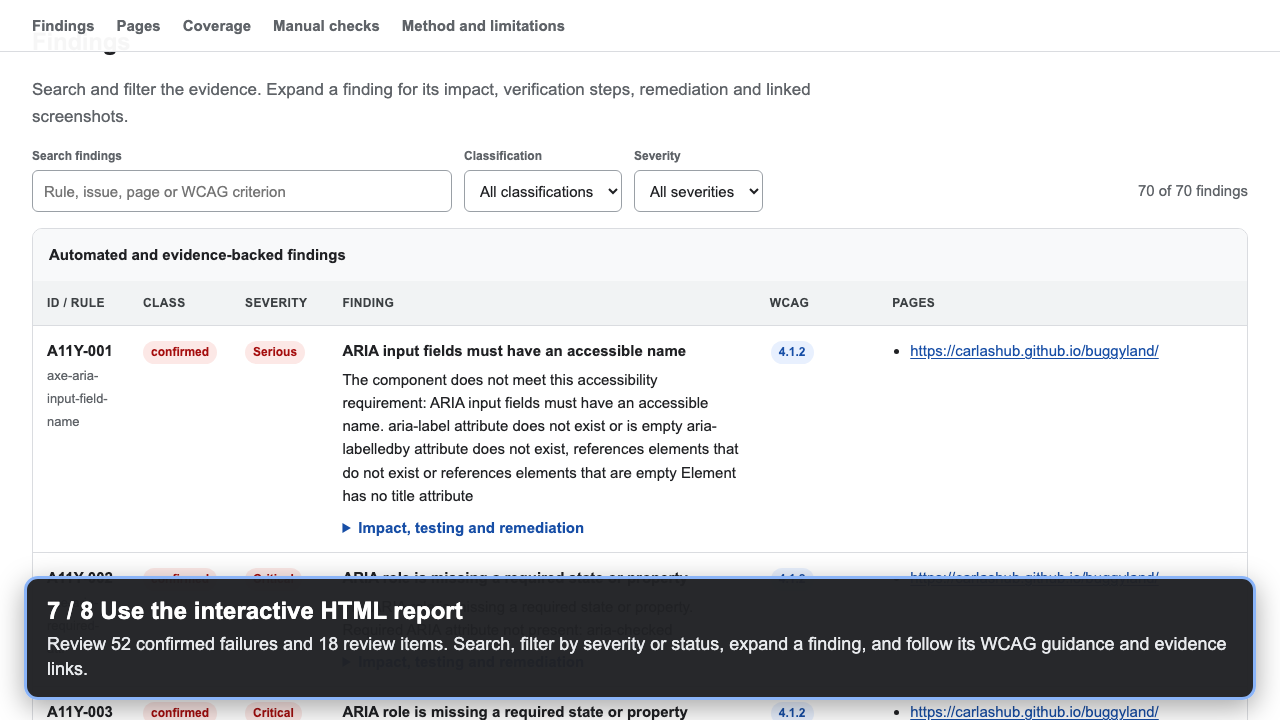
Watch or download the complete captioned v1.2.0 walkthrough, inspect its successful public run, or read the video transcript. It starts with adding and running the workflow, then shows exactly where to download and open the HTML and Excel results.
The two BuggyLand pages declare 172 intentional failure fixtures across all 86 active WCAG 2.2 success criteria. The historical v1.2.0 walkthrough produced 70 consolidated machine results: 52 confirmed failures and 18 items for review, with zero execution errors. Those numbers should not match: automated rules inspect rendered behaviour, consolidate repeated evidence, and cannot decide every WCAG requirement. The benchmark evidence guide provides the complete criteria matrix, fixture inventory, downloadable enhanced workbook, raw JSON, and manual verification plan.
The v1.8.1 quality baseline audits four page and fragment states at desktop, mobile, and 320px reflow sizes, then repeats the complete run to detect unstable results. Its reviewed baseline is 68 consolidated records: 31 confirmed failures, 36 items for review, and 1 interaction blocker, plus all 55 A/AA criterion-specific checks. It also executes 42 site-specific journey instances across the unblocked page and viewport combinations: 12 pass and 30 deliberately expose broken form announcements, tabs, modal focus management, Escape handling, and toast announcements. Independent 200% text-resize and 320px reflow phases prevent one responsive check from being mistaken for the other. Two blocked #special states remain visibly partial for interaction coverage instead of being reported as passes, while all three non-interactive responsive phases still test their rendered modal states. The exact machine-result baseline is enforced by the regression fixture and the scheduled public workflow.
For a client-neutral example, watch the sanitised plugin demonstration or read its transcript.
Add this file as .github/workflows/accessibility-audit.yml in any GitHub project:
name: Accessibility audit

on:
  workflow_dispatch:

permissions:
  contents: read

jobs:
  audit:
    uses: CarlasHub/accessibility-audit-plugin/.github/workflows/reusable-accessibility-audit.yml@v1
    with:
      urls: |-
        https://example.com/
        https://example.com/contact
      exact-hosts: example.com
      max-pages: '2'
List every page under urls, one per line, then open Actions → Accessibility audit → Run workflow and start the run. The run summary provides one download containing the complete report folder and its portable sharing ZIP. No checkout, browser setup, artifact step, token, or hostname field is required. The Action tests only the URLs in the workflow and does not crawl the rest of the site. See GitHub Action usage for advanced inputs, pull-request comments, quality gates, and security recommendations.
Reports stay local in CLI and plugin use, while the reusable workflow's normal artifact follows repository access controls. For deliberately public evidence, the reusable workflow also offers an explicit publish-report: true GitHub Pages deployment and a hosted-report-url output. It is off by default; review the complete report and the hosted-report privacy guidance before enabling it.
If the plugin is already installed:
- Decide which pages are in scope. The plugin tests only the URLs you supply; it does not discover or crawl a whole site.
- In Cursor or Claude Code, run
/accessibility-auditwith one URL, several URLs, a pasted URL list, or a page-list file. In Codex or Copilot, ask it to use the Accessibility Audit plugin with the same input. - Check the pre-audit summary. It resolves page-list files before consent and shows the page count and preview, exclusions, hosts and no-crawl boundary, effective coverage and run settings, output filename and template, auditor, and landing-page QA URL. Interactive runs audit that approved in-memory page snapshot even if the source file changes afterward.
- Let the headless audit finish, or stop it safely if needed. Progress appears in the editor or terminal.
- Extract the generated ZIP and open
Accessibility_Audit_Report.htmlfor the quickest review. UseAccessibility_Audit_Report.xlsxfor detailed triage, keeping it beside thescreenshotsfolder so its evidence links continue to work.
One page:
/accessibility-audit https://preview.example.test/
Selected pages:
/accessibility-audit https://preview.example.test/ https://preview.example.test/jobs https://preview.example.test/contact
Every page in a prepared list:
/accessibility-audit pages.xlsx
For the shortest terminal path, use Quick Audit with one authorized page. It applies the Automated auditor default, limits the run to that exact hostname, runs headlessly, and opens the generated HTML report:
node dist/cli.js quick https://preview.example.test/Add --no-open on a headless server or when you only want the report paths printed.
To learn the workflow before using a real URL, run the self-contained demo. It audits an intentionally imperfect practice page served only on your computer, writes to Accessibility Audit Demo Results, and opens the HTML report:
node dist/cli.js demoThe demo never visits an external website and does not imply accessibility certification. Add --no-open on a headless server.
Equivalent request in Codex or Copilot:
Use the Accessibility Audit plugin to audit every URL in pages.xlsx.
For a complete-site audit, the pasted list or page-list file must contain the complete canonical URL inventory. Supplying the home page does not make the plugin crawl the rest of the site.
| Field | Plain-language meaning | Default |
|---|---|---|
| Pages/input | The exact URLs, pasted URL list, or page-list file that will be tested. | Required |
| Auditor | The name recorded in the workbook. Use a person’s name when a person owns the audit. | Automated |
| Landing-page QA URL | The project’s main QA or staging URL shown in the Overview sheet. It is report metadata and does not add pages to the scope. | First resolved URL |
| Output directory | The isolated folder that receives the HTML report, workbook, JSON, CSV, SARIF, screenshots, and ZIP. | Accessibility Audit Results in the user’s home directory |
Every supplied page is checked at desktop (1440×1000), mobile (390×844), and 320-pixel reflow sizes. In plain terms, the plugin looks for problems such as:
- images, links, buttons, and form fields that do not have usable names;
- incorrect page structure or broken relationships between controls and content;
- keyboard focus that is unreachable, out of order, outside the viewport, invisible, or fully covered, including forward/reverse order and bypass-block journeys;
- menus, disclosures, and tabs whose state or keyboard operation is broken, plus configured site-specific keyboard, form, interaction, and live-region task journeys;
- content that overflows, clips, overlaps, disappears, or loses focus visibility/functionality at narrow widths, at 200% root-text size, or after WCAG text-spacing overrides;
- same-site links that are empty, placeholders, missing fragments, or consistently return 404/410;
- target-size spacing conflicts, plus selected table, media, and responsive-layout signals that require review.
The browser runs headlessly by default, so it should not take over the desktop. Visible consent banners are dismissed before the main checks and evidence capture. If one remains blocking, the plugin records the coverage blocker and does not claim that underlying interactions were tested. Each final confirmed, blocker, or review reporting unit can retain one representative contextual screenshot when the relevant state and element can be reproduced reliably; all occurrences remain traceable in JSON without creating a large duplicate image set.
The report separates four evidence categories:
| Category | Meaning | What to do |
|---|---|---|
confirmed |
The plugin reproduced deterministic evidence of a failure. | Fix it, then retest. A person should still confirm high-impact or context-sensitive cases. |
review |
The plugin found a credible signal, but context or a WCAG exception requires human judgment. | Perform the documented Test method before deciding whether it fails. |
blocker |
The page could not be tested, for example because it returned an unavailable response. | Restore access or correct the URL, then rerun it. Never count it as a pass. |
manual |
Automation cannot determine the result. | Complete the stated guided check with an appropriate tester. |
Every populated finding starts with Status = Open so teams can triage it without implying a final compliance verdict. Use Evidence type to distinguish confirmed, review, blocker, and manual records, then follow Test method before assigning work.
Start with Top actions in the HTML report or Audit Summary worksheet. The list is capped at three items and prioritises coverage blockers first, then confirmed barriers by severity, review candidates, and manual checks. Blocker and review labels describe the work needed rather than pretending they are confirmed failures; each item links back to its original stable finding ID and leaves the full register unchanged.
WCAG 2.2 Level AA is always the public conformance target. Optional AAA automation is advisory only. The HTML report, workbook, and JSON include a criterion-by-criterion ledger using passed, failed, manual-review-required, not-applicable, and inconclusive; a criterion is never inferred to pass merely because no automated issue was found. Findings also identify their W3C WCAG mapping, Deque axe-core rule source where applicable, and only the WCAG 2.0 A/AA criteria incorporated by Revised Section 508 E205.4. The overall conformance decision remains not determined until qualified human assessment is complete.
Severity (Critical, Serious, Moderate, or Minor) describes expected user impact. It is different from WCAG level, evidence confidence, remediation effort, and delivery priority.
See Understanding the report for a worksheet and column guide, and Manual verification for checks that remain outstanding.
- Headless Playwright Chromium execution by default, with opt-in Firefox and WebKit coverage and visible terminal or MCP progress.
- Automatic one-time installation of the selected Playwright browser when it is unavailable; runtime and browser files stay in plugin-owned storage.
- axe-core WCAG 2.2 A/AA rules plus selected best-practice signals, which remain review items when no WCAG success criterion is mapped.
- DOM and semantic checks for page structure, image alternatives, controls, fields, landmarks, duplicate ids, tables, and media.
- Deterministic forward/reverse keyboard journeys, bypass-block activation, focus visibility/viewport/obscuration checks, and disclosure state/relationship interaction tests.
- Configurable, repeatable task journeys for project-specific keyboard operation, forms, widget state, focus management, URL changes, and scoped live-region DOM updates.
- Tab-component state, roving tabindex, arrow navigation, activation, and tab/panel relationship checks.
- Conservative same-origin link validation for empty names, placeholders, missing fragments, confirmed 404/410 destinations, and server-error review signals.
- Desktop, 390px mobile, and 320px reflow viewports with independent default, 200% root-text, and WCAG text-spacing states covering overflow, clipping, overlap, focus, and lost-functionality evidence.
- Consent-banner detection and dismissal before interaction testing and evidence capture; reject or necessary-only actions are preferred.
- At most one representative contextual component screenshot per final confirmed, blocker, or review reporting unit, with the affected element outlined inside its navigation, form, tablist, card, section, or other component boundary.
- Full-page screenshots only for page-level failures or unresolved blocking surfaces; a failed component capture never falls back to unrelated full-page evidence.
- Lightweight relative screenshot links in
FindingsandEvidence; images are not embedded in the workbook. - Graceful cancellation that writes partial HTML, JSON, CSV, and SARIF plus a validated partial XLSX workbook.
- URL, XLSX, CSV, TXT, JSON, and local URL-set XML sitemap page-list inputs.
- One row for the same reusable component implementation, rendered name, and root cause across affected pages; generic unnamed controls also require the same rendered location, and page-specific findings remain separate.
- Embedded instructions, command, skill, rules, MCP server, workbook template, validation, CI checks, and generated marketplace payloads for Claude and GitHub Copilot.
- A self-contained Node.js GitHub Action with job-summary, pull-request-comment, artifact, and conservative quality-gate support.
- A per-page, per-viewport JSON coverage matrix that distinguishes confirmed pass/fail evidence from inconclusive, manual, not-tested, and not-applicable areas.
- Optional native Guidepup workflows for macOS VoiceOver and Windows NVDA that publish bounded spoken-transcript evidence with browser, operating-system, and journey metadata.
- Node.js 22 or later.
- npm.
- A Playwright-supported browser. Chromium is the default and can also use supported system Chrome/Edge installations; opt-in Firefox and WebKit runs use their Playwright-managed browser. If the selected browser is absent, the plugin installs it once after audit confirmation unless automatic installation is disabled.
- Microsoft Excel or another OOXML-compatible reader for the generated workbook.
The core browser audit needs no screen-reader package or operating-system accessibility permission. Native screen-reader evidence is an optional, separate GitHub Actions workflow and does not replace manual assistive-technology testing.
Clone the plugin into its own directory. Do not install its dependencies inside a repository being audited.
git clone https://github.com/CarlasHub/accessibility-audit-plugin.git accessibility-audit
cd accessibility-audit
npm ci
npm run build
Installing the default Chromium browser during development is optional but avoids the first-run download. Replace chromium with firefox or webkit only when you plan to opt in to that engine:
npx playwright install chromiumThe dist/ directory is produced by npm run build and is intentionally not committed.
For complete platform-specific setup, activation, verification, updating, uninstalling, and troubleshooting steps, use Installation. The sections below are the short local-development paths.
Download and extract the ready-made agent plugin archive in a permanent tools directory. For local installation on macOS or Linux, Cursor discovers plugins under its local plugin directory; point it at the extracted directory and reload Cursor:
PLUGIN_DIR="$(pwd -P)"
mkdir -p ~/.cursor/plugins/local
ln -sfn "$PLUGIN_DIR" ~/.cursor/plugins/local/accessibility-audit
Then run Developer: Reload Window, open Customize, and confirm that accessibility-audit exposes its command, skill, rule, and MCP server.
On Windows PowerShell, extract the ready-made archive directly into Cursor's local plugin directory:
$Destination = Join-Path $env:USERPROFILE ".cursor\plugins\local\accessibility-audit"
New-Item -ItemType Directory -Force (Split-Path $Destination) | Out-Null
curl.exe -L -o accessibility-audit-agent-plugin.tgz https://github.com/CarlasHub/accessibility-audit-plugin/releases/latest/download/accessibility-audit-agent-plugin.tgz
New-Item -ItemType Directory -Force $Destination | Out-Null
tar.exe -xzf accessibility-audit-agent-plugin.tgz -C $Destination --strip-components=1
After an installation is updated, replace the extracted directory and reload Cursor. Contributors using a source checkout must run npm ci and npm run build after updating.
Cursor can also load the root mcp.json when the repository is configured as a plugin. The manifest is .cursor-plugin/plugin.json.
Cursor Marketplace submission requires a public Git repository. A private repository can instead be used for local development or an organisation’s private team marketplace. See Installation and the Cursor plugin reference.
Download and extract the ready-made agent plugin archive, then start Claude Code in the unrelated project while loading that separate plugin directory:
cd /path/to/project-being-audited
claude --plugin-dir /path/to/accessibility-audit
The Claude plugin manifest is .claude-plugin/plugin.json, and its MCP definition is .claude-mcp.json.
For a persistent local installation, add the built checkout as a Claude marketplace and install the plugin:
/plugin marketplace add /path/to/accessibility-audit
/plugin install accessibility-audit@accessibility-audit-marketplace
/reload-plugins
Team-marketplace publication is a separate release workflow: users need access to the destination marketplace, and the published snapshot must include runnable build output. See Installation and the Claude Code plugin marketplace documentation.
Download the current Claude Desktop plugin ZIP, or build the self-contained custom-plugin file locally:
npm ci
npm run package:claude-desktop
The command validates the archive structure and writes versioned and stable ZIP filenames plus their SHA-256 files. In Claude Desktop, open Customize, select Plugins, use the custom-plugin upload option, and choose the ZIP. The ZIP contains the skill and its local MCP runtime; do not unzip it before uploading.
Open a new conversation in the Chat tab, type /, select Run Accessibility Audit, and provide one or more explicit URLs or a supported page-list file. The local MCP server requires Node.js 22 or later on the same computer. Organisation policy may prohibit custom plugins or local MCP servers. See Installation for verification, updating, and removal.
The repository generates separate, marketplace-ready payloads for GitHub Copilot CLI and GitHub Copilot in VS Code. These payloads include compiled code, bundled production dependencies, skills, MCP configuration, and an isolated runtime launcher:
- Download the Copilot CLI package for direct local CLI installation.
- Download the Copilot VS Code marketplace package for administrator-managed marketplace distribution. It is not a
.vsixextension.
Contributors can rebuild every release bundle locally:
npm ci
npm run package:release-bundles
npm run validate:marketplace
npm run test:marketplace
The release-bundle command also writes a reproducible CycloneDX 1.6 production-dependency SBOM and SHA-256 files beside the versioned archives. An exact v<package.json version> tag runs the full release gate; a mismatched tag stops before packaging or attestation. A valid tag retains those versioned files as the attested-release-<tag> workflow artifact and records GitHub build-provenance and SBOM attestations for every release archive. It does not publish a GitHub release or upload public assets automatically; a repository owner still reviews and publishes them explicitly. After downloading a candidate, verify its checksum and repository-backed attestation before distribution:
sha256sum --check accessibility-audit-agent-plugin-1.8.4.tgz.sha256
gh attestation verify accessibility-audit-agent-plugin-1.8.4.tgz --repo CarlasHub/accessibility-audit-plugin
For local Copilot CLI verification, install the generated CLI payload directly:
copilot plugin install ./marketplace/carlashub-plugin-marketplace/accessibility-audit/copilot-cli
copilot plugin list
For team distribution, use the staged payload and catalog fragments documented in Marketplace submission. No marketplace repository is modified by the build command.
Download and extract the ready-made agent plugin archive. Its Codex manifest is .codex-plugin/plugin.json, and its MCP server is declared in .mcp.json. Register the separate extracted directory as a local marketplace, install it, and start a new session:
codex plugin marketplace add /path/to/accessibility-audit
codex plugin add accessibility-audit@accessibility-audit-marketplace
codex plugin list
In Codex CLI, enter /plugins to open the plugin browser. See Installation for activation, updating, and troubleshooting.
The Codex IDE extension does not currently support plugins. Use Codex CLI or another supported Codex/ChatGPT plugin surface. See the official OpenAI plugin documentation.
Use the bundled command:
/accessibility-audit https://preview.example.test/
Multiple selected pages:
/accessibility-audit https://preview.example.test/ https://preview.example.test/jobs https://preview.example.test/contact
You can also paste a whitespace- or newline-separated list directly. Bullets, numbered lines, and a JSON string array are accepted; commas and semicolons inside a URL are preserved.
A complete page-list file:
/accessibility-audit /absolute/path/to/pages.xlsx
The confirmation form resolves the supplied pages or page-list file first, then shows a pre-audit summary with the resolved count and preview, exclusions, hosts, explicit no-crawl scope, coverage, viewports, named journeys, preset, browser selection and mode, automatic-install behavior, authentication-state use, concurrency, timeout and traversal limits, screenshot setting, output filename and template, auditor, and landing-page QA URL. Automated is the editable auditor default. The landing page defaults to the first resolved URL. A form-confirmed run audits the approved in-memory page snapshot even if the source file changes afterward. If the client does not support MCP forms, the tool returns confirmation-required with the same structured summary and a confirmationDigest; the agent confirms it in chat and retries once with both confirmed: true and that digest. confirmed: true without the returned digest never starts an audit. The digest binds the resolved page snapshot and every effective setting, including the report name and template path. A changed page list or setting returns confirmation-stale instead of starting an unapproved run.
The plugin tests only the URLs provided. It does not crawl a site or infer missing pages. This fixed boundary is recorded as scopeMode: "supplied-pages-only" in confirmation data and JSON results, and is stated in the HTML and Excel reports. Link checks may validate destinations, but linked pages are never added as audit targets. To audit a complete site, provide a complete canonical URL list in XLSX, CSV, TXT, JSON, or local URL-set XML sitemap form.
Check local prerequisites before the first audit or when setup fails:
npm run doctorThe non-destructive doctor checks Node.js 22+, the canonical report template, write access for both the report directory and its sibling portable ZIP, and selected-browser launch readiness. It does not visit a target or install software. Pass the audit's custom --output, --template, --browser, --channel, or --executable-path settings after -- to check them. Browser channels apply only to Chromium. Use npm run --silent doctor -- --json when another tool needs clean machine-readable results. Packaged installs can run the equivalent accessibility-audit doctor command directly.
Try the complete report workflow without supplying a URL:
node dist/cli.js demoThe demo uses a bundled, deliberately imperfect practice page on a temporary loopback-only server. It does not contact an external site, retains the normal audit checks and report formats, and stores its output separately in Accessibility Audit Demo Results. Use --no-open when automatic report opening is not wanted.
Quick Audit for one authorized URL, safe defaults, and automatic HTML report opening:
node dist/cli.js quick https://preview.example.test/Use --no-open to skip opening the report. Quick Audit authorizes only the supplied URL and derives an exact-host boundary; it does not crawl the rest of the site.
For repeatable multi-page setups, list the available presets and select one on the normal audit command:
node dist/cli.js presets
node dist/cli.js audit pages.xlsx --preset thorough| Preset | Best for | Changes from the established defaults |
|---|---|---|
standard |
Most audits | None; this is the recommended WCAG 2.2 A/AA setup |
thorough |
Release readiness | Adds AAA advisory checks and raises timeout, keyboard, and link limits |
debug |
Investigating a difficult page | Shows the browser, processes one page at a time, and uses a longer timeout |
Every preset retains the core desktop, mobile, 320-pixel reflow, keyboard, link, and evidence workflow. Explicit command-line options or config fields override the preset. MCP clients can use the same preset field.
Interactive direct invocation:
node dist/cli.js https://preview.example.test/Explicit audit command with selected options:
node dist/cli.js audit \
  https://preview.example.test/ \
  https://preview.example.test/jobs \
  --auditor "Auditor Name" \
  --landing-page https://preview.example.test/ \
  --output "accessibility-audit-results" \
  --exact-host preview.example.test \
  --max-pages 2 \
  --history reports/august/audit-results.json \
  --history reports/september/audit-results.json \
  --staging-only \
  --max-links 200
Page-list input:
node dist/cli.js audit pages.xlsx \
  --auditor "Auditor Name" \
  --output "accessibility-audit-results" \
  --staging-only
Interactive execution resolves the targets, asks for the auditor and landing-page QA URL, prints the same pre-audit summary used by MCP, and asks for start confirmation. --yes accepts supplied/default values and starts without prompts. Add --open to either form of the normal audit command to open the finished HTML report; every terminal run prints labelled paths for opening the HTML and sharing the portable ZIP.
Add one or more repeatable --history <audit-results.json> options to create an optional chronological trend in the HTML report and workbook. The files remain local, can be supplied in any order, and are compared only across equivalent browser-engine, URL, and viewport scope; a browser-engine change is reported as partial and never creates false new or resolved findings. Reports created before browser selection was available have no browserEngine field and are interpreted as Chromium for backward compatibility. A present value must be chromium, firefox, or webkit; any other value is rejected rather than silently changing comparison results. History never changes the audit target or quality gate.
Progress is written to stderr. The final structured result is written to stdout.
- In Cursor, Claude, Codex, or Copilot, press the client’s Stop control.
- In a terminal, press
Ctrl+Conce.
The plugin closes active browser work, retains completed evidence, writes Accessibility_Audit_Report.html, Accessibility_Audit_Report.xlsx, audit-results.json, audit-findings.csv, and audit-results.sarif, validates the partial workbook, packages its files, and returns status: "cancelled". Pressing Ctrl+C a second time exits immediately and can prevent report completion.
Supported inputs are:
- One or more explicit HTTP(S) URLs.
- A pasted whitespace- or newline-separated URL list, including bulleted or numbered lines, or a JSON string array. Every entry is validated and malformed entries are identified by position.
- XLSX workbooks. Columns named
QA page,Staging URL,URL, orPage URLare preferred; otherwise HTTP(S) cells are scanned. - CSV files containing URLs.
- TXT files containing URLs, normally one per line.
- JSON arrays or objects containing URL strings.
- Local XML sitemap files with a
<urlset>root. Only page<url><loc>values are imported; metadata URLs are ignored. Sitemap indexes and remote sitemap fetching are intentionally not followed, so provide each child URL-set file explicitly.
Use allowedHosts or repeated --allow-host flags to authorize a hostname and its subdomains. Use exactHosts or repeated --exact-host flags when each approved hostname must match literally. maxPages or --max-pages is an optional hard ceiling from 1 to 50,000: after parsing, authorization, and deduplication, an oversized scope stops before any browser or report starts instead of being silently truncated. When it is omitted, the explicit supplied scope is unlimited. Enable stagingOnly only when every supplied target is a staging, QA, preview, test, or local host.
The default output directory is Accessibility Audit Results under the user’s home directory. A custom outputDir can be supplied.
Generated files:
Accessibility_Audit_Report.html— polished, self-contained, accessible report that leads with the decision-ready position, next step, and review shortcuts, then explains what each result means, why it matters, how it was checked, and how to fix it, with an accessible Copy ticket action for ready-to-paste work items.Accessibility_Audit_Report.xlsx— validated CarlasHub WCAG 2.2 audit workbook.audit-results.json— complete evidence, classifications, requested/completed/skipped pages, axe incomplete/pass metadata, keyboard and link truncation, interaction blockers, the coverage matrix, and guided checks.audit-findings.csv— a portable flat finding register with stable IDs, fingerprints, classification, ownership, and remediation fields.audit-results.sarif— SARIF 2.1.0 results for compatible code-scanning and automation systems.screenshots/*.png— full-page screenshots only for page-level failures or unresolved blocking surfaces.screenshots/elements/*.png— one retained representative contextual image per final confirmed, blocker, or review reporting unit when the element and tested state are visible and stable; the affected element is outlined within surrounding component context.<output-directory>.zip— portable copy of the HTML report, workbook, JSON, CSV, SARIF, and linked screenshot tree, written beside the output directory.
Workbook worksheets:
Audit Summary— decision-ready current position and recommended next step, landing-page QA URL, scope, auditor, methods, totals, severity distribution, limitations, and outstanding guided checks.Findings— a 25-field remediation register covering evidence confidence, workflow status, severity, WCAG mapping, affected scope, user impact, reproducible results, recommendation, ownership, effort, and screenshot evidence.Page Inventory— every requested URL with audit state, planned and completed viewports, consent handling, runtime errors, and notes.Evidence— portable evidence paths linked to their finding, page, viewport, rule, component, locator, evidence type, and detail.Manual Checks— one row for each of the 55 active A/AA criteria, with a criterion-specific procedure, applicability, evidence prompt, status, and reviewer notes.WCAG 2.2 Reference— visible criterion, level, title, and W3C Understanding links used to enrich findings.WCAG Criteria— generated criterion-by-criterion AA and optional AAA-advisory status ledger with finding links, automated evidence, limitations, and W3C Understanding links.
Native VoiceOver and NVDA runs publish separate JSON, Markdown, HTML, and Playwright artifacts so environment-specific spoken evidence is not confused with the core cross-platform report.
The bundled workbook is an original CarlasHub template designed around WCAG 2.2 audit and remediation workflows. Its six canonical template sheets separate executive summary, findings, page coverage, evidence, guided manual checks, and standards reference; the generator appends the seventh WCAG Criteria ledger while retaining portable links and validation controls.
The report keeps these categories separate:
confirmed— deterministic reproduced evidence, such as a WCAG-tagged axe violation, missing label, broken ARIA relationship, missing fragment, or two-source 404/410 response.review— a signal requiring human judgment, such as target-size exceptions, text-spacing overflow, placeholder links, a 5xx response, linked-image wording, or ambiguous component behavior.blocker— the requested page could not be tested.manual— procedures automation cannot prove.
Link validation deliberately avoids broad crawling and destructive requests:
- Only rendered same-origin links are network-checked.
- External links, downloads, non-HTTP protocols, and logout/delete/remove/unsubscribe paths are not requested.
- HTTP 404/410 is confirmed only when both the authenticated Playwright request context and an in-page browser fetch return the same status.
- HTTP 5xx and placeholder destinations remain review items.
- Empty link names include text, ARIA labels, valid labelled-by text, descendant image alternatives, input values, and titles before being reported.
- Equivalent custom and axe link-name evidence is de-duplicated.
- axe
regionbest-practice nodes are summarized as one page-structure review row per page instead of one failed row per DOM node. - Identical text-contrast treatments can be shared across pages only when the measured foreground, background, ratio, implementation evidence, and root cause match. Distinct colour treatments remain distinct rows, and a host is never labelled site-wide without traceable evidence for every affected page.
- Repeated landmark-name signals are grouped only when the role, accessible name, and implementation signature match; related axe nodes are retained.
- Repeated disclosure triggers are grouped only within the same rendered component family and root cause. Missing
aria-controlsalone produces no finding for an ordinary disclosure or accordion. - Disclosure checks wait for the rendered control inventory to stabilize, establish a collapsed baseline, verify the exact live control receiving focus, and test both Enter and Space. After each activation they re-query the control and every referenced panel, wait for JavaScript and animations to settle, and capture
aria-expanded, visual panel visibility, and accessibility-tree exposure in the same DOM snapshot. Visual visibility is measured independently fromaria-hidden/inertexposure so those conditions cannot be confused. A mismatch is confirmed only from settled visual-state evidence; hidden/inactive clones, ambiguous identities, detached controls, incomplete interactions, and missingaria-controlsalone remain raw JSON and inconclusive coverage evidence, not workbook findings. - Generic disclosure checks do not require Escape. Escape is evaluated manually only for interaction patterns that require it, such as dialogs and applicable menus or popovers.
- Invalid
dlparent/child and orphaneddt/ddsignals from the same description-list component are reported as one structural root cause. - A target is not reported merely because one rendered dimension is below 24 CSS pixels. Inline text links are excluded, isolated undersized targets that satisfy the spacing geometry do not create workbook rows, and raw measurements remain available in JSON.
- Target-size rows require a rendered spacing collision or an axe target-size violation/incomplete signal, remain
reviewitems while the Equivalent, Inline, User Agent Control, and Essential exceptions are unresolved, and group related controls in the same rendered component into one finding. - Focus-obscuration checks sample the visible centre and four inset corners. A control is reported as confirmed only when unrelated content covers every sampled point; off-screen geometry and one covered point do not create a failure.
Tab checks do not report optional Home/End support as a failure. They separately test orientation-aware arrow navigation, Enter/Space or automatic activation, aria-selected, tabindex behavior, aria-controls, tabpanel, and aria-labelledby relationships. Broken references and keyboard-unreachable tabs are confirmed; non-standard but potentially operable authoring patterns remain review items.
Pass --config audit.config.json. Command-line values override the file.
{
  "preset": "standard",
  "auditor": "Automated",
  "landingPageUrl": "https://preview.example.test/",
  "outputDir": "artifacts/client-audit",
  "allowedHosts": ["preview.example.test"],
  "exactHosts": ["preview.example.test"],
  "maxPages": 250,
  "stagingOnly": true,
  "headless": true,
  "browserEngine": "chromium",
  "autoInstallBrowser": true,
  "storageState": "../private-audit-state/audit-session.json",
  "concurrency": 2,
  "timeoutMs": 30000,
  "maxTabStops": 120,
  "maxLinksPerPage": 200,
  "captureScreenshots": true,
  "journeysFile": "journeys/primary-navigation.journeys.json"
}
journeysFile keeps reviewed journeys reusable and resolves relative to the configuration file, so the same checked-in setup works from any current directory. It accepts either a top-level journey array or an approved { "journeys": [...] } file and applies strict validation before any audit starts. Use --journeys-file <path> to select a file directly or override both journeys and journeysFile from --config; direct CLI paths resolve from the current directory. A configuration file must not contain both journey fields. Existing inline journeys configuration remains supported.
For protected pages, storageState reuses an authorized Playwright browser-state JSON file in each isolated audit context. The example assumes the configuration is at the repository root and deliberately places state in a private directory outside that repository; choose an equivalent outside-repository location for your checkout. Configuration paths resolve relative to the configuration file; --storage-state <path> and MCP paths resolve from the current directory and override configuration. Before any browser or report starts, an authentication preflight validates the exact supported Playwright shape, size, owner-only POSIX permissions, public-suffix safety, cookie/origin host scope, and separation from the report directory and portable ZIP. The confirmed bytes are then reused as one private in-memory snapshot; a later file change stops the run and requires fresh confirmation. The pre-audit summary reports success without printing the path or contents. Keep state files out of source control and report directories, restrict their permissions, rotate them after use, and never share their paths or contents in prompts or reports. Host restrictions, consent handling, and all established audit checks remain active. Follow the authenticated-page security guide for least-privilege setup, storage, and cleanup.
Journeys restart from the requested URL and run at every applicable viewport. They may be limited with urlIncludes and viewports. Missing selectors are reported as inconclusive; reproduced assertion or keyboard-focus failures are confirmed. Use the complete BuggyLand journey pack as a working keyboard, form, modal, tabs, and live-region example. The GitHub Action also accepts the same array through journeys or a checked-in JSON file through journeys-file.
To create a first journey without writing the step schema by hand, run accessibility-audit journeys build. The interactive builder offers an ARIA disclosure/menu button (using aria-expanded), form validation with an ARIA live-region or alert, dialog, horizontal or vertical tabs with automatic or manual activation, and status-message patterns. It asks only for the relevant selectors, behavior, and scope, then prints a schema-valid JSON array. Native details/summary disclosures and visible error summaries without live-region semantics can still be represented with hand-authored steps, but are not mislabeled as supported guided patterns. The builder does not visit the site, start an audit, or replace existing hand-authored journey files.
Preserve work that is not ready to run with accessibility-audit journeys draft partial-journey.json; use --output <path> to choose the destination, or omit the input to create a blank journey-draft.json. The command accepts a partial journey object, an array, or an object with a journeys array, records current strict-validation issues, and never treats those issues as a save failure. Drafts use an explicit versioned accessibility-audit-journey-draft envelope and keep candidates under candidateJourneys, so neither the CLI nor the GitHub Action can mistake them for runnable journey configuration. Existing files are never overwritten. The guided builder can save its completed result in the same review state with accessibility-audit journeys build --draft journey-draft.json; it still prints the established runnable JSON to standard output.
When review is complete, run accessibility-audit journeys approve journey-draft.json. Approval revalidates the draft's current candidateJourneys instead of trusting its saved validation snapshot, and writes an established { "journeys": [...] } configuration without starting an audit. A checkout.draft.json input defaults to checkout.journeys.json; use --output <path> to choose another destination. Approval refuses malformed, incomplete, unsupported-version, and already-existing outputs. The approved file works directly with CLI --config and the GitHub Action journeys-file input, while the original draft remains non-runnable and unchanged.
Check a hand-authored or generated file before an audit with accessibility-audit journeys validate journeys.json. The validator accepts both the top-level array used by the GitHub Action and an object with a journeys array used by audit configuration, rejects misspelled or unknown journey and step fields, reports every schema issue with its JSON path, and never visits a page or starts an audit. Add --json for a machine-readable success or failure envelope; failures keep a nonzero exit status and use the stable codes file-read, invalid-json, or invalid-schema. Default output sanitizes terminal control characters and never echoes malformed file content; ACCESSIBILITY_AUDIT_DEBUG=1 adds the validator's safe stack trace.
Set preset to standard, thorough, or debug. Other fields in the same file take precedence over the preset, so a team can start with a named setup and change only the limits it needs.
Use --headed only when debugging. Normal and CI execution should remain headless.
run_accessibility_audit— recommended one-shot entry point with presets, confirmation, progress, cancellation, report generation, and validation.audit_pages— lower-level explicit URL entry point.audit_from_file— lower-level page-list entry point.get_audit_instructions— returns the embedded generic workflow.validate_accessibility_report— validates workbook structure, remediation, image evidence, and obsolete-sheet removal.list_guided_manual_checks— returns procedures automation does not prove.
Completed and safely cancelled audit tool results include direct resource links to the generated HTML report and portable ZIP, so compatible clients can present Open accessibility audit report and Share accessibility audit report actions. The server also publishes the run-accessibility-audit MCP prompt.
The three audit tools accept an optional historyPaths array of prior local audit-results.json files. The approval summary shows only their filenames and count, while the approval digest binds the ordered paths before execution.
Automation cannot establish complete WCAG conformance. Manual work remains necessary for:
- The user experience of supported screen-reader/browser combinations; a configured live-region journey proves only the observed DOM announcement contract.
- Physical mobile devices, touch gestures, orientation, and drag alternatives.
- Alternative-text meaning, captions, audio descriptions, language changes, and heading/label quality.
- Complete contrast over gradients, images, and every component state.
- Timing, flashing, cognitive consistency, error quality, accessible authentication, and exception analysis.
- Unconfigured, destructive, authentication-sensitive, or context-dependent keyboard journeys and application-specific workflows.
Use list_guided_manual_checks, the workbook Overview, and docs/manual-verification.md to complete those procedures.
- The target repository is read-only. The plugin does not edit source, governance files, agent rules, CI, hooks, manifests, or lockfiles.
- Source-checkout dependencies stay in the plugin directory. Marketplace runtime dependencies and downloaded browsers stay in client-owned plugin data, never in the audited project.
- Output is written only to the configured audit directory.
- Only explicitly supplied URLs are audited.
- Visible consent banners are dismissed before component checks and screenshot capture. JSON states whether a banner was found, which action was used, and whether it was dismissed.
- Host allowlists and optional staging-only enforcement are available.
- Browser checks are headless by default.
- The plugin never asks for or collects sign-in credentials. An operator may opt in to a local Playwright storage-state file; the plugin passes that file to local browser contexts without showing its path or contents in the pre-audit summary. Treat the file as a live secret and follow the authenticated-page security guide.
- Screenshots and page content can contain sensitive information; protect and delete report artifacts according to project policy.
See SECURITY.md for vulnerability reporting and data-handling notes.
npm run lint
npm run typecheck
npm run test:quality-contract
npm test
npm run build
npm run test:integration
npm run build:marketplace
npm run validate:marketplace
npm run test:marketplace
npm pack --dry-run
Validate a generated workbook:
node dist/cli.js validate accessibility-audit-results/Accessibility_Audit_Report.xlsxThe integration suite runs real Chromium, verifies confirmed/review classifications, checks focused screenshot capture and relative evidence links, validates the portable archive, and tests graceful cancellation. Unit tests do not replace real browser or manual assistive-technology verification.
CLI failures show a stable error code, the underlying message, and ordered recovery steps. MCP audit tools return the same guidance as structured data, including the failure stage, code, message, nextSteps, and whether retrying is appropriate. Follow the first suggested action before retrying; do not broaden the authorized hosts merely to bypass a scope error.
Stack traces are hidden by default so routine client output does not expose local paths or implementation details. CLI, MCP, and GitHub Action failures also redact common authorization headers, cookies, URL credentials, sensitive URL parameters, token/password fields, and storage-state values. Local CLI debugging with ACCESSIBILITY_AUDIT_DEBUG=1 may show filesystem paths, but authentication values remain redacted. Redaction is defense in depth: still review output before sharing it and never place secrets in URLs, configuration, filenames, prompts, or report artifacts.
Repository validation also runs npm run verify:credentials. This rejects credential literals in source, workflow, plugin, MCP, and generated marketplace manifests without echoing the detected value. Marketplace bootstrap and launcher messages use the same safe-output policy, so installation errors are redacted before they reach client logs.
- Run
npm ciandnpm run buildin the plugin directory. - Confirm
dist/mcp.jsexists. - Reload the editor or start a new Claude, Codex, or Copilot session.
- Confirm the plugin is enabled at the intended user/workspace scope.
- Review the client’s MCP logs for
accessibility-auditstartup errors.
The plugin installs the selected Playwright browser automatically when it is unavailable. Chromium remains the default and also tries supported system Chrome and Edge installations; Firefox and WebKit never fall back to Chromium. If automatic downloads are blocked, run npx playwright install chromium, npx playwright install firefox, or npx playwright install webkit in the plugin checkout as appropriate. Pass --no-auto-install-browser only when that fallback must be disabled.
Check allowedHosts, stagingOnly, redirects, authentication, and skippedUrls in audit-results.json. Page Inventory shows each requested URL and its audit state. A skipped or interrupted page is never presented as passed.
Inspect the JSON evidence, response status, final URL, authentication state, and page-specific routing. Only matching 404/410 checks are confirmed; placeholder destinations and 5xx responses remain review findings.
Keep captureScreenshots enabled, confirm the output directory is writable, and inspect the JSON evidence path. The final report retains at most one representative screenshot for each confirmed, blocker, or review reporting unit when the state and element can be reproduced. A component whose selector cannot be resolved is left without a screenshot instead of receiving unrelated full-page evidence. Keep the workbook beside its screenshots directory or use the generated ZIP so the relative links continue to work.
- Installation for Cursor, Claude Code, Codex, and GitHub Copilot: docs/installation.md
- Marketplace packaging and submission: docs/marketplace-submission.md
- GitHub Action usage: docs/github-action.md
- GitHub Developer Program application: docs/github-developer-program.md
- Start-to-finish instructions: docs/user-guide.md
- WCAG terminology for non-specialists: docs/wcag-basics.md
- Usage and troubleshooting: SUPPORT.md
- Security reports: SECURITY.md
- Contribution and verification requirements: CONTRIBUTING.md
- Release history: CHANGELOG.md
- Detailed test matrix: docs/testing-matrix.md
- Workbook behavior: docs/reporting.md
- Guided checks after automation: docs/manual-verification.md
- Privacy notice: PRIVACY.md
- Terms of use: TERMS.md
MIT. See LICENSE.