###View Blade Template
Tugas 1 membuat view untuk project anda
1 membuat folder dan file yang akan di isi
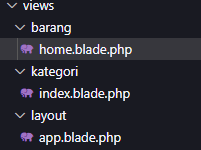
nama folder yang anda harus dibuat -barang -kategori -layout
Nama file yang harus dibuat -home.blade.php -index.blade.php -app.blade.php
folder dan file-file nya menjadi satu sepeeti
contoh gambar yang terlihat dibawah ini
Tugas 2 membuat layout dengan master template blade untuk project anda
2 pada folder layout 'file app.blade.php' kita mengambil css dan js di bootstrap ini linknya https://getbootstrap.com/docs/5.2/getting-started/introduction/#cdn-links
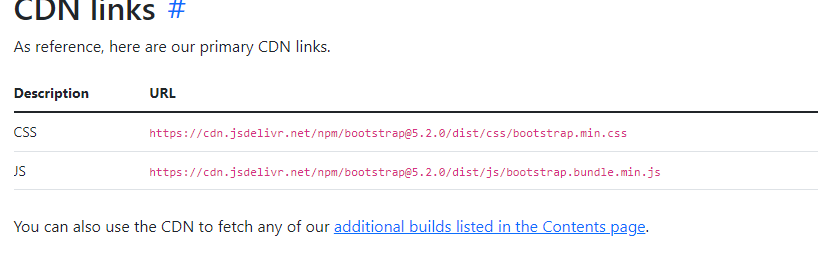
gambar diatas adalah bagian bootstrap yang kita pakai sebagai css menmbahkan syntax sebagai berikut
<link rel="stylesheet" href="https://cdn.jsdelivr.net/npm/bootstrap@5.2.0/dist/css/bootstrap.min.css">
selanjutnya bagian js dengan menambahkan syntax sebagai berikut
<script src ="https://cdn.jsdelivr.net/npm/bootstrap@5.2.0/dist/js/bootstrap.bundle.min.js"></script>
selanujutnya isi file app.blade.php dengan all codenya
<!DOCTYPE html>
<html lang="en">
<head>
    <meta charset="UTF-8">
    <meta http-equiv="X-UA-Compatible" content="IE=edge">
    <meta name="viewport" content="width=device-width, initial-scale=1.0">
    <link rel="stylesheet" href="https://cdn.jsdelivr.net/npm/bootstrap@5.2.0/dist/css/bootstrap.min.css">
    <title>
        @yield('title')
    </title>
    <script src ="https://cdn.jsdelivr.net/npm/bootstrap@5.2.0/dist/js/bootstrap.bundle.min.js"></script>
</head>
<body>

    <!-- untuk navbar -->

    <nav class="navbar navbar-expand-lg bg-light">
  <div class="container-fluid">
    <a class="navbar-brand" href="#">Navbar</a>
    <button class="navbar-toggler" type="button" data-bs-toggle="collapse" data-bs-target="#navbarSupportedContent" aria-controls="navbarSupportedContent" aria-expanded="false" aria-label="Toggle navigation">
      <span class="navbar-toggler-icon"></span>
    </button>
    <div class="collapse navbar-collapse" id="navbarSupportedContent">
      <ul class="navbar-nav me-auto mb-2 mb-lg-0">
        <li class="nav-item">
          <a class="nav-link active" aria-current="page" href="#">Home</a>
        </li>
        <li class="nav-item">
          <a class="nav-link" href="#">barang</a>
        </li>
        <li class="nav-item">
          <a class="nav-link" href="#">kategori</a>
        </li>

    </div>
  </div>
</nav>
<div class="container">
@yield('kontent')
</div>


</body>
</html>
saya tidak menggunakan cara yang saya jelaskan karena di bootstrap sudah ada yan g mudah jadi saya hanya menggcopy paste saja
selanjutnya folder barang yang berisi file 'home.blade.php'
all codenya akan terlihat seperti dibawah ini karena kurang lebih saya memahami inmsi code dibawah
@extends('layout.app')

@section('title')
barang
@endsection

@section('kontent')
<div class="mt-3">
    <table class="table table-stripped">
        <thread>
            <tr>
                <th width=5%>No.</th>
                <th>Nama</th>
                <th width=15%>kategori</th>
                <th width=10%>qty</th>
                <th width=15%>harga beli</th>
                <th width=15%>harga jual</th>
                <th width=15%>aksi</th>
</tr>
</thread

<tbody>
    <tr>
        <td>1.</td>
        <td>meja</td>
        <td>barang</td>
        <td>12</td>
        <td>RP.50000</td>
        <td>RP.55000</td>
        <td>Hapus | Edit</td>
    </tr>
    <tr>
        <td>2.</td>
        <td>kursi</td>
        <td>barang</td>
        <td>12</td>
        <td>RP.40000</td>
        <td>RP.45000</td>
        <td>Hapus | Edit</td>
    </tr>
</tbody>
</table>
</div>
@endsection
Selanjutnya pada folder kategori file index.blade.php
codenya akan ditam,pilkan seperti dibawah ini
@extends('layout.app')

@section('title')
kategori
@endsection

@section('content')
<div class="mt-3">
    <table class="table table-stripped">
        <thread>
            <tr>
                <th width="5%">No.</th>
                <th>Nama</th>
                <th>kategori</th>
                <th width="15%>Aksi</th>
</tr>
</thread

<tbody>
<tr>
    <td>1</td>
    <td>ATK</td>
    <td>Hapus | Edit</td>
</tr>
</tbody>
</table>
</div>
lalu hasil dari barang seperti berikut code dari foldder barang home.blade.php

hasil dari folder kategopri
code dari index.blade.php
