This project is a defect detection web UI based on the EBM-YOLOv8 model.
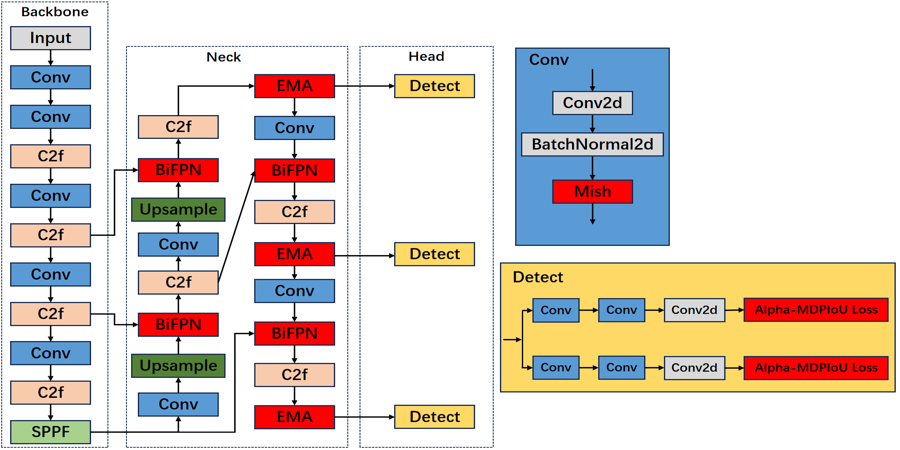
EBM-YOLOv8 = YOLOv8(Backbone) + EMA(Neck) + BiFPN(Neck) + Alpha-MPDIou(Bbox. Loss) + Mish(Activation Function for Convolution)
Yinghao He, a graduated student from the North University of China.
git clone https://github.com/CherrySama/DefectsDetection.gitPip install the ultralytics package including all requirements in a Python>=3.8 environment with PyTorch>=1.8.
pip install ultralytics
pip install streamlitthis project do not have its own dataset, you can write your own dataset yaml cfg and put your dateset in the 'datasets' floder.
And if you want to use train.py to train your model, you should revise line12 in train.py to make sure that you could train your model successfully:
    results = model.train(data='VOC_Aluminum.yaml',  # path to your data.yaml
                        epochs=200,
                        imgsz=640,
                        workers=8,
                        batch=16,
)parent
├── ultralytics
└── datasets
you can train the YOLOv8 model with a yolo command:
yolo train --data data/defects.yaml --weights yolov8n.pt --epochs 300 --batch-size 16 --device 0 --project runs/train --name defectsyolo can be used for a variety of tasks and modes and accepts additional arguments, i.e. imgsz=640. See the YOLOv8 CLI Docs for examples.
you can also train the YOLOv8 model with a python script:
import torch
from ultralytics import YOLO

model = YOLO("yolov8n.pt")  # load a pretrained model (recommended for training)

model.train(data="data/defects.yaml", epochs=200, batch-size=16, device=0, project="runs/train", name="defects")  # Train the model
metrics = model.val()  # evaluate model performance on the validation set
results = model("https://ultralytics.com/images/bus.jpg")  # predict on an image
path = model.export(format="onnx")  # export the model to ONNX format
or you can simply use the train.py script to train the model:
python train.py See YOLOv8 Python Docs for more examples.
streamlit run demo.pyOpen the web browser and visit http://localhost:8501 to start the web UI.
This is my little graduation project, I'll be glad that you could use it as your baseline model or just simply have a look.
If you have any questions or suggestions, please feel free to contact me at the following Email address 925782272@qq.com or create a new issue.