Compatibility
there is support for puzzle locks
This module allows you to define puzzles which lock interacting with actors, items, journals, journal pages, walls and tiles. The functionality with items and actors has no conflicts with Terminal. However, walls, journal pages, tiles and journals have some overlap with Terminal features. As such you will have to follow the guide here to have the two modules play nice.
- how can I have a page/button of Terminal locked behind a puzzle lock?
- how can I have the Terminal locked behind a puzzle lock?
- Are there other ways I can have a Terminal open on puzzle completion?
- Open the puzzle config for a journal page. Keep in mind this is different than a journal. You must begin editing a page inside a journal to first see the
Puzzle Lockbutton. - Pick any puzzle, copy the code below and paste it into
Unlock Macro, and changeOn Unlock PermissionstoObserver.
game.socket.emit('module.terminal', { action: "puzzle", uuid: object.uuid, uid: user.id })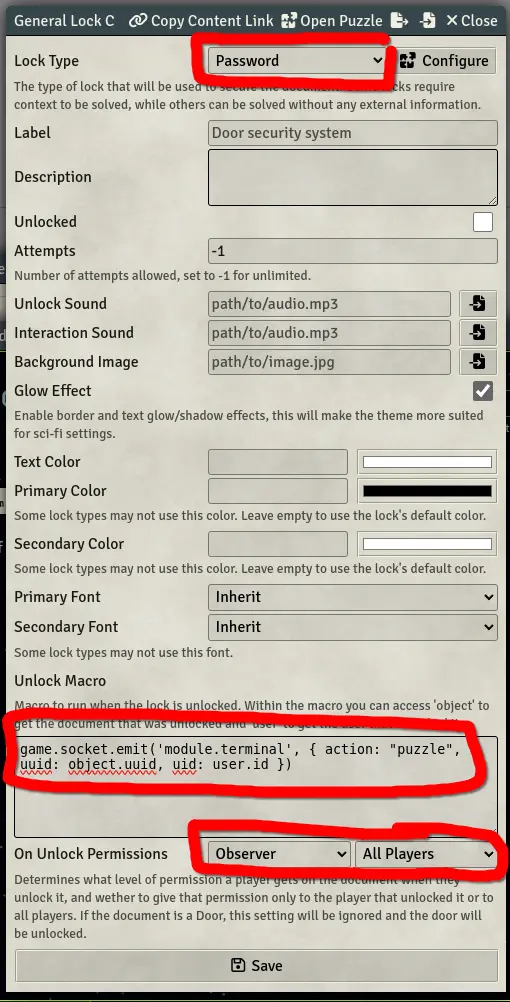
- You must now provide a way for the player to open the puzzle. The best way to do this is create a separate page which has a UUID link to the puzzle locked page. Here is an example format for how you can create UUID links in a page:
in Foundry V12+ you can get the UUID of any document by clicking the top left icon of a window
@UUID[YOUR_PAGE_UUID_GOES_HERE]{placeholder text}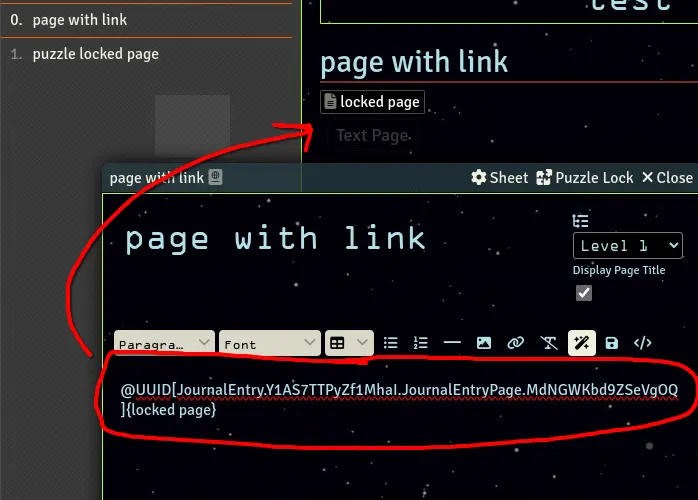
- Finally you must set the puzzle locked page to ownership of "limited" for all players ("None" should work as well, but conflicts with encrypted pages, so not recommended)
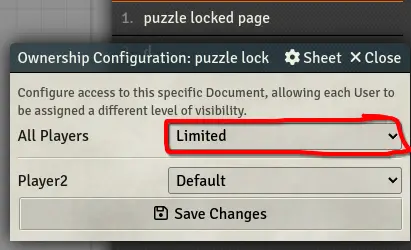
- That's it, now when a player clicks on the UUID link they will see the puzzle. If it gets unlocked, then the buttons in the Terminal get regenerated. At that point the new page will be represented as a new button (if you have several buttons for the Terminal it may not be immediately obvious to the person viewing the Terminal that a new button has shown up. You as the GM may need to hint to them that a new button has appeared).
In order to reset this you must go back into the page puzzle lock config and "lock" it again. As well as set its ownership back to "limited"
Its possible to have a puzzle lock before Terminal can be opened. Keep in mind that the developer, theripper93, has found only the "When: click" action will work for this. Having the action on "When: enter", will only open the puzzle lock for the GM.
- On the Triggers tab set "When" to only "click"
- Import the "Open Terminal for specific user" macro from your "Terminal Macros" compendium.
- Add a new action to the triggers tab of the tile config of "Run Macro". Set its only argument to the Tile UUID that has a Terminal configured.
Don't just copy what I have here for the args. Use your own Tile UUID!
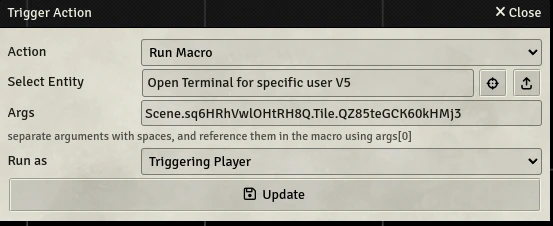
- Have any player click on the tile
If you want to just have the Terminal render for a player after they complete a specific puzzle lock. You could use one of these two code blocks inside your "Unlock Macro" field.
for just the triggering user
CONST TILE_UUID = "Scene.abc.Tile.123"
// theripper93 does have the tile id exposed if the macro is attached to a tile puzzle lock
// it can be used under `object.id`. All other documents (i.e. actors, items) will need the
// tile id manually entered for this `TILE_UUID` variable
game.socket.emit('module.terminal', { action: "render", tuid: TILE_UUID, uid: user.id })
for all connected non-GM users
CONST TILE_UUID = "Scene.abc.Tile.123"
for (const user of game.users.filter(u => u.active && !u.isGM)) {
  game.socket.emit('module.terminal', { action: "render", tuid: TILE_UUID, uid: user.id })
}