



Note: For best viewing experience, read this documentation on GitHub.
Full-featured Home Assistant integration for Syncthing. Monitor folder sync status, device connectivity and traffic, trigger rescans, and pause/resume folders and devices — all from your HA dashboard. Supports multiple Syncthing instances simultaneously.
The core Syncthing integration creates only one sensor per folder showing its state. That's it.
This integration adds:
| Feature | Built-in | This |
|---|---|---|
| Folder state sensor | ✅ | ✅ |
| Folder completion % | ✅ dedicated sensor | |
| Bytes / files needed | ✅ dedicated sensor | |
| Folder size & file count | ✅ dedicated sensor | |
| Pull error detection | ✅ dedicated sensor | |
| Last scan / last file | ❌ | ✅ |
| Device online/offline | ❌ | ✅ |
| Device connection type | ❌ | ✅ |
| Per-device traffic stats | ❌ | ✅ |
| Total traffic sensors | ❌ | ✅ |
| Scan trigger (button + service) | ❌ | ✅ |
| Pause / resume folder | ❌ | ✅ |
| Pause / resume device | ❌ | ✅ |
| Multi-instance support | ❌ | ✅ |
| UI config (no YAML) | ✅ | ✅ |
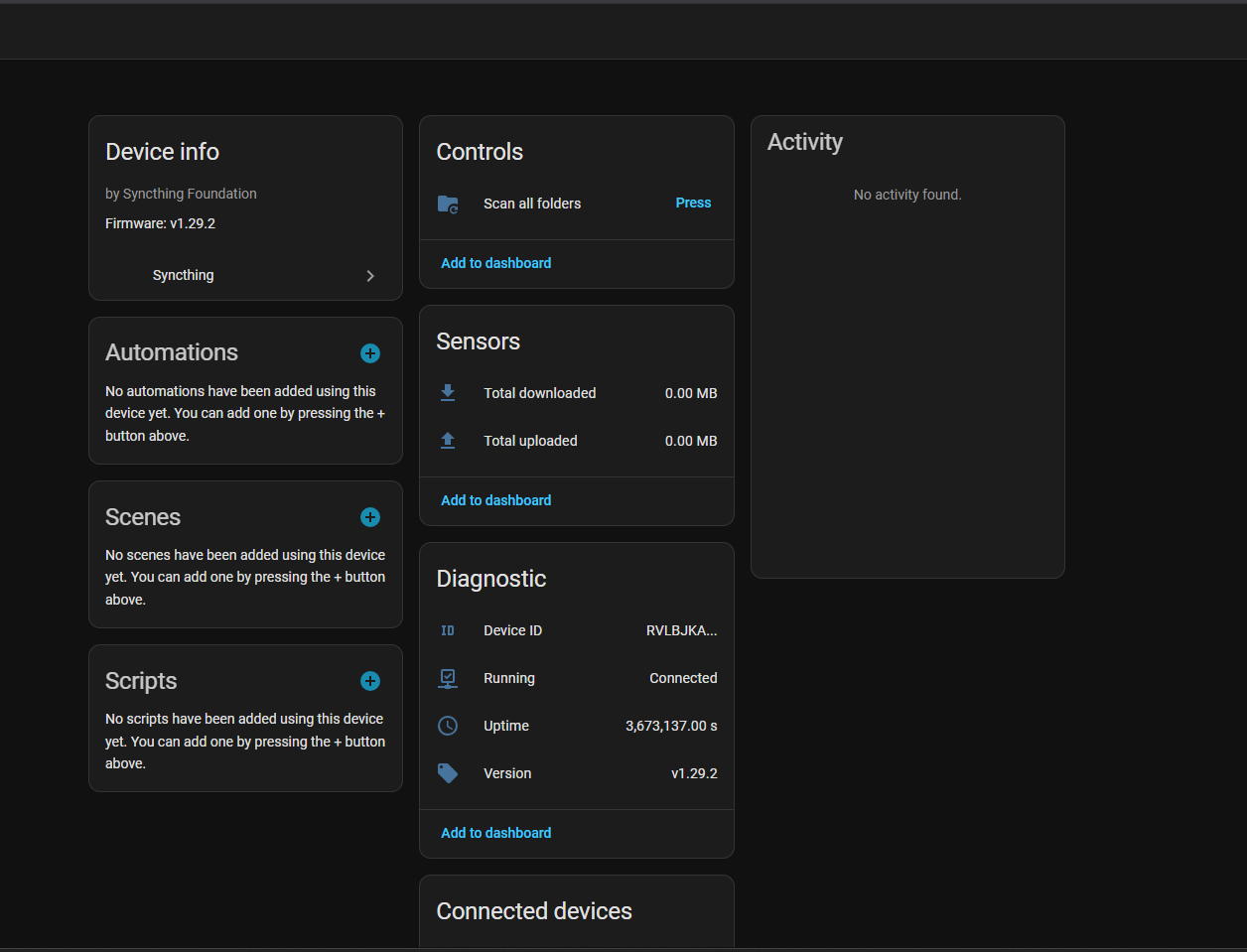
System device — version, uptime, running state, total traffic and scan button:
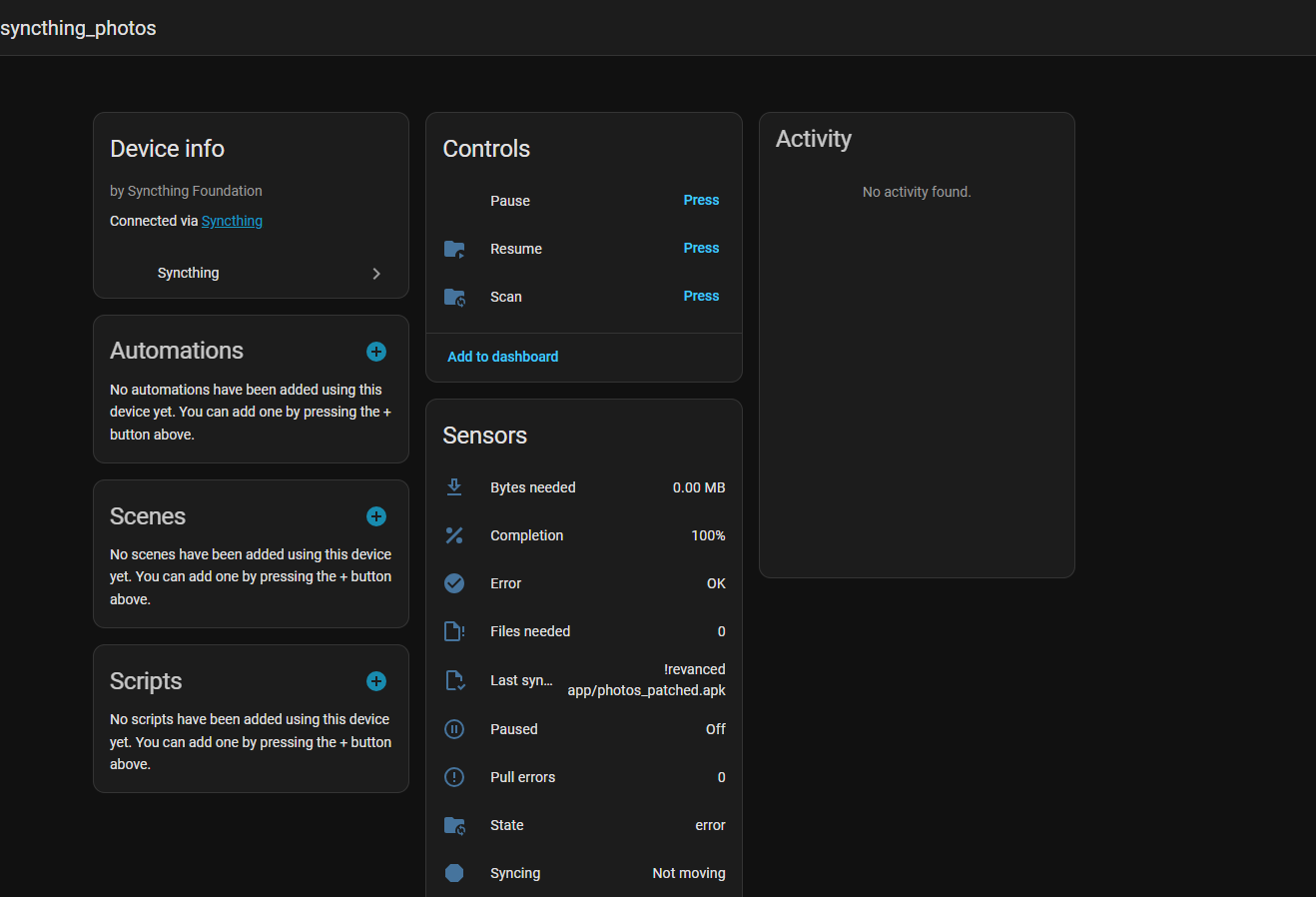
Folder — sync state, completion, controls and all folder sensors:
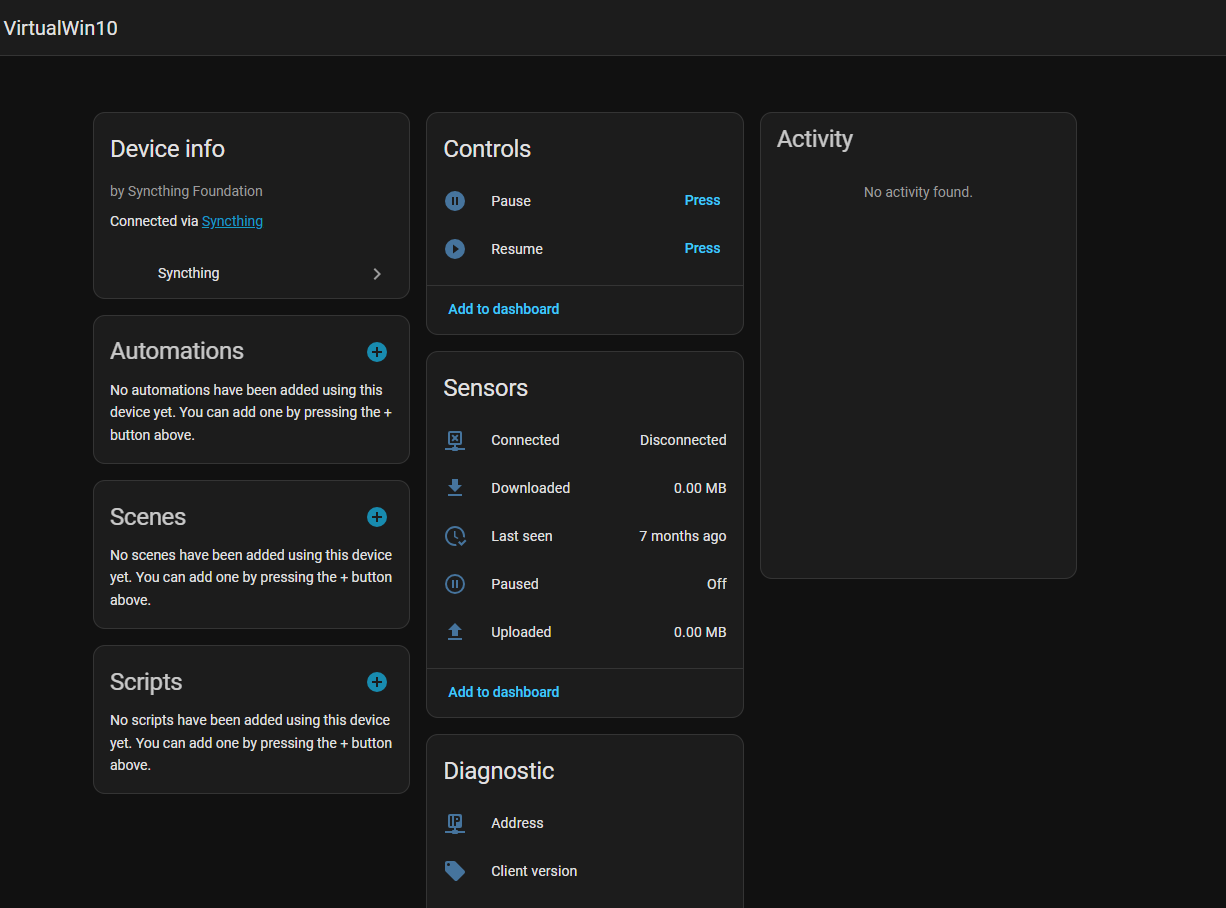
Remote device — connectivity, traffic, pause/resume controls and diagnostic sensors:
- Open HACS → Integrations
- Click the three-dot menu → Custom repositories
- Add
https://github.com/Csontikka/ha-syncthing-extendedwith category Integration - Click Download
- Restart Home Assistant
After setup, the integration appears in Settings → Integrations:

- Copy
custom_components/syncthing_extended/to your HAconfig/custom_components/directory - Restart Home Assistant
- Go to Settings → Integrations → Add Integration
- Search for Syncthing
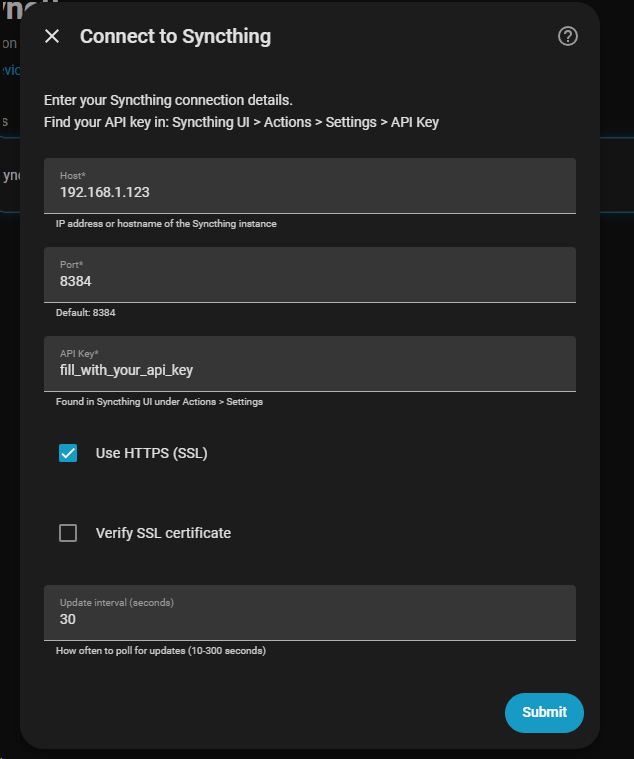
- Enter your connection details:
| Parameter | Required | Default | Description |
|---|---|---|---|
| Host | Yes | — | IP address or hostname of the Syncthing instance |
| Port | Yes | 8384 |
Syncthing GUI/API port |
| API Key | Yes | — | Found in Syncthing UI: Actions → Settings → API Key |
| Use HTTPS | No | false |
Connect using HTTPS instead of HTTP |
| Verify SSL | No | false |
Validate the HTTPS certificate (requires Use HTTPS) |
| Update interval | No | 30 |
How often to poll for updates, in seconds (10–300) |
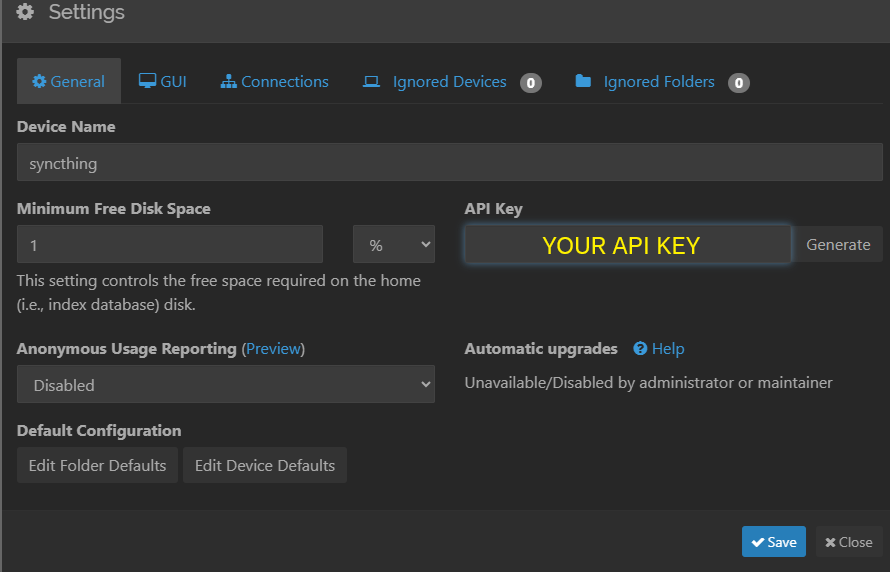
- Syncthing UI: Actions → Settings → right panel → API Key
- Linux:
~/.local/state/syncthing/config.xml→<gui><apikey>…</apikey></gui> - Proxmox LXC:
/root/.local/state/syncthing/config.xml
Syncthing must listen on a non-localhost address. If bound to 127.0.0.1:8384, change it to 0.0.0.0:8384 in Syncthing GUI (Settings → GUI Listen Addresses) and restart Syncthing.
After setup you can change the Update interval via Settings → Integrations → Syncthing → Configure.
If your API key changes, Home Assistant will show a re-authentication prompt. Click Re-authenticate and enter the new API key — no need to delete and re-add the integration.
| Entity | Type | Description |
|---|---|---|
| Running | Binary sensor | on when Syncthing is reachable |
| Version | Sensor | Syncthing version string |
| Uptime | Sensor | Uptime in seconds |
| Device ID | Sensor | This instance's Syncthing device ID |
| Total downloaded | Sensor | Total bytes received (all devices) |
| Total uploaded | Sensor | Total bytes sent (all devices) |
| Entity | Type | Description |
|---|---|---|
| State | Sensor | idle / syncing / scanning / error |
| Completion | Sensor | Sync completion percentage |
| Bytes needed | Sensor | Bytes remaining to sync |
| Files needed | Sensor | File count remaining to sync |
| Error | Binary sensor | on when pull errors > 0 |
| Syncing | Binary sensor | on when state is syncing |
| Paused | Binary sensor | on when folder is paused |
| Scan | Button | Trigger immediate rescan |
| Pause | Button | Pause this folder |
| Resume | Button | Resume this folder |
| Total size | Sensor | Total folder size |
| Total files | Sensor | Total file count |
| Pull errors | Sensor | Number of pull errors |
| Last scan | Sensor | Timestamp of last folder scan |
| Last synced file | Sensor | Filename of last synced file |
| Entity | Type | Description |
|---|---|---|
| Connected | Binary sensor | on when device is online |
| Paused | Binary sensor | on when device is paused |
| Downloaded | Sensor | Bytes received from this device |
| Uploaded | Sensor | Bytes sent to this device |
| Pause | Button | Pause sync with this device |
| Resume | Button | Resume sync with this device |
| Connection type | Sensor | tcp-client, relay-server, quic-client, etc. |
| Address | Sensor | Remote IP:port |
| Client version | Sensor | Syncthing version on remote device |
| Last seen | Sensor | Timestamp of last connection |
| Service | Parameters | Description |
|---|---|---|
syncthing_extended.scan_folder |
folder_id |
Trigger rescan of one folder |
syncthing_extended.scan_all |
— | Trigger rescan of all folders |
syncthing_extended.pause_folder |
folder_id |
Pause a specific folder |
syncthing_extended.resume_folder |
folder_id |
Resume a specific folder |
syncthing_extended.pause_device |
device_id |
Pause sync with a device |
syncthing_extended.resume_device |
device_id |
Resume sync with a device |
syncthing_extended.pause_all |
— | Pause all devices |
syncthing_extended.resume_all |
— | Resume all devices |
automation:
  - alias: "Alert when Syncthing folder has errors"
    trigger:
      - platform: state
        entity_id: binary_sensor.syncthing_extended_folder_documents_error
        to: "on"
    action:
      - service: notify.mobile_app
        data:
          message: "Syncthing: Documents folder has sync errors!"

  - alias: "Scan after backup completes"
    trigger:
      - platform: state
        entity_id: sensor.backup_status
        to: "completed"
    action:
      - service: syncthing_extended.scan_all

  - alias: "Alert when device offline for 1 hour"
    trigger:
      - platform: state
        entity_id: binary_sensor.syncthing_extended_device_nas_connected
        to: "off"
        for: "01:00:00"
    action:
      - service: notify.mobile_app
        data:
message: "Syncthing: NAS has been offline for 1 hour"This integration creates many entities per folder and device. If you notice increased database size, we recommend the following:
We recommend disabling entities you don't actively use: Settings → Devices & Services → Syncthing → click the device → find the entity → toggle it off. Disabled entities are not polled and generate no history.
High-frequency numeric sensors (traffic counters, uptime, bytes needed) can accumulate a lot of history. If you only need the current values and don't require historical data, we recommend excluding them from the recorder in configuration.yaml:
recorder:
  exclude:
    entity_globs:
      - sensor.syncthing_extended_*_in_bytes
      - sensor.syncthing_extended_*_out_bytes
      - sensor.syncthing_extended_*_uptime
      - sensor.syncthing_extended_*_bytes_needed
Or exclude the entire integration and re-include only what you want to track:
recorder:
  exclude:
    entity_globs:
      - sensor.syncthing_extended_*
      - binary_sensor.syncthing_extended_*
  include:
    entity_globs:
      - binary_sensor.syncthing_extended_*_running
      - binary_sensor.syncthing_extended_*_error
- sensor.syncthing_extended_*_stateDownload the integration diagnostics file for bug reports — it includes integration state and the last 1000 debug log entries.
- Go to Settings → Devices & Services
- Find Syncthing → click the integration
- Click the three-dot menu → Download diagnostics
- Attach the
.jsonfile to your GitHub issue
To see detailed logs in the HA log viewer, add to configuration.yaml:
logger:
  default: info
  logs:
    custom_components.syncthing_extended: debug
This enables per-request API traces, coordinator update summaries, and button/service call tracking.
- Go to Settings → Devices & Services → Syncthing
- Click the three-dot menu → Delete
- Optionally remove
custom_components/syncthing_extended/and restart HA
Available in 30 languages:


- Home Assistant 2024.1.0+
- Syncthing v1.20.0+
Found a bug or have an idea? Open an issue — feedback and feature requests are welcome!
If you find this integration useful, consider buying me a coffee.