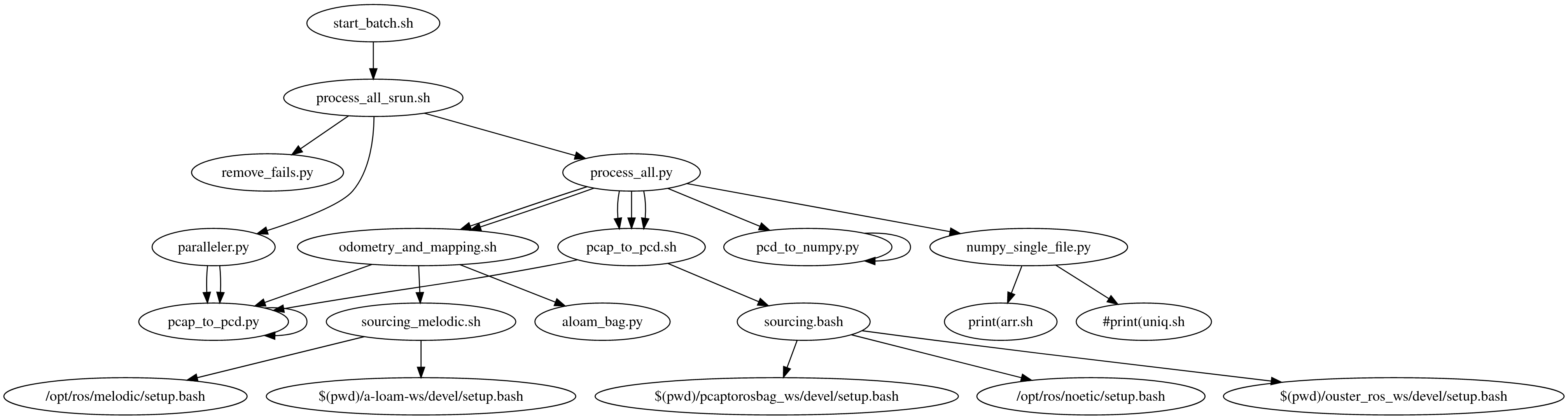
newfiles
- full_model_sbatch.sh
- full_model_sbatch_aggregator.sh
- uploader.py
- batch_post_aggregate.py
today we created a better method for downsampling. This enables shorter than 1 hour tasks for simplifying large scenes like shanasheel and hathara
the process begins with running batch_downsample.py and a downsample float and a number of groups to break the numpy data into for faster downsampling. The script then searches for all the zipped npys in the temp folder. If it finds these then it passes the folders name and the two command line arguments it got to the sbatch script full_model_sbatch.sh. This file then uses a singularity container to execute numpy_single_file.py providing the downsampling value and the total groups, and section number. The section number is really nothing other than the id (0-n) where n is the number of groups we are splitting the point cloud processing into. The script then also saves the downsampled result with information that can be used at the aggregation step to make a single npy file representing the full model.
uploader.py is also useful when trying to get all the data up on google drive.
creating an sbatch script that will help me perform the aggregation of the npy data
trying to work on how to run aloam on the results of the data it will involve running part of the workflow from one singularity and then switching to the other
note that the scripts used for processing are in order start_batch.sh -> process_all_srun.sh -> process_all.py -> pcap_to_pcd.sh -> pcap_to_pcd.py
going back to other processing form because the pointcloud2 is missing for the first lidar data using ouster_proc and the original singularity container
making the phoenix museum folder, this will contain the first trip file tomb1 for processing into a .bin format
old batch.sh config
#!/bin/bash
#SBATCH --job-name=process_sama_lidar
#SBATCH --ntasks=8
#SBATCH --ntasks-per-node=1
#SBATCH --cpus-per-task=4
#SBATCH --nodes=8
#SBATCH --time=2:00:00
#SBATCH --partition=standard
#SBATCH --account=visteam
making it possible to supply a folder to the sbatch process_all_batch.sh
general instructions are for using the contents of the scripts here
start batch processing with
sbatch process_all_batch.sh
this will use the process_all_srun.sh to start up a number of processing nodes
each processing will run the python script process_all.py
this requires these parts
- to_process : folder that has pcap and json files in it
- an environment variable indicating which processing node it is
this then executes in a singularity container the pcap_to_pcd.sh bash script
this bash script will source the ros sourcing.bash file
make the temp folder if it doesn't exist and a logs folder, and a log folder for the particular file we are processing
also set a Ros environment variable $ROS_HOME and then start the python file pcap_to_pcd.py
Its been shown that better luck with processing comes when we process each file through the entire set of steps one at a time. like convert all pcaps to bags, then to -pc.bags then to pcd folders.