A native macOS port of Blur AutoClicker — every feature, fully ported.



- 🎯 Precise click targeting — click at cursor position or set custom coordinates
- 🔁 Sequence mode — define multi-point click sequences with per-point click counts
- ⚡ High-speed clicking — sub-millisecond precision using CoreGraphics on macOS
- 🖱️ Left, Right & Middle click support
- ⌨️ Keyboard key pressing with lower/uppercase letter control
- 🔄 Double-click mode with configurable delay
- 🎲 Speed variation — randomize intervals with Gaussian distribution for human-like behavior
- ⏱️ Time limit & click limit — auto-stop after a set duration or number of clicks
- 🛑 Failsafe stops — corner stop, edge stop, and custom stop zones
- 📊 Usage stats — tracks total clicks, sessions, time, and CPU usage across all runs
- ⌨️ Global hotkeys — start/stop without switching windows
- 🚀 Launch at login — optional autostart via macOS LaunchAgent
- 🖥️ Process list — switch or stop behavior when configured apps take focus
- 🔔 Auto-updater — get notified and update in-app
- 📜 In-app changelog — view release notes from the settings panel
- Go to the latest release
- Download the
.dmgfor your Mac:- Apple Silicon (M1/M2/M3/M4):
aarch64build - Intel Mac:
x86_64build
- Apple Silicon (M1/M2/M3/M4):
- Open the
.dmgand drag BlurAutoClicker to your Applications folder - Grant Accessibility access when prompted: System Settings → Privacy & Security → Accessibility → enable BlurAutoClicker
- Grant Input Monitoring access: System Settings → Privacy & Security → Input Monitoring → enable BlurAutoClicker
⚠️ If macOS blocks the app on first launch, go to System Settings → Privacy & Security and click Open Anyway
If you see "BlurAutoClicker is damaged and can't be opened" after installing:
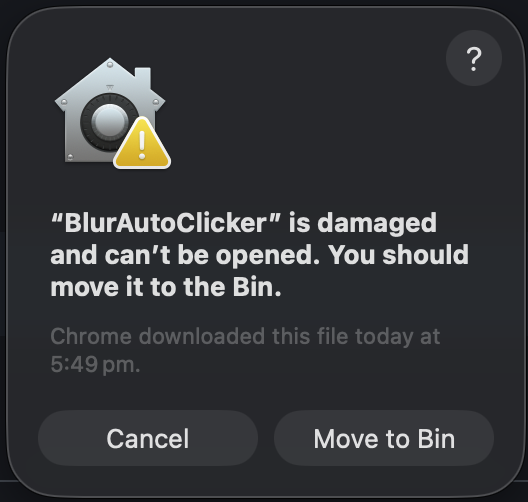
Open Terminal and run this command once:
xattr -cr /Applications/BlurAutoClicker.appThen launch the app normally. You will never need to do this again.
Prerequisites: Rust, Node.js 20+, Xcode Command Line Tools
git clone https://github.com/Djozman/Blur-AutoClickerMAC.git
cd Blur-AutoClickerMAC
npm install
npm run build
The built app and .dmg will be in src-tauri/target/release/bundle/.