
This repository contains the Vagrant files required to run the virtual lab environment used in the DNCS course.
        +-----------------------------------------------------+
        |                                                     |
        |                                                     |eth0
        +--+--+                +------------+             +------------+
        |     |                |            |             |            |
        |     |            eth0|            |eth2     eth2|            |
        |     +----------------+  router-1  +-------------+  router-2  |
        |     |                |            |             |            |
        |     |                |            |             |            |
        |  M  |                +------------+             +------------+
        |  A  |                      |eth1                       |eth1
        |  N  |                      |                           |
        |  A  |                      |                           |
        |  G  |                      |                     +-----+----+
        |  E  |                      |eth1                 |          |
        |  M  |            +-------------------+           |          |
        |  E  |        eth0|                   |           |  host-c  |
        |  N  +------------+      SWITCH       |           |          |
        |  T  |            |                   |           |          |
        |     |            +-------------------+           +----------+
        |  V  |               |eth2         |eth3                |eth0
        |  A  |               |             |                    |
        |  G  |               |             |                    |
        |  R  |               |eth1         |eth1                |
        |  A  |        +----------+     +----------+             |
        |  N  |        |          |     |          |             |
        |  T  |    eth0|          |     |          |             |
        |     +--------+  host-a  |     |  host-b  |             |
        |     |        |          |     |          |             |
        |     |        |          |     |          |             |
        ++-+--+        +----------+     +----------+             |
        | |                              |eth0                   |
        | |                              |                       |
        | +------------------------------+                       |
        |                                                        |
        |                                                        |
        +--------------------------------------------------------+
- Python 3
- 10GB disk storage
- 2GB free RAM
- Virtualbox
- Vagrant (https://www.vagrantup.com)
- Internet
- Install Virtualbox and Vagrant
- Clone this repository
git clone https://github.com/fabrizio-granelli/dncs-lab - You should be able to launch the lab from within the cloned repo folder.
cd dncs-lab
[~/dncs-lab] vagrant up
Once you launch the vagrant script, it may take a while for the entire topology to become available.
- Verify the status of the 4 VMs
[dncs-lab]$ vagrant status
Current machine states:

router                    running (virtualbox)
switch                    running (virtualbox)
host-a                    running (virtualbox)
host-b                    running (virtualbox)
- Once all the VMs are running verify you can log into all of them:
vagrant ssh routervagrant ssh switchvagrant ssh host-avagrant ssh host-bvagrant ssh host-c
This section describes the assignment, its requirements and the tasks the student has to complete. The assignment consists in a simple piece of design work that students have to carry out to satisfy the requirements described below. The assignment deliverable consists of a Github repository containing:
- the code necessary for the infrastructure to be replicated and instantiated
- an updated README.md file where design decisions and experimental results are illustrated
- an updated answers.yml file containing the details of your project
- Hosts 1-a and 1-b are in two subnets (Hosts-A and Hosts-B) that must be able to scale up to respectively 199 and 292 usable addresses
- Host 2-c is in a subnet (Hub) that needs to accommodate up to 200 usable addresses
- Host 2-c must run a docker image (dustnic82/nginx-test) which implements a web-server that must be reachable from Host-1-a and Host-1-b
- No dynamic routing can be used
- Routes must be as generic as possible
- The lab setup must be portable and executed just by launching the
vagrant upcommand
- Fork the Github repository: https://github.com/fabrizio-granelli/dncs-lab
- Clone the repository
- Run the initiator script (dncs-init). The script generates a custom
answers.ymlfile and updates the Readme.md file with specific details automatically generated by the script itself. This can be done just once in case the work is being carried out by a group of (<=2) engineers, using the name of the 'squad lead'. - Implement the design by integrating the necessary commands into the VM startup scripts (create more if necessary)
- Modify the Vagrantfile (if necessary)
- Document the design by expanding this readme file
- Fill the
answers.ymlfile where required (make sure that is committed and pushed to your repository) - Commit the changes and push to your own repository
- Notify the examiner (fabrizio.granelli@unitn.it) that work is complete specifying the Github repository, First Name, Last Name and Matriculation number. This needs to happen at least 7 days prior an exam registration date.
- https://rogerdudler.github.io/git-guide/
- http://therandomsecurityguy.com/openvswitch-cheat-sheet/
- https://www.cyberciti.biz/faq/howto-linux-configuring-default-route-with-ipcommand/
- https://www.vagrantup.com/intro/getting-started/
This project was made by Emanuele Chini (matr. 202488) and Francesco Malagò (matr. 172080).
The initiator script gave us this requirements:
- Host a usable addresses: 199
- Host b usable addresses: 292
- Host c usable addresses: 200
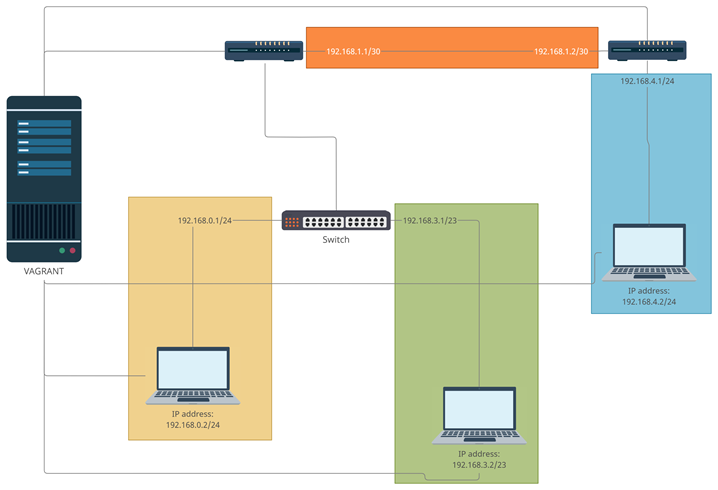
In order to satisfy the project requirements we decided to create 4 subnet, which are respectively:
- 192.168.1.0/30 between Router-1 and Router-2 to cover only the andresses of the two routers.
- 192.168.0.0/24 between Host-a and Router-1 to cover the 199 addresses required (2^8-2=254 > 199)
- 192.168.3.0/23 between Host-b and Router-1 to cover the 292 addresses required (2^9-2=510 > 292)
- 192.168.4.0/24 between Host-c and Router-2 to cover the 200 addresses required
| Device | Interface | IP | Subnet | Color subnet |
|---|---|---|---|---|
| Router-1 | enp0s9 | 192.168.1.1 | 1 | Orange |
| Router-2 | enp0s9 | 192.168.1.2 | 1 | Orange |
| Router-1 | enp0s8.2 | 192.168.0.1 | 2 | Yellow |
| Host-a | enp0s8 | 192.168.0.2 | 2 | Yellow |
| Router-1 | enp0s8.3 | 192.168.3.1 | 3 | Green |
| Host-b | enp0s8 | 192.168.3.2 | 3 | Green |
| Router-2 | enp0s8 | 192.168.4.1 | 4 | Blue |
| Host-c | enp0s8 | 192.168.4.2 | 4 | Blue |
The vagrant file contains the basic setup for every virtual machine, including the path to each start-up script. We modified the paths to the start-up script for every virtual machine (default is common.sh), afterwards we also increased the virtual memory dedicated to Host-c from 256 MB to 512 MB to be able to run the Docker image.
In the various scripts we used several commands which are explained below:
- To know what interfaces are physically installed on a system it's necessary to use this command because
ifconfigshows only interfaces that are in a configured state.
dsmeg| grep -i eth
- Assigns an IP address to a specific interface.
ip addr add [ip] dev [interface]
- Set's the interface in the "up" status.
ip link set dev [interface] up
- Creates a VLAN using an existing interface and assigns a tag.
ip link add link [interface] name [VLAN] type vlan id [tag]
- Enables IP forwarding.
sysctl -w net.ipv4.ip_forward=1
- Redirects all the traffic coming from a subnet to an ip address through an interface.
ip route add [subnets addresses] via [ip] dev [interface]
- These commands configure the switch and assign a VLAN tag to the interface.
ovs-vsctl add-br switch
ovs-vsctl add-port switch [interface]
ovs-vsctl add-port switch [interface] tag="[tag]"
- These commands install docker, the test docker image and run them.
apt update
apt -y install docker.io
systemctl start docker
systemctl enable docker
docker pull dustnic82/nginx-test
docker run -p 80:80 -d dustnic82/nginx-test
For each device, we created a script file with all the commands necessary, the content of which is shown below.
sudo ip addr add 192.168.0.2/24 dev enp0s8
sudo ip link set dev enp0s8 up
sudo ip route add 192.168.0.0/21 via 192.168.0.1
sudo ip a add 192.168.3.2/23 dev enp0s8
sudo ip link set dev enp0s8 up
sudo ip route add 192.168.0.0/21 via 192.168.3.1
#Docker setup
sudo apt-get update
sudo apt -y install docker.io
sudo systemctl start docker
sudo systemctl enable docker
sudo docker pull dustnic82/nginx-test
sudo docker run -p 80:80 -d dustnic82/nginx-test
#Network setup
sudo ip addr add 192.168.4.2/24 dev enp0s8
sudo ip link set dev enp0s8 up
sudo ip route add 192.168.0.0/21 via 192.168.4.1
sudo sysctl -w net.ipv4.ip_forward=1
sudo ip addr add 192.168.1.1/30 dev enp0s9
sudo ip link set dev enp0s9 up
sudo ip link add link enp0s8 name enp0s8.2 type vlan id 2
sudo ip link add link enp0s8 name enp0s8.3 type vlan id 3
sudo ip addr add 192.168.0.1/24 dev enp0s8.2
sudo ip addr add 192.168.3.1/23 dev enp0s8.3
sudo ip link set dev enp0s8 up
sudo ip route add 192.168.4.0/24 via 192.168.1.2
sudo sysctl -w net.ipv4.ip_forward=1
sudo ip addr add 192.168.1.2/30 dev enp0s9
sudo ip link set dev enp0s9 up
sudo ip addr add 192.168.4.1/24 dev enp0s8
sudo ip link set dev enp0s8 up
sudo ip route add 192.168.0.0/21 via 192.168.1.1
sudo ip route add 192.168.3.0/24 via 192.168.1.1
#Openvswitch setup
apt-get update
apt-get install -y tcpdump
apt-get install -y openvswitch-common openvswitch-switch apt-transport-https ca-certificates curl software-properties-common
#Network setup
sudo ovs-vsctl add-br switch
sudo ovs-vsctl add-port switch enp0s8
sudo ovs-vsctl add-port switch enp0s9 tag="2"
sudo ovs-vsctl add-port switch enp0s10 tag="3"
sudo ip link set dev enp0s8 up
sudo ip link set dev enp0s9 up
sudo ip link set dev enp0s10 up
To test our network, we brought up the network with vagrant up, then we logged in each VM with vagrant ssh [name VM].
Then we used the command ping -c3 192.168.4.2 from both host-a and host-b to verify the reachability of host-c.
Remember that if the VM have been already created it is mandatory to use the instruction vagrant provision --provision otherwise the Vagrantfile will not load the .sh file.
After that, in order to obtain the HMTL page from host-a, we used the command curl 192.168.4.2.
The result is shown below:
<!DOCTYPE html>
<html>
<head>
<title>Hello World</title>
<link href="data:image/png;base64,iVBORw0KGgoAAAANSUhEUgAAAEAAAABACAYAAACqaXHeAAAGPElEQVR42u1bDUyUdRj/iwpolMlcbZqtXFnNsuSCez/OIMg1V7SFONuaU8P1MWy1lcPUyhK1uVbKcXfvy6GikTGKCmpEyoejJipouUBcgsinhwUKKKJ8PD3vnzsxuLv35Q644+Ue9mwH3P3f5/d7n6/3/3+OEJ/4xCc+8YQYtQuJwB0kIp+JrzUTB7iJuweBf4baTlJ5oCqw11C/JHp+tnqBb1ngT4z8WgReTUGbWCBGq0qvKRFcHf4eT/ZFBKoLvMBGIbhiYkaQIjcAfLAK+D8z9YhjxMgsVUGc84+gyx9AYD0khXcMfLCmUBL68HMZ+PnHxyFw3Uwi8B8hgJYh7j4c7c8PV5CEbUTUzBoHcU78iIl/FYFXWmPaNeC3q4mz5YcqJPI1JGKql2Z3hkcjD5EUznmcu6qiNT+Y2CPEoH3Wm4A/QERWQFe9QQ0caeCDlSZJrht1HxG0D3sOuCEiCA1aj4ZY3Ipzl8LiVtn8hxi5zRgWM8YYPBODF/9zxOLcVRVs+YGtwFzxCs1Bo9y+avBiOTQeUzwI3F5+kOwxsXkkmWNHHrjUokqtqtSyysW5gUHV4mtmZEHSdRkl+aELvcFIRN397gPPXD4ZgbxJW1S5OJdA60MgUAyHu1KfAz+pfCUtwr+HuQc8ORQ1jK4ZgGsTvcY5uQP5oYkY2HfcK5sGLpS6l1xZQwNn7Xkedp3OgMrWC1DX0Qwnms/A1rK9cF9atNVo18DP/3o5fF99BGo7LFDRWgMJJQaYQv/PyOcHySP0TITrBIhYb+WSHLrlNGEx5NeXgj2paW8C5rs46h3Dc3kt3G2Ogr9aqoes+f5RvbL1aJ5iXnKnxkfIEoB3N/zHeHAmF9ovwryvYvC9TysnICkEonPX212vvOU8+As6eS+QCDAw0aNLABq6LO8DkJMSSznMMEfScFFGwCJYXbDV7lq17RYIQu+QTYpjRUBM3gZQIt+cOwyTpWRpYBQRsKrgU4ceNS4JkCSxLI1+ZsIS0NvXB6sLE/tL5EQkQJKOm52YON9y7glqJkCSOqzrD6Uvc1wZ1EBA07V/IafmN4ckHG+ugJkSEHuVQQ0ENFy9BLP3R0NR4ymHJGRWFWBnZ6fPVwMBF9EDgrD2z0USqtoaHJKw49SBoZ2dWggIxmcEsvspYLLi4PKNDrvv68OfuKLt/68MqiJAan4Q0IpDm6G7r8fue692X4fI7PiByqA6AqygNh0XHIaClDOkpz9aGVRJABo8CTP+3sqfHZJQeqkSgvHZn+xaqEICKAlhECSGO60MWdVF4IcesDL/ExUSYN3okCrD31fqHZLwcWkq5owPVUoA3UcIgdBv10BrV7vdz3b39kBhw0kVE2BNirG/bqRghyPqIcBKQkKJcVgE1LQ1wR3S5ooqCDBKlSEUzGdyFBNwvq1RTQT0b4BOF5+BgoayCUqAtTLMSXsRzl6uHX8EONoUtXS2KCfAusOsyVwFLV1tznNAuzflAGxb+R/esGuodDcD0bUVbYLelhRf/mWD08ogdYtTjNwYbIsrORhBIwJMPOTWHh1i6Lriz107FUKviivcZvfp8WZvN8TmbVS2rtsHI8mMtn9gSe50KAz79yWw8490OGYpp8lsTUGictd3EA6PHVwB20+mYUNURo/aMs4dhqjsdcoOWGxH5yYu0g0P0EzFBd7DxZoVHY7aHmWtB6VunwhLB6P0gFULk6zhJnvnBw5HW9D9N5GkpQEjMBcQOg+JMBNxjMZgHISawvGZHiKw+0mybv5ozP0txgvk07AQvWxAoh98sXsur3RmwMStxIud9fiIzMAIXTV6yNqxHaH7gg1GA7bgxVvHfEjq1hAl10ZM/A46gO0x0bOPoiHpSEDvsMZhXVVbVRL4TLz2E140EK1dgsnnd9mBaHcmwuigJHeCGLkXvHNaNHOBP4J/HYmoGbGwsJU1ka0nAvM2ht40758ZNmvvRRJ24l3roMa7MxVq4jpRdyMRc8bh9wR0TyIRWdR9hzNXaJs3Ftif6KDWuBcBH0hErky2bNraV5E9jcBjiapE1ExHkO8iEY1OvjLTjAkugezh7ySqFUPoXHTtZAR7ncY4rRrYYgtcCtGHPUgmjEhPmiKXjXc/l4g6HfGJT3ziEw/If86JzB/YMku9AAAAAElFTkSuQmCC" rel="icon" type="image/png" />
<style>
body {
margin: 0px;
font: 20px 'RobotoRegular', Arial, sans-serif;
font-weight: 100;
height: 100%;
color: #0f1419;
}
div.info {
display: table;
background: #e8eaec;
padding: 20px 20px 20px 20px;
border: 1px dashed black;
border-radius: 10px;
margin: 0px auto auto auto;
}
div.info p {
display: table-row;
margin: 5px auto auto auto;
}
div.info p span {
display: table-cell;
padding: 10px;
}
img {
width: 176px;
margin: 36px auto 36px auto;
display:block;
}
div.smaller p span {
color: #3D5266;
}
h1, h2 {
font-weight: 100;
}
div.check {
padding: 0px 0px 0px 0px;
display: table;
margin: 36px auto auto auto;
font: 12px 'RobotoRegular', Arial, sans-serif;
}
#footer {
position: fixed;
bottom: 36px;
width: 100%;
}
#center {
width: 400px;
margin: 0 auto;
font: 12px Courier;
}
</style>
<script>
var ref;
function checkRefresh(){
if (document.cookie == "refresh=1") {
document.getElementById("check").checked = true;
ref = setTimeout(function(){location.reload();}, 1000);
} else {
}
}
function changeCookie() {
if (document.getElementById("check").checked) {
document.cookie = "refresh=1";
ref = setTimeout(function(){location.reload();}, 1000);
} else {
document.cookie = "refresh=0";
clearTimeout(ref);
}
}
</script>
</head>
<body onload="checkRefresh();">
<img alt="NGINX Logo" src="http://d37h62yn5lrxxl.cloudfront.net/assets/nginx.png"/>
<div class="info">
<p><span>Server address:</span> <span>172.17.0.2:80</span></p>
<p><span>Server name:</span> <span>9cc6c0cbb7de</span></p>
<p class="smaller"><span>Date:</span> <span>19/Mar/2021:10:16:38 +0000</span></p>
<p class="smaller"><span>URI:</span> <span>/</span></p>
</div>
<br>
<div class="info">
<p class="smaller"><span>Host:</span> <span>192.168.4.2</span></p>
<p class="smaller"><span>X-Forwarded-For:</span> <span></span></p>
</div>
<div class="check"><input type="checkbox" id="check" onchange="changeCookie()"> Auto Refresh</div>
<div id="footer">
<div id="center" align="center">
Request ID: bc4d1b65579b457b1bcb0ef1e4bb7a9e<br/>
© NGINX, Inc. 2018
</div>
</div>
</body>
</html>
