Quick Start • Plesk Extension • Features • Troubleshooting • Discord


Integration Guide | Documentation | Sign Up
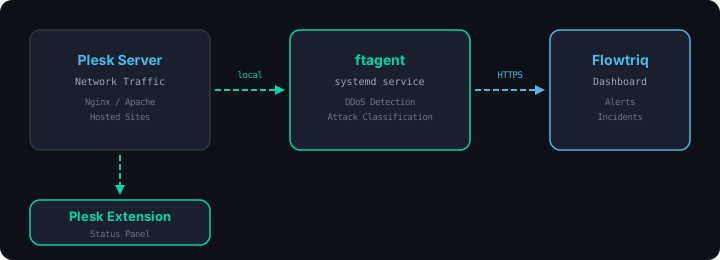
Plesk servers host websites and are frequent targets for volumetric and application-layer DDoS attacks. This integration installs ftagent as a lightweight systemd service on your server, monitors traffic in real time, and reports to the Flowtriq dashboard. A Plesk extension gives you at-a-glance status and service controls directly in your hosting panel.
SSH into your Plesk server as root and run:
curl -fsSL https://raw.githubusercontent.com/Flowtriq/flowtriq-plesk/main/install.sh | bashThe installer will:
- Verify Plesk is installed
- Install ftagent via pip
- Run interactive setup (
ftagent --setup) - Enable and start the agent as a systemd service
- Install and register the Plesk extension
# Install the agent
pip3 install ftagent
ftagent --setup

# Enable the service
systemctl enable ftagent
systemctl start ftagent

# Install the extension
git clone https://github.com/Flowtriq/flowtriq-plesk.git /tmp/flowtriq-plesk
cp -r /tmp/flowtriq-plesk/plesk-extension /usr/local/psa/admin/htdocs/modules/flowtriq
chown -R psaadm:psaadm /usr/local/psa/admin/htdocs/modules/flowtriq
plesk bin extension --register flowtriqThe extension appears in the Plesk panel and shows:
| Agent Health | Running/stopped indicator with last heartbeat |
| Agent Version | Currently installed ftagent version |
| Recent Incidents | Attacks detected in the last 24 hours |
| Service Controls | Start, stop, and restart buttons |
| Dashboard Link | Direct link to the full Flowtriq dashboard |
| Real-time Monitoring | Continuous traffic analysis on the server |
| Attack Detection | Volumetric floods, SYN floods, and application-layer attacks |
| Alerting | Instant notifications when an incident is detected |
| Auto-Mitigation | Upstream or local firewall rules to drop attack traffic |
| Plesk Panel | Agent status, service controls, and dashboard link |
| Web Dashboard | Full analytics at flowtriq.com/dashboard |
| Requirement | Details |
|---|---|
| Plesk | Obsidian 18.0+ |
| OS | Ubuntu 20.04+, Debian 10+, CentOS 7+, AlmaLinux 8+, Rocky Linux 8+ |
| Python | 3.6+ (installed automatically if missing) |
| Access | Root |
| Account | Free Flowtriq account at flowtriq.com |
ftagent service not starting
# Check service status
systemctl status ftagent

# View recent logs
journalctl -u ftagent --no-pager -n 30

# Verify the binary is installed
which ftagent
Plesk extension not appearing
# Verify the extension directory exists
ls -la /usr/local/psa/admin/htdocs/modules/flowtriq/

# Re-register the extension
plesk bin extension --register flowtriq

# Restart Plesk
systemctl restart psa
No incidents showing in dashboard
- Verify the agent is running:
systemctl status ftagent - Check that your API key is correct:
cat /etc/ftagent/config.json - Confirm the server can reach the Flowtriq API:
curl -s https://api.flowtriq.com/health
Nginx and Apache compatibility
The agent monitors traffic at the network level, so it works regardless of which web server Plesk is configured to use (Nginx, Apache, or Nginx as a reverse proxy for Apache). No special configuration needed.
curl -fsSL https://raw.githubusercontent.com/Flowtriq/flowtriq-plesk/main/uninstall.sh | bashOr run uninstall.sh from a local clone.
How much overhead does the agent add?
Minimal. The agent uses well under 1% CPU and around 30 MB of memory during normal operation. It is designed for production servers and will not interfere with your hosted sites.
Does it work alongside other Plesk extensions?
Yes. The Flowtriq extension is a standard Plesk module and does not conflict with other extensions, security tools, or Plesk features.
Can I manage multiple Plesk servers from one dashboard?
Yes. Each server runs its own agent, and all of them report to the same Flowtriq dashboard where you can see every node in one view.
Where do I get my API key?
Sign up at flowtriq.com, then go to Settings > API in your dashboard.
How do I update ftagent?
pip3 install --upgrade ftagent
systemctl restart ftagentStart your free 14-day trial at flowtriq.com/signup.
MIT. See LICENSE.
Built by Flowtriq - Real-time DDoS detection and mitigation.