Quick Start • Direct Install • NetFlow Export • Config Reference • Troubleshooting • Discord


Integration Guide | Documentation | Sign Up
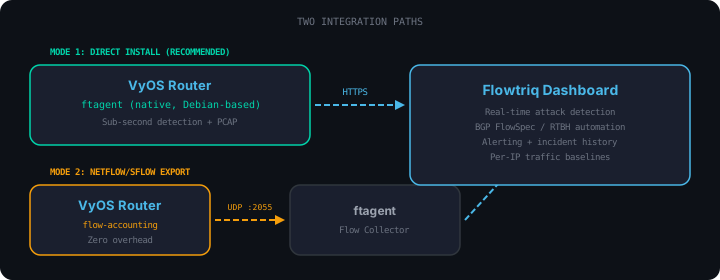
VyOS is unique among router platforms because it's built on Debian Linux. This means you can either run ftagent directly on the router or use the traditional flow export approach. Both paths connect to the Flowtriq dashboard for real-time attack detection, alerting, and automated mitigation.
| Direct Install | NetFlow Export | |
|---|---|---|
| Detection speed | < 1 second | 15-60 seconds |
| PCAP evidence | Yes | No |
| L7 classification | Full | Limited |
| CPU on VyOS | ~2% | Minimal |
| Requires | Python 3.8+ | Remote Linux host |
| BGP FlowSpec/RTBH | Yes | Yes |
| Alerting | Yes | Yes |
| Multi-node dashboard | Yes | Yes |
Direct install is the recommended path for most deployments. You get sub-second detection, PCAP-based evidence capture, and full protocol classification without needing a separate host.
NetFlow export is better for high-throughput routers (10G+) where you want zero additional overhead on the VyOS box, or when you already have a centralized ftagent collector.
VyOS Router
┌───────────────────────────────────────┐
│                                       │
│   WAN traffic ──> ftagent (local)     │
│                      │                │
│                      │ HTTPS          │
└──────────────────────┼────────────────┘
                       v
             ┌──────────────────────┐
             │  Flowtriq Dashboard   │
             │  flowtriq.com         │
             └──────────────────────┘
VyOS Router                              Linux host (any VM, VPS, or bare metal)
┌──────────────────┐                    ┌──────────────────────────────┐
│                  │   NetFlow v9       │                              │
│   WAN traffic    │ ─────────────────> │   ftagent (flow collector)   │
│                  │   UDP :2055        │                              │
└──────────────────┘                    └──────────┬───────────────────┘
                                                   │
                                                   │ HTTPS
                                                   v
                                        ┌──────────────────────┐
                                        │  Flowtriq Dashboard   │
                                        │  flowtriq.com         │
                                        └──────────────────────┘
curl -fsSL https://raw.githubusercontent.com/Flowtriq/flowtriq-vyos/main/setup.sh | shThe script detects whether you're running on VyOS and offers both integration modes.
SSH into your VyOS router and run:
# Install ftagent
pip3 install ftagent

# Create config
sudo mkdir -p /etc/ftagent
sudo tee /etc/ftagent/config.json > /dev/null <<EOF
{
  "api_key": "YOUR_API_KEY",
  "interface": "eth0"
}
EOF

# Create systemd service (if not already present)
sudo tee /etc/systemd/system/ftagent.service > /dev/null <<EOF
[Unit]
Description=Flowtriq Agent - DDoS Detection
After=network-online.target
Wants=network-online.target

[Service]
Type=simple
ExecStart=/usr/local/bin/ftagent
Restart=always
RestartSec=5
StandardOutput=journal
StandardError=journal

[Install]
WantedBy=multi-user.target
EOF

# Enable and start
sudo systemctl daemon-reload
sudo systemctl enable ftagent
sudo systemctl start ftagent
Verify it's running:
sudo systemctl status ftagent
sudo journalctl -u ftagent -fEnter VyOS configure mode and apply the flow export settings:
configure
set system flow-accounting interface eth0
set system flow-accounting netflow version 9
set system flow-accounting netflow server 10.0.0.50 port 2055
set system flow-accounting netflow timeout expiry-interval 60
commit
save
Replace eth0 with your WAN interface and 10.0.0.50 with the IP of your ftagent host.
Verify flow-accounting is active:
show flow-accounting
On your Linux host running ftagent, add flow collector settings to /etc/ftagent/config.json:
{
  "flow_enabled": true,
  "flow_protocol": "netflow_v9",
  "flow_port": 2055,
  "flow_node_ip": "YOUR_VYOS_WAN_IP"
}
Then restart ftagent:
sudo systemctl restart ftagentVyOS also supports sFlow. To use sFlow instead of NetFlow:
configure
set system flow-accounting interface eth0
set system flow-accounting sflow server 10.0.0.50 port 6343
commit
save
And configure ftagent with:
{
  "flow_enabled": true,
  "flow_protocol": "sflow_v5",
  "flow_port": 6343,
  "flow_node_ip": "YOUR_VYOS_WAN_IP"
}For convenience, the vyos-commands.sh helper generates the exact VyOS CLI commands based on your inputs:
sh vyos-commands.shIt outputs copy-pasteable commands for your chosen protocol, interface, and target host.
- Real-time DDoS detection from your VyOS router's traffic perspective
- 7+ attack types: UDP flood, SYN flood, ICMP flood, DNS amplification, NTP amplification, memcached, multi-vector
- Automated alerting: Discord, Slack, email, webhook, PagerDuty
- BGP FlowSpec / RTBH automation: auto-mitigate at the network edge
- Incident history: full timeline of every attack with traffic graphs
- Per-IP baselines: learns your normal traffic and detects deviations
- PCAP evidence (direct install): packet captures for forensic analysis
configure
set system flow-accounting interface eth0
set system flow-accounting netflow version 9
set system flow-accounting netflow server <FTAGENT_IP> port 2055
set system flow-accounting netflow timeout expiry-interval 60
commit
save
configure
set system flow-accounting interface eth0
set system flow-accounting netflow version 5
set system flow-accounting netflow server <FTAGENT_IP> port 2055
set system flow-accounting netflow timeout expiry-interval 60
commit
save
configure
set system flow-accounting interface eth0
set system flow-accounting sflow server <FTAGENT_IP> port 6343
commit
save
Monitor multiple interfaces by adding each one:
set system flow-accounting interface eth0
set system flow-accounting interface eth1
set system flow-accounting interface eth2
configure
delete system flow-accounting
commit
save
# Check flow-accounting status
show flow-accounting

# Check flow-accounting config
show configuration commands | grep flow-accounting

# Monitor flow exports in real time
monitor log | grep flow
# Verify ftagent is listening on the flow port
sudo ss -ulnp | grep 2055

# Check flows are arriving
sudo tcpdump -i any udp port 2055 -c 5

# Check ftagent logs
sudo journalctl -u ftagent -f | grep flow# Service status
sudo systemctl status ftagent
# Live logs
sudo journalctl -u ftagent -f
# Check ftagent is capturing traffic
sudo journalctl -u ftagent --since "5 min ago" | grep -c "packet"- VyOS 1.4+ (rolling) or VyOS 1.3.x (LTS)
- Direct install: Python 3.8+ (included in VyOS 1.4+)
- NetFlow export: A Linux host (any distro) to run ftagent, plus network connectivity on UDP 2055 (or 6343 for sFlow)
- A free Flowtriq account
- NetFlow v5 (Cisco legacy, fixed format)
- NetFlow v9 (recommended, template-based)
- IPFIX / NetFlow v10 (RFC 7011)
- sFlow v5
No flows arriving at ftagent:
# Check ftagent is listening
sudo ss -ulnp | grep 2055

# Check firewall rules aren't blocking UDP 2055
# On the ftagent host:
sudo tcpdump -i any udp port 2055 -c 5

# On VyOS, verify flow-accounting is active:
show flow-accounting
VyOS flow-accounting not starting:
# Check the configuration is committed
show configuration commands | grep flow-accounting

# Restart the flow-accounting process
restart flow-accounting
ftagent not starting on VyOS (direct install):
# Check Python is available
python3 --version

# Check ftagent is installed
pip3 show ftagent

# Check service logs
sudo journalctl -u ftagent --no-pager -n 50

# Verify config file syntax
python3 -c "import json; json.load(open('/etc/ftagent/config.json'))"
Flows arriving but no data on dashboard:
- Verify your API key is correct in
/etc/ftagent/config.json - Ensure the
flow_node_ipmatches the source IP that VyOS sends from - Check that the ftagent host has outbound HTTPS access to
flowtriq.com
VyOS Python version too old (1.3.x LTS):
VyOS 1.3.x ships with Python 3.7. If ftagent requires 3.8+, use the NetFlow export mode instead, or upgrade to VyOS 1.4+.
Will ftagent affect VyOS routing performance?
No. ftagent monitors traffic passively using packet capture. It does not sit in the forwarding path and does not modify any packets. On high-throughput routers (10G+), consider using NetFlow export mode to keep any additional overhead off the VyOS box entirely.
Does it work with VyOS in VM mode?
Yes. Both integration paths work whether VyOS is running on bare metal, as a VM (KVM, VMware, Hyper-V), or in a cloud environment (AWS, GCP, Azure). The only requirement is that the monitored interface sees the traffic you want to protect.
Can I use sFlow instead of NetFlow?
Yes. VyOS supports both NetFlow and sFlow through the system flow-accounting configuration. ftagent accepts both protocols. sFlow uses sampling and is lighter-weight at very high traffic rates, while NetFlow captures every flow. For DDoS detection, both work well.
Can I monitor multiple interfaces?
Yes. Add multiple set system flow-accounting interface lines, one per interface. For direct install mode, configure the interface ftagent should capture on (typically the WAN-facing interface).
What happens during a VyOS upgrade?
For direct install: ftagent is installed via pip and lives outside the VyOS image. After a VyOS image upgrade, you may need to reinstall ftagent (pip3 install ftagent). Your config at /etc/ftagent/config.json persists.
For NetFlow export: VyOS configuration survives upgrades as long as you use save after commit. No additional steps needed.
Start your free 14-day trial at flowtriq.com/signup.
MIT License. See LICENSE for details.
Built by Flowtriq - Real-time DDoS detection and mitigation.