An add-on for DeepSeek Harness (DSH) that keeps a task's requirements and checks them before the task is marked complete. It restores the same checklist after a resumed session and accepts only matching saved tool results as evidence.

For version 0.6.3, use the command below after confirming that its GitHub Release is published. The release contains the exact artifact identity and platform evidence; source acceptance records the development checks.
dsh plugin --profile web add dsh-completion-guard@0.6.3Upgrade and restart DSH before running the host-lock checks below. The lock records the package versions and installation directories DSH actually uses. A lock generated before an upgrade describes the old packages and will fail against the new runtime. inject writes to <profile>/cordis.patch.yml, so back up that file first.
Check that each command's JSON output says status: "supported". inspect, inject and verify-dump can exit with code 0 even when their verdict is unsupported; a successful shell exit alone is insufficient.
DSH_RUNTIME_ROOT=/absolute/path/to/.dsh-runtime
DSH_PROFILE_ROOT=/absolute/path/to/.dsh/profiles/web
GUARD_HOST_LOCK="$DSH_PROFILE_ROOT/node_modules/.bin/dsh-completion-guard-host-lock"

"$GUARD_HOST_LOCK" inspect --runtime-root "$DSH_RUNTIME_ROOT" --profile-root "$DSH_PROFILE_ROOT"
"$GUARD_HOST_LOCK" inject --runtime-root "$DSH_RUNTIME_ROOT" --profile-root "$DSH_PROFILE_ROOT"
dsh --profile web --dump-config | "$GUARD_HOST_LOCK" verify-dump --runtime-root "$DSH_RUNTIME_ROOT" --profile-root "$DSH_PROFILE_ROOT" --dump-config -
On Windows, run the same three subcommands through dsh-completion-guard-host-lock.cmd in the Web settings directory's node_modules\.bin directory and use Windows absolute paths. Native acceptance and publication evidence is recorded per version, bound to that version's exact bytes, in the acceptance record; a version's source and deterministic evidence never substitutes for its own installed-artifact claim. Other host versions and artifacts need their own native evidence. Repeat this check after changing DSH, Guard or the profile location; an ordinary market-only update does not require reinjection. The Guard stays unavailable if the active package set is missing, mixed, duplicated, or different from a checked setup.
Restart DSH Web, open a session, and enable the Guard:
/context-guard on
/context-guard status
Activation is opt-in by default. status shows whether the Guard is on, its startup phase (armed means waiting for your first message), the active policy tier, how many checks remain, and a summary of why the rest are open. off stops protection for the current session without deleting its history. clear closes the current checklist while keeping prohibitions. diagnose explains why a completion check passed or failed. migration reports which rule set the session is under and what an upgrade or rollback would mean. release reports the explicit release contract, its coverage, and anything in flight.
- Saves requirements, acceptance checks, prohibitions, and later corrections without overwriting history.
- Uses only tool calls and results that DSH has saved, and stores a redacted summary rather than full output.
- Accepts evidence only when the action and result match the requested command, file, or other target.
- Rechecks completion after a session is rebuilt or resumed, and refuses to certify damaged state.
- Stops the Guard-owned Goal completion path when the current checklist has not passed. DSH internals can still bypass this path, so the plugin reports those cases rather than claiming to block every possible write.
Version 0.6.3 supports exactly DSH 0.1.5-rc.2 or 0.1.5-rc.1 with Cordis 4.0.2. These are the latest registered release and the verified minimum. The previous Session API, V2 event vocabulary, and every older host package set remain removed. If you are upgrading from DSH 0.1.2-rc.1, start a new session: Guard does not migrate old logs, proposals or certificates, and it never deletes or reinterprets your old data.
Package discovery and npm installation now publish the same newest-first exact union, 0.1.5-rc.2 || 0.1.5-rc.1. Older versions, unregistered stable 0.1.5, and future versions are not advertised as supported. Every admitted version must still match its complete 33-package DSH core graph; missing, mixed, or unknown graphs fail closed.
The registered host sets are DSH 0.1.5-rc.1 and 0.1.5-rc.2, each with its own exact 33-package graph. Their identities come from published npm tarballs; mixed versions fail the host check. Registry identity and native acceptance are separate: use the annex for the exact Guard artifact, host version and platform to establish a native pass. See the compatibility guide for version rules and host-lock provenance.
Restart is a separate capability. Current DSH does not supply independently verified bindings for market's loaded instance, so the Guard market restart adapter is unavailable. A requested restart remains pending; core protection and unrelated operations continue. Installing or applying a package on disk does not prove that a running process or UI has adopted it.
Upgrading the core lock requires fresh inspection and injection from the actual runtime and profile. Old certificates are not relabelled as evidence for the new lock. See the upgrade guide and compatibility guide.
Choose a published version from npm and verify its commit, checksum and native annexes on the GitHub Release. The historical 0.4.2 release targets DSH 0.1.2-rc.1 with market 1.41 and does not contain this decoupling. A source version, CI, same-byte native acceptance and publication are separate states; see acceptance scope.
The project was renamed from dsh-context-guard on 2026-08-29; its internal bundle id is still context-guard. Migration preserves sessions, activation and disabled settings. Do not load both package names in one profile. Node.js >=22 and pnpm >=11 are required.
Context Guard has two activation modes:
opt-in(default): protection is off when a session starts. Run/context-guard onin that session to turn it on, and/context-guard offto turn it off again. This changes only the current session.always: DSH sessions are protected automatically from the first real message. A brand-new session stays completely empty — the Guard writes nothing into it — so you can still pick the DSH session mode (standard, minimal, or a custom preset) before sending anything. The moment your first real message enters a step, protection begins in that same step and ahead of your message: the first task, including its first file changes, is covered. A first message that only carries an image or an attachment starts protection too and leaves an unresolved asset item until its meaning is clarified; a blank message starts nothing. Running/context-guard offturns protection off for that session until you runonagain.
These modes only control Guard protection. They are not the DSH session mode (for example, the standard or minimal mode) that a session starts with. Because the Guard no longer writes into sessions before the first message, a session's DSH mode can be selected while the session is still new. /context-guard on and /context-guard off turn Guard protection on or off; they never change the DSH session mode.
To make DSH sessions start with protection on, add this entry to the cordis.patch.yml used by the way you start DSH:
- id: context-guard
  name: dsh-completion-guard
  config:
    activation: always
DSH can run with a Web interface in a browser, or Headless without a browser interface from a terminal or an automated task. These two ways of running DSH use separate settings files. Edit the file for the one you use, or edit both if you use both:
| System | How you use DSH | Default path |
|---|---|---|
| macOS / Linux | Web | $HOME/.dsh/profiles/web/cordis.patch.yml |
| macOS / Linux | Headless | $HOME/.dsh/profiles/headless/cordis.patch.yml |
| Windows | Web | %USERPROFILE%\.dsh\profiles\web\cordis.patch.yml |
| Windows | Headless | %USERPROFILE%\.dsh\profiles\headless\cordis.patch.yml |
If you set a custom DSH_HOME, use that directory instead of $HOME/.dsh or %USERPROFILE%\.dsh.
You can also paste this prompt into DSH and let it make the change:
Set
dsh-completion-guardtoalwaysmode. Find thecordis.patch.ymlused by the way I am currently running DSH (Web interface or Headless), back it up first, and only setactivation: alwayson the entry withid: context-guard. Do not change any other settings or restart DSH. When finished, show me the file path and the exact diff.
After the change, restart DSH.
Once enabled, the Guard saves direct user requirements and acceptance checks. A saved tool result counts only when it matches the requested command, file, or other target. A machine-certified completion requires the Guard's checkpoint; missing, stale, or mismatched evidence leaves the task uncertified. Investigations and explanations outside the supported evidence rules can still end with an honest answer, without a completion certificate.
Read-only evidence collection and actions that change packages, files, services, or Git state use separate tools. A successful lookup never grants permission to make a change. Exact command limits and platform evidence are documented in docs/COMPATIBILITY.md.
“Update the plugin and check the GUI” can contain work the Guard cannot certify, and questions such as “是否有更新” are inquiries: they stay recorded with their source, but no checkpoint or rebind can machine-certify an answer — complete the investigation and report the result. The checkpoint reports a reason and one concrete next action per item, and context_guard_prepare (read-only) shows, before a stateful action, the supported command shape, the required resolution/effect/state evidence order, and the exact missing target fields.
Use context_guard_rebind to propose an exact, complete split of the old text. If the action or target needs clarification, first ask the root user for an explicit instruction that includes the original clause; the proposal can reference that new item's ID. The tool returns a proposal ID and a comparison. The user applies it with the confirmation line 确认重绑定 <proposal ID> as the first line of a reply; an explanation request or a new task after a blank line keeps its own meaning, and a new task is captured normally. A confirmation buried in a sentence, quotes, or a code block, or followed by a reversal, does nothing. Splitting a requirement into equally uncertifiable pieces returns “no certification gain” instead of asking for a pointless confirmation. Unsupported parts remain pending, and a qualified safe end does not mean all work is complete.
The default context_guard_checkpoint call uses bindings: [] for diagnosis. It shows at most eight current items/constraints and ten evidence rows, within 12 KiB of plugin JSON. pagination reports totals and a separate next_cursor for each list; the first page is not the whole contract. Use item_ids or evidence_ids to focus a query, or evidence_scope: "history" for the complete evidence history, including rows marked unavailable. Keep the query unchanged when following a cursor; a changed contract or evidence snapshot requires a fresh query. Large rows expose detail_id; retrieve chunks with detail_offset and return the first response's snapshot as detail_snapshot on later chunks. All queries remain read-only and never shrink the certification set.
Four things you will notice, and the one that matters most.
A question never deletes work beside it — and a mixed clause is no longer auto-authorized. Separate clauses keep their own readings, so "更新插件,检查是否存在更新,安装新主题,记录变更。" is still an update, a question, an install and a record: the answer closes the question and the other three stay open. But when a question, an explanation, an investigation and an action share ONE clause, the Guard no longer guesses that the action is a separate instruction. It keeps the whole clause as one undecided obligation, which stays visible, cannot be closed by an ordinary answer, cannot take a completion certificate, and authorizes nothing — write the action as its own sentence to authorize it ("Check whether the cache is valid. Then install the package."). This is the deliberate narrowing recorded in docs/CONTRACT_REVISION_0_6_3.md: the earlier build tried to prove that such an action had left the question's scope, and every proof turned out to be a guess about vocabulary or word position. A purely informational request still closes with the answer it receives.
Where work happens is no longer assumed from where the session started. When
an instruction says which repository to change, the Guard records that choice
and its source. When it does not, the session's working directory is kept as
context only: a commit or push that never named a repository stays an explicit
open question instead of being authorized against whichever directory the
session happened to start in. A short follow-up such as "提交并推送" inherits the
repository only when the current work unit holds exactly one repository the user
already named; two candidates stay an explicit choice for you, and a repository
called /repo-a.js is still a repository — a file extension is part of the name
you gave, not proof of what kind of thing it is.
context_guard_prepare answers about the item you actually asked about. It
now reports whether your intended action, revision and target match the current
obligation, using the same judgement the execution gate applies. If you assume a
different action, it says so and names the item's own action instead of handing
you a recipe the gate would refuse; an action manual is labelled recipe_only,
and a target you supply that the obligation did not select is reported as a
proposal, never as authority.
An obligation recorded by an earlier version is never inherited as a pass. Upgrading to 0.6.3 re-reads the records that can still affect the current conclusion — including ones already marked answered — and flags any whose own text still orders work, or whose git target has no auditable source, as needing review. Their history is preserved byte for byte and nothing is re-executed, but they block a new certificate and a Goal completion until you resolve them, so a misreading an earlier version published cannot quietly become current truth.
The Guard no longer asks you to re-word a request it cannot certify. When a task names a concrete action this build has no certification adapter for — a directory cleanup, a rename, a removal — the Guard reports that capability limit and leaves the work uncertified. It does not ask you for more input and it does not propose a rebind, because neither would change what can be certified. Work that the Guard cannot certify is still your work; it is simply reported as such. A rebind stays what it always was: a way to replace a recorded obligation with a real root instruction that names a supported action and target.
A successful tool call is no longer read as more than it says. Every shell
result now separates what the host returned, what the console actually declared
about the exit status, whether the effect could be attributed to your task's own
operation, and the business outcome. If no exit status was read, the Guard says
unknown rather than assuming 0; a compound script whose last command
succeeded is not evidence that its earlier commands did.
A cleanup result keeps its condition. "Remove it" is only satisfied for the objects proven to have no dependants. The recovery guidance states that condition, keeps unknown dependants visible, and reports registry removal, content removal and directory removal separately instead of summarising a partial result as done. This version does not add a remover, kill a process, or promise to block a condition the host cannot see.
What does not change: ordinary answers, investigations and ordinary tool work still need no Guard approval, and the Guard never turns its own missing capability into a claim that you did not authorize the work.
The following behaviours are what you will actually notice. Everything before the new protocol boundary keeps its old meaning; nothing is re-read.
Asking a question no longer leaves a permanent to-do. An automatically recognized question is closed by the host's own record: the final assistant message of a turn that completed normally. A status summary, a draft, an intermediate reply, another turn's answer, a subagent's answer, or an interrupted turn never closes it. "Answered" means the answer reached you — it says nothing about whether it was correct or whether any work was done.
Unresolved explanation or mixed requests need an explicit span partition through context_guard_interpret. The caller identifies information and unknown spans; only information spans can close with the interpreting turn's answer. Unknown and undeclared spans stay pending. The guard checks structure and replay identity, while the model remains responsible for the semantic classification.
An attached screenshot or image is a question to answer, not a command to
run. Each attachment keeps its own identity and closes only through two
facts: an explicit interpretation record (context_guard_interpret with the
item ID, after actually reading the attachment) and the answer of the turn
that recorded the interpretation. A picture of a commit button never authorizes a commit; an
answer that says the images were not viewed closes nothing. Images plus real
modifications close separately, and an explicitly requested visual
verification still needs its own readback.
A document "update" is decided by the object, not the verb. "Update the docs" becomes a bounded modification whose exact file you leave to the assistant, inside the directory and file type your instruction captured. Something the Guard cannot recognize as a file keeps an honest "I could not determine this" state instead of being forced into an action or silently closed.
Answering a question does not complete the rest of the sentence. "Check for updates and also create report.txt" closes the question when the answer is delivered and leaves the file creation open until it has its own evidence.
Tasks are tracked as units. Delegating a sub-task to a subagent opens a child unit whose open work counts towards the parent, so delegating never drops the parent's own work. A subagent's answer is recorded as bounded evidence and never closes the parent on its own. A prohibition or a wait you declared earlier continues to govern the same action in later tasks.
Corrections replace what they refine. A later instruction that contains a pending obligation verbatim supersedes it atomically and keeps both revisions. Explanations, prohibitions and waits never delete an obligation by similar wording, and nothing is removed just because a new sentence looks alike.
A trusted answer to the host's own question narrows a target. When the assistant asks you where a file should go and you pick a directory, that answer — from the host's own question tool, with its call and result both on record — narrows where the file may land. Text pasted into the conversation does not. Sandbox approvals are recorded separately and never grant a target.
Three tiers change how much proof is required at completion. They are separate
from the opt-in / always activation modes, and installing never enters the
release tier.
| Tier | What it demands |
|---|---|
standard (default) |
Work must be supported by durable evidence; ordinary tools are not gated behind extra Guard approval. |
strict |
On top of standard, a visual or complete-scope verification you explicitly asked for must be discharged by a real readback fact, not by a tool that merely succeeded. |
release |
Only an explicitly adopted release contract authorizes a release operation. Until you adopt one, release operations are refused rather than performed under the standard rules. |
Set the tier in the same cordis.patch.yml entry as activation:
- id: context-guard
  name: dsh-completion-guard
  config:
    activation: always
policy: strictA release is never implicit. A "release" keyword in a message, a loaded Skill, or an installation does not adopt anything; only this command does:
/context-guard release adopt {"operations":["npm_publish"],"candidate":{"ref":"refs/heads/main","fullSha40":"<40 hex characters>","version":"0.6.1","artifactDigest":"<64 hex characters>"}}
After adoption, /context-guard release reports the contract, its candidate, its
per-operation coverage, what has been consumed, and anything still in flight.
Each operation spends exactly one reservation, written before the effect and
settled afterwards from a trusted readback. A wrong candidate SHA, ref, artifact
digest or version, an expired ticket, a consumed ticket, a retry of a request
that is still in flight, and an opaque runner are all refused before any effect.
Coverage is stated honestly, and the gap is attributed. This release
protects only the surface Guard itself routes: publishing an npm artifact
through context_guard_action. git tag and the GitHub Release operations have
no Guard-owned route yet, so a contract requiring them is refused before any
effect and reported as release_operation_unrouted — a scope reduction this
release explicitly took, not a claim that the host makes them impossible. A
composite runner is refused as an opaque host boundary. /context-guard release
prints this table in machine-readable form. A trusted in-process caller that
bypasses the Guard entirely is a host trust boundary; the plugin reports what it
can see and does not claim to stop what it cannot see.
Context Guard certifies completion; DSH still owns Goal, Todo, Compaction, continuation, permissions, and tool execution. This plugin is not a security sandbox, semantic proof system, token-pruning tool, or replacement for those DSH facilities.
Evidence is bounded and redacted. Complete prompts, stdout, file contents, credentials, Authorization headers, URL query values, image bytes, and raw transcripts are not stored by the guard. See docs/PRIVACY.md.
This project began as a DSH port of deterministic behavior from GreenLv/codex-context-guard v0.8.8. That version is the historical starting point, not the current compatibility level.
Version 0.4.0 was deliberately aligned with the shared evidence rules in Codex Context Guard 0.10.0: proof must belong to work that is still open and must show the operation, target, and result the user actually requested. This is a limited behavior-level alignment, not a claim that the two products have the same features.
The 0.6.x line implements the C01–C12 shared contract that pairs this release with a planned Codex Context Guard 0.14.0: source spans and coverage, one interpretation view, trusted answer delivery, work units with a required-descendant closure, per-action conditions, responsibility tiers, bounded target resolution, atomic clarification, the proof capability matrix, explicit release tickets, fresh projections, and unified migration diagnostics. The plain-language comparison, the implementation status per contract, and the dated delta ledger are in docs/SEMANTIC_COMPATIBILITY.md.
Two shared artifacts are deliberately incomplete, and calling them done would be false. The upstream repository had not landed a frozen v2 conformance fixture at the time of this release, so the v2 fixture here is a DSH-authored candidate rather than a byte mirror, and UPSTREAM_PIN.json still pins only the unchanged v1 fixtures. Cross-language parity and the canonical mirror therefore remain open; the delta ledger records them as such.
The two repositories serve different runtimes:
codex-context-guardis the Codex Hook/Python implementation with Codex plugin-cache and Hook lifecycle integration.dsh-completion-guardis an independent TypeScript implementation over native DSH Session events, commands, tools, and agent lifecycle.
They do not share runtime state, installers, caches, or release histories. Fixes are contributed to the repository that owns the affected runtime and are ported deliberately when the same behavior belongs in both products. See docs/UPSTREAM_BASE.md and docs/PORTING_NOTES.md for the exact reused and replaced boundaries.
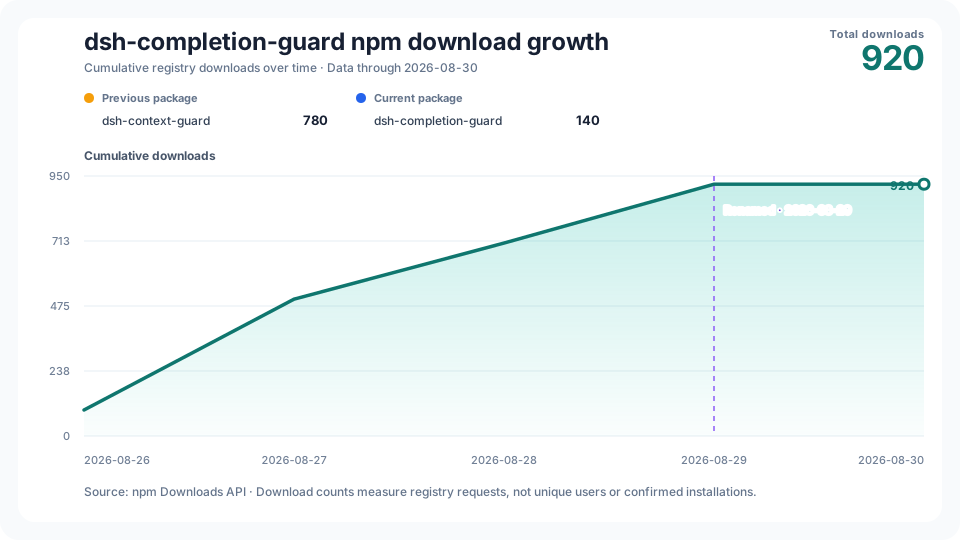
The cumulative chart keeps the old and new npm package totals visibly separate, marks the 2026-08-29 rename, and combines them only for the project growth line. npm download counts measure registry requests; they are not counts of unique users or confirmed installations.
History starts on the first public npm release day, 2026-08-26; its real first-day count is retained even when nonzero. The vertical axis starts at zero. Date labels share one fixed day interval and centered anchors; the caption always gives the exact coverage end.
The daily workflow publishes through the last day whose counts are unchanged in checks at least 12 hours apart and at least two UTC calendar days old. The API availability date is shown separately; this observation rule is not an npm guarantee that counts will never change. See the source data.
CHANGELOG.md— versioned user-visible changes.docs/ARCHITECTURE.md— ownership, durable state, and certification pipeline.docs/COMPATIBILITY.md— supported DSH versions and certifiable command subset.docs/LOCAL_ACCEPTANCE.md— deterministic, isolated, native, and public-package validation scopes.docs/distribution.md— verified public distribution destinations and the rename note.docs/PRIVACY.md— stored facts, prohibited data, and failure behavior.docs/UPSTREAM_BASE.md— historical starting point and repository authority boundary.docs/SEMANTIC_COMPATIBILITY.md— current shared behavior and known gaps.docs/PORTING_NOTES.md— behavior retained from Codex and DSH-specific replacements.
pnpm install --frozen-lockfile
pnpm run test:stats
pnpm run typecheck
pnpm test
pnpm run lint
pnpm run build
pnpm run pack:check
These commands validate a local source tree and package. CI, native-platform acceptance, npm publication, GitHub release identity, and installation in a live DSH environment remain separate evidence scopes.