在 OpenAI 和 Anthropic API 协议之间进行双向转换的代理服务集合,通过 Node.js SDK 中转绕过 WAF 检测


AnyRouter.top 是一个提供 API 转发服务的中转站网站。
- 用途: 帮助国内用户绕过网络限制,直接通过本地终端调用 Claude 的 API
- 现状: 常被社区用于低成本使用 Claude Code 功能
- 体验地址: http://115.190.165.156:3000/
- 体验 Key:
sk-eKU0nC4uERD0OVirefq6VgcD2FCwn7t7lvqy84c9xIQrlD1S(100 美金用完即止)
| 站点 | 类型 | 特点 |
|---|---|---|
| AnyRouter.top | 公益站 | 每天登录送 25 美金 |
| AgentRouter | 公益站 | 可抽奖、登录送 25 美金 |
| CodeMirror | 非公益 | 邀请新户送积分 |
| GemAI | 非公益 | 有 gemini-3-pro-image-preview |
| GeekNow | 非公益 | 有 gemini-3-pro-image-preview、gpt5.2 |
| JXinCM | 付费 | 支持 Sora2 |
| CPass | 非公益 | 邀请新户送积分 |
| GoGoGo公益站 | 公益站 | 新户送100,每天可签到,gemini-3-pro/flash-preview |
| hotaruapi | 非公益 | 新户送20,每天可签到 |
本项目包含多个代理服务和客户端示例,实现了 OpenAI 和 Anthropic API 协议的互相转换。通过 Node.js SDK 中转绕过 WAF 检测,实现 API 接口和 Claude Code 的便捷使用。
- Node.js SDK 中转: 使用官方 Anthropic SDK 绕过 WAF/TLS 指纹检测
- Claude Code 请求伪装: 自动注入 Claude Code CLI 完整请求特征,绕过高级模型负载限制
- 双向协议转换: OpenAI ↔ Anthropic 协议互相转换
- 客户端头部透传: 完整透传客户端请求头到上游,支持 Claude Code 等工具直连
- 透传代理模式: 客户端提供 API Key,服务端只做协议转换
- 多 Key 负载均衡: 支持逗号分隔的多个 Key 自动轮询
- Docker 一键部署: 三个服务容器化编排
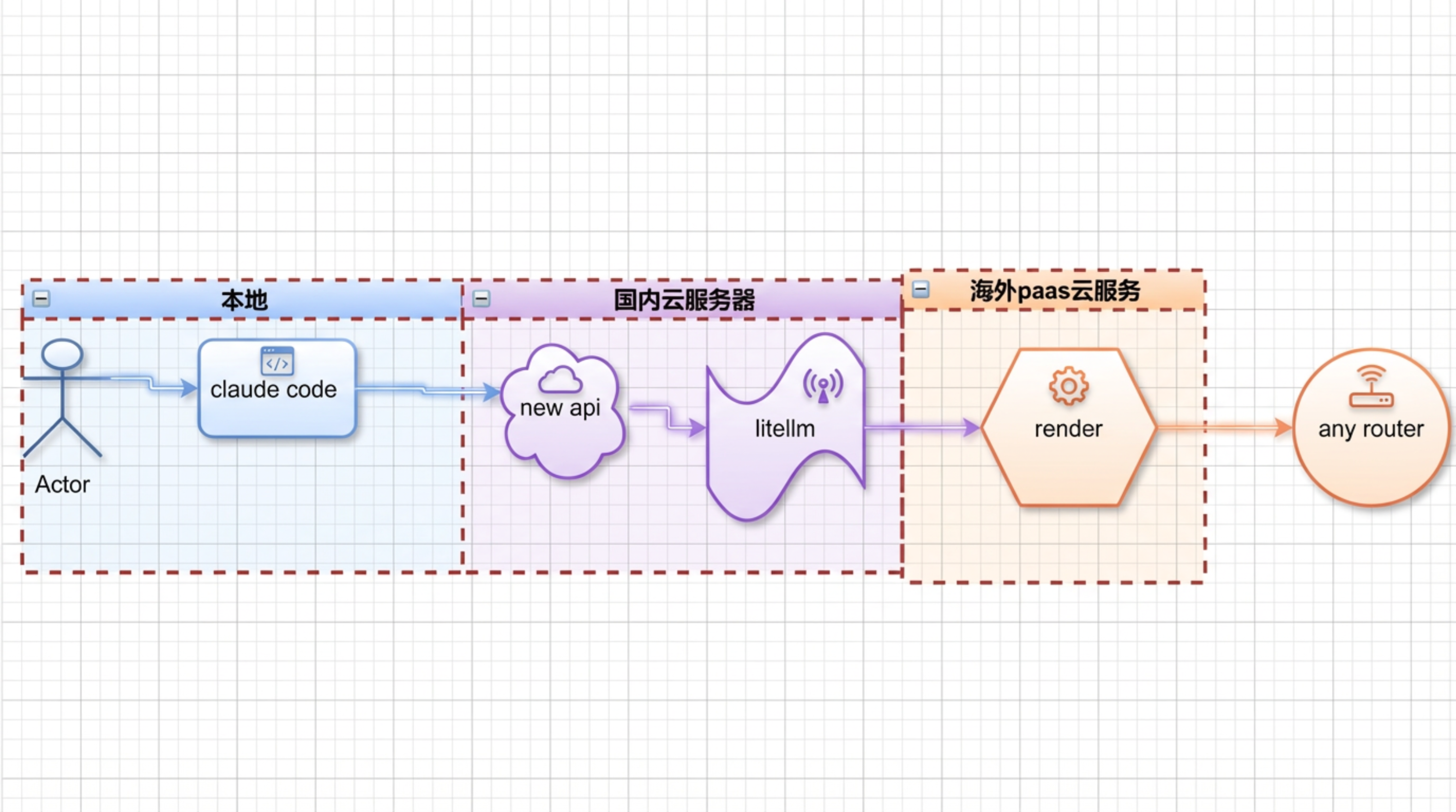
┌──────────────────────────────────────────────────────────────────────────────────────┐
│                      调用链路:Node.js SDK 中转模式                                    │
├──────────────────────────────────────────────────────────────────────────────────────┤
│                                                                                      │
│   ┌──────────────┐     ┌─────────────────────┐     ┌────────────────┐   ┌─────────┐ │
│   │ OpenAI 客户端 │ ──► │ anyrouter2openai.py │ ──► │  Node.js Proxy │ ► │AnyRouter│ │
│   │ (带 Key)      │     │ Python (9999)       │     │  (4000)        │   │(Claude) │ │
│   │ Bearer sk-xxx │     │ OpenAI→Anthropic    │     │  WAF 绕过      │   │         │ │
│   └──────────────┘     └─────────────────────┘     │  TLS 指纹      │   └─────────┘ │
│                                                     │  Claude Code   │               │
│   ┌──────────────┐     ┌─────────────────────┐     │  请求伪装      │               │
│   │Anthropic客户端│ ──► │anyrouter2anthropic  │ ──► │                │               │
│   │ (带 Key)      │     │ Python (9998)       │     │                │               │
│   │ x-api-key:    │     │ 头部透传            │     │                │               │
│   │ sk-xxx        │     │                     │     │                │               │
│   └──────────────┘     └─────────────────────┘     └────────────────┘               │
│                                                                                      │
│   ┌──────────────┐     ┌──────────────────────────┐                   ┌─────────┐   │
│   │Anthropic客户端│ ──► │anyrouter2anthropic       │ ────────────────► │AnyRouter│   │
│   │ (带 Key)      │     │  _agentrouter.py         │   直连(无WAF)   │(Claude) │   │
│   │               │     │ Python (9997)            │                   └─────────┘   │
│   └──────────────┘     └──────────────────────────┘                                  │
│                                                                                      │
└──────────────────────────────────────────────────────────────────────────────────────┘
| 技术 | 版本 | 用途 |
|---|---|---|
| Python | 3.11+ | 代理服务主语言 |
| Node.js | 20+ | SDK 中转层(绕过 WAF) |
| FastAPI | 0.116+ | Web 框架 |
| httpx | 0.28+ | 异步 HTTP 客户端 |
| @anthropic-ai/sdk | 0.71+ | 官方 Anthropic Node.js SDK |
| Uvicorn | 0.35+ | ASGI 服务器 |
- Python 3.11+
- Node.js 20+
- pip / npm
# Python 依赖
pip install -r requirements.txt

# Node.js 依赖
cd node-proxy && npm install && cd ..# 1. 启动 Node.js 代理(端口 4000,必须最先启动)
cd node-proxy && npm start &
# 2. 启动 Anthropic 协议代理(端口 9998)
python anyrouter2anthropic.py
# 3. 启动 OpenAI 协议代理(端口 9999)
python anyrouter2openai.pyimport openai
client = openai.OpenAI(
api_key="sk-your-anyrouter-api-key",
base_url="http://localhost:9999/v1"
)
response = client.chat.completions.create(
model="claude-haiku-4-5-20251001",
messages=[{"role": "user", "content": "你好"}],
stream=True
)
for chunk in response:
if chunk.choices[0].delta.content:
print(chunk.choices[0].delta.content, end="")import openai
# 多个 Key 用逗号分隔,代理会自动轮询
client = openai.OpenAI(
api_key="sk-key1,sk-key2,sk-key3",
base_url="http://localhost:9999/v1"
)import anthropic
client = anthropic.Anthropic(
api_key="sk-your-anyrouter-api-key",
base_url="http://localhost:9998"
)
response = client.messages.create(
model="claude-haiku-4-5-20251001",
max_tokens=1024,
messages=[{"role": "user", "content": "你好"}]
)
print(response.content[0].text)复制 .env.example 为 .env 并按需修改:
| 变量名 | 默认值 | 说明 |
|---|---|---|
NODE_PROXY_PORT |
4000 |
Node.js 代理端口 |
NODE_PROXY_URL |
http://127.0.0.1:4000 |
Python 代理连接 Node.js 的地址 |
ANYROUTER_BASE_URL |
https://anyrouter.top |
上游服务地址(Node.js 使用) |
PORT |
9998 |
Anthropic 代理端口 |
OPENAI_PROXY_PORT |
9999 |
OpenAI 代理端口 |
HOST |
0.0.0.0 |
绑定地址 |
HTTP_TIMEOUT |
120 |
HTTP 请求超时时间(秒) |
DEFAULT_MAX_TOKENS |
8192 |
默认最大 tokens |
FORCE_NON_STREAM |
false |
强制非流式模式(OpenAI 代理) |
透传模式不需要在服务端配置 API Key,客户端必须在请求头中提供。
# 构建 Python 代理镜像
docker build -t wwwzhouhui569/anyrouter2proxy:latest .

# 构建 Node.js 代理镜像
docker build -t wwwzhouhui569/anyrouter-node-proxy:latest ./node-proxy# 开发环境(本地构建镜像)
docker-compose -f docker-compose-dev.yml up -d
# 生产环境(使用预构建镜像)
docker-compose up -d
# 查看状态
docker-compose ps
# 查看日志
docker-compose logs -f
# 停止服务
docker-compose down需要先创建 Docker 网络,确保三个容器互通:
# 创建网络
docker network create anyrouter-proxy

# 1. 启动 Node.js 代理(必须最先启动)
docker run -d \
  --name anyrouter-node-proxy \
  --network anyrouter-proxy \
  -p 4000:4000 \
  -e NODE_PROXY_PORT=4000 \
  -e ANYROUTER_BASE_URL=https://anyrouter.top \
  anyrouter-node-proxy:latest

# 2. 启动 Anthropic 代理
docker run -d \
  --name anyrouter-anthropic-proxy \
  --network anyrouter-proxy \
  -p 9998:9998 \
  -e RUN_MODE=anthropic \
  -e NODE_PROXY_URL=http://anyrouter-node-proxy:4000 \
  -e PORT=9998 \
  anyrouter2proxy:latest

# 3. 启动 OpenAI 代理
docker run -d \
  --name anyrouter-openai-proxy \
  --network anyrouter-proxy \
  -p 9999:9999 \
  -e RUN_MODE=openai \
  -e NODE_PROXY_URL=http://anyrouter-node-proxy:4000 \
  -e OPENAI_PROXY_PORT=9999 \
anyrouter2proxy:latest# 检查 Node.js 代理
curl http://localhost:4000/health
# 检查 Anthropic 代理(含 Node.js 状态)
curl http://localhost:9998/health
# 检查 OpenAI 代理(含 Node.js 状态)
curl http://localhost:9999/health
# 测试调用
curl -X POST http://localhost:9999/v1/chat/completions \
-H "Authorization: Bearer sk-your-api-key" \
-H "Content-Type: application/json" \
-d '{"model": "claude-haiku-4-5-20251001", "messages": [{"role": "user", "content": "你好"}]}'# 标记镜像
docker tag anyrouter2proxy:latest wwwzhouhui569/anyrouter2proxy:latest
docker tag anyrouter-node-proxy:latest wwwzhouhui569/anyrouter-node-proxy:latest
# 推送到 Docker Hub
docker push wwwzhouhui569/anyrouter2proxy:latest
docker push wwwzhouhui569/anyrouter-node-proxy:latest| 端点 | 方法 | 说明 |
|---|---|---|
/v1/messages |
POST | Anthropic Messages API(直连上游) |
/v1/models |
GET | 列出可用模型 |
/health |
GET | 健康检查 |
/stats |
GET | 负载均衡统计 |
/ |
GET | 服务信息 |
| 端点 | 方法 | 说明 |
|---|---|---|
/v1/messages |
POST | Anthropic Messages API(含 WAF 处理) |
/health |
GET | 健康检查 |
/ |
GET | 服务信息 |
| 端点 | 方法 | 说明 |
|---|---|---|
/v1/messages |
POST | Anthropic Messages API |
/v1/models |
GET | 列出可用模型 |
/health |
GET | 健康检查(含 Node.js 状态) |
/ |
GET | 服务信息 |
| 端点 | 方法 | 说明 |
|---|---|---|
/v1/chat/completions |
POST | OpenAI Chat Completions API |
/v1/models |
GET | 列出可用模型 |
/health |
GET | 健康检查(含 Node.js 状态) |
/ |
GET | 服务信息 |
Authorization: Bearer sk-your-api-key
# 多 Key 负载均衡
Authorization: Bearer sk-key1,sk-key2,sk-key3x-api-key: sk-your-api-key
# 或
Authorization: Bearer sk-your-api-key
# 多 Key 负载均衡
x-api-key: sk-key1,sk-key2,sk-key3| 模型名称 | 说明 |
|---|---|
claude-haiku-4-5-20251001 |
Claude Haiku 4.5 |
claude-3-5-haiku-20241022 |
Claude 3.5 Haiku |
claude-3-5-sonnet-20241022 |
Claude 3.5 Sonnet |
claude-3-7-sonnet-20250219 |
Claude 3.7 Sonnet |
claude-sonnet-4-20250514 |
Claude Sonnet 4 |
claude-sonnet-4-5-20250929 |
Claude Sonnet 4.5 |
claude-sonnet-4-6 |
Claude Sonnet 4.6 |
claude-opus-4-5-20251101 |
Claude Opus 4.5 |
claude-opus-4-6 |
Claude Opus 4.6 |
anyrouter2proxy/
├── anyrouter2anthropic.py              # Anthropic 协议代理 - Node.js 中转模式 (端口 9998)
├── anyrouter2openai.py                 # OpenAI 协议代理 - Node.js 中转模式 (端口 9999)
├── anyrouter2anthropic_agentrouter.py  # Anthropic 协议代理 - 直连模式 (端口 9997)
├── node-proxy/                         # Node.js 代理层(WAF 绕过 + Claude Code 伪装)
│   ├── server.mjs                      # Node.js 代理服务 (端口 4000)
│   ├── package.json                    # Node.js 依赖配置
│   └── Dockerfile                      # Node.js 镜像构建文件
├── Dockerfile                          # Python 代理镜像构建文件
├── docker-compose.yml                  # 生产环境 Docker Compose
├── docker-compose-dev.yml              # 开发环境 Docker Compose
├── .env.example                        # 环境变量示例
├── .env.agentrouter                    # AgentRouter 直连模式配置
├── requirements.txt                    # Python 依赖
├── test_openai_proxy.py                # OpenAI 代理测试
├── test_agentrouter_proxy.py           # Anthropic 代理测试
│
├── # LiteLLM 方案
├── anthropic2openai_proxy.py           # Anthropic → OpenAI 代理 (端口 8088)
├── conf_anthropic20251212.yaml         # LiteLLM 配置文件
├── openai_client.py                    # OpenAI SDK 客户端示例
├── anthropic_client.py                 # Anthropic SDK 客户端示例
│
└── README.md
方式一:通过 Node.js 中转代理(推荐,可使用高级模型)
{
  "env": {
    "ANTHROPIC_AUTH_TOKEN": "sk-your-anyrouter-api-key",
    "ANTHROPIC_BASE_URL": "http://localhost:9998",
    "ANTHROPIC_MODEL": "claude-sonnet-4-6"
  }
}
方式二:直连 AnyRouter(需配合 Claude Code 环境变量)
{
  "env": {
    "ANTHROPIC_AUTH_TOKEN": "sk-your-anyrouter-api-key",
    "ANTHROPIC_BASE_URL": "https://anyrouter.top",
    "ANTHROPIC_MODEL": "claude-opus-4-6",
    "CLAUDE_CODE_ATTRIBUTION_HEADER": "0",
    "CLAUDE_CODE_DISABLE_NONESSENTIAL_TRAFFIC": "1"
  }
}注意:直连方式仅适用于 Claude Code 等 CC 工具,普通 API 客户端无法添加这两个环境变量。推荐使用方式一通过代理调用,代理会自动注入所有必要的 Claude Code 请求特征。
- 添加新的 API 提供商
- API 地址:
http://localhost:9999/v1(OpenAI)或http://localhost:9998(Anthropic) - API Key:填入你的 anyrouter.top API Key
- 选择模型并开始使用
Q: 401 Unauthorized 错误?
A: 确保请求头包含有效的 API Key。OpenAI 协议使用 Authorization: Bearer sk-xxx,Anthropic 协议使用 x-api-key: sk-xxx。
Q: 服务无法访问?
A: 检查服务状态:docker-compose ps 和 docker-compose logs。确保 Node.js 代理已启动。
Q: health 接口显示 node_status 为 unreachable?
A: Node.js 代理未启动或网络不通。检查 node-proxy 容器是否运行:docker-compose logs node-proxy。
Q: 如何使用多个 API Key?
A: 在客户端将多个 Key 用逗号分隔,如 sk-key1,sk-key2,sk-key3,代理会自动轮询。
Q: 遇到 WAF 拦截返回 HTML 内容?
A: Node.js 代理内置了 WAF 自动解决机制。确保请求经过 Node.js 代理(4000 端口),而不是直连上游。
Q: Docker 容器启动顺序?
A: Node.js 代理必须最先启动。使用 docker-compose 时已通过 depends_on + service_healthy 自动保证启动顺序。
Q: 高级模型(sonnet-4-6、opus-4-6)报"负载已达上限"?
A: 这是上游服务对非 Claude Code 请求的限制。使用 Node.js 中转模式(端口 9998/9999)可自动注入 Claude Code 请求特征绕过限制。直连模式(端口 9997)无此能力。
Q: "invalid claude code request" 错误?
A: 上游检测到 Claude Code 的 User-Agent 但请求体不符合 Claude Code 特征。请确保使用 Node.js 中转模式,代理会自动注入完整的 Claude Code 系统提示、thinking 字段和 SDK 指纹头。
新增功能:Claude Code 请求伪装 & 高级模型支持
- Claude Code 请求伪装:Node.js 代理层自动注入完整 Claude Code CLI 请求特征,包括:
User-Agent: claude-cli/2.1.39 (external, cli)anthropic-beta: claude-code-20250219,...等 beta 特性标识x-app: cli、x-stainless-*SDK 指纹头、sec-fetch-mode等完整头部- Claude Code 系统提示(system prompt)
thinking: {"type": "adaptive"}自适应思维metadata用户身份信息
- 客户端头部完整透传:Python 代理层(9998/9999)不再硬编码请求头,改为完整透传客户端所有特殊头到 Node.js 层,支持 Claude Code 等工具直连时的头部原样传递
- 绕过高级模型负载限制:通过模拟 Claude Code 请求特征,解决
claude-sonnet-4-6、claude-opus-4-6等高级模型 "负载已达到上限" 的问题 - 新增模型支持:
claude-sonnet-4-6、claude-opus-4-6 - 请求日志增强:Python 代理层增加完整请求头和请求体日志(脱敏),便于调试和抓包分析
修复问题:
- 修复
anyrouter2openai.py硬编码系统提示导致 Node.js 层无法注入 Claude Code 特征的问题 - 修复 Python httpx 的
User-Agent: python-httpx/0.28.1泄露导致上游识别为非 Claude Code 请求的问题 - 修复 Node.js 代理缺少
anthropic-version头导致非流式请求被拒绝的问题 - 修复小写/大写重复头(
content-type/Content-Type、accept/Accept)导致上游解析异常的问题
- 初始版本
- Node.js SDK 中转模式,绕过 WAF/TLS 指纹检测
- OpenAI ↔ Anthropic 双向协议转换
- 多 Key 负载均衡
- Docker 容器化部署
- AgentRouter 直连代理模式
MIT License
欢迎加入技术交流群,分享你的使用心得和反馈建议:

- 微信: laohaibao2025
- 邮箱: 75271002@qq.com

如果这个项目对你有帮助,欢迎请我喝杯咖啡
微信支付

如果觉得项目不错,欢迎点个 Star