Releases: HexmosTech/git-lrc
v0.3.9

Release v0.3.9
Date: 2026-05-25
Summary
This release fixes the self-update flow. Previously, lrc self-update could fail to apply the update correctly. The download now shows a completion confirmation with artifact size and speed after the binary is fetched.
Install and Update
New install:
# Linux/macOS
curl -L https://hexmos.com/ipm-install | bash && ipm i HexmosTech/git-lrc

# Windows
iwr https://hexmos.com/ipm-install-ps | iex; ipm i HexmosTech/git-lrc
Update:
lrc self-update
Changes
Self-update reliability fix
Resolves an issue where lrc self-update could fail to complete the update correctly.
Breaking Changes
- None.
Verification
lrc --versionlrc self-update --check
Known Issues
- None.
v0.3.8

Release v0.3.8
Date: 2026-05-24
Summary
This release adds a live Active Reviews dashboard — navigate to http://localhost:<port>/ and see every running review session on your machine in a VS Code-styled interface. It also ships session isolation so a stale browser tab can never accidentally read or commit against a different review, and fixes the run name in the UI always showing the correct server-assigned name.
Install and Update
New install:
# Linux/macOS
curl -L https://hexmos.com/ipm-install | bash && ipm i HexmosTech/git-lrc

# Windows
iwr https://hexmos.com/ipm-install-ps | iex; ipm i HexmosTech/git-lrc
Update:
lrc self-update
Changes
Active Reviews listing page
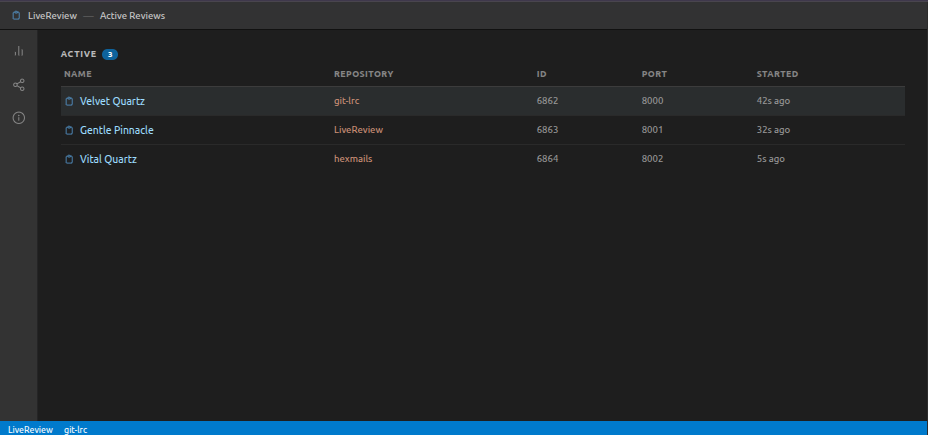
Open any lrc local URL without a session token (e.g. http://localhost:8000/) and you get a live dashboard of every review running on your machine — name, repository, ID, port, and how long ago it started. Click any row to jump straight into that review. The listing auto-cleans dead entries on every load, so you never see stale sessions.
Impact stats panel
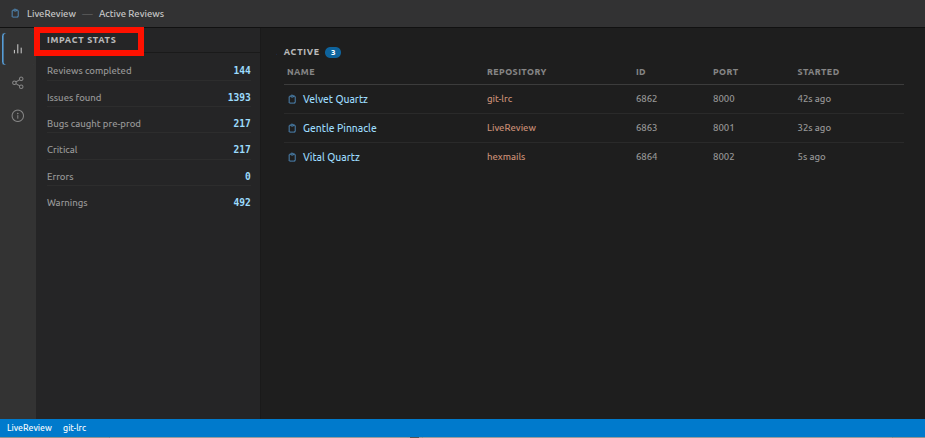
The listing page has a VS Code-style activity bar with three side panels. Click the bar-chart icon to open your cumulative review impact stats pulled live from LiveReview — total reviews, bugs caught before production, issues by severity, and more.
Share and GitHub panels
- Share icon — opens a pre-filled LinkedIn-format post with your impact numbers. Edit it in the textarea and hit "Copy message" to grab it.
- Info icon — shows the git-lrc GitHub repo with live star, fork, and open issue counts plus a direct "Star on GitHub" button. Falls back to hardcoded counts if GitHub is unreachable.
Session isolation
Every review URL now includes a ?r=<id> session token. All API endpoints validate this token and reject mismatched requests with a 403 session_mismatch. If you open an old tab after a port is reused by a new review, you'll see a clear "Session Ended" screen instead of silently loading the wrong review.
Run name now shows the server-assigned name
The "Run: …" subtitle under "LiveReview Results" was previously showing a locally-generated placeholder name instead of the one assigned by the server. It now correctly shows the server-assigned friendly name as soon as the review is submitted.
Local review link in terminal output
The + METADATA + block printed to the terminal now shows the direct local review URL alongside the LiveReview cloud link so you can copy it straight from the terminal.
Feedback always linked to the right review
General feedback submitted from the header is now always linked to the correct review ID in the database, even if the browser doesn't send it explicitly. The server injects the review ID server-side before forwarding to the API.
Breaking Changes
- None.
Verification
lrc --versionlrc --help- Run a review — confirm terminal shows both the LiveReview cloud link and the local
?r=URL - Open
http://localhost:<port>/— confirm the listing page appears with the active review - Open the listing page from a second terminal (different port) — confirm both reviews appear
- Check that the run name under "LiveReview Results" matches what LiveReview assigned, not a generated placeholder
- Submit general feedback — confirm the DB row has the correct
review_id
Known Issues
- None.
v0.3.7

Release v0.3.7
Date: 2026-05-22
Summary
This release focuses on making the review UI more useful and polished. You can now give feedback on individual comments and summary slides, see your code review impact stats, and share them with your team. The header has been cleaned up and the review page is more interactive overall.
Install and Update
New install:
# Linux/macOS
curl -L https://hexmos.com/ipm-install | bash && ipm i HexmosTech/git-lrc

# Windows
iwr https://hexmos.com/ipm-install-ps | iex; ipm i HexmosTech/git-lrc
Update:
lrc self-update
Changes
Feedback on review comments
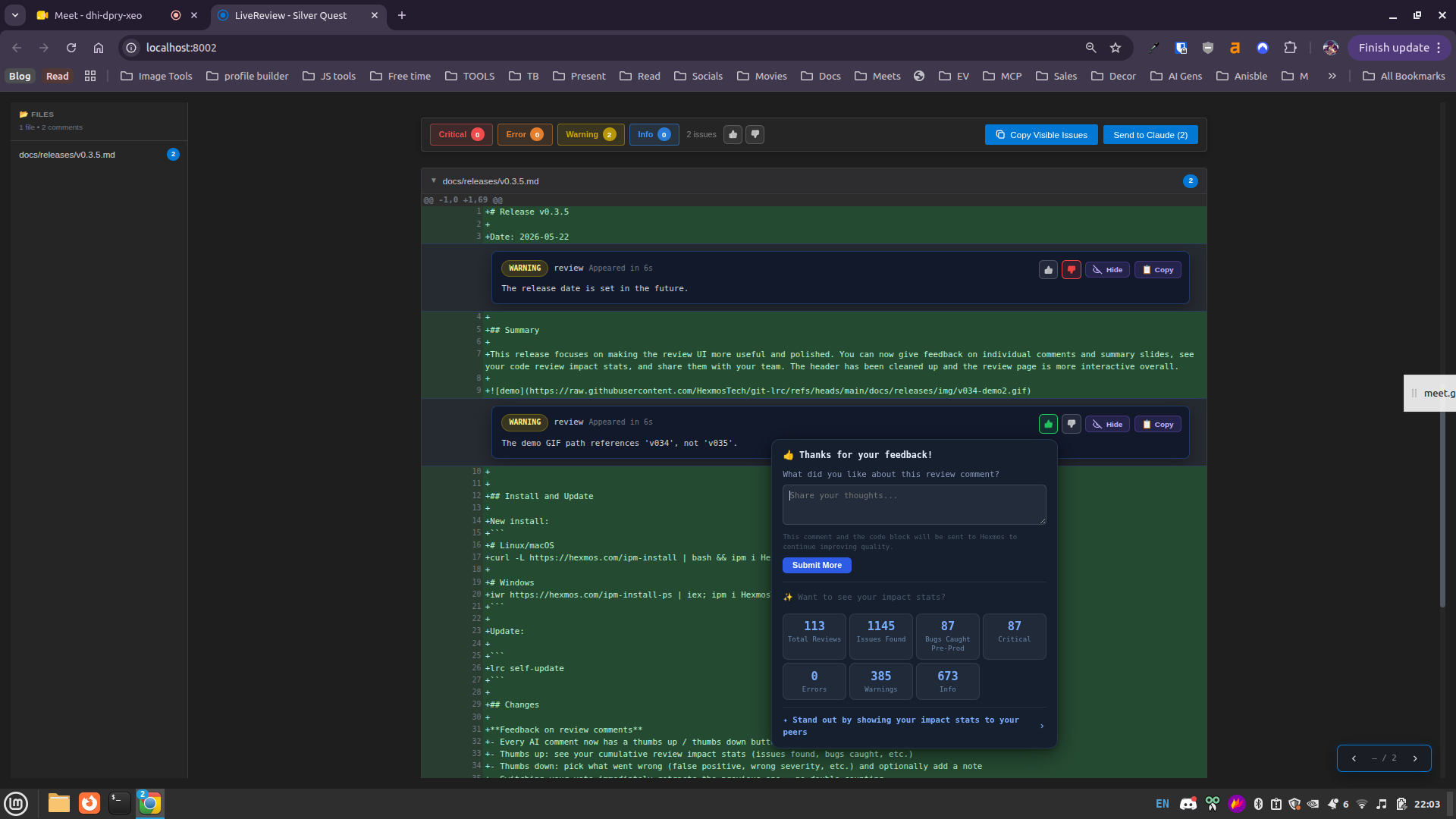
- Every AI comment now has a thumbs up / thumbs down button
- Thumbs up: see your cumulative review impact stats (issues found, bugs caught, etc.)
- Thumbs down: pick what went wrong (false positive, wrong severity, etc.) and optionally add a note
- Switching your vote immediately retracts the previous one — no double-counting
- The submit button now correctly shows an error if sending feedback fails instead of always saying "done"
Feedback on summary slides
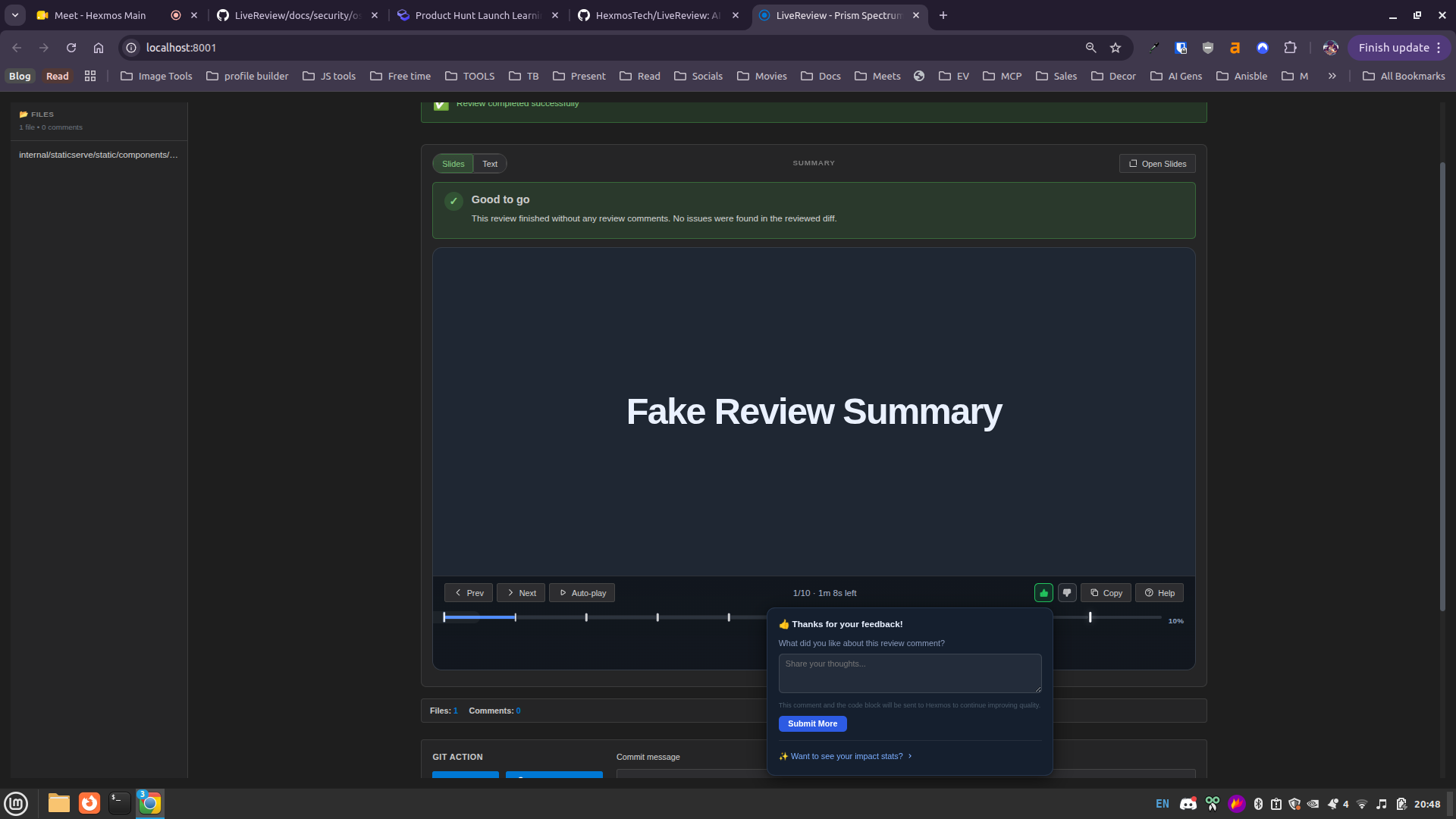
- The review summary slideshow now has the same thumbs up / thumbs down buttons
- Voting captures the current slide content and the full slide list so feedback is contextual
Share your impact
- After upvoting, hover over "Want to see your impact stats?" to see a breakdown of your reviews
- From the stats view, hover "Stand out by showing your impact stats to your peers" to get a pre-written LinkedIn post you can copy and edit
Header improvements
- Cleaner, compact single-row header — less vertical space, everything visible at a glance
- Hover over the logo to see a "Star us on GitHub" prompt
- Hover over LiveReview Results to get a shareable link to hexmos.com/livereview
- The run name and date are now tucked in an ⓘ icon — hover to see them, with a copy button for the run name
- The Feedback button in the header lets you rate the overall review experience; also shows your impact stats
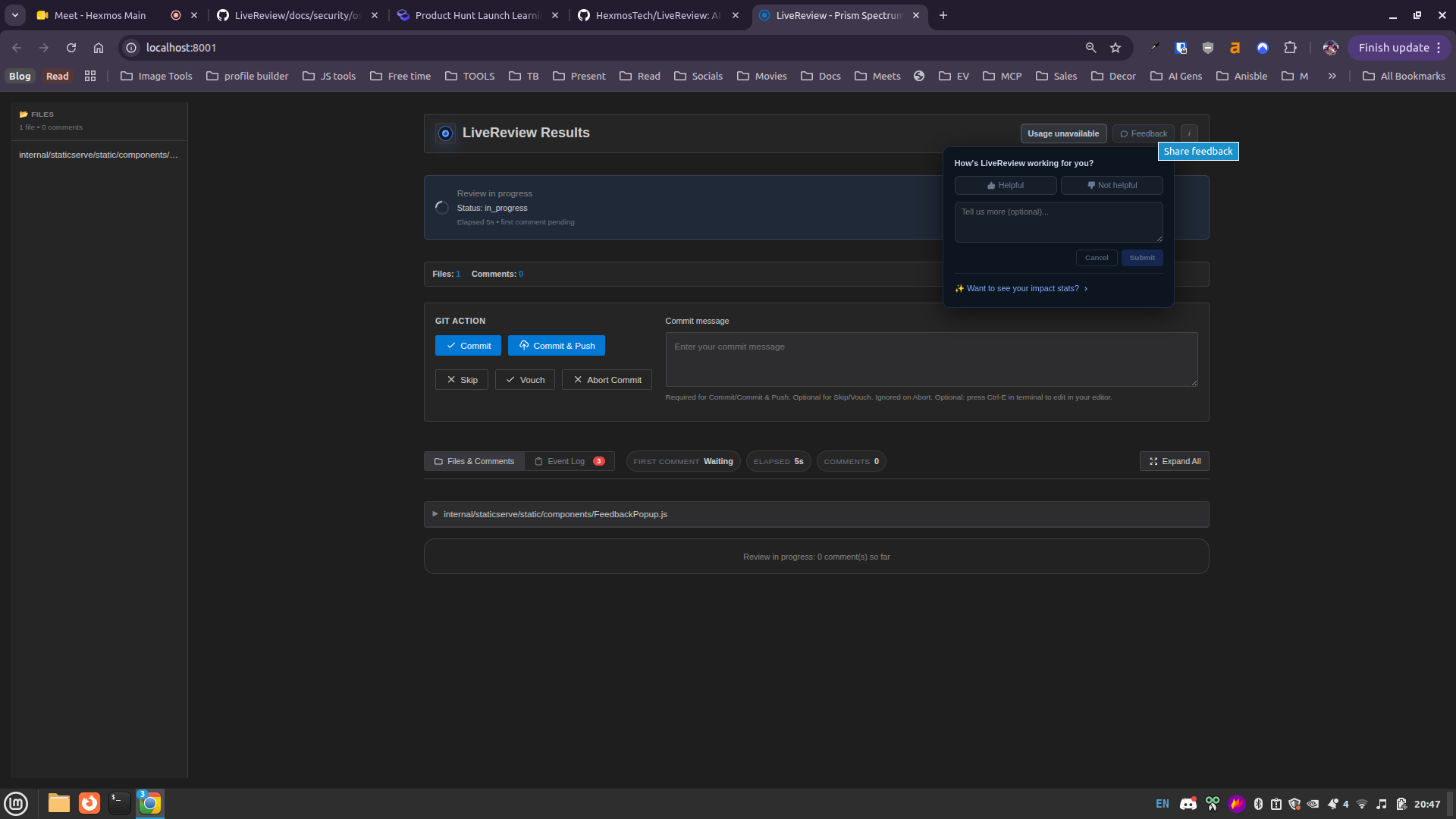
Popup positioning fix
- Feedback popups near the top or bottom of the screen now appear in the right place relative to the button (previously they could land far away from it)
Breaking Changes
- None.
Verification
lrc --versionlrc --help- Run a review and confirm thumbs up/down buttons appear on comments
- Check that the header shows logo, "LiveReview Results", usage chip, Feedback, and ⓘ icon
Known Issues
- None.
v0.3.5
Release v0.3.5
Date: 2026-05-22
Summary
This release focuses on making the review UI more useful and polished. You can now give feedback on individual comments and summary slides, see your code review impact stats, and share them with your team. The header has been cleaned up and the review page is more interactive overall.
Install and Update
New install:
# Linux/macOS
curl -L https://hexmos.com/ipm-install | bash && ipm i HexmosTech/git-lrc

# Windows
iwr https://hexmos.com/ipm-install-ps | iex; ipm i HexmosTech/git-lrc
Update:
lrc self-update
Changes
Feedback on review comments
- Every AI comment now has a thumbs up / thumbs down button
- Thumbs up: see your cumulative review impact stats (issues found, bugs caught, etc.)
- Thumbs down: pick what went wrong (false positive, wrong severity, etc.) and optionally add a note
- Switching your vote immediately retracts the previous one — no double-counting
- The submit button now correctly shows an error if sending feedback fails instead of always saying "done"
Feedback on summary slides
- The review summary slideshow now has the same thumbs up / thumbs down buttons
- Voting captures the current slide content and the full slide list so feedback is contextual
Share your impact
- After upvoting, hover over "Want to see your impact stats?" to see a breakdown of your reviews
- From the stats view, hover "Stand out by showing your impact stats to your peers" to get a pre-written LinkedIn post you can copy and edit
Header improvements
- Cleaner, compact single-row header — less vertical space, everything visible at a glance
- Hover over the logo to see a "Star us on GitHub" prompt
- Hover over LiveReview Results to get a shareable link to hexmos.com/livereview
- The run name and date are now tucked in an ⓘ icon — hover to see them, with a copy button for the run name
- The Feedback button in the header lets you rate the overall review experience; also shows your impact stats
Popup positioning fix
- Feedback popups near the top or bottom of the screen now appear in the right place relative to the button (previously they could land far away from it)
Breaking Changes
- None.
Verification
lrc --versionlrc --help- Run a review and confirm thumbs up/down buttons appear on comments
- Check that the header shows logo, "LiveReview Results", usage chip, Feedback, and ⓘ icon
Known Issues
- None.
v0.3.4
Release v0.3.4
Date: 2026-05-11
Summary
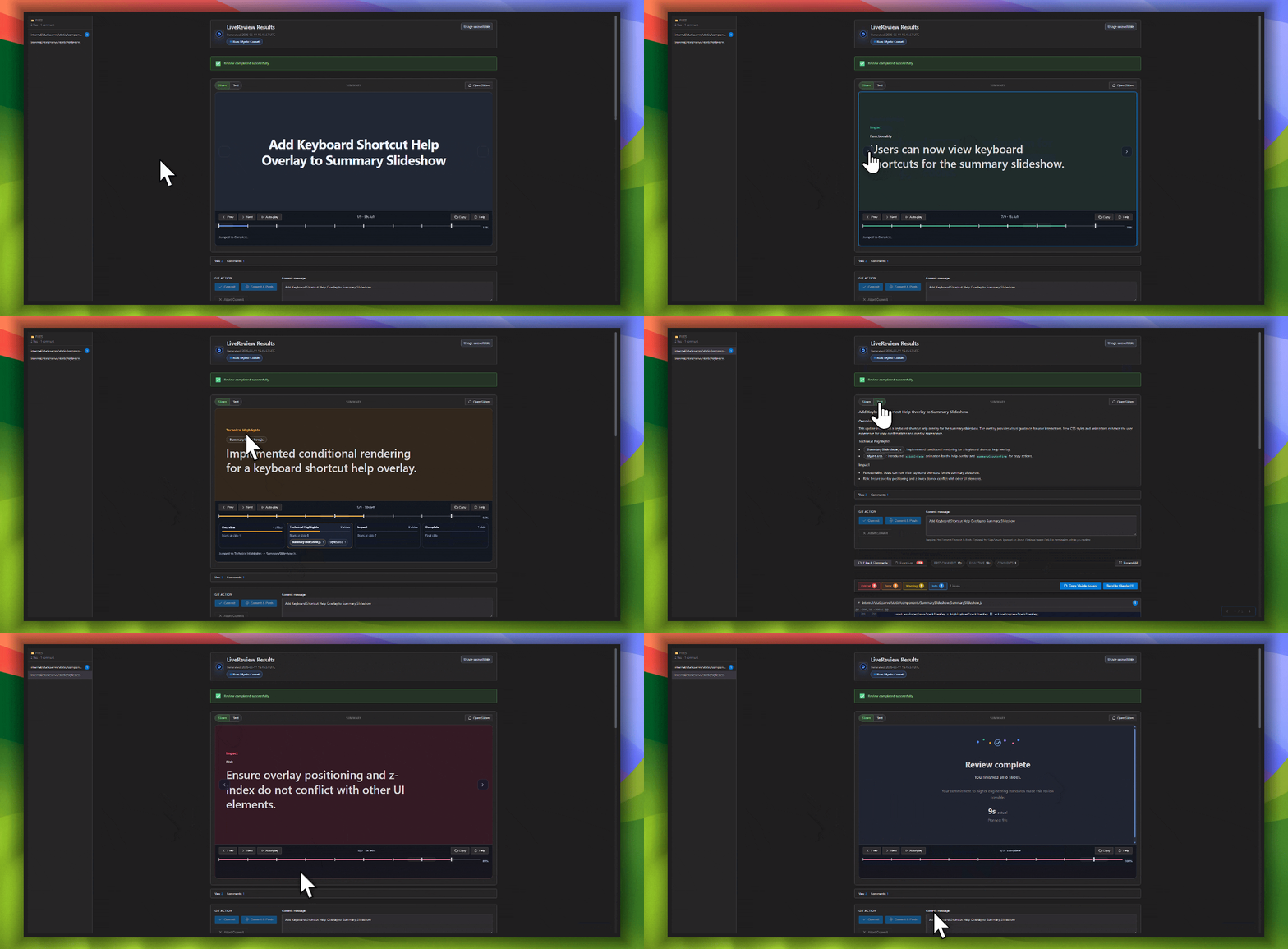
git-lrc can now present the diff change summary as a focused slide
deck, so you can understand the change in 30-60 seconds instead of
scanning a long wall of text.
Use the forward and backward arrow keys to move through the summary.
File reference chips make it easy to jump into the relevant files when
you want more detail. The presentation also uses sensible colors, such
as red for risks, to make important signals easier to spot quickly.
Here's a demo of how it works:
Install and Update
New install:
# Linux/macOS
curl -L https://hexmos.com/ipm-install | bash && ipm i HexmosTech/git-lrc

# Windows
iwr https://hexmos.com/ipm-install-ps | iex; ipm i HexmosTech/git-lrc
Update:
lrc self-update
Changes
- Added a slide-based diff change summary that is faster to skim.
- Added keyboard navigation using the forward and backward arrow keys.
- Added file reference chips so you can quickly inspect the underlying
files behind each point. - Improved visual signaling with clearer colors for risks and other key
review cues.
Breaking Changes
- None.
Verification
- lrc --version
- lrc --help
Known Issues
- None.
v0.3.3
Release v0.3.3
Date: 2026-05-07
Summary
When there are 0 comments -- because no issues found, provide a "good to go" assurance.
Install and Update
New install:
# Linux/macOS
curl -L https://hexmos.com/ipm-install | bash && ipm i HexmosTech/git-lrc

# Windows
iwr https://hexmos.com/ipm-install-ps | iex; ipm i HexmosTech/git-lrc
Update:
lrc self-update
Verification
- lrc --version
- lrc --help
Known Issues
- None.
v0.3.2

Release v0.3.2
Date: 2026-05-07
Summary
Improved the error message when LOC is not sufficient
Related issue #50
Install and Update
New install:
# Linux/macOS
curl -L https://hexmos.com/ipm-install | bash && ipm i HexmosTech/git-lrc

# Windows
iwr https://hexmos.com/ipm-install-ps | iex; ipm i HexmosTech/git-lrc
Update:
lrc self-update
Changes
- List the most important user-facing changes.
Breaking Changes
- None.
Verification
- lrc --version
- lrc --help
Known Issues
- None.
v0.3.1
Release v0.3.1
Date: 2026-05-06
Summary
- Adding subtle performance metrics to lrc ui
- Shows better, more informative loader now
- First comment arrival stat, and also loading time for each comment arrival
Install and Update
New install:
# Linux/macOS
curl -L https://hexmos.com/ipm-install | bash && ipm i HexmosTech/git-lrc

# Windows
iwr https://hexmos.com/ipm-install-ps | iex; ipm i HexmosTech/git-lrc
Update:
lrc self-update
Breaking Changes
- None.
Verification
- lrc --version
- lrc --help
Known Issues
- None.
v0.3.0
Release v0.3.0
Date: 2026-05-06
Summary
This PR introduces a workflow to visually filter git-lrc findings and hand them off to the Claude Code CLI for automatic, interactive code remediation
related discussion: #52
Changes:
- Sent only visually shown comments to the AI agent instead of using manual checkboxes.
- Added a custom "Check Your Terminal" overlay modal to replace native browser alerts.
- Launched Claude interactively to safely prompt users for (y/n) write permissions.
Install and Update
New install:
# Linux/macOS
curl -L https://hexmos.com/ipm-install | bash && ipm i HexmosTech/git-lrc

# Windows
iwr https://hexmos.com/ipm-install-ps | iex; ipm i HexmosTech/git-lrc
Update:
lrc self-update
Changes
- List the most important user-facing changes.
Breaking Changes
- None.
Verification
- lrc --version
- lrc --help
Known Issues
- None.
v0.2.3
Release v0.2.3
Date: 2026-05-03
Summary
This release fixes stability issues in the Review UI and the GitHub Actions security pipeline.
Install and Update
New install:
# Linux/macOS
curl -L https://hexmos.com/ipm-install | bash && ipm i HexmosTech/git-lrc

# Windows
iwr https://hexmos.com/ipm-install-ps | iex; ipm i HexmosTech/git-lrc
Update:
lrc self-update
Changes
- UI Stability: Fixed "Failed to load module script" error in browsers by explicitly registering
.mjsfiles asapplication/javascript. This ensures the Manager UI and Review UI load correctly on all Linux distributions regardless of system MIME settings. - CI Fix: Resolved OSV-Scanner installation failure in GitHub Actions by switching to direct binary download, bypassing
go installrestrictions related to upstreamreplacedirectives.
Breaking Changes
- None.
Verification
- lrc --version
- lrc --help
- git lrc ui (Verify no console errors for .mjs files)
Known Issues
- None.