A comprehensive AI-powered superannuation advisor with ML models, real-time predictions, conversational AI, Azure Speech Services, and automated email system. Features a clean, card-based, accessible dashboard UI targeted at older users with high-contrast design, large fonts, and simple navigation.
- User Selection: Dropdown with 10 sample User_IDs from the dataset for testing different user profiles
- Summary Card: Shows retirement amount, monthly increase needed, and peer comparison
- Key Metrics: Current balance, % to goal, estimated monthly income at 65, contributions
- Peer Comparison: Investment strategy comparison with age/risk groups
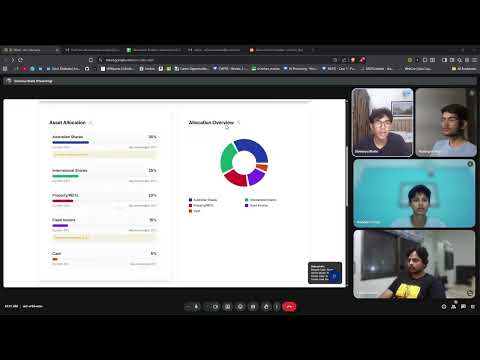
- Asset Allocation Cards: Visual breakdown by asset type (Stocks, ETFs, Managed Funds, etc.)
- Donut Chart: Interactive asset allocation with hover tooltips
- Growth Projection: Line chart showing investment growth with milestones
- Investment Types: Display of user's current investment types and funds
- Milestone Cards: Display user goals with progress tracking
- Dynamic Goal Addition: Add short-term and long-term goals
- Progress Tracking: Visual progress bars and completion status
- Retirement Impact: Shows how goals affect retirement projections
- Tax Benefits: Explanation of superannuation tax advantages
- Government Pension: Age Pension eligibility and benefits
- Private Pension: Private pension options and strategies
- Withdrawal Strategies: Fixed, Dynamic, and Bucket strategies
- "Explain This" Buttons: Chatbot integration for plain language explanations
- Risk Tolerance Slider: Low/Medium/High risk selection
- Asset Allocation Input: Interactive sliders for ideal allocation
- Comparison Tool: Compare user allocation with recommended allocation
- Risk Assessment: Comprehensive risk analysis and recommendations
- Floating Action Button: Easy access to AI advisor
- Voice Interaction: Text-to-speech capabilities
- Voice Controls: Start/stop recording, voice selection, enable/disable
- Individual Message Playback: Speaker icons for manual message reading
- Sample Questions: Pre-built questions for common scenarios
- ML Model Integration: Simulated responses based on user data
- Contextual Advice: Personalized recommendations based on user profile
- Speech-to-Text (STT): Voice input for chatbot interactions
- Multiple Voice Options: Australian, US, and UK English voices
- Voice-Guided Signup: Voice-assisted user profile creation
- Real-time Audio Processing: Optimized for 16kHz, 16-bit, mono audio
- 6-Hour Scheduled Emails: Automated financial updates every 6 hours
- Manual Email Trigger: "Get Financial Update" button with news source selection
- News Source Options:
- 📰 NewsAPI: Real-time financial news from NewsAPI.org
- 🤖 Gemini AI: AI-generated financial content with recent web data
- Professional HTML Templates: Beautiful, responsive design with MUFG branding
- Comprehensive Content Categories:
- 📈 Stock Market & Economic Updates
- 🏠 Real Estate & Bonds
- 📋 Policy Changes & Tax Updates
- 📰 General Financial News
├── backend/               # Python ML backend
│   ├── api.py            # FastAPI server
│   ├── train.py          # ML model training
│   ├── chat_router.py    # AI chatbot integration
│   ├── inference.py      # ML model inference
│   ├── requirements.txt  # Python dependencies
│   └── setup.bat/sh      # Backend setup scripts
├── src/
│   ├── components/
│   │   ├── dashboard/    # Dashboard components
│   │   └── ui/           # Reusable UI components
│   ├── pages/            # Main application pages
│   ├── services/         # Data service layer
│   └── lib/              # Utility functions
└── case1.csv             # Dataset
- Mock Data: 10 sample users with realistic financial profiles
- Peer Comparison: Age group and risk group comparisons
- Projection Calculations: Retirement amount and contribution calculations
- Investment Types: Support for various Australian investment categories
src/
├── components/dashboard/
│   ├── UserSelection.tsx          # User profile switcher
│   ├── DashboardHeader.tsx        # User info and progress
│   ├── SummaryCard.tsx            # Retirement projection
│   ├── MetricsGrid.tsx            # Key financial metrics
│   ├── NavigationTabs.tsx          # Main navigation
│   ├── PortfolioPage.tsx          # Asset allocation & growth
│   ├── GoalsPage.tsx              # Financial goals management
│   ├── EducationPage.tsx          # Benefits & education
│   ├── RiskPage.tsx               # Risk assessment
│   ├── ChatbotPage.tsx            # AI advisor interface
│   └── FloatingChatButton.tsx     # Quick chat access
├── services/
│   └── dataService.ts            # Data management & calculations
└── pages/
    └── Dashboard.tsx              # Main dashboard component
- React 18: Modern React with hooks
- TypeScript: Type-safe development
- Tailwind CSS: Utility-first styling
- Radix UI: Accessible component primitives
- Recharts: Data visualization
- Lucide React: Consistent iconography
- Large, Clear Text: Easy-to-read fonts and high contrast
- Simple Navigation: Intuitive tab-based interface
- Visual Feedback: Clear status indicators and progress bars
- Helpful Tooltips: Contextual information and explanations
- Consistent Layout: Predictable interface patterns
- Scenario Planning: "What if" calculations for contributions
- Risk Assessment: Personalized risk tolerance evaluation
- Goal Tracking: Visual progress toward financial goals
- Peer Comparison: Benchmark against similar users
- Educational Resources: Built-in learning materials
Windows:
cd backend
setup.bat
Linux/Mac:
cd backend
chmod +x setup.sh
./setup.sh-
Install Python Dependencies
cd backend pip install -r requirements.txt -
Install Node.js Dependencies in the ROOT Folder
npm install
-
Train ML Models
cd backend python train.py -
Set up Environment Variables Create a
.envfile in the backend folder with your API keys:# Hugging Face Token (for ML models) HF_TOKEN=your_huggingface_token_here # Azure Speech Services (for voice features) AZURE_SPEECH_KEY=your_azure_speech_key_here AZURE_SPEECH_REGION=your_azure_region_here #Supabase SUPABASE_URL= SUPABASE_SERVICE_KEY= VITE_SUPABASE_URL= VITE_SUPABASE_ANON_KEY= # Email Service (for automated emails) SMTP_HOST=smtp.gmail.com SMTP_PORT=587 SMTP_SECURE=false SMTP_USER=your_email@gmail.com SMTP_PASSWORD=your_app_password ADMIN_EMAIL=your_email@gmail.com # News APIs (optional - for email content) NEWS_API_KEY=your_news_api_key_here GEMINI_API_KEY=your_gemini_api_key_here
-
Start the ML Backend
cd backend python api.py -
Start the Frontend
npm run dev
-
Access the Application
- Frontend: http://localhost:8080
- Backend API: http://localhost:8000
- Health Check: http://localhost:8000/health
Use the user selection dropdown to switch between different user profiles (U1000-U1009)
- KMeans Clustering: User segmentation based on demographics and financial behavior
- Logistic Regression: Risk tolerance prediction using financial and demographic features
- XGBoost: Investment recommendations and pension projections
- Mistral LLM: Conversational AI powered by meta-llama/Llama-3-8b-chat
- Context-Aware Responses: AI pulls user data from ML models and CSV dataset
- Natural Language Processing: Understands queries about risk, contributions, projections, and peer comparisons
/user/{user_id}- Get user profile/predict/{user_id}- Pension projection + risk category/summary/{user_id}- Dashboard summary statistics/peer_stats/{user_id}- Peer comparison data/simulate- Run projections with adjusted contributions/risk/{user_id}- Risk tolerance prediction/segment/{user_id}- User segmentation/recommendations/{user_id}- Investment recommendations
POST /text-to-speech- Convert text to speechPOST /speech-to-text- Convert speech to textGET /voices- Get available voices
GET /trigger-email- Trigger email with default sourceGET /trigger-email/{news_source}- Trigger email with specific source (gemini/newsapi)POST /send-email- Send email with custom parameters
GET /health- Check system status including email scheduler
The application uses real data from case1.csv with 500+ users including:
- Demographics (Age, Gender, Country, Employment Status)
- Financial Data (Income, Savings, Contributions, Investment Types)
- Risk Profiles and Investment Experience
- Pension Eligibility and Tax Benefits
- Transaction History and Portfolio Diversity
- Go to the "Chatbot" tab in the dashboard
- Click "Start Recording" to speak your question
- AI will respond with both text and voice
- Use speaker icons next to messages for manual playback
- Select different voices from the dropdown
- When creating a new user profile, use the enhanced signup form
- Enable "Voice Guided Mode" for step-by-step voice assistance
- Speak your answers to questions
- The form will be filled automatically based on your speech input
- Emails are sent automatically every 6 hours
- Use the "Get Financial Update" button in the dashboard header
- Select news source (NewsAPI or Gemini AI) before sending
- Check your email for comprehensive financial updates
- Real Excel Integration: Connect to actual dataset
- Real-time Data: Live market data integration
- Advanced Analytics: More sophisticated financial modeling
- Mobile App: Native mobile application
- Enhanced Voice Commands: More natural voice interactions
- Landing Page

- Signup Page

- User Dashboard

This project is part of the MUFG Hackathon and is designed for demonstration purposes.