A ROS2 node that receives streamed JPEG frames from an ESP32-CAM over a serial link, reassembles them, decodes them, and publishes the result as a sensor_msgs/Image message on /recam/image_raw.
Important: Do not rename the
irap_dockerfolder. This name is fixed insidedocker-compose.ymlas the volume bridge identifier and must remain unchanged.
- Firmware Installation (ESP32-CAM)
- High-Level Package Installation (Docker)
- Prerequisites
- Build
- Run
- Camera Settings
- Parameters
- View the Stream
- Console Output
- Overview
- Latency Test
- Navigate to the
irap_dockerfolder that you cloned from GitHub. - Enter the
espcam_firmwaresubdirectory. - Install
esptoolif it is not already available:pip install esptool
- Connect the ESP32-CAM to your computer, then run the following command. Replace
--portwith your actual port.- Linux/Ubuntu: check available ports with
ls /dev/tty* - Windows: check Device Manager under COM Ports
python3 -m esptool --chip esp32s3 --port /dev/ttyACM0 --baud 460800 \ write_flash 0x0000 bootloader.bin 0x10000 firmware.bin - Linux/Ubuntu: check available ports with
- A successful flash produces output similar to the following:
esptool.py v4.7.0 Serial port /dev/ttyACM1 Connecting... Chip is ESP32-S3 (QFN56) (revision v0.2) Features: WiFi, BLE, Embedded PSRAM 8MB (AP_3v3) Crystal is 40MHz MAC: 10:20:ba:03:9c:b4 Uploading stub... Running stub... Stub running... Changing baud rate to 460800 Changed. Configuring flash size... Flash will be erased from 0x00000000 to 0x00003fff... Flash will be erased from 0x00010000 to 0x00061fff... Compressed 15104 bytes to 10430... Wrote 15104 bytes (10430 compressed) at 0x00000000 in 0.2 seconds (effective 499.5 kbit/s)... Hash of data verified. Compressed 334128 bytes to 191627... Wrote 334128 bytes (191627 compressed) at 0x00010000 in 2.4 seconds (effective 1113.6 kbit/s)... Hash of data verified. Leaving... Hard resetting via RTS pin... - Open a serial monitor and verify that the device repeatedly prints the following every 100 milliseconds:
[irap-recam] : firmware-version=1.0.0
- Push the
irap_dockerfolder to the Arduino UNO Q device using ADB:adb push irap_docker /home/arduino/
- Disable the hardware serial debugger on the Arduino UNO Q to free up
/dev/ttyMSM0for ESP32-CAM communication. This script patches the boot entry console to use an alternate debugging console:sudo bash patch_serial.sh
- Disable the default Wi-Fi configuration and remove Gretty to optimize Wi-Fi adapter performance:
sudo bash set_wifi_and_remove_gretty.sh
- Build the Docker image (requires an internet connection):
sudo bash docker_build.sh
- Start the Docker Compose stack:
sudo docker compose up -d
- Open an interactive shell inside the container:
sudo docker compose exec ros2_humble bash - ros2 launch inside the container:
ros2 launch irap_recam irap_recam_launch.py
- Launch the ROS2 node. If everything is connected and configured correctly, you should see frame rate statistics similar to:
[irap_recam] FPS: 10.16 | FrameID:  65 | Size: 32764 | Resolution: 640x480 | Processing: 14ms | Serial latency: 171.98ms
[irap_recam] FPS: 10.24 | FrameID:  78 | Size: 32776 | Resolution: 640x480 | Processing: 16ms | Serial latency:  71.15ms
[irap_recam] FPS: 11.12 | FrameID:  90 | Size: 32692 | Resolution: 640x480 | Processing: 15ms | Serial latency:  97.55ms
[irap_recam] FPS: 11.09 | FrameID: 102 | Size: 33220 | Resolution: 640x480 | Processing: 15ms | Serial latency:  97.46ms
[irap_recam] FPS: 11.15 | FrameID: 114 | Size: 32200 | Resolution: 640x480 | Processing: 14ms | Serial latency:  90.33ms
[irap_recam] FPS: 11.12 | FrameID: 126 | Size: 31543 | Resolution: 640x480 | Processing: 15ms | Serial latency:  88.08ms
-
Ubuntu 22.04 (tested; other 22.04-based distributions should work)

-
Latency Test
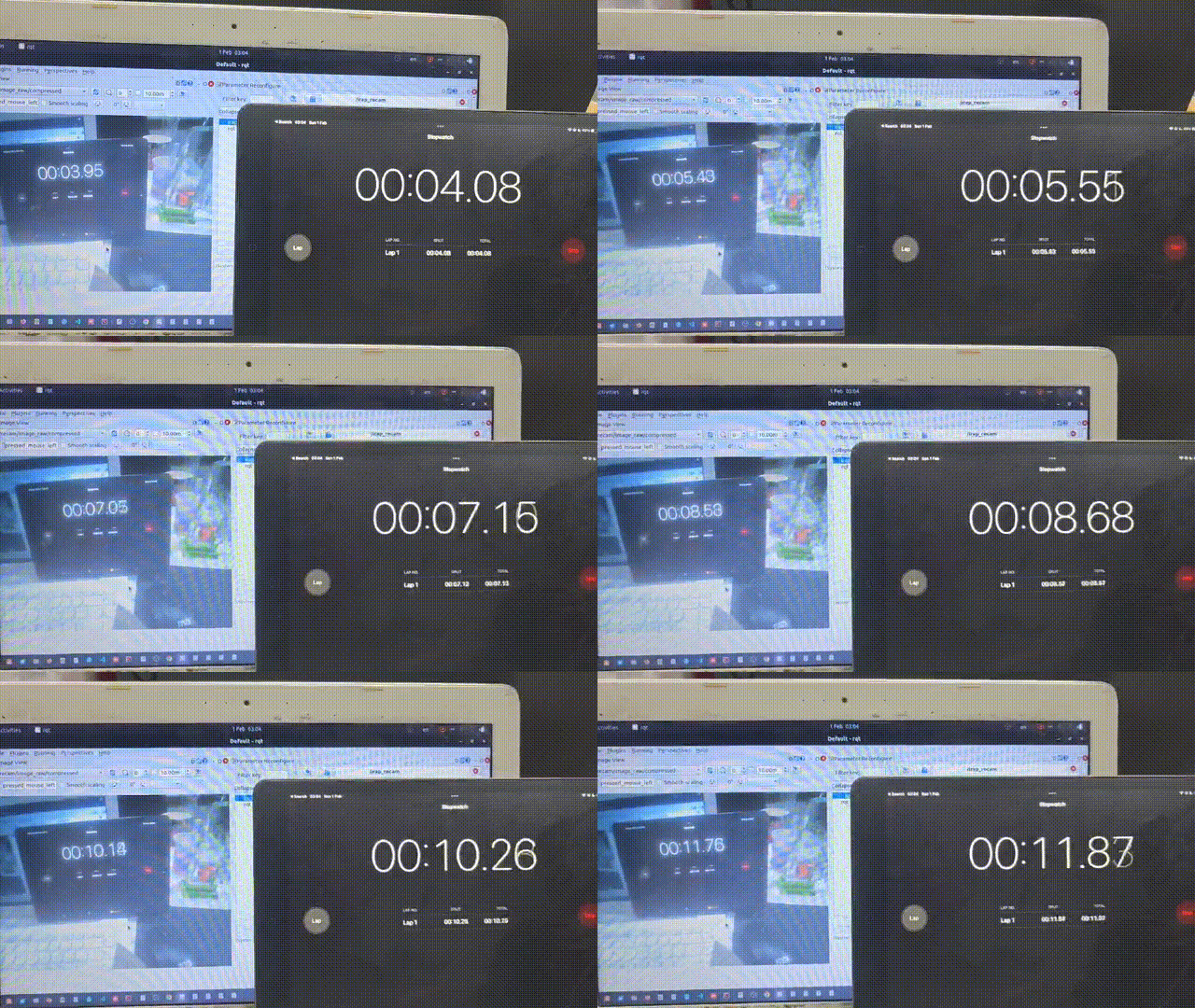
- ROS2 Humble
- C++17-capable compiler (
g++ ≥ 11)
ros2 run irap_recam irap_recamOverride defaults via command-line arguments:
ros2 run irap_recam irap_recam --ros-args \
    -p device:=/dev/ttyUSB0 \
-p baudrate:=4000000Important: Update the
deviceandbaudratevalues in the launch file to match your setup before launching.
device_arg = DeclareLaunchArgument(
    'device',
    default_value='/dev/ttyACM0',
    description='Serial device path'
)

baudrate_arg = DeclareLaunchArgument(
    'baudrate',
    default_value='4000000',
    description='Serial baud rate'
)
ros2 launch irap_recam irap_recam_launch.pyAll camera parameters are configurable at runtime via rqt or the command line without restarting the node.
| Parameter | Range | Default | Description |
|---|---|---|---|
cam_resolution |
1 – 21 | 8 (VGA) | Image resolution (see table below) |
cam_quality |
1 – 63 | 15 | JPEG quality (lower = better) |
cam_brightness |
−3 – 3 | 3 | Camera brightness |
cam_contrast |
−3 – 3 | 3 | Camera contrast |
cam_saturation |
−4 – 4 | 4 | Camera saturation |
cam_exposure |
−4 – 4 | 4 | Camera exposure |
| Index | Resolution | Label |
|---|---|---|
| 0 | 96 × 96 | FRAMESIZE_96X96 |
| 1 | 160 × 120 | FRAMESIZE_QQVGA |
| 2 | 176 × 144 | FRAMESIZE_QCIF |
| 3 | 240 × 176 | FRAMESIZE_HQVGA |
| 4 | 240 × 240 | FRAMESIZE_240X240 |
| 5 | 320 × 240 | FRAMESIZE_QVGA |
| 6 | 400 × 296 | FRAMESIZE_CIF |
| 7 | 480 × 320 | FRAMESIZE_HVGA |
| 8 | 640 × 480 | FRAMESIZE_VGA |
| 9 | 800 × 600 | FRAMESIZE_SVGA |
| 10 | 1024 × 768 | FRAMESIZE_XGA |
| 11 | 1280 × 720 | FRAMESIZE_HD |
| 12 | 1280 × 1024 | FRAMESIZE_SXGA |
| 13 | 1600 × 1200 | FRAMESIZE_UXGA |
| 14 | 1920 × 1080 | FRAMESIZE_FHD |
| 15 | 720 × 1280 | FRAMESIZE_P_HD |
| 16 | 864 × 1536 | FRAMESIZE_P_3MP |
| 17 | 2048 × 1536 | FRAMESIZE_QXGA |
| 18 | 2560 × 1440 | FRAMESIZE_QHD |
| 19 | 2560 × 1600 | FRAMESIZE_WQXGA |
| 20 | 1080 × 1920 | FRAMESIZE_P_FHD |
| 21 | 2560 × 1920 | FRAMESIZE_QSXGA |
ros2 param set /irap_recam cam_quality 25
ros2 param set /irap_recam cam_resolution 5 # QVGA 320×240| Parameter | Type | Default | Description |
|---|---|---|---|
device |
string | /dev/ttyMSM0 |
Serial device path |
baudrate |
int | 4000000 |
Serial baud rate (minimum 9600) |
# GUI image viewer
ros2 run image_view image_view --ros-args -r image:=/recam/image_raw

# Or via rqt
rqt_image_viewThe node prints a statistics line once per second while running:
FPS: 44.2 | FrameID: 1042 | Size: 18765 | Resolution: 640x480 | Processing: 1ms | Serial latency: 49.3ms
| Field | Description |
|---|---|
FPS |
Decoded frames per second |
FrameID |
Last completed frame sequence number received from the ESP32-CAM |
Size |
Raw JPEG size in bytes before decoding |
Resolution |
Decoded image dimensions |
Processing |
Time from last chunk received to frame published (ms) |
Serial latency |
Round-trip time measured via the dataControl bit handshake (ms) |
- Runtime reconfiguration of ESP32-CAM settings directly from
rqt
End-to-end latency at 640 × 480 resolution and 1 Mbaud is typically 50–70 ms.