中文 | English

Argos (Ἄργος) is an ESP32-C3-powered system monitor that displays real‑time host metrics on a 256×64 OLED screen:
| Category | Metrics |
|---|---|
| Hostname | System hostname |
| CPU | Frequency, temperature, threads, core count |
| Memory | Total, used, usage % |
| Disk | Total, used, usage % |
| OS | Type, distro, version |
| Clock | UTC and local time |
Save named configuration profiles to Argos and load them on demand. Each profile stores Wi‑Fi credentials, NTP server settings, and more. Delete profiles you no longer need directly from the device. Currently the device supports max to 3 profiles.


Argos in action
Argos has two components:
-
Target agent (
deploy/launch.go) — a Go program that collects system metrics (CPU, memory, disk, OS, temperature) and exposes them as a JSON HTTP endpoint on port8080, advertising via mDNS. -
ESP32 device — connects to the same Wi‑Fi network, polls
/api/infoevery second, parses the JSON response, and renders the data on the OLED display.
graph TD
  A["Target Device<br/>Run Server"]
  B["Argos: SoftAP<br/>& HTTP Server"]
  C["Captive Portal"]
  D["Argos: STA<br/>& HTTP Client"]
  E["Argos: UI"]
  F["Argos: Encoder"]

  B -->|"launch"| C
  C -->|"POST config"| B
  B -->|"switch to STA"| D
  D -->|"GET /api/info"| A
  A -->|"JSON"| D
  D -->|"parsed data"| E
  F -->|"input events"| E
ESP-DDC is the project's own custom component — it contains all of Argos' firmware logic and is the only one tracked in git. The remaining components are third‑party, gitignored, and must be obtained before building:
| Component | Source | Purpose |
|---|---|---|
| u8g2 | git clone https://github.com/olikraus/u8g2.git components/u8g2 |
OLED graphics (SSD1322 via SPI) |
| esp_littlefs | git clone https://github.com/joltwallet/esp_littlefs.git components/esp_littlefs |
Fail‑safe flash filesystem |
| espressif__mdns | git clone https://github.com/espressif/esp-protocols.git components/espressif__mdns |
mDNS service discovery |
# One‑liner to clone all missing components:
git clone https://github.com/olikraus/u8g2.git components/u8g2
git clone https://github.com/joltwallet/esp_littlefs.git components/esp_littlefs
git clone https://github.com/espressif/esp-protocols.git components/espressif__mdns
ESP‑IDF framework — provided by the SDK:
driver · esp_wifi · nvs_flash · esp_http_client · esp_http_server · esp_timer · esp_netif · mdns · cJSON · esp_event · freertos · lwip
Requires ESP‑IDF ≥ 5.0.
Cross‑platform Go agent; see Deployment for setup.
| Package | Version |
|---|---|
| cobra | v1.10.2 |
| gopsutil | v4.26.4 |
| zeroconf | v1.0.0 |
Pre‑built binaries are included for Linux (amd64/arm64) and Windows (amd64) under deploy/.
Pre‑built binaries are provided under deploy/. Pick the one matching your platform:
| Binary | Platform | Status |
|---|---|---|
deploy/linux/amd64/argos-linux-amd64 |
Linux x86‑64 | Verified with Ubuntu 24.04 / 22.04 |
deploy/linux/arm64/argos-linux-arm64 |
Linux ARM64 (e.g. Raspberry Pi) | Unverified |
deploy/windows/argos-windows-amd64.exe |
Windows x86‑64 | Unverified |
# Linux
chmod +x deploy/linux/amd64/argos-linux-amd64
./deploy/linux/amd64/argos-linux-amd64

# Windows
deploy\windows\argos-windows-amd64.exe
A better practice is to just to rename the binary as argos, which saves a lot of troubles, then:
sudo mv argos /usr/local/bin/To build from source you must enter the root directory where go.mod is :
cd deploy
go mod download
# Example platform: linux amd64
GOOS=linux GOARCH=amd64 go build -ldflags="-s -w" -o argos .The binary launches argos service in the target machine via cli.
# check current version
cd linux/amd64
./argos-linux-amd64 --version
                       ___
                      /   |  _________ _____  _____
                     / /| | / ___/ __ `/ __ \/ ___/
                    / ___ |/ /  / /_/ / /_/ (__  )
                   /_/  |_/_/   \__, /\____/____/
                               /____/

===========================================================================
     2026 @ i4N  https://github.com/Jav1ki4N/Argos | Version: Prototype
# start server, you may add -v or --verbose so the program will print verbose information
# of the data collected in JSON on every http request
./argos-linux-amd64 start
2026/06/01 20:38:36 [Argos]: mDNS broadcasting: argos-target.local → 198.18.0.1:8080
2026/06/01 20:38:36 [Argos]: Service is started. You may connect your ESP32 device to this server
2026/06/01 20:38:36 [Argos]: This process could fail if you are using a VPN, it's advised to launch the server before connecting to a VPN
2026/06/01 20:38:36 [Argos]: Press Ctrl+C to stop the server # use -h or --help or help to learn more about the detailed usage
./argos-linux-amd64 --help
argos [-v | --version] [-h | --help | help] <command>
===========================================================================
flags:
-v, --version Show the current version of Argos
-h, --help Show this help message
commands:
start[-v | --verbose] Start the Argos server to monitor and control your
ESP32 devices. Use -v or --verbose for detailed logging.
===========================================================================Verify the endpoint:
curl http://$(hostname -I | awk '{print $1}'):8080/api/infoThe ESP32 starts as a SoftAP. Connect your device to it and a DNS server redirects all queries to a captive portal hosted on the ESP32's flash. From there you fill in a configuration profile:
| Field | Description |
|---|---|
| SSID | Target Wi‑Fi network SSID |
| Password | Target Wi‑Fi network password |
| NTP Server | Network Time Protocol server |
| ProfileName | Profile name (defaults to SSID) |
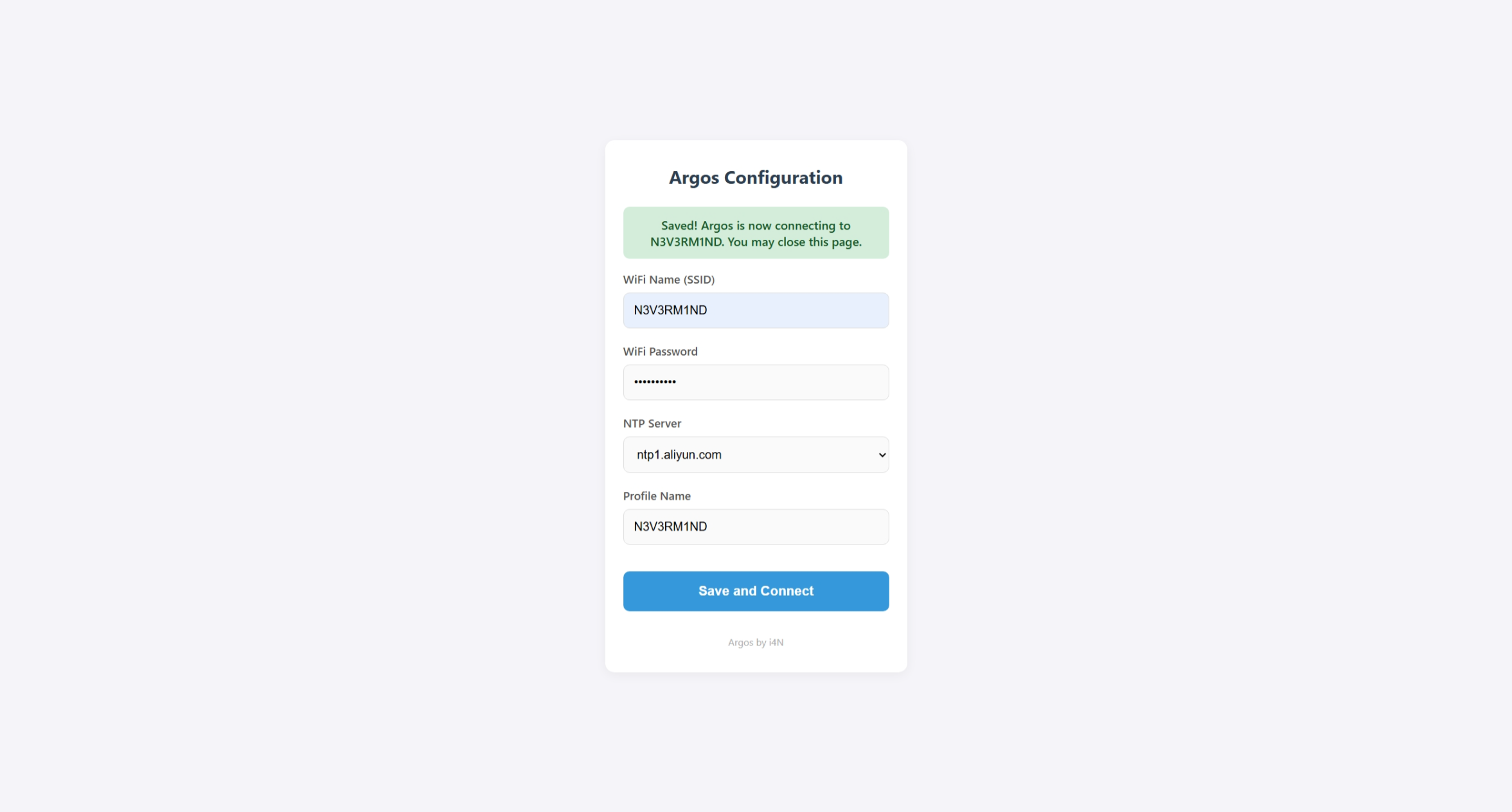
Captive Portal
After saving, the ESP32 switches to STA mode and locates the target device via mDNS. A GET request fetches the system info JSON, which is parsed and rendered on the display.
All PCBs are built with ICEDA (EasyEDA)
The prototype revision — built for testing — has several known issues:
- On‑board USB should not be exposed to the user; dual power paths risk damaging the SoC.
- External USB should be wired to the on‑board USB
D+/D-lines so firmware can be flashed externally. - Charge and charge‑complete LEDs behave incorrectly. No LED indicates state when running on battery alone.
- The ETA9697 5 V boost circuit is unused; the 1.7 V dropout causes excess heat on the ME6231 LDO.
- The display module should be replaced with a custom PCB for better maintainability and fit.
- ADC battery measurement is imprecise.
- Silkscreen quality is poor.
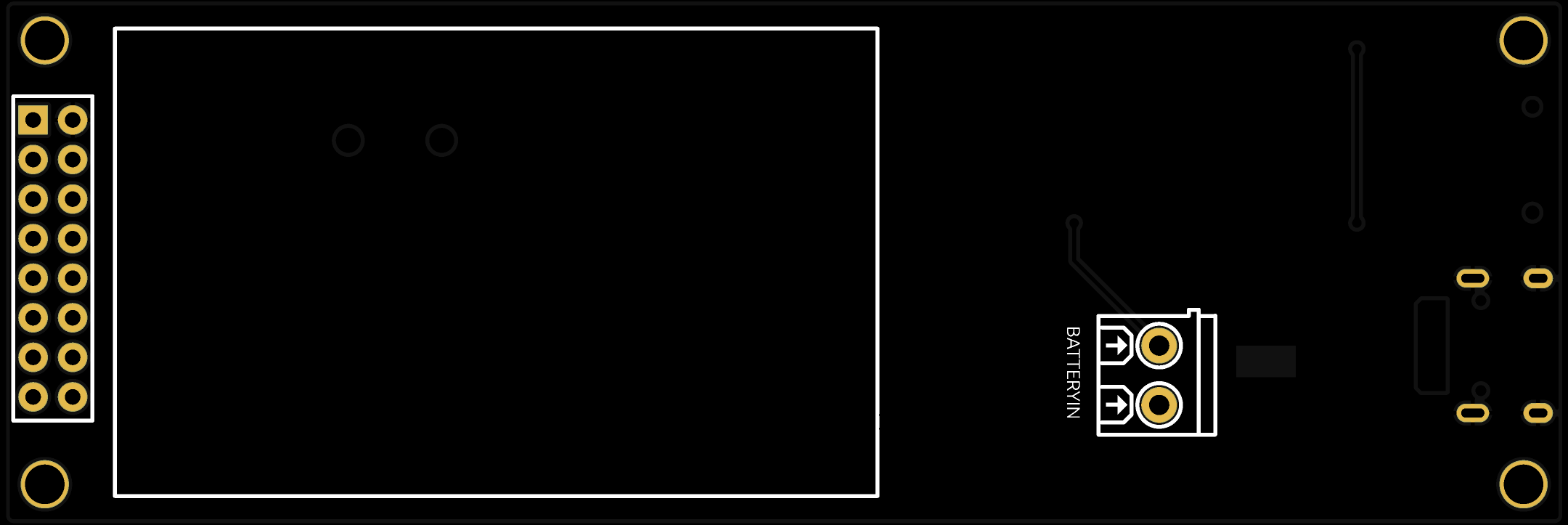
Top view
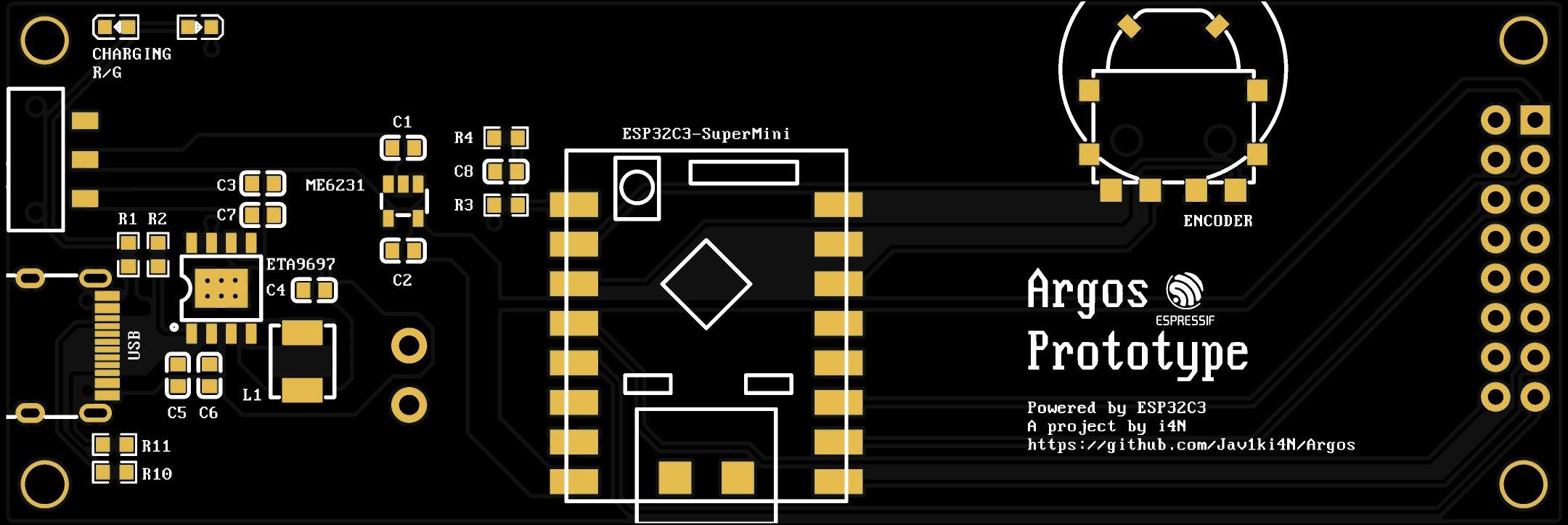
Bottom view
| Name | Type | Value | Qty |
|---|---|---|---|
| ESP32C3SuperMini | MCU / SoC | ESP32-C3 | 1 |
| Encoder | Input | SIQ-02FVS3 | 1 |
| Pin Header | Connector | 2×8p | 1 |
| Power Switch | Switch | MSKT-12D14 | 1 |
| USB | Connector | USB Type‑C 16p | 1 |
| LED | LED | 0603 | 2 |
| R1, R2 | Resistor | 0603 1 kΩ | 2 |
| R3, R4 | Resistor | 0603 100 kΩ | 2 |
| R10, R11 | Resistor | 0603 5.1 kΩ | 2 |
| L1 | Inductor | 2.2 µH | 1 |
| C1–C5 | Capacitor | 0603 10 µF | 5 |
| C6, C7 | Capacitor | 0603 0.1 µF | 2 |
| C8 | Capacitor | 0603 1 µF | 1 |
| ETA9697 | Battery Charging IC | ETA9697E8A | 1 |
| ME6231 | LDO | ME6231C33M5G | 1 |
| Battery | Battery | Li‑Po 60×30×48 mm | 1 |
| Terminal Block | Connector | KF128-2P | 1 |
| Display | Display Module | SER3.12‑D, SSD1322 | 1 |
Bill of Materials
- System information collection
- Platform migration to ESP32‑C3
- PCB design and validation
- Encoder driver
- LittleFS integration
- Captive portal on AP mode
- Configuration profiles via captive portal
- Multi‑profile support
- mDNS auto‑discovery of target device
- Stack‑based UI FSM
- Network task FSM rewrite
- UI rewrite
- Rewrite PC-Side service with Go
- Battery monitoring via ADC
- Offline time acquisition
- …