1. Setup
Download the latest release of Ultra-VIP.
Make sure it's compatible with your server's version of SourceMod.
- Extract the zip file.
- Upload the extracted
addonsdirectory into the root of your game server (this is the folder that contains themapsandcfgdirectories).
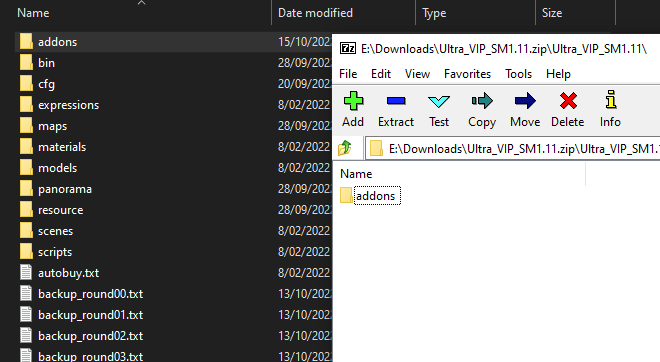
If somehow this is unclear, read the guide on how to install plugins.
Ultra-VIP does not assign admin flags or overrides to players. This is intentional--it's better design for the module API.
You will need to assign permissions yourself either by using another plugin or by modifying the standard SourceMod config files.
Ultra-VIP supports any combination of the following:
- Admin Flags (the older and more limited admin system still unfortunately used everywhere).
- Admin Groups/Overrides (the newer and more flexible system).
- Manual Steam ID assignment (not recommended for normal use; this is explained later).
Ultra-VIP will also probably work with any database-accessing admin management plugins; it's capable of giving out bonuses when a player's admin permissions change mid-game.
If you want to know how to set up admin permissions, you can read the SourceMod guides on adding admins (flags) or adding groups (groups/overrides).
The main config file addons/sourcemod/configs/ultra_vip_main.cfg contains documentation explaining how to configure the plugin.
For a more detailed explanation, see the configuration guide.