WsTune is an open-source project designed to tunnel TCP/UDP traffic over WebSockets, enabling secure and efficient communication between networks, even behind firewalls. Built primarily with .NET 9 for modern performance, it also includes a compact .NET 4.5 version for smaller deployments. The project consists of three core components:
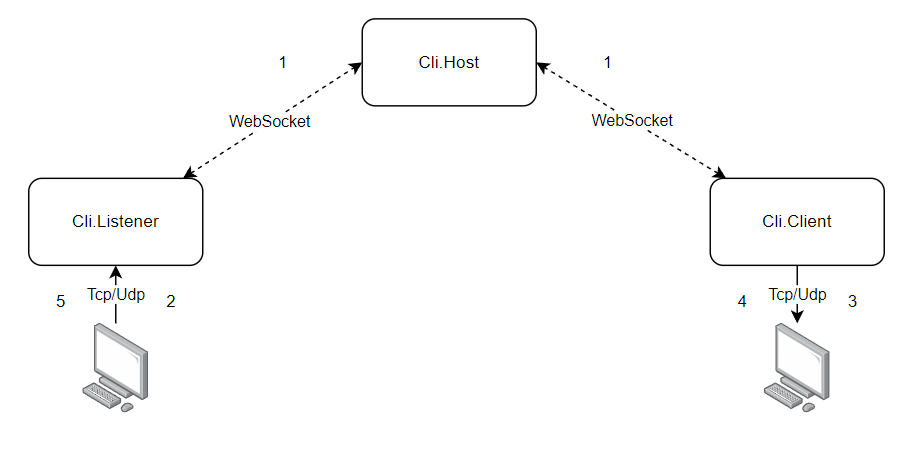
- WsTuneCli.Listener: Listens for incoming TCP/UDP packets and forwards them over WebSockets.
- WsTuneCli.Server: Receives and simulates packets on the destination machine.
- WsTuneCli.Host: Acts as the intermediary server hosted on the internet, facilitating connections between listeners and servers.
Additionally, the project provides:
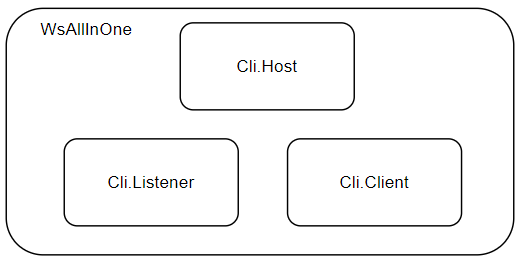
- WsAllInOne: A single project combining all three services for simplified deployment.
- WsAllInOne.Std: The .NET 4.5 version of the all-in-one project, optimized for compactness.
Upon starting, the Listener and Server establish WebSocket connections to the Host using SignalR. Communication between components is configured via an appsettings.json file.
This project includes WebSockify implementations compatible with the NoVNC project, making it suitable for remote desktop and VNC tunneling.
- Tunnel TCP/UDP traffic over WebSockets for cross-network accessibility.
- Support for SignalR-based WebSocket connections.
- Configurable via JSON for easy setup of multiple tunnels.
- Compact .NET 4.5 builds for resource-constrained environments.
- WebSockify compatibility for integration with tools like NoVNC.
- Middleman Host for internet-exposed mediation.
-
Clone the repository:
git clone https://github.com/MorfiWifi/WsTune.git -
Navigate to the project directory:
cd WsTune -
Build the project using .NET 9 (or .NET 4.5 for the Std version):
dotnet buildFor the .NET 4.5 version (WsAllInOne.Std), ensure you have the appropriate SDK installed and target the specific project.
-
Run the services:
- For individual components:
dotnet run --project WsTuneCli.Listener, etc. - For all-in-one:
dotnet run --project WsAllInOne
- For individual components:
Each service is configured using an appsettings.json file. Below is a sample configuration:
{
  "Logging": {
    "LogLevel": {
      "Default": "Information",
      "Microsoft": "Warning",
      "System": "Error",
      "WsTuneCli.Listener": "Debug"
    }
  },
  "SignalREndpoint": "/sample-endpoint", // SignalR Endpoint On Host (use full url if required)
  "WebSockifyEndpoint": "/direct-websocket", // WebSockify Endpoint (Only for Host Service)
  "Identity": "N56", // Name of current instance (Unique for each WS connection)
  "Configs": [
    {
      "Name": "Local-VNC-TCP", // User-friendly name for connection
      "Protocol": "TCP",
      "ListenPort": 40000, // Listener port
      "TargetHost": "127.0.0.1", // Target Host relative to destination
      "TargetPort": 5900, // Target port relative to destination
      "Destination": "A17" // Destination machine Identity
    },
    {
      "Name": "N56-RDP",
      "Protocol": "TCP",
      "ListenPort": 40001,
      "TargetHost": "192.168.110.111",
      "TargetPort": 3389,
      "Destination": "A17"
    }
  ]
}- SignalREndpoint: The endpoint on the Host for SignalR connections.
- WebSockifyEndpoint: Specific to the Host for direct WebSocket handling.
- Identity: A unique identifier for the instance.
- Configs: An array of tunnel configurations, specifying protocol, ports, targets, and destinations.
- Deploy the Host on an internet-accessible server.
- Configure and run the Listener on the source machine to capture incoming packets.
- Configure and run the Server on the destination machine to receive and forward packets.
- Use the all-in-one builds for testing or single-machine setups.
The Listener and Server will connect to the Host via WebSockets, allowing packet tunneling based on the configured identities and destinations.
- Connecting to RDP Behind a Firewall: Tunnel RDP traffic (port 3389) from a remote client to a firewalled server.
- Implementing Your Own VNC/RDP Middle Server: Use the Host as a proxy for remote desktop sessions.
- Generalizing Local TCP/UDP Services Over the Internet: Expose local services (e.g., databases, APIs) securely to external networks.
- Connecting Different Network Clusters: Bridge isolated networks for seamless data transfer.
This project was made possible with help from WebsockifySharp for WebSockify implementations.
This project is open-source. Please refer to the LICENSE file in the repository for details. (If no LICENSE exists, consider adding one, e.g., MIT.)