A comprehensive USB HID Joystick implementation for Raspberry Pi Pico with support for buttons, shifters, and analog pedals.
Vibe coded due to not having free time at all / spending such time on said Simrig HW :))

- Direct Mapped Buttons - Physical buttons directly mapped to joystick buttons with debouncing (hazards, DSC, handbrake...)
- Edge-Triggered Buttons - Momentary pulse (300ms) on state change (light switch)
- Combo Button Groups - Two-pin combinations with 200ms detection window (E46 window switches)
- H-Pattern Shifter - Analog stick shifter with reverse gear detection (Logitech or any other)
- Analog Pedals - 16-bit precision pedals via ADS1115 ADC with auto-calibration
- EEPROM Storage - Pedal calibration saved automatically
- Calibration Reset - Hold button to reset pedal calibration
- Raspberry Pi Pico
- ADS1115 16-bit ADC module (for pedals)
- Buttons/switches for input (pull-up mode)
- Shifter with potentiometers (G2x shifter)
- Pedals with potentiometers (G2x pedals)
Install these libraries via Arduino IDE Library Manager:
- ezButton - Button debouncing library
- Joystick (by earlephilhower) - USB HID Joystick for RP2040
- ADS1115_WE - ADS1115 ADC library (only if using pedals)
| Component | GPIO Pin | Function |
|---|---|---|
| I2C SDA | GP20 | ADS1115 Communication |
| I2C SCL | GP21 | ADS1115 Communication |
| Shifter X | GP26 (ADC0) | Analog X-axis |
| Shifter Y | GP27 (ADC1) | Analog Y-axis |
| Reverse | GP22 | Digital input (HIGH=Reverse, LOW=6th) |
Note: Direct buttons, edge buttons, and combo groups are configured in the code arrays.
#define ENABLE_SHIFTER true   // Set to false to disable shifter
#define ENABLE_PEDALS true // Set to false to disable pedalsDirectButton directButtons[] = {
{2, 9}, // Pin GP2 -> Joystick Button 9
{3, 10}, // Pin GP3 -> Joystick Button 10
// Add more buttons here
};EdgeButton edgeButtons[] = {
{13, 16} // Pin GP13 -> Button 16 (300ms pulse on state change)
};ComboGroup comboGroups[] = {
{5, 6, 1, 2, 3, 4}, // Pins GP5, GP6 -> Buttons 1-4
// pin1, pin2, btn_p1_only, btn_combo_12, btn_p2_only, btn_combo_21
};Combo Logic:
- Press Pin1 alone for 200ms → Button 1
- Press Pin1, then Pin2 within 200ms → Button 2
- Press Pin2 alone for 200ms → Button 3
- Press Pin2, then Pin1 within 200ms → Button 4
ShifterConfig shifter = {
  26,    // X_AXIS_PIN (GP26/ADC0)
  27,    // Y_AXIS_PIN (GP27/ADC1)
  22,    // REVERSE_PIN (GP22)
  320,   // X_LEFT_THRESHOLD
  600,   // X_RIGHT_THRESHOLD
  650,   // Y_TOP_THRESHOLD
  250,   // Y_BOTTOM_THRESHOLD
  {17, 18, 19, 20, 21, 22, 23, 24}  // Joystick buttons for gears 0-7
};
Gear Mapping:
     1   3   5
     |   |   |
     2   4   6/R

Gear 0 = Neutral (no button pressed)
Gear 7 = Reverse (bottom-right + HIGH on reverse pin)
PedalConfig pedals[NUM_PEDALS] = {
  {0, 3, 5},  // ADS1115 A0 -> Rx axis, 5% deadzone
  {2, 5, 3},  // ADS1115 A2 -> Rz axis, 3% deadzone
  {1, 4, 3}   // ADS1115 A1 -> Ry axis, 3% deadzone
  // channel, joystick_axis, deadzone_percent
};ADS1115 Module Raspberry Pi Pico
────────────── ─────────────────
VDD ───────────────────> 3.3V
GND ───────────────────> GND
SDA ───────────────────> GP20
SCL ───────────────────> GP21
Potentiometer ADS1115
─────────────────────── ───────
Pedal 1 ────────────────> A0
Pedal 2 ────────────────> A1
Pedal 3 ────────────────> A2
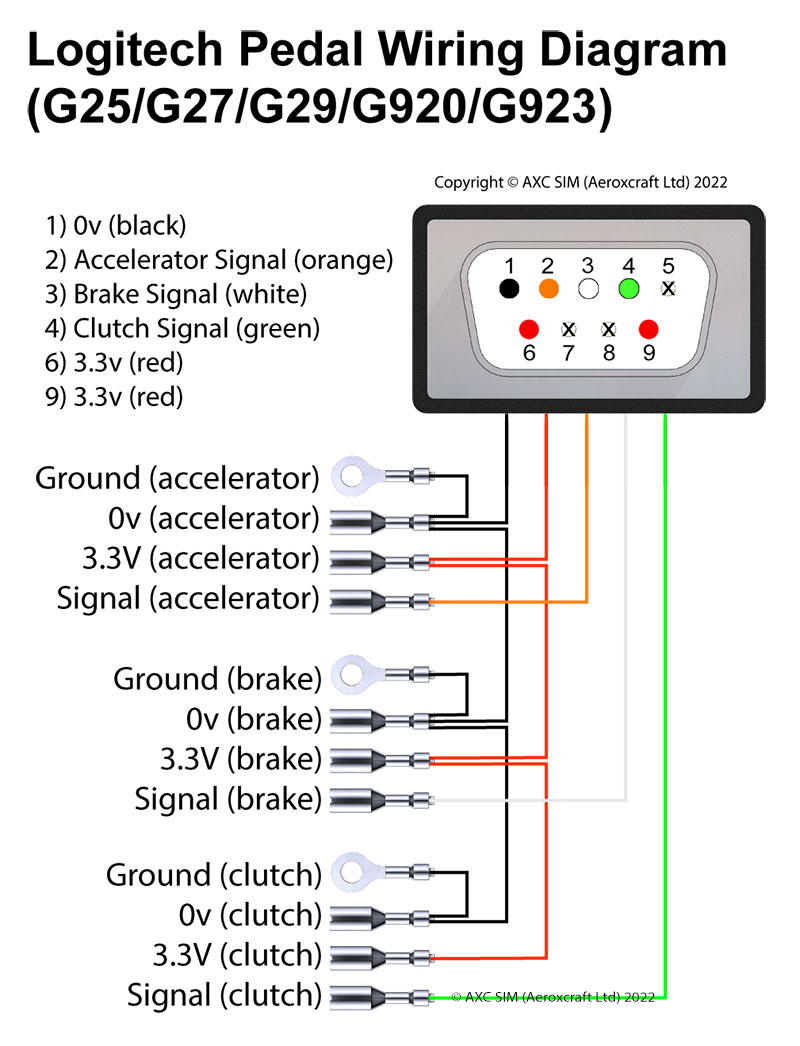
All buttons use internal pull-up resistors:
Button/Switch           Raspberry Pi Pico
─────────────          ─────────────────
One side ──────────────> GPxx (configured pin)
Other side ────────────> GND

Pressed = LOW (connected to GND)
Released = HIGH (pulled up internally)
- Upload the code to your Raspberry Pi Pico
- Connect your hardware according to the wiring guide
- The pedals will auto-calibrate as you use them
- Calibration is saved to EEPROM after 60 seconds of no changes
Automatic Calibration:
- Press each pedal fully a few times
- The min/max values are automatically learned
- Saved to EEPROM after 60 seconds
Manual Reset:
- Hold the first direct button (directButton[0]) for 10 seconds
- All pedal calibration will reset to defaults
- Release button and recalibrate by pressing pedals
The shifter uses threshold values that you can adjust in the configuration:
X_LEFT_THRESHOLD,X_RIGHT_THRESHOLD- Left/Center/Right positionsY_TOP_THRESHOLD,Y_BOTTOM_THRESHOLD- Top/Bottom positions