
Terminal AI Agent — speak naturally, execute instantly.
No GUI. No workflow builder. Just your terminal and plain English.






Octopus is a terminal-based autonomous AI agent powered by Groq + Llama 3.3 70B. Tell it what you want in plain English and it executes real tasks — no setup wizards, no drag-and-drop, no configuration files.
npx octopus-agent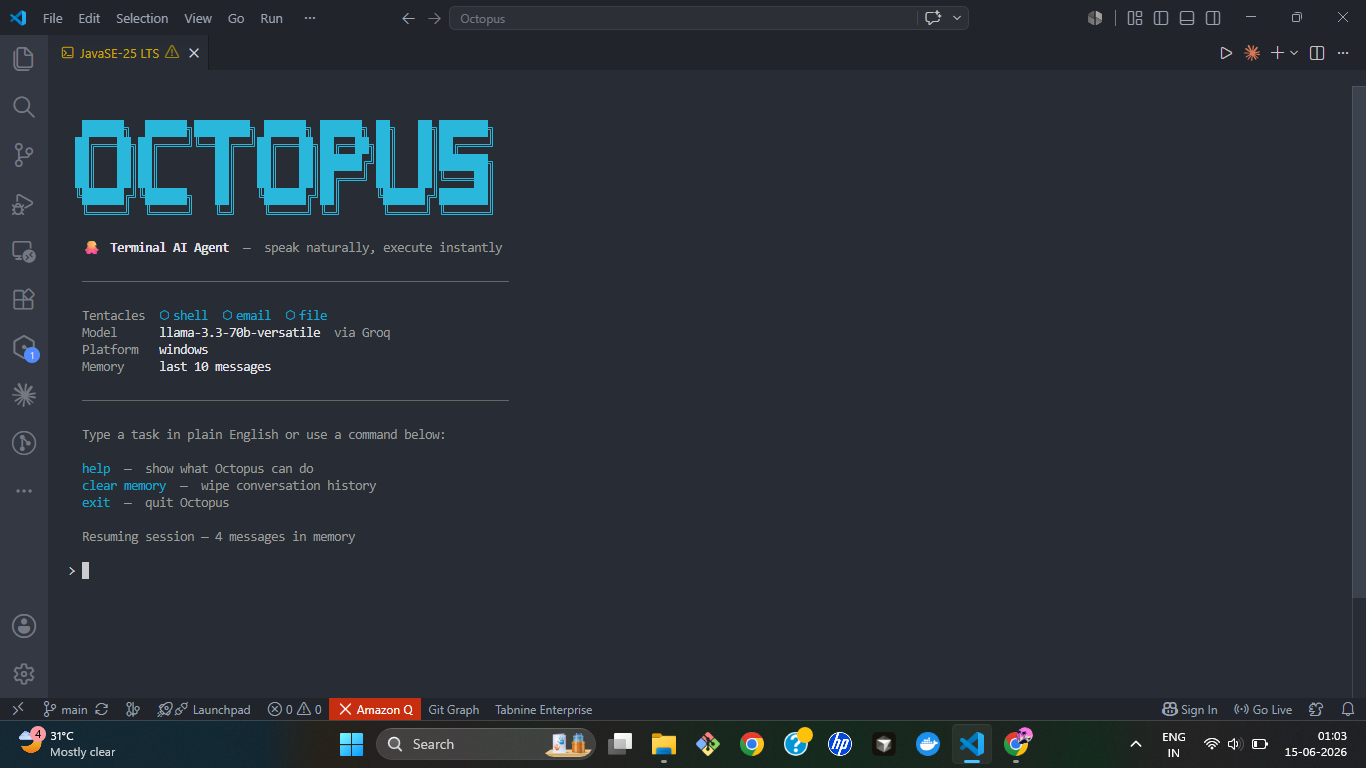
Run any terminal command in plain English. Cross-platform Windows, Mac, Linux.
"show my running processes"
"what is my IP address"
"list files in downloads"
Read, write, search, and list files across your system.
"read ~/notes.txt"
"write my ideas to ~/ideas.txt"
"search for invoice files in documents"
Send emails via Gmail. Octopus writes the subject and body from your description.
"email john that the meeting is cancelled"
"send priya the project update"
Scrape, screenshot, summarize pages and search the web via Google News RSS.
"search for latest AI news"
"summarize https://dev.to/some-article"
"take a screenshot of github.com/Codewithpabitra"
"get the content from https://nodejs.org"
AI-powered git operations — from smart commits to repo intelligence.
Local operations:
"show git status"
"commit my changes with a good message"
"show last 5 commits"
"what changed in my files"
"undo my last commit"
"create a branch called feature/auth"
"what's in my stashes"
"show stale branches older than 30 days"
Remote operations:
"push my changes"
"pull latest from remote"
"am I ahead or behind remote"
"how many branches in remote repo"
"what is the remote origin"
"fetch latest from remote"
AI powered:
"generate my standup"
"write a PR description"
"is it safe to push"
"who has committed the most"
"show repo stats"
Multi-step tasks across tentacles, automatically detected — no special syntax needed.
"check if safe to push, run tests, then push"
"generate my standup and email it to my manager"
"scrape a page, summarize it, save to a file"
"run a full security check before I deploy"
Octopus plans the steps, asks for anything missing before running, executes in order, and stops cleanly if a step fails.
npx octopus-agentnpm install -g octopus-agent
octopusgit clone https://github.com/Codewithpabitra/Octopus.git
cd Octopus
npm install
npm run devRun the setup wizard:
npm run setupOr create .env manually:
GROQ_API_KEY=gsk_your_key_here
GROQ_MODEL=llama-3.3-70b-versatile
GMAIL_USER=you@gmail.com
GMAIL_APP_PASSWORD=xxxx xxxx xxxx xxxx
Get your free Groq API key at console.groq.com
Gmail App Password: myaccount.google.com → Security → App passwords
| Command | What it does |
|---|---|
help |
Show all tentacles and examples |
clear memory |
Wipe conversation history |
exit |
Quit Octopus |
Octopus remembers your last 10 messages across sessions. Context is stored locally at ~/.octopus/memory.db — nothing leaves your machine except the Groq API call.
| Platform | Status |
|---|---|
| Windows | ✅ Supported |
| macOS | ✅ Supported |
| Linux | ✅ Supported |
| Layer | Technology |
|---|---|
| Runtime | Node.js 18+ |
| Language | TypeScript |
| AI / LLM | Groq — Llama 3.3 70B |
| Nodemailer + Gmail OAuth | |
| Web | Playwright + Google News RSS |
| Git | simple-git |
| Supervisor | Multi-agent Supervisor Architecture |
| Memory | SQLite via better-sqlite3 |
| CLI | Chalk + Ora |
- Shell tentacle
- File tentacle
- Email tentacle
- Web tentacle (scrape, screenshot, summarize, search)
- Git tentacle (15+ operations with AI)
- Cross-platform Windows + Mac + Linux
- Persistent SQLite memory
- Landing page
- Supervisor mode (multi-step, multi-tentacle task orchestration)
- WhatsApp tentacle
- Google Calendar tentacle
- Session login for web (LinkedIn, GitHub private)
- Plugin API for community tentacles
PRs are welcome. To add a new tentacle:
- Create
src/tentacles/yourname.ts - Export an
executefunction - Add the action type to
src/core/intentParser.ts - Wire it in
src/core/router.ts
Built with Octopus by Codewithpabitra | MIT License