A modern Kemono downloader userscript featuring a beautiful UI, multiple downloaders, and extensive customization options.




If you encounter any errors or have feature suggestions, feel free to open an issue for discussion.
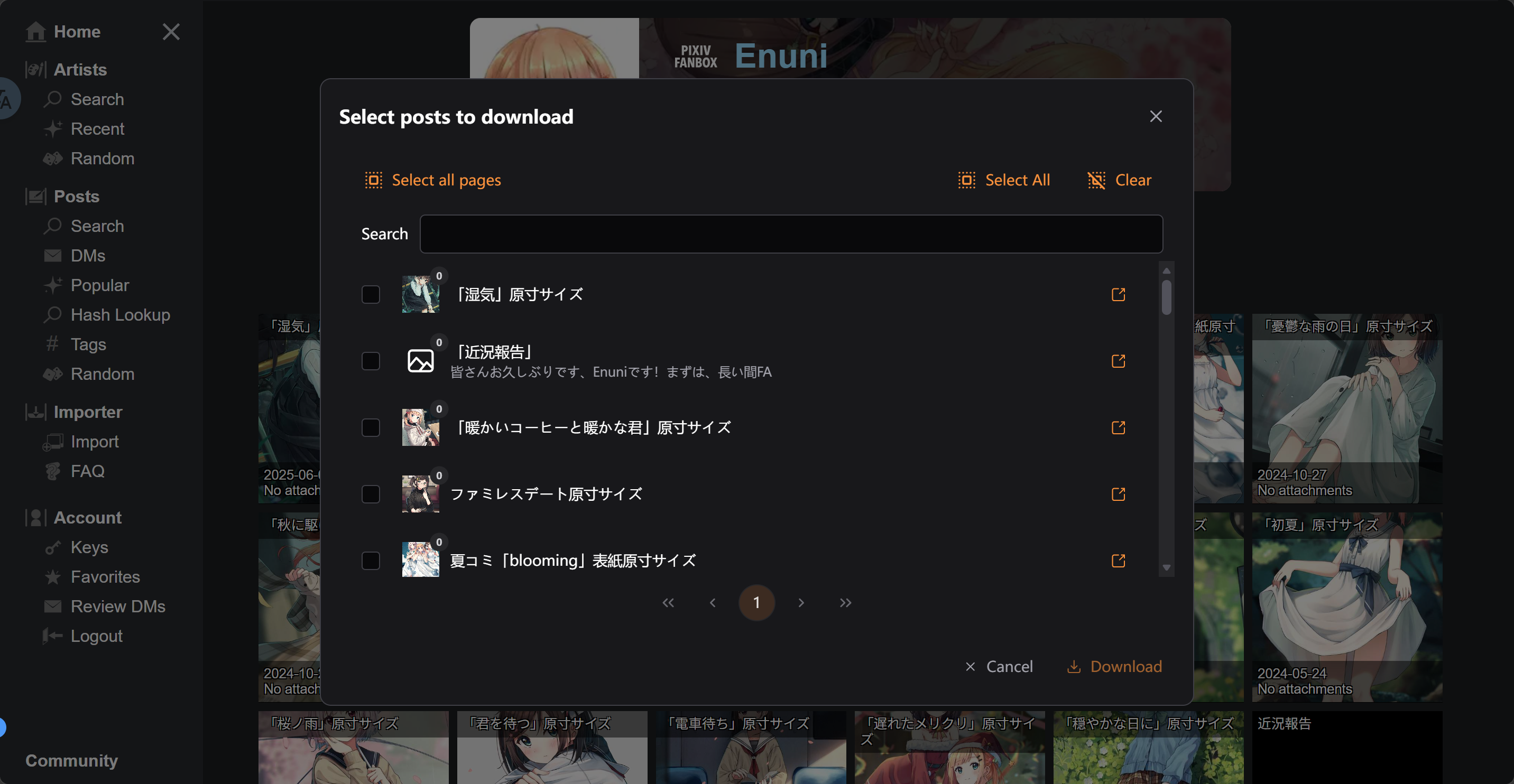
- Modern UI design based on PrimeVue and Tailwind CSS
- Responsive layout supporting desktop and mobile
- Dark/Light theme support
- Multi-language support
- Batch download support
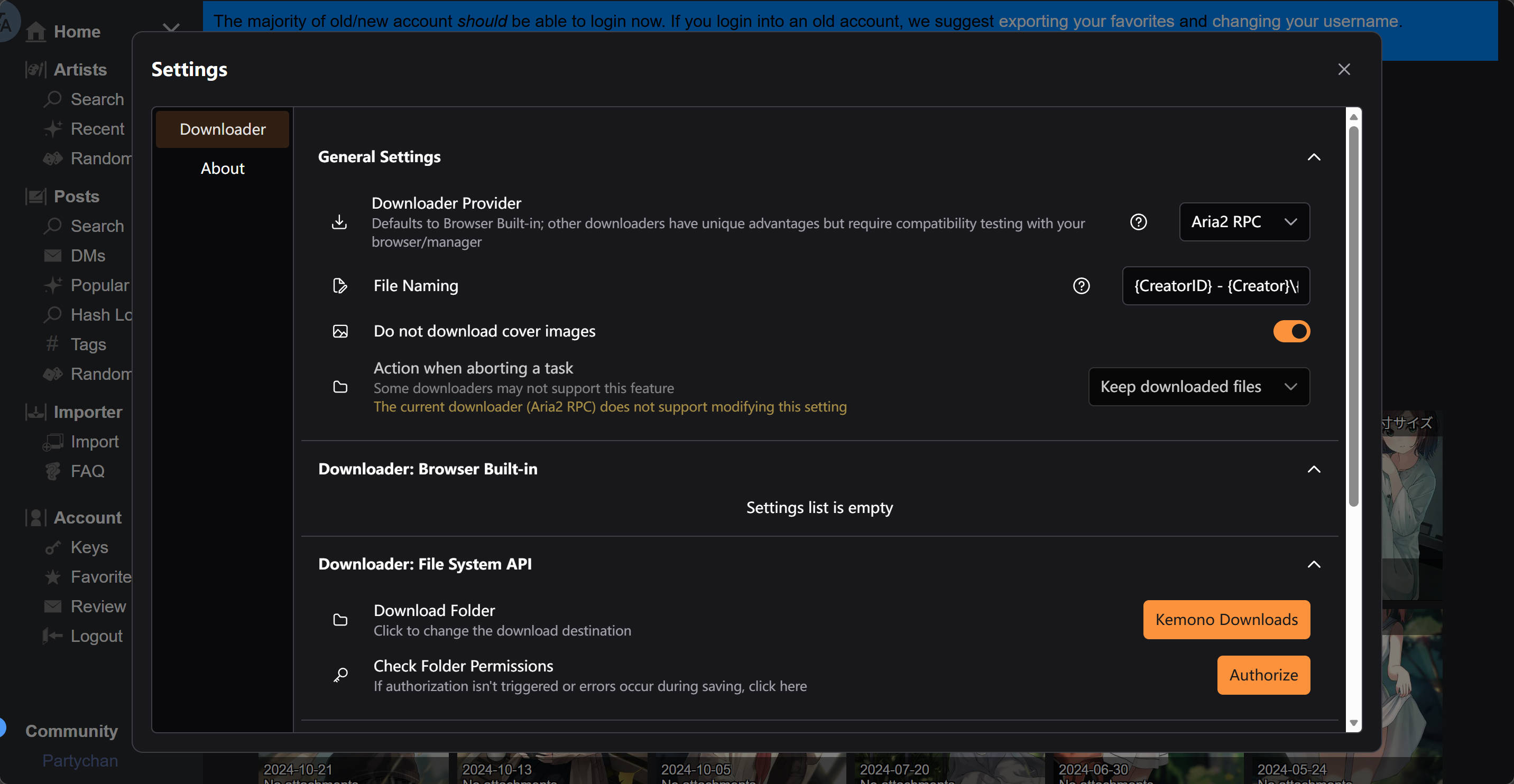
- Multiple downloader options
- Intelligent filename handling
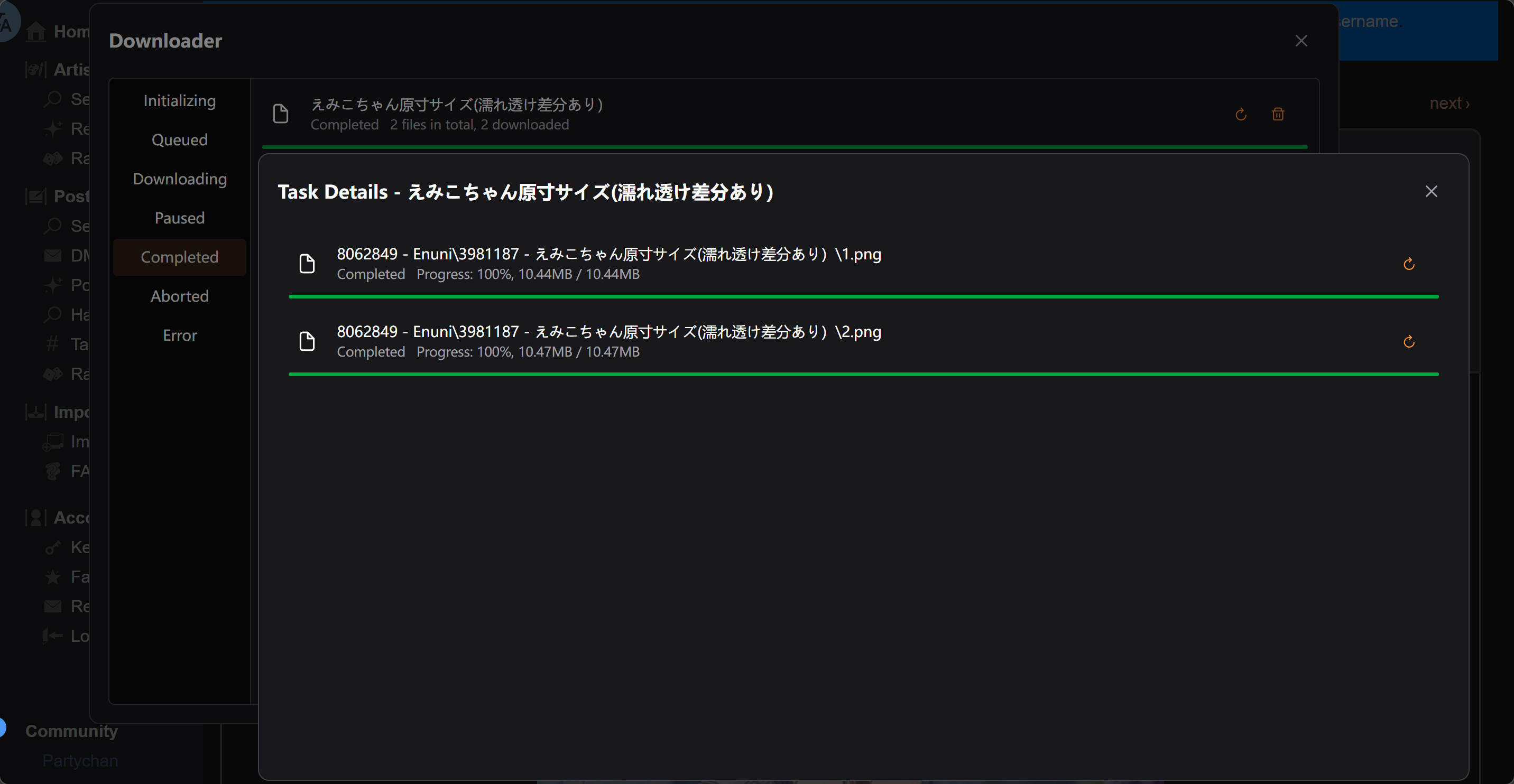
- Download progress display
- Download task management
- Custom settings for different downloaders
- Custom filenames (supports directory structure creation)
- Modular architecture design
- Type-safe TypeScript development
- Modern Vue 3 Composition API
- Automated build process
- Development server with HTTPS support
Choose one of the following methods:
This project uses npm as the package manager for development. Other package managers may require manual adaptation.
- Node.js 18+
- npm or yarn
- Clone the project
git clone https://github.com/PYUDNG/Kemono-Downloader.git
cd kemono-downloader- Install dependencies
npm install
# or
yarn install- Start the development server
npm run dev
# or
yarn dev- Build the userscript
npm run build
# or
yarn buildAfter building, a kemono-downloader.(min|greasyfork)?.user.js file will be generated in the /dist/ directory. Install it by following these steps:
- Open any build artifact and copy all its code content
- Install the Tampermonkey or Violentmonkey browser extension
- Click "Add new script" in the extension manager
- Paste the generated userscript content
kemono-downloader/
├── src/
│   ├── components/         # Shared Vue components
│   │   ├── ListItem.vue    # Single-line list item component
│   │   ├── PostsSelector/  # Post selector component
│   │   └── TabLayout/      # Tab layout component
│   ├── modules/            # Feature modules
│   │   ├── api/            # API module
│   │   ├── creator/        # Creator page module
│   │   ├── downloader/     # Downloader module
│   │   ├── post/           # Post page module
│   │   └── settings/       # Settings module
│   ├── utils/              # Utility functions
│   ├── volt/               # PrimeVue component wrappers
│   ├── main.ts             # Application entry point
│   └── loader.ts           # Module loader
├── build-utils/            # Build utilities
├── scripts/                # Build scripts
├── server/                 # Development server configuration
├── package.json            # Project configuration
├── vite.config.ts          # Vite configuration
└── tsconfig.json           # TypeScript configuration
- Frontend Framework: Vue 3 + TypeScript
- Build Tool: Vite
- UI Component Library: PrimeVue
- Styling Solution: Tailwind CSS
- Userscript: vite-plugin-monkey
- State Management: Vue Composition API
- Internationalization: vue-i18n
- Utility Libraries: mitt, uuid, dedent## 📦 Build & Deployment
npm run devnpm run buildThe production build output will be created in /dist/
You can participate in this project by submitting Issues and Pull Requests.
- Clearly describe the problem or feature request
- Provide reproduction steps
- Include relevant screenshots or logs
- Fork the project repository
- Create a feature branch
- Commit code changes
- Write clear commit messages
- Create a Pull Request
This project does not have strict code style requirements, but please ensure your code at least:
- Includes appropriate comments
- Passes TypeScript type checking
Each commit can contain multiple updates, and each update should be written as a list item.
Each update should indicate the update type at the beginning of the list item, separated by an English colon and space (: ):
| Update Type | Description |
|---|---|
feat |
New feature addition |
improvement |
Improvement to existing features |
code |
No functional changes, only code (including comments) modifications (code optimization, etc.) |
performance |
No functional changes, only performance improvements |
bug fix |
Bug fixes |
i18n |
No code changes, only language pack updates |
maintainence |
Other updates with no code changes, e.g., TODO list updates, dependency updates, etc. |
refactor |
No functional changes, complete code rewrite (refactoring) |
If an update corresponds to multiple types, use the most primary type.
Commit messages should be written in English.
Commit message example:
- feat: new download provider `aria2`
- improvement: debounce TextInput for settings
- bug fix: download button no response after multiple clicks
- maintainence: updated TODO
- maintainence: updated README
- refactor: build script
The above commit messages are just examples. In actual commits, for so many updates, try to split them into multiple commits.
This project is licensed under the GPL-3.0 license.
- vite-plugin-monkey - Vite plugin for building user scripts
- Pixiv Downloader - Downloader for multiple sites including Pixiv
- Vue.js - Progressive JavaScript framework
- PrimeVue - Next-generation Vue UI component library
- Tailwind CSS - Utility-first CSS framework
- Vite - Next-generation frontend build tool
- Tampermonkey - Popular user script manager
- Violentmonkey - Open-source user script manager
Welcome to reach out via:
- Submit a GitHub Issue
- Submit a Pull Request
- Submit a Greasyfork Discussion
Note: This project is for learning and research purposes only. Please comply with the terms of use and copyright regulations of relevant websites.