Arduino IDE support repository for PatternAgents Boards
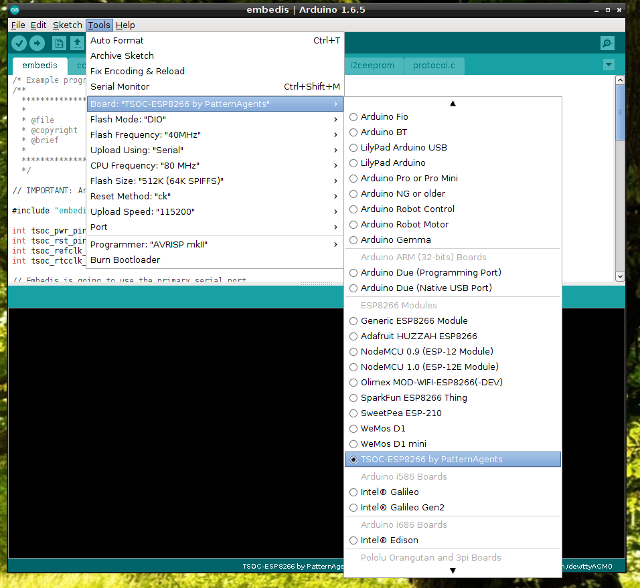
Each board will be added as an entry to the Arduino Tools > Board menu.
To add board support for our products, go to File > Preferences, and paste this URL into the 'Additional Boards Manager URLs' input field:
https://raw.githubusercontent.com/PatternAgents/Arduino_Boards/master/BoardsManager/package_patternagents_index.json
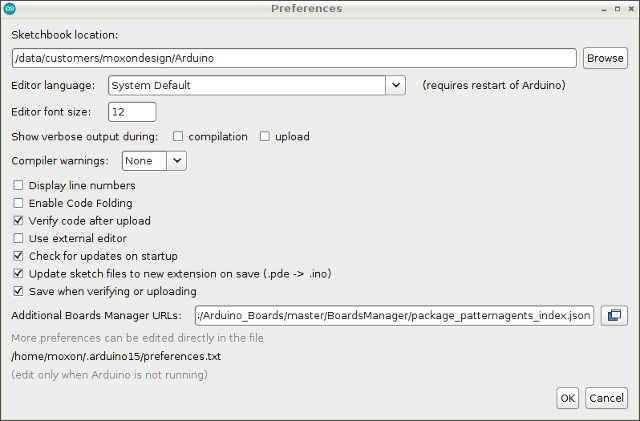
This field can be found in 'Preferences...' under the Arduino File menu.
Now, under the Tools > Board > Boards Manager..., if you type in "esp8266", you will see an option to install board files for ESP8266 Arduino compatible boards. Select "Install" to add these to your list of supported boards.
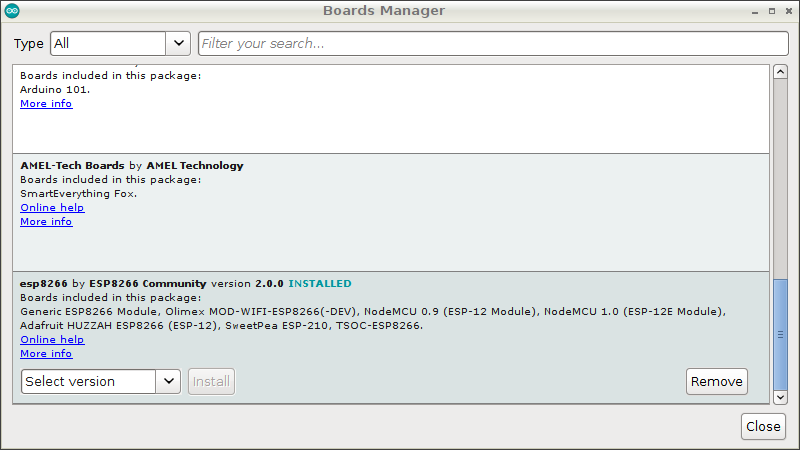
Now, when you select the Boards list, you will see a collection of new boards for PatternAgents.
- Please note: This will only work under Arduino IDE versions 1.5 and up.
- If you are using Arduino 1.6.6 and the link isn't working for you, change "https" at the beginning of the link to "http" and try again.
- Information on compiling and programming the bootloaders can be found in the bootloaders directory.
- If you encounter a CRC Error, that means a previous install left files in the C:\Users[username]\AppData\local\Arduino15 directory. Rename/Remove that directory and re-install.
The folks who make this project possible:
- PatternAgents, LLC
- Tom Moxon
- David Turnbull