A simple additive scene loading system with a built-in loading screen workflow.
Loads scenes asynchronously in the background, keeps them inactive until fully ready, displays a loading canvas during the transition with an accurate loading bar, and then cleanly activates the new scene while unloading the old one, with a garbage collection pass in between. Designed to provide smooth, controlled scene transitions with minimal setup.
Check out Releases tab to see a history of all versions of this package.
Select `Install package from git URL...` in the Package Manager
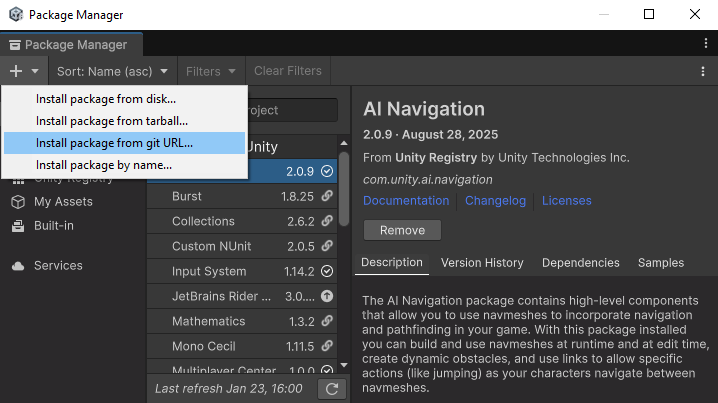
For latest release:
https://github.com/Persomatey/unity-scene-bridge.git#upm
Or install specific releases:
https://github.com/Persomatey/unity-scene-bridge.git#v0.0.1
Go to Release and download directly from Assets
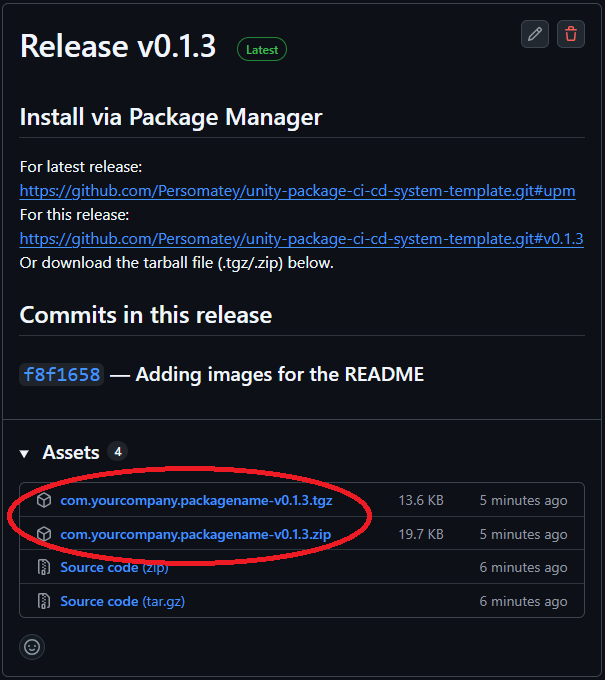
com.huntergoodin.scenebridge-v#.#.#.tgz
com.huntergoodin.scenebridge-v#.#.#.zip
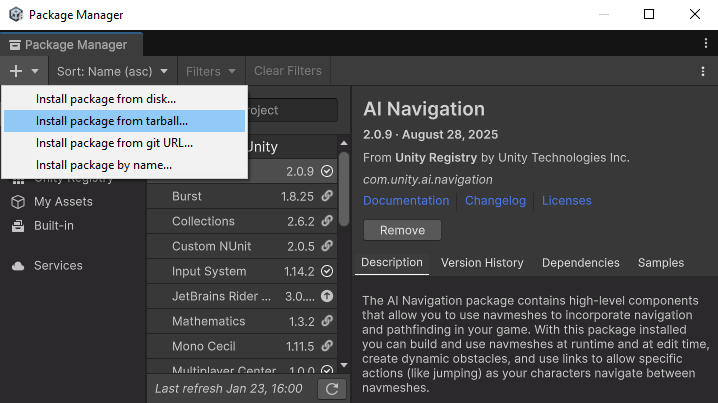
Select `Install package from tarball...` in the Package Manager
- Install the package
- Drag the
SceneBridge Loaderprefab into your scene - Feel free to create your own transition canvases
- Import the sample
- Add the sample scenes to the Build Profile
- A singleton-based Scene Loader
- Centralized loader accessible from anywhere in your project
- Easy
SceneBridge Loaderprefab provided to drag and drop into your project
- Custom loading screens
- Loading screen can display the current progress of the
AsyncOperation - Loading screen can display various backgrounds with a random selection from an array in the
SceneBridge Loaderprefab- (Optional) Text and image color synchronization accross background images
LoadingScreen.correlateTipColorWithBackgoundImgLoadingScreen.correlateHeaderColorWithBackgoundImgLoadingScreen.correlateloadingBarColorWithBackgoundImgInputSystemGatedLoadingScreen.correlateProgColorWithBackgoundImgInputManagerGatedLoadingScreen.correlateProgColorWithBackgoundImg
- (Optional) Text and image color synchronization accross background images
- Loading screen can display various text snippets (for tips, lore tidbits, etc.) with a random selection from an array in the
SceneBridge Loaderprefab - Five types of loading screens (more details in the Loading Screens section):
 └── LoadingScreen
 	├── AutomaticLoadingScreen
 	├── UIGatedLoadingScreen
 	├── InputManagerGatedLoadingScreen
 	└── InputSystemGatedLoadingScreen
- Loading screen can display the current progress of the
- The loading screen you want can be set in
SceneBridgeLoader.chosenLoadingScreen -
- Scene transition animation support
- Transition animations can play into (and out of) screens
- Ex: Play a transition animation into the loading screen, then a transition animation into the new scene.
- Ex: Play a transition animation when loading into a new scene directly
- Duration control for the animations
SceneBridgeLoader.AnimationDuration- Included animations are exactly one second to make it easy to calculate the speed of the animation given a duration
- Mid-point duration control
SceneBridgeLoader.TransitionMidPointDuration- If you want there to be a slight pause in between the "transition in" and "transition out" animations (to hang on a black screen for a sec or something)
- Transitions included in the
SceneBridge Loaderprefab by default:- Fade
- Fade to black / fade out of black
- Included in the nested
Fade Transition Canvascanvas
- Swipe
- Swipe to black / swipe out of black
- Included in the nested
swipe Transition Canvascanvas
- Fade
- It's easy to swap in/out which animations you want into the
SceneBridgeLoader.transitionCanvasesarray- Pass which transition index you want to play by passing it as a variable to the functions outlined below
- Feel free to create your own transition animations!
- Remember to add them to the
SceneBridgeLoader.transitionCanvasesarray -

- Remember to add them to the
- Transition animations can play into (and out of) screens
- Several scene loading functions:
- Outlined in the Loading Functions section
- Maybe sometimes you want the loading screen to appear, sometimes you don't
- Ability to change loading screen shown
- In case there are times when gating progression makes sense, and others where it doesn't
- Scene Cleanup – Automatically unload previous scenes after switching to the new one
- (Optional) DontDestroyOnLoad support for persistence across scenes
- Not sure why you wouldn't want this enabled for a tool like this, but it's an option just in case


- Loading Screen
LoadingScreen.cs- Base class for all loading screens
- Gated Loading Screen
GatedLoadingScreen.cs- Base class for gated loading screens
- Automatic Loading Screen
AutomaticLoadingScreen.cs- Loads directly into the next scene automatically when the scene is ready
- Example Canvas provided in the
SceneBridge Loaderprefab
- UI Gated Loading Screen
UIGatedLoadingScreen.cs- Progression blocked behind a button press
- Example Canvas provided in the
SceneBridge Loaderprefab
- Input Manager Gated Loading Screen
InputManagerGatedLoadingScreen.cs- Uses Unity's old Input Manager
- Progression blocked behind a
if (Input.GetKeyDown())logic gate - Example Canvas provided in the
SceneBridge Loaderprefab
- Input System Gated Loading Screen
InputSystemGatedLoadingScreen.cs- Uses Unity's new Input System
- Progression blocked behind a
if (anyButton.IsPressed())logic gate - Example Canvas provided in the
SceneBridge Loaderprefab
- Load Scene Asynchronously With Loading Screen And Transitions
- Called using
SceneBridgeLoader.Instance.LoadSceneAsynchronouslyWithLoadingScreenAndTransition("scene_name", transitionInIndexFirst, transitionOutIndexFirst, transitionInIndexSecond, transitionOutIndexSecond) - Flow:
- Play transition animation at
transitionInIndexFirst - Enable loading screen
- Play transition animation at
transitionOutIndexFirst - Load scene/gate logic (if any)
- Play transition animation at
transitionInIndexSecond - Disable/reset loading screen
- Enable new scene
- Unload old scene
- Play transition animation at
transitionOutIndexSecond
- Play transition animation at
- Takes a string (
sceneName) for the scenes name you're loading into - Takes an int (
transitionInIndexFirst) for the "transition in" animation (for anim in the index ofSceneBridgeLoader.transitionCanvases) - Takes an int (
transitionOutIndexFirst) for the "transition out" animation (for anim in the index ofSceneBridgeLoader.transitionCanvases) - Takes an int (
transitionInIndexSecond) for the "transition in" animation (for anim in the index ofSceneBridgeLoader.transitionCanvases) - Takes an int (
transitionOutIndexSecond) for the "transition out" animation (for anim in the index ofSceneBridgeLoader.transitionCanvases)
- Called using
- Load Scene Asynchronously With Transitions
- Called using
SceneBridgeLoader.Instance.LoadSceneAsynchronouslyWithTransition("scene_name", transitionInIndex, transitionOutIndex) - Flow:
- Play transition animation at
transitionInIndex - Load new scene
- Enable new scene
- Unload old scene
- Play transition animation at
transitionOutIndex
- Play transition animation at
- Takes a string (
sceneName) for the scenes name you're loading into - Takes an int (
transitionInIndex) for the "transition in" animation (for anim in the index ofSceneBridgeLoader.transitionCanvases) - Takes an int (
transitionOutIndex) for the "transition out" animation (for anim in the index ofSceneBridgeLoader.transitionCanvases)
- Called using
- Load Scene Asynchronously With Loading Screen
- Called using
SceneBridgeLoader.Instance.LoadSceneAsynchronouslyWithTransition("scene_name") - Flow:
- Enable loading screen
- Load scene/gate logic (if any)
- Enable new scene
- Unload old scene
- Disable/reset loading screen
- Takes a string (
sceneName) for the scenes name you're loading into
- Called using
No plans on when I'd release these features, would likely depend on my needs for a specific project/boredom/random interest in moving this project along.
- Minimum loading screen duration
- Add a variable to all loading screens that has X seconds (tunable) alive to prevent loading screens from flashing too quickly on fast loads
- Timer Conditional Loading Screen
- A type of derived loading screen (one for each type of screen) that stays on the mid-transition animation until X seconds (tunable) before it decides to show the loading screen.
- Maybe inheritance isn't the best call here... maybe make this a toggleable option in all loading screen classes? Or use a design pattern like an Interface or something?
- Another solution to the "loading screens from flashing too quickly on fast loads" problem but also one that some games might just feel better with
- A type of derived loading screen (one for each type of screen) that stays on the mid-transition animation until X seconds (tunable) before it decides to show the loading screen.