

For more information about a specific command, use !help [command]
| Categories | Commands |
|---|---|
| Administration | prefix setadmin setmodo setuser joinchan joinmsg joinbox leavechan leavemsg leavebox controlchan defrole shield disable |
| Moderation | clean slowmode voicekick voicemute voiceunmute kick ban softban unban purge resetchan |
| Utility | ping uptime server member avatar textchan controlgate banlist modolist adminlist |
| Memes | issou |
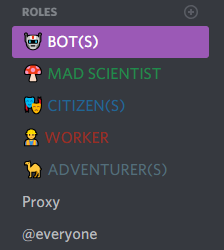
Set this role in the uppermost position or you can also set Proxy's role directly in the uppermost position as well:
The bot will kick accounts that have been created less than [any value you want from 0 to 30] days ago.
Example:
!shield 0 disables the shield.
!shield 3 kicks an account created less than 3 days.
Here is the tutorial.
If you have any issues, check the wiki or join my server.
Proxy is currently hosted 24/7 on a VPS and uses PostgreSQL for its database.