A full-stack team collaboration platform for managing projects and tasks with role-based workflows, an activity feed, file attachments, and analytics dashboards. Built as a pnpm monorepo with a NestJS API and a React SPA sharing a typed contract package.
| Layer | Tech |
|---|---|
| Frontend | React 19, TanStack Router / Query / Table / Form, Tailwind v4 |
| Backend | NestJS 11, MikroORM 6 (MongoDB driver), MongoDB 7 / Atlas |
| Auth | JWT access + rotating refresh token (HttpOnly cookie) + bcryptjs |
| Shared | @collabflow/shared — enums, types, and API contracts |
| Tooling | pnpm workspaces, Vite 6, Swagger / OpenAPI, Multer + Cloudinary |
▶️ Watch the full overview: https://youtu.be/N2ZV88jq5CM
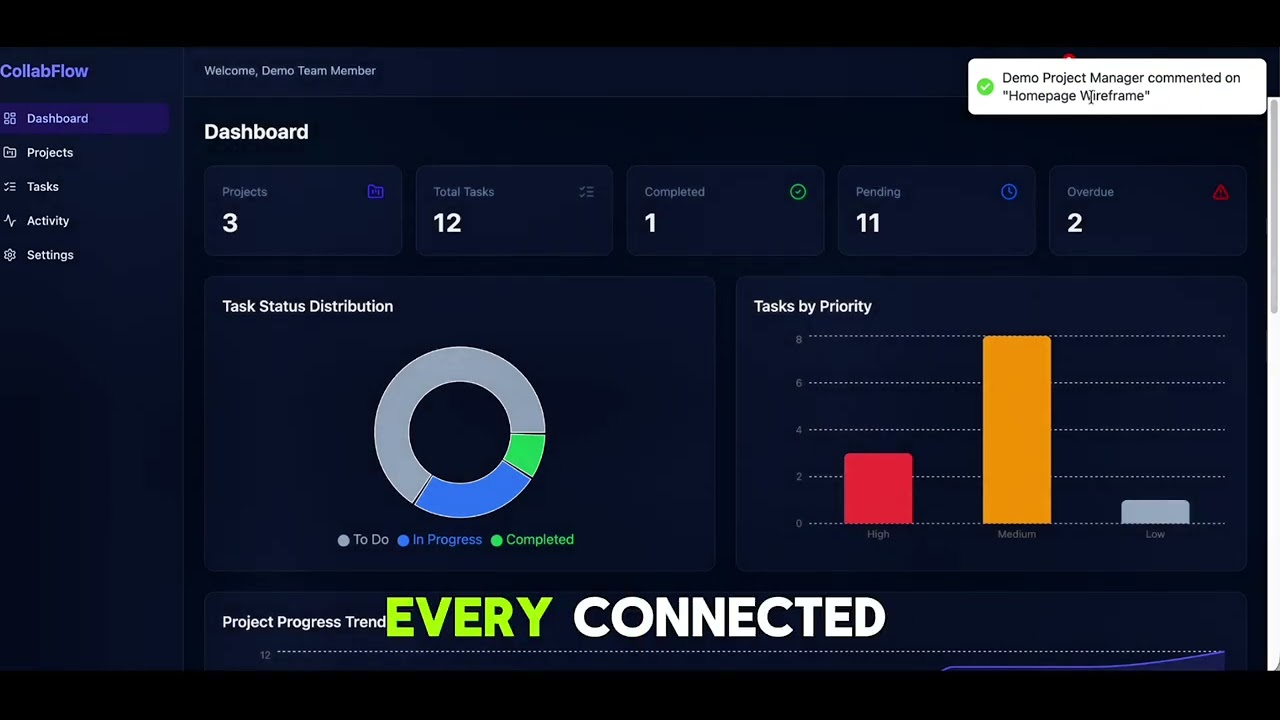
A complete tour of CollabFlow — auth & roles, projects, tasks, comments, notifications, the activity feed, analytics, and file attachments. Click the thumbnail to play:
| Resource | URL |
|---|---|
| 🎬 Walkthrough video | https://youtu.be/N2ZV88jq5CM |
| 🌐 Web app | https://collabflow-web-sj.vercel.app/ |
| 📘 API docs (Swagger) | https://collabflow-2135.onrender.com/api/docs |
| 🔌 API base URL | https://collabflow-2135.onrender.com/api/v1 |
Sign in instantly with the built-in demo accounts (one click each on the login page) or with the credentials below.
Note: the API is hosted on Render's free tier, so the first request after a period of inactivity may take ~30–60s while the instance cold-starts. The web app is served from Vercel.
CollabFlow ships a complete project-collaboration workflow end to end — authentication, role-based access, projects, tasks, threaded comments, an in-app notification inbox, an audit feed, analytics, and file attachments — exposed through a documented REST API and a polished React SPA. Every feature is listed below.
| Feature | Details |
|---|---|
| Signup / login / logout | Email + password auth (/auth/signup, /auth/login, /auth/logout) with input validation. |
Current user (me) |
GET /auth/me returns the authenticated profile and rehydrates the SPA on reload. |
| JWT access tokens | Short-lived (15m, configurable) HS256 access tokens; payload carries sub, email, role. |
| Rotating refresh tokens | 7-day refresh token stored hashed per user in an HttpOnly, SameSite=strict cookie; rotated on every /auth/refresh, preventing replay. Web client auto-refreshes on 401. |
| Password hashing | bcryptjs with 12 salt rounds; password & refresh hashes never serialized. |
| Account state | isActive flag gates login; lastLoginAt recorded on each login. |
| Feature | Details |
|---|---|
| Three roles | Admin, Project Manager, Team Member (default), enforced by global JwtAuthGuard + RolesGuard. |
| Role-scoped visibility | Team Members see only projects/tasks/activities they belong to; Admin & PM see everything. |
| Permission gates | Create/delete projects, manage members, create/delete tasks, and change task priority are role-gated server-side and mirrored in the UI (buttons/tabs hidden by role). |
| Feature | Details |
|---|---|
| Full CRUD | List (paginated), create, read, update, delete (/projects). Delete cascades to tasks (Admin only). |
| Status | active / completed / on_hold. |
| Member management | Add/remove members (/projects/:id/members); creator is always a member and cannot be removed; members with open tasks cannot be removed. |
| Search & filters | Name search, status filter, and deadlineStatus = upcoming (≤7 days) / overdue. |
| Sorting & pagination | Sort by createdAt, updatedAt, name, deadline; page-based (limit ≤100). |
| Validation | Case-insensitive unique name (3–120 chars), description ≤2000 chars, ISO deadline. |
| Feature | Details |
|---|---|
| Full CRUD | List (paginated), create, read, update, delete (/tasks). |
| Status & priority | Status todo / in_progress / completed; priority high / medium / low. |
| Dedicated status endpoint | PATCH /tasks/:id/status for quick status changes (with optimistic UI update). |
| Bulk actions | POST /tasks/bulk updates status or deletes up to 100 tasks, returning per-item succeeded / failed results. |
| Assignment | Assign to a project member, reassign, or unassign; completed tasks can't be reassigned. |
| Filters & search | By project, status, priority, assignee, deadlineStatus, and title search. |
| Sorting & pagination | Sort by createdAt, updatedAt, dueDate, priority, title; limit ≤100. |
| Validation | Title 2–160 chars (unique per project), future-only due date, ≤20 attachments. |
| Feature | Details |
|---|---|
| Threaded discussion | List/create/edit/delete comments on a task (/tasks/:taskId/comments), ordered oldest-first, paginated. |
| Permissions | Comment author or Admin/PM may edit or delete; visibility inherits the task's project access. |
| Notifications & audit | Posting a comment notifies the task assignee, creator, and prior commenters, and records a TASK_COMMENTED activity. |
| Feature | Details |
|---|---|
| In-app inbox | GET /notifications (paginated, newest-first) with an unreadOnly filter. |
| Unread count | GET /notifications/unread-count powers the header bell badge (99+ cap). |
| Mark read | Mark one (PATCH /notifications/:id/read) or all (POST /notifications/read-all). |
| Types | task_assigned, comment_added (live); task_updated, deadline_soon (reserved). |
| Dispatch behavior | Best-effort (never rolls back the source action), recipients de-duplicated, taskId deep-links survive task deletion. |
| Notification bell | Header dropdown lists recent items, marks all read, and navigates to the related task. |
| Feature | Details |
|---|---|
| Audit log | Chronological, paginated, role-scoped feed (GET /activities) filterable by project and type. |
| Tracked events | Project created/updated/deleted, task created/assigned/status-changed/deleted/commented, member added/removed. |
| Resilient records | Pre-rendered messages with denormalized projectId/projectName that survive project deletion; logging is best-effort. |
| UI | Color-coded, icon-tagged timeline with relative timestamps, on the dashboard (latest 5) and a full /activity page. |
| Feature | Details |
|---|---|
| Dashboard summary | Totals for projects/tasks plus completed/pending/overdue and status/priority breakdowns (/analytics/dashboard). |
| Per-project stats | Completion %, deadline, and overdue counts per project (/analytics/projects). |
| Progress trend | 8-week created-vs-completed burn-up (/analytics/trend). |
| Upcoming deadlines | Tasks due within 7 days (/analytics/upcoming). |
| High-priority tasks | Open high-priority tasks (/analytics/high-priority). |
| Team workload | Per-member total/completed/pending counts (/analytics/workload, Admin/PM only). |
| Visualizations | Recharts pie, bar, and area charts with theme-aware tooltips. |
| Feature | Details |
|---|---|
| Multipart upload | POST /uploads accepts up to 10 files per request (multipart/form-data). |
| Validation | MIME-allowlisted (images, PDF, Word/Excel/PowerPoint, plain text, CSV, ZIP) and size-capped (MAX_FILE_SIZE_MB, default 10 MB). |
| Cloud storage | Buffered in memory and streamed to Cloudinary (folder collabflow); the returned secure HTTPS URL, original name, and size attach to tasks. No local disk required — works on ephemeral/serverless hosts. |
| Web picker | AttachmentField multi-file component with de-duplication, existing-attachment removal, and download links. |
| Feature | Details |
|---|---|
| File-based routing | TanStack Router pages: Login, Signup, Dashboard, Projects (list/new/detail/edit), Tasks (list/detail), Team, Activity, Settings. |
| Data layer | TanStack Query (axios client, token interceptor, auto-refresh, query-key factory, optimistic task status updates). |
| Data tables | TanStack Table task grid with sorting, multi-select, inline status editing, and a bulk-action toolbar. |
| Dark / light theme | Persisted theme toggle (header + Settings) that syncs the document class and chart tooltips. |
| Login niceties | Password-visibility toggle and one-click demo-account login (Admin / PM / Team Member). |
| Toasts | react-hot-toast success/error feedback across all mutations. |
| Permission-aware UI | Buttons, tabs, and editors render conditionally by role/assignment. |
| Accessibility | aria-labels on icon buttons, label/input associations, visible focus rings, semantic markup. |
| Component | Details |
|---|---|
Custom modal dialog (ConfirmDialog) |
Imperative, promise-based confirmation dialog driven by a Zustand store (confirm({ message }) resolves true/false). Mounted once globally — no prop drilling. Supports title, message, confirmText, cancelText, and variant (danger/primary); used for project, task, and bulk-delete confirmations. |
Modal |
Base overlay primitive behind ConfirmDialog and edit forms — backdrop click-to-close, Escape-to-close, close button, scrollable content, dark mode. |
| Design system | Button (primary/ghost/danger/outline + loading), Input, Textarea, Select, Card, Label, FieldError, Badge (color-coded status/priority), Spinner, Pagination (with per-page selector), EmptyState. |
AppShell |
Sidebar + header layout with role-based nav, notification bell, theme toggle, and logout. |
NotificationBell |
Header dropdown with unread badge and mark-all-read. |
| Feature | Details |
|---|---|
| REST API | Versioned under /api/v1, consistent { data, meta } pagination envelope (limit ≤100). |
| API docs | Interactive Swagger / OpenAPI UI at /api/docs, generated from the controllers. |
| Typed contract | @collabflow/shared enums, types, and DTOs shared across API and web. |
| User directory | GET /users (Admin/PM) with role filter and name/email search for member pickers. |
| CORS | Configurable allow-list via ALLOWED_ORIGINS. |
collabflow/
├── apps/
│   ├── api/        # NestJS backend (auth, projects, tasks, uploads,
│   │               # activities, analytics)
│   └── web/        # React SPA (TanStack Router file-based routes)
└── packages/
    └── shared/     # Shared enums, types, and API contracts
Node.js  >= 20.x
pnpm     >= 9.x   (repo is pinned to pnpm 11 via packageManager)
MongoDB  >= 7.x   (local, Docker, or a MongoDB Atlas connection string)
# 1. Install all workspace dependencies
pnpm install

# 2. Configure environment (see Environment variables below)
cp .env.example apps/api/.env    # then set MONGODB_URI and the JWT secrets
cp .env.example apps/web/.env    # web only needs the VITE_* lines

# 3. Seed the demo users — Admin, Project Manager, Team Member (first run only)
pnpm seed

# 4. Run both apps in parallel
pnpm dev| App | URL |
|---|---|
| API | http://localhost:4000/api/v1 |
| API docs (Swagger) | http://localhost:4000/api/docs |
| Web | http://localhost:5173 |
Run them individually with pnpm dev:api or pnpm dev:web.
| Command | Description |
|---|---|
pnpm dev |
Run API + web in parallel (watch mode) |
pnpm dev:api |
Run only the NestJS API in watch mode |
pnpm dev:web |
Run only the Vite dev server |
pnpm build |
Build every workspace package |
pnpm seed |
Seed the demo admin account |
pnpm test |
Run tests across all packages |
The root .env.example documents every variable. Copy the
relevant block into apps/api/.env and apps/web/.env.
| Variable | Description | Example |
|---|---|---|
NODE_ENV |
Runtime environment | development |
PORT |
API port | 4000 |
MONGODB_URI |
MongoDB connection string (local or Atlas) | mongodb+srv://…/collabflow |
JWT_SECRET |
Secret for signing access tokens (HS256) | dev-access-secret-change-me |
JWT_REFRESH_SECRET |
Secret for signing refresh tokens | dev-refresh-secret-change-me |
JWT_EXPIRES_IN |
Access-token lifetime | 15m |
JWT_REFRESH_EXPIRES_IN |
Refresh-token lifetime | 7d |
ALLOWED_ORIGINS |
Comma-separated CORS allow-list | http://localhost:5173 |
MAX_FILE_SIZE_MB |
Per-file upload size limit | 10 |
CLOUDINARY_URL |
Cloudinary connection string (attachment storage) | cloudinary://key:secret@cloud |
CLOUDINARY_CLOUD_NAME |
Alternative to CLOUDINARY_URL (used if it is unset) |
your-cloud |
CLOUDINARY_API_KEY |
Alternative to CLOUDINARY_URL |
123456789012345 |
CLOUDINARY_API_SECRET |
Alternative to CLOUDINARY_URL |
your-api-secret |
DEMO_ADMIN_EMAIL |
Email for the seeded Admin user | admin@collabflow.dev |
DEMO_MANAGER_EMAIL |
Email for the seeded Project Manager user | manager@collabflow.dev |
DEMO_MEMBER_EMAIL |
Email for the seeded Team Member user | member@collabflow.dev |
DEMO_ADMIN_PASSWORD |
Shared password for all seeded demo users | Demo@1234 |
| Variable | Description | Example |
|---|---|---|
VITE_API_BASE_URL |
Base URL of the API (/api/v1) |
http://localhost:4000/api/v1 |
VITE_WS_URL |
Base URL for realtime (reserved) | http://localhost:4000 |
Generate strong, unique values for
JWT_SECRETandJWT_REFRESH_SECRETin any non-development environment (e.g.openssl rand -base64 48).
pnpm seed creates one user per role, all sharing the same password
(DEMO_ADMIN_PASSWORD, default Demo@1234). Emails are overridable via the
DEMO_*_EMAIL variables before seeding.
| Role | Password | |
|---|---|---|
| Admin | admin@collabflow.dev |
Demo@1234 |
| Project Manager | manager@collabflow.dev |
Demo@1234 |
| Team Member | member@collabflow.dev |
Demo@1234 |
You can also use the Sign up page to create additional accounts.
The API and web app deploy independently. The live demo runs the API on Render and the web app on Vercel, with attachments on Cloudinary and the database on MongoDB Atlas — but any equivalent Node host / static host works.
pnpm install --frozen-lockfile
pnpm buildA ready-to-use render.yaml blueprint is included. On the Render
dashboard choose New → Blueprint, connect this repo, and Render provisions
the service from that file (build via corepack + pnpm, health check on
/api/docs, auto-deploy on push). It then prompts for the sync: false secrets.
To deploy anywhere else:
-
Provide all
apps/api/.envvariables via your host's secret manager. -
Point
MONGODB_URIat a production MongoDB (e.g. MongoDB Atlas). -
Set
NODE_ENV=productionandALLOWED_ORIGINSto your web app's origin (e.g.https://collabflow-web-sj.vercel.app). -
Set
CLOUDINARY_URL(or the discreteCLOUDINARY_*vars) so attachment uploads work. No writable disk is needed — files stream straight to Cloudinary. -
Start the compiled server:
pnpm --filter @collabflow/api start:prod # node dist/main.jsThe API binds to
0.0.0.0:$PORTand serves routes under/api/v1, with Swagger at/api/docs.
- Set
VITE_API_BASE_URLto the deployed API's/api/v1URL at build time (Vite inlinesVITE_*vars duringpnpm build). pnpm --filter @collabflow/web buildemits a static bundle toapps/web/dist/.- Serve
apps/web/dist/from any static host or CDN (Vercel, Netlify, S3 + CloudFront, Nginx). The includedapps/web/vercel.jsonrewrites all paths to/so client-side routing works; on other hosts configure the equivalent SPA fallback toindex.html.
- Run the seed once against the production database to create the initial admin, then rotate the password.
- CORS, cookie security, and refresh-token rotation rely on the API and web
origins being configured consistently via
ALLOWED_ORIGINS/VITE_API_BASE_URL.
Md Shah Jalal