



HELIOS is a custom Home Assistant Lovelace card that turns your solar setup into a living 3D view of your home, the sun and the weather, all in real time and right inside your dashboard.
It reads your solar, grid and battery wiring straight from the Home Assistant Energy dashboard, pulls a multi-model weather forecast from Open-Meteo (no key), and stitches both onto a tilted, rotatable map of your home. The sun's daily arc, the live sun disc, the incidence ray, the production / battery / grid chips and the cast shadows all follow a timeline you can scrub days into the past or the future, watching every layer move with it.
The scene is drawn by a self-contained 2.5D engine with no WebGL: a tilted raster basemap with every overlay (buildings, shadows, sun arc, chips and leaders) projected on top in SVG, so the card stays light and fluid on any device, phone included. Basemap tiles come from CARTO (free, no key), themed light or dark to match Home Assistant.
Website + live demo: explore the full card, the documentation and the public roadmap at helios-ha.org.
Helios has three view modes, switched from the round buttons in the top-left corner.
- Sun arc, the sun's full daily trajectory projected with depth onto your home. The below-horizon portion renders as discreet dots behind the home so it reads as a calm background, while the daylight portion, the sun disc and the irradiance readout always stack on top.
- Live sun disc + irradiance halo, pinned on the arc; the inner fill scales with the live W/m², a soft sun-coloured halo fades from the centre out.
- Incidence ray, a dashed line from the sun to the home, animated to flow faster the stronger the sun.
- Sunrise / sunset markers, placed where the arc crosses the horizon, with the local time (hidden in polar day / night where there is no crossing).
- PV production chip + leader + bead (when a solar source is configured), shows the instantaneous production; a bead rides the leader to the home at a speed proportional to current output. Cumulative-energy meters (kWh) are differentiated to watts on the fly; power-native sources are read directly.
- Battery chips (when a battery is configured), state of charge and signed instantaneous power, with a bead whose direction follows charge / discharge.
- Grid chip + leader + bead (when a grid source is configured), the active import / export flow, with a bead whose direction and speed track the power.
- Custom entity chip (optional), pick any power or energy entity in the editor and Helios surfaces it as an extra chip top-left, with a leader to the home and a bead that flows with the value's sign.
- Home pill, the hub the chip cluster orbits, showing the home consumption when the Energy dashboard exposes enough to derive it. Click any chip (or the home) to point the timeline at that metric; the home pill even grows a per-source stacked column when several solar sources are configured.
- Cast ground shadows, projected from the surrounding building footprints, fading as the sun nears the horizon. Toggle and opacity are configurable.
- Day / night ground, the ground darkens where the sun is below the horizon, so dawn and dusk read at a glance.
- Hover glow + auto-rotation, a soft halo signals the home is interactive; an opt-in idle orbit slowly turns the scene counter to the sun's motion and pauses the moment you touch the card.
- Timeline, the active period as a re-targetable chart below the scene: production (with dashed forecast and per-string breakdown), consumption, grid, battery, battery SoC, irradiance, cloud cover or your custom entity. Click or drag to scrub; the whole scene snaps to the selected instant.
A radial instrument that bins each metric into 24 hours of the day and stands a ring of cylinders around a central column, one bar per hour. The right-hand rail toggles metrics as filters: each active metric adds its own concentric ring (production, consumption, battery SoC, battery, grid, irradiance, cloud, custom). Hover or tap a slice to light up that hour across every ring and read each metric's value in the tooltip. A soft day / night wedge on the ground shows when the sun is up over the period, and an N / S compass keeps the dial legible as it rotates with the scene.
A radial comparison of one metric, hour by hour: the current period stands as a ring of bars while a floating marker and stem pin the same hour in the previous comparable period, so you read instantly whether each hour is up or down. Bars are coloured good or bad depending on the metric (more production is good, more grid import is not). An arrow with a drop line marks the current hour, the central column reads the global delta of the whole period versus the one before, and the same day / night wedge grounds the dial.
Helios follows your Home Assistant language, with 63 languages translated today.
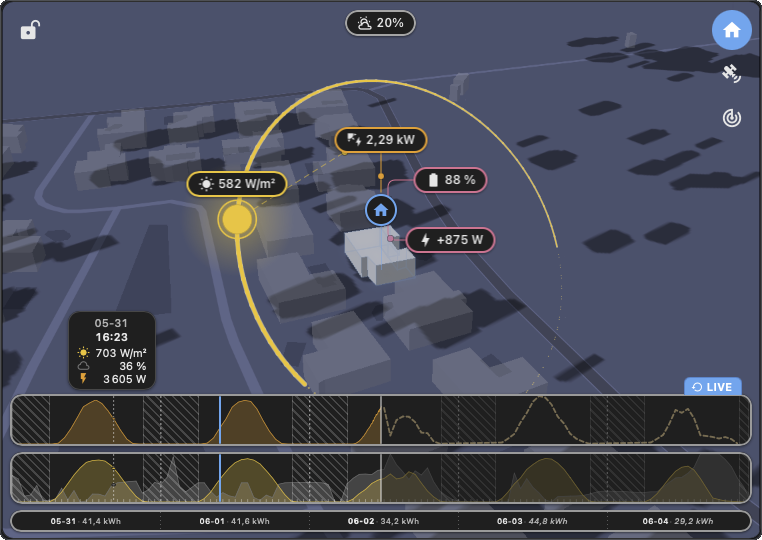
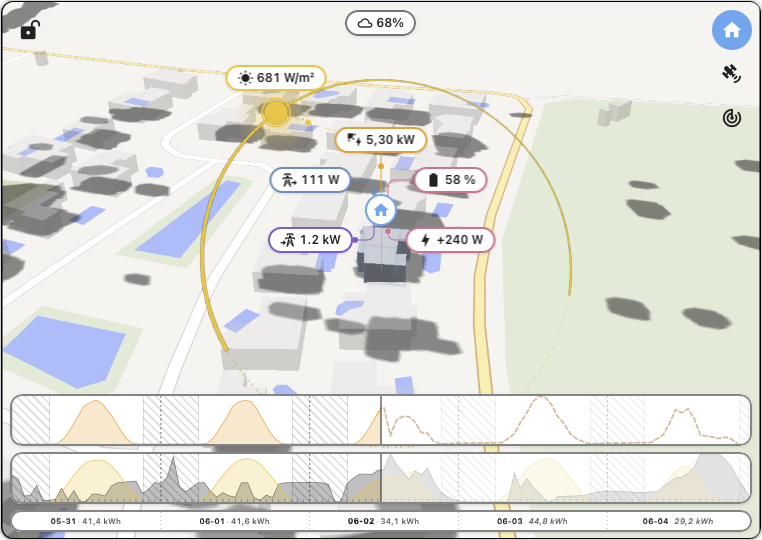
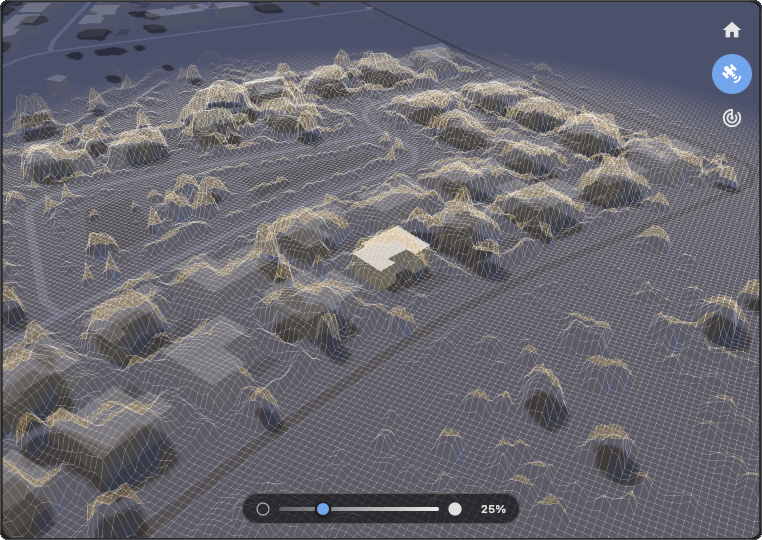
HELIOS displaying current solar exposure, cloud coverage and live PV production for the user's home. An interactive live demo is available at helios-ha.org.
Helios is built and maintained by one person, in the open. If it helps your daily routine, a star on GitHub or a small coffee keeps the project alive and lets me keep pushing on the next cycle. Upcoming work is tracked live on the public roadmap at helios-ha.org.

Helios is available directly in the HACS store.
- Open HACS.
- Search for HELIOS.
- Install it.
- Reload your browser.
- Add the card to your dashboard:
type: custom:helios-card
- Download
helios.jsfrom the latest release. - Copy it to
<config>/www/community/helios/. - Add the resource to your dashboard:
url: /local/community/helios/helios.js
type: module
No API key required. The basemap is served by CARTO (free, no key) and weather comes from Open-Meteo (also free, no key).
Solar, grid and battery wiring is not configured per-card: Helios resolves every entity slot from the HA Energy dashboard (Settings then Dashboards then Energy), the same global config the official Energy card reads. Set the slots there once and Helios picks them up automatically. The options below cover only the visual and install-specific bits.
Minimal config:
type: custom:helios-cardThe visual editor exposes every option below. Direct YAML editing also works.
| Key | Type | Default | Description |
|---|---|---|---|
home-latitude |
number | HA home | Optional override (decimal degrees). Applied only when both lat and lon are set and valid; otherwise the card uses hass.config. Useful for a holiday home, a shared install, or several cards each centred on a different place. |
home-longitude |
number | HA home | Companion to home-latitude. Partial or out-of-range values are ignored. |
| Key | Type | Default | Description |
|---|---|---|---|
auto-rotate-enabled |
boolean | false |
Idle camera orbit. Off by default; enable for kiosk / always-on dashboards. Any drag pauses it, then it resumes after a short idle. |
camera-pitch-deg |
15-85 | 55 |
Optional fixed pitch at boot. Drag still works unless locked. |
camera-bearing-deg |
0-359 | hemisphere | Optional fixed bearing at boot. |
camera-locked |
boolean | false |
Disable drag-rotate and the idle orbit; the camera stays at the configured pose. Also toggled live from the lock button on the card. |
The card also remembers the live camera pose, the active mode, the selected clock filters and the lock per home (or per
cache-id), so reopening the dashboard restores exactly what you left.
| Key | Type | Default | Description |
|---|---|---|---|
display-radius |
50-500 m | 200 |
Distance around the home within which buildings and shadows render. The main perf lever on older phones. |
building-count |
10-100 | 50 |
How many of the nearest buildings to keep around the home. |
building-real-size |
boolean | true |
Extrude buildings to their real OSM heights (capped). When false, every building uses the fixed building-height prism. |
building-height |
3-10 m | 6 |
Fixed prism height used when building-real-size is false. |
building-cluster-radius |
0-100 m | 0 |
Buildings within this distance of the home (or touching it) join the home group at full opacity. Use it to attach garages / verandas to the house. |
building-opacity |
0-1 | 0.5 |
Opacity of the surrounding buildings. The home (and its cluster) always stays at full opacity. |
building-color |
color | theme | Optional base tone for the surrounding buildings. |
shadows-enabled |
boolean | true |
Master toggle for the cast ground shadows (projected from the building footprints). |
shadow-opacity |
0-1 | 0.32 |
Opacity of the cast shadows. |
| Key | Type | Default | Description |
|---|---|---|---|
display-update-frequency-per-hour |
1-6 | 4 |
Storage + render cadence (buckets per hour) for the data store and every graph. 4 = 15-minute granularity (the HA Energy bucket size); raise for smoother curves, lower to save memory. Live numeric chips bypass this and stay on the direct hass.states path. |
value-decimals |
0-3 | 1 |
Decimal places on every kW / kWh / % readout. |
The rolling window itself is chosen live from the timeline's period selector (Standard, Today, Week, Month, Year) and remembered per card; it needs no YAML key.
| Key | Type | Default | Description |
|---|---|---|---|
solar-irradiance-entity |
entity_id | none | Optional physical irradiance sensor (W/m²). When set, its live state + recorder history feed the sun chip number, the irradiance chart and the sun-arc colouring for past + present; forecast hours still come from Open-Meteo. |
custom-entity |
entity_id | none | Optional power (W/kW/MW) or energy (Wh/kWh/MWh) entity surfaced as an extra chip top-left and as a clock / trend metric. |
custom-entity-icon |
MDI icon | entity icon | Optional icon override for the custom-entity chip; falls back to the entity's own icon, then a generic glyph. |
custom-entity-color |
color | theme red | Optional colour for the custom-entity chip, its leader and its clock ring. |
home-color |
color | theme | Optional colour for the home pill and its consumption readout. |
| Key | Type | Default | Description |
|---|---|---|---|
cache-id |
string | auto | A hidden, auto-generated id that keeps each card's saved view (mode, clock filters, camera, lock) independent, so two cards on the same home (for example one in scene mode, one in clock mode) do not share state. You normally never touch this. |
- Solar position, a compact declination + equation-of-time model with hour-angle normalisation so longitudes far from Greenwich stay correct, validated against the NOAA reference.
- Clear-sky GHI, Haurwitz (1945),
1098 * cos(z) * exp(-0.059 / cos(z))W/m², attenuated by cloud via Kasten-Czeplak (1980). - Effective cloud cover, Helios replaces Open-Meteo's raw total
cloud_coverwithlow + 0.6*mid + 0.2*high(capped at 100 %), which matches ground perception and shortwave attenuation better. - Multi-model weather, every fetch fuses a global model (ECMWF IFS) with the most accurate regional model for your location, taking the per-timestep median so a single-model outlier cannot skew the curve. Cached in the browser, with exponential back-off on rate limits.
- Energy from the HA Energy dashboard, the single source of truth for every solar / grid / battery number. Live chips read the configured rate sensors (or differentiate a cumulative meter to watts); the timeline's past curves read the recorder's pre-computed
changemetric, the exact numbers the official Energy dashboard shows, so the two surfaces agree to the watt-hour. - PV forecast, read natively from the HA Energy dashboard's configured solar-forecast provider and drawn as the dashed prediction the live observation tracks against; scrubbing into the future flips the PV chip to the predicted figure.
- Buildings, fetched once from OpenStreetMap (Overpass), interpreted in the browser (height cap or fixed prism, radius / count / cluster filters) and cached locally, so the scene spins up offline on the next load.
Full algorithm + architecture details: see ARCHITECTURE.md. Per-release notes: see CHANGELOG.md.
| Component | Technology |
|---|---|
| Frontend | Lit 3, TypeScript (strict) |
| Rendering | Self-contained 2.5D engine: tilted raster basemap (HTML canvas) + SVG overlays, no WebGL |
| Basemap | CARTO raster tiles (light / dark, no key) |
| Weather data | Open-Meteo API (free, no key, multi-model fusion) |
| Energy data | Home Assistant Energy dashboard (recorder change metric + live states) |
| Buildings | OpenStreetMap via Overpass |
| Solar math | NOAA-validated |
| Build | Vite |
npm install
npm run dev        # local dev server
npm run typecheck  # strict TS
npm run build      # produces dist/helios.js
The card is TypeScript-first and fully self-contained, a single helios.js bundle with no runtime dependency beyond Lit.
Source layout:
| Path | Purpose |
|---|---|
src/helios-card.ts |
Top-level Lit element: render orchestrator + HA + Lit lifecycle + view modes |
src/helios-engine.ts |
Engine lifecycle: weather / buildings fetch, sun + shadow refresh, camera + auto-rotate |
src/helios-config.ts |
HeliosConfig schema + resolver helpers (radius, custom entity, colours, ...) |
src/constants.ts |
Defaults / bounds, cache TTLs, camera limits, colour + math constants |
src/card/init.ts |
Home-coords resolver + engine bootstrap + visibility observer |
src/card/editor.ts |
Visual editor (accordion sections, sliders, entity / icon / colour pickers) |
src/card/energy-prefs.ts |
HA Energy dashboard subscription + slot resolution (PV / grid / battery / forecast) |
src/card/energy-forecast.ts |
HA solar-forecast fetch + merge |
src/card/energy-stats.ts |
Recorder change-metric helpers (5-min buckets to watts) |
src/card/pv.ts battery.ts grid.ts |
Per-source live + history (power, SoC, import / export) |
src/card/irradiance.ts |
Optional irradiance-sensor override into the engine |
src/card/custom-entity.ts |
Custom power / energy entity (chip + clock / trend metric) resolution |
src/card/unifiedStore.ts |
Rolling-window data store: one bucketised source of truth for every graph |
src/card/charts.ts charts-pv.ts charts-generic.ts |
Timeline SVG charts + scrub cursors + day labels + tooltip |
src/card/timeline.ts timeline-model.ts timeline-modes.ts |
Scrub handlers, tick granularity, the five rolling-window periods |
src/card/timeline-night.ts timeline-tooltip.ts |
Timeline night-zone shading + hover tooltip |
src/card/energy-clock.ts clock-hourly.ts |
Clock + trend dials: hour-of-day rings, central column, projection |
src/card/trend.ts |
Period-over-period (current vs previous) hour-of-day profiles |
src/card/sun-zones.ts |
Per-hour day / night fraction for the dial ground wedge |
src/card/hud.ts hud-geometry.ts |
Scene HUD projection (sun arc, chips, leaders) refreshed each frame |
src/card/format.ts |
Locale-aware number / value formatting + energy colour tokens |
src/engine/renderer.ts |
Scene painter: ground tilt + buildings + shadows + night wash (canvas + SVG) |
src/engine/projection.ts |
2.5D camera + bearing / pitch / perspective projection |
src/engine/tiles.ts |
CARTO basemap raster stitching + Web Mercator math |
src/engine/buildings.ts |
Overpass fetch + interpret (radius / count / height / cluster) |
src/engine/sun.ts sun-arc.ts |
Solar position + Haurwitz / Kasten-Czeplak irradiance + PV math + arc geometry |
src/engine/weather.ts weather-resolve.ts |
Open-Meteo multi-model fetch + cache + back-off |
src/engine/colors.ts |
Hex blending + time-of-day tints (night shade, building tint) |
src/css/ |
Card + editor + clock + timeline style literals |
src/i18n/ |
Strict-typed translations (63 languages) |
See ARCHITECTURE.md for the subsystem-by-subsystem walkthrough.
HELIOS depends on several open data services. None require an account or API key.
- CARTO, the free raster basemap tiles (light / dark, no labels) the scene is built on.
- OpenStreetMap, the map data behind the basemap and the building footprints (via Overpass). © OpenStreetMap contributors.
- Open-Meteo, weather forecasts (cloud cover, irradiance, temperature, wind). Free, no key, multi-model fusion under the hood.
- Home Assistant Energy dashboard, the single source of truth for solar / grid / battery wiring.
A heartfelt thank you to every user who tried Helios, filed an issue, suggested an idea or simply shared a screenshot. Your feedback is what shaped the direction the card has taken.
I build bridges between data and reality. To me, development is more than a profession; it is the tool I have used since childhood to try and decode the complexity of the world around me. I learn every day, fully aware that total understanding is an infinite horizon I will likely never reach, but the journey is worth it.
This project is licensed under the GNU General Public License v3.0, see the LICENSE file for details.
