Features and Functionality Bags Ecosystem Page
- Introduction
- Project Structure
- Core Components
- Architecture Overview
- Detailed Component Analysis
- Design System
- Integration Points
- Performance Considerations
- Future Implementation Guide
- Conclusion
The Bags Ecosystem Page serves as a comprehensive dashboard for monitoring and tracking whale wallet activities on the Solana blockchain. This page is designed to showcase upcoming features for whale tracking, large holder monitoring, and significant token transfer analysis. The implementation follows a modern React architecture with a dark-themed terminal-inspired design system, providing users with real-time insights into institutional capital flows and market-moving transactions.
The page currently presents a "coming soon" interface with placeholder statistics and feature previews, setting expectations for the upcoming whale tracking capabilities that will integrate with the broader InfraWatch monitoring ecosystem.
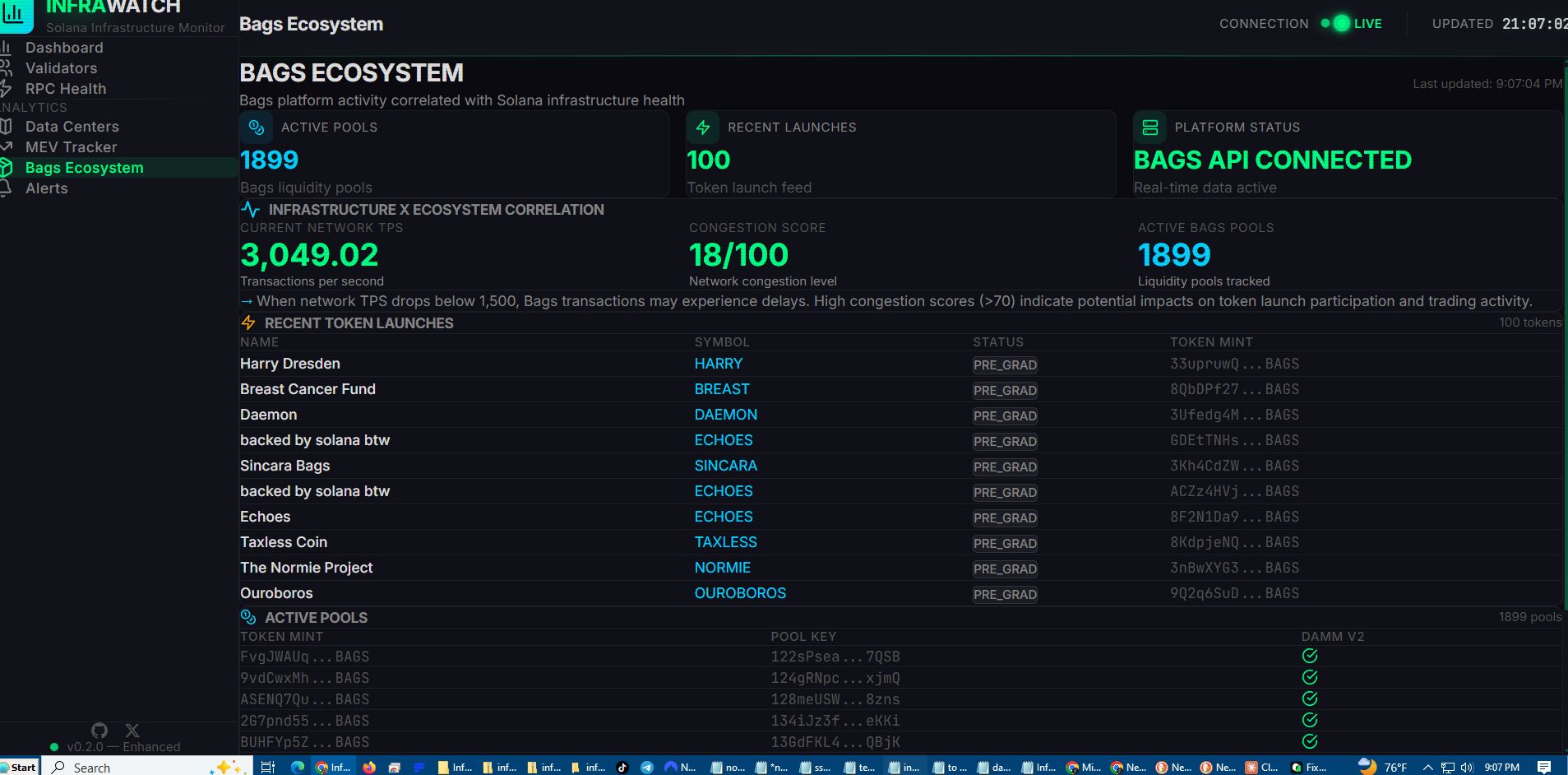
The Bags Ecosystem Page preview showing upcoming whale tracking features and statistics.
The Bags Ecosystem Page is part of a larger React application structured with clear separation of concerns:
graph TB
subgraph "Frontend Application"
AppShell["AppShell Layout"]
Sidebar["Navigation Sidebar"]
Header["Page Header"]
BagsPage["Bags Ecosystem Page"]
subgraph "Components"
Icons["Custom Icons"]
StatCard["Statistics Cards"]
ComingSoon["Coming Soon Card"]
end
subgraph "Services"
ApiService["API Service"]
NetworkStore["Network Store"]
end
subgraph "Styling"
CSS["Tailwind CSS"]
Theme["Dark Theme Variables"]
end
end
subgraph "Backend Integration"
Routes["Route Aggregator"]
BackendAPI["Backend API"]
end
AppShell --> Sidebar
AppShell --> Header
AppShell --> BagsPage
BagsPage --> StatCard
BagsPage --> ComingSoon
BagsPage --> Icons
BagsPage --> ApiService
ApiService --> BackendAPI
Sidebar --> Routes
Header --> NetworkStore
CSS --> Theme
Diagram sources
- App.jsx:12-28
- Sidebar.jsx:18-148
- Header.jsx:16-104
- BagsEcosystem.jsx:69-162
Section sources
- App.jsx:1-31
- BagsEcosystem.jsx:1-163
The Bags Ecosystem Page consists of several reusable components that work together to create a cohesive user experience:
The primary BagsEcosystem:69-162 component serves as the container for all page content, implementing a responsive grid layout with three main sections: header information, feature preview cards, and informational content.
The StatCard:48-67 component provides a flexible card for displaying key metrics with customizable colors and icons. It supports three color schemes (cyan, green, primary) and displays value, label, and subtext information.
The ComingSoonCard:4-46 component creates an animated card with gradient borders and pulsing indicators, effectively communicating feature availability timelines to users.
Section sources
- BagsEcosystem.jsx:4-162
The Bags Ecosystem Page follows a component-based architecture with clear data flow patterns:
sequenceDiagram
participant User as "User"
participant Router as "React Router"
participant AppShell as "AppShell"
participant BagsPage as "BagsEcosystem"
participant Components as "Child Components"
participant Icons as "Icons Library"
participant Store as "Network Store"
User->>Router : Navigate to /bags
Router->>AppShell : Render layout
AppShell->>BagsPage : Load page content
BagsPage->>Components : Render stat cards
BagsPage->>Icons : Import custom SVG icons
BagsPage->>Store : Access network state
Components->>Icons : Use wallet, arrow, users icons
Store-->>BagsPage : Provide connection status
BagsPage-->>User : Display whale tracking preview
Diagram sources
- App.jsx:12-28
- BagsEcosystem.jsx:69-162
- Icons.jsx:57-81
- networkStore.js:5-45
The architecture demonstrates a unidirectional data flow where the main page component orchestrates child components while maintaining separation of concerns through reusable utilities and services.
Section sources
- App.jsx:1-31
- BagsEcosystem.jsx:1-163
The Bags Ecosystem Page implements a sophisticated layout system with multiple content sections:
flowchart TD
PageStart["Page Load"] --> HeaderSection["Header Section<br/>Title + Description"]
HeaderSection --> ComingSoonCard["Coming Soon Card<br/>Feature Preview"]
ComingSoonCard --> StatsGrid["Statistics Grid<br/>2 Column Layout"]
StatsGrid --> FeaturePreview["Feature Preview<br/>3 Column Layout"]
FeaturePreview --> InfoBanner["Information Banner<br/>About Whale Tracking"]
InfoBanner --> PageEnd["Complete View"]
StatsGrid --> StatCard1["Whale Wallets Tracked<br/>1,247"]
StatsGrid --> StatCard2["24h Large Transfers<br/>$284M"]
FeaturePreview --> SmartAlerts["Smart Alerts<br/>Transfer Notifications"]
FeaturePreview --> FlowAnalysis["Flow Analysis<br/>Token Movement Tracking"]
FeaturePreview --> PortfolioTracking["Portfolio Tracking<br/>Position Monitoring"]
Diagram sources
- BagsEcosystem.jsx:69-162
The page seamlessly integrates with the application's design system through extensive use of CSS custom properties and Tailwind CSS utilities:
The design system defines a comprehensive color palette optimized for dark theme interfaces:
| Color Category | CSS Variable | Usage Example |
|---|---|---|
| Background Primary | --color-bg-primary: #0a0a0f |
Main page background |
| Background Secondary | --color-bg-secondary: #12121a |
Card backgrounds |
| Accent Cyan | --color-accent-cyan: #00d4ff |
Primary highlights |
| Accent Green | --color-accent-green: #00ff88 |
Success/active states |
| Text Primary | --color-text-primary: #e0e0e0 |
Main text content |
| Border Subtle | --color-border-subtle: rgba(255, 255, 255, 0.06) |
Card borders |
The page leverages several custom animations for enhanced user experience:
- Shimmer Effect: Animated gradient background for card hover states
- Pulse Animation: Continuous pulsing for status indicators and loading states
- Connection Pulse: Live connection status visualization
- CRT Scanlines: Subtle scanline overlay for authentic terminal feel
Section sources
- BagsEcosystem.jsx:1-163
- index.css:3-28
The page demonstrates several advanced React composition patterns:
The ComingSoonCard:4-46 and StatCard:48-67 components serve as reusable building blocks that accept props for customization, enabling consistent UI patterns across the application.
The Icons.jsx:57-81 library provides a comprehensive set of custom SVG icons specifically designed for the whale tracking feature set, ensuring visual consistency and performance optimization.
Section sources
- Icons.jsx:1-136
- BagsEcosystem.jsx:4-162
The Bags Ecosystem Page implements a sophisticated design system that enhances user experience through consistent visual patterns and interactive elements.
The design system establishes clear typographic hierarchy with monospace fonts optimized for technical content, ensuring readability across different screen sizes and resolutions.
The page features sophisticated hover effects and transitions that provide immediate feedback for user interactions:
- Card Hover Effects: Subtle border animations with gradient overlays
- Pulsing Indicators: Animated status dots for live connections
- Smooth Transitions: Consistent 200-500ms transition durations for all interactive elements
The layout adapts seamlessly across different screen sizes:
- Mobile: Single column layout for optimal touch interaction
- Tablet: Two-column statistics grid
- Desktop: Three-column feature preview layout
Section sources
- index.css:1-217
- BagsEcosystem.jsx:96-144
The Bags Ecosystem Page integrates with several backend systems and services to provide comprehensive whale tracking functionality:
The page navigation is integrated with the backend route system through the main application router, ensuring seamless routing between frontend and backend services.
The api.js:1-43 service provides centralized API communication with proper error handling and request/response interceptors, supporting future integration with whale tracking endpoints.
While the current implementation focuses on static content, the page is designed to integrate with the existing networkStore.js:1-48 for real-time data updates and connection status monitoring.
Section sources
- App.jsx:12-28
- api.js:1-43
- networkStore.js:1-48
The Bags Ecosystem Page is optimized for performance through several key strategies:
- Custom SVG icons eliminate external dependency bloat
- Minimal component dependencies reduce initial load time
- Efficient CSS custom properties minimize style computation overhead
- Pure functional components with minimal re-renders
- Efficient grid layouts using CSS Grid and Flexbox
- Optimized animation performance with hardware acceleration
- Proper cleanup of event listeners and intervals
- Efficient state management preventing memory leaks
- Optimized image handling for logo and asset rendering
The current Bags Ecosystem Page serves as a foundation for future whale tracking implementation. Here's a roadmap for expanding functionality:
- Connect to backend whale tracking APIs
- Implement real-time data fetching and updates
- Integrate with existing network monitoring infrastructure
- Implement wallet address monitoring with configurable thresholds
- Add transfer alert system with notification preferences
- Develop token flow visualization dashboards
- Historical data analysis and trend identification
- Institutional activity pattern recognition
- Market movement prediction algorithms
graph LR
subgraph "Current State"
StaticPage["Static Bags Page"]
PlaceholderData["Placeholder Statistics"]
end
subgraph "Future State"
DynamicPage["Dynamic Whale Tracking"]
RealTimeData["Real-time Whale Data"]
AnalyticsEngine["Advanced Analytics Engine"]
end
StaticPage --> DynamicPage
PlaceholderData --> RealTimeData
DynamicPage --> AnalyticsEngine
Diagram sources
- BagsEcosystem.jsx:82-162
The Bags Ecosystem Page represents a sophisticated implementation of modern React development practices combined with a distinctive dark-themed design aesthetic. The page successfully communicates upcoming whale tracking capabilities while maintaining technical excellence through reusable components, efficient styling, and scalable architecture.
The implementation demonstrates strong attention to user experience through thoughtful animations, responsive design, and intuitive navigation patterns. The modular component structure ensures maintainability and extensibility for future whale tracking feature development.
Key strengths of the implementation include:
- Clean separation of concerns through component composition
- Sophisticated design system with custom animations
- Performance-optimized rendering and resource management
- Scalable architecture ready for future feature expansion
The page serves as an excellent foundation for the upcoming whale tracking functionality, providing users with clear expectations and a polished interface for monitoring institutional capital flows on the Solana blockchain.