Clear Docker volume Be aware that your every volume will be gone
docker volume rm $(docker volume ls -q)
Clear Docker images Be aware that your every images will be deleted
docker rmi -f $(docker images -aq)
Build postgres image with initial command in setup.ql
Please remind that this will remove exist table name raw_data and predicted_data and create the new ones.
docker-compose build --no-cache postgres
Build other every images and run (About 15 minutes for the first time)
docker-compose up -d
now you should be able to access airflow UI via http://localhost:8080
Log in to airflow with username : airflow and password : airflow
now you should be able to see DAGs available in the system
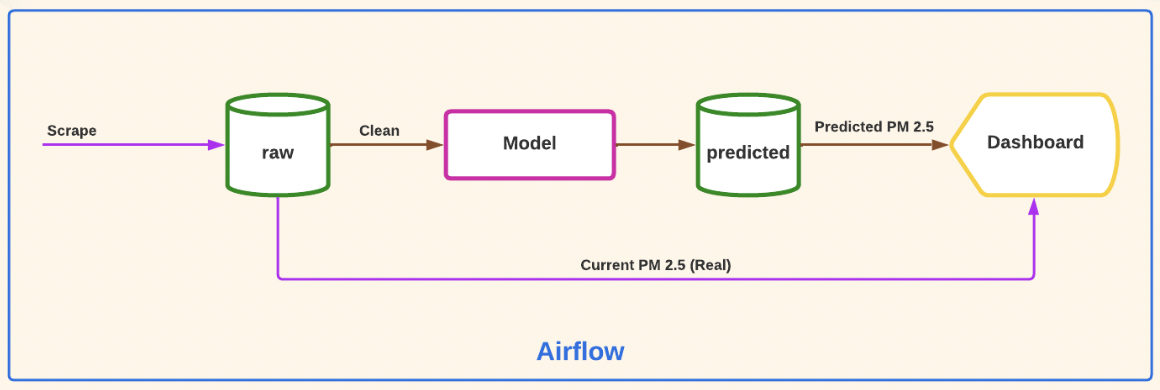
Trigger hourly_dag to start scraping data and save the data to the database (table: raw_data)
Cautions! Default start date of DAG is set to 14-05-2022 00.00 UTC+7
To change this, go to daily_dag.py and change start date argument with UTC timezone.
Trigger daily_dag to feed the data to a model and start training the model.
After that the data will be saved in the database (table: predicted_data)
Next, the data will be sent to PowerBI report.
Cautions! To execute this step, you need atleast 6 successive days data from the previous step.
Open the provided PowerBI report and enjoy! 😂
ps. We use PowerBI report instead of dashboard since the dashboard is not responsive. 😢