Sangu Package - Warlord TW extension
The Sangu Package is a Greasemonkey script for Firefox, Opera and Chrome that improves Tribal Wars gameplay speed and optimizes gameplay flow by adding extra features on pretty much every page, most notably the village overview pages.
Note that the rules have changed and it's no longer allowed (at least on the NL server) to install a script with Tampermonkey or from the Chrome Web Store.
If you want to install the Sangu Package, follow instructions on this forum thread. Also note that there have been updates there that never made it back into this repository.
The Sangu Package supports all TribalWars.nl worlds. All features should work on the latest versions of Opera, FireFox and Chrome.
The code is pure JavaScript with extensive use of jQuery.
Code structure:
- *config* : server and world config, user settings and translations.
- *func* : Functions of all kinds. (UI, DateTime, Debug, Persistence, Number and TW Building helpers)
- *global* : Features active on all pages. (activator, friends, incomingsindicator, map jumper, ...)
- *greasemonkey* : Code specific for Greasemonkey/UserScript.
- *overviews* : The features for the Tribal Wars overview pages. Most code is in here
- *page* : The features for specific Tribal Wars pages. ... and in here.
- buildPackage.ahk: The Autohotkey script that creates
sangupackage.user.jsfromstart.user.js. Use this during development - mergeIt.ahk : Other merger script. Used for releasing the package.
- mergeIt.ini : Configuration for
mergeIt.ahk. - release.user.js : The release version of the script.
- start.user.js : The file that is merged by
mergeIt.ahktosangupackage.user.js. - version.txt : Current version of Sangu Package.
An Autohotkey script (buildPackage.ahk) can be used to assemble the different js files into "sangupackage.user.js". To do this: Download and install Autohotkey (make sure you download AutoHotkey_L (v1.1+) and not the basic flavor (v1.0.x)), then double click buildPackage.ahk and it will create the complete Greasemonkey script.
mergeIt.ahk and mergeIt.ini can be configured to not only assemble the script but to also copy it to browser Greasemonkey directories and even activate the browser window and refresh the TW page.
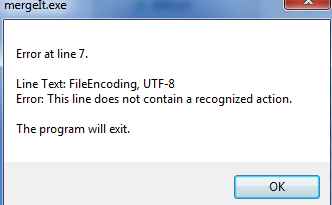
If an error like the one below occurs during assembly:
Then you have installed an older version of AutoHotkey, known as AutoHotkey Basic which is not compatible with buildPackage or mergeIt.ahks.
This (Autohotkey) means the script can currently only be assembled on a Windows machine. (This was perhaps not really thought through:)
Run mergeIt.ahk and reload "Load Unpacked sangupackage-release" in chrome://extensions.